Freedom251 › Version Control Software
Fossil
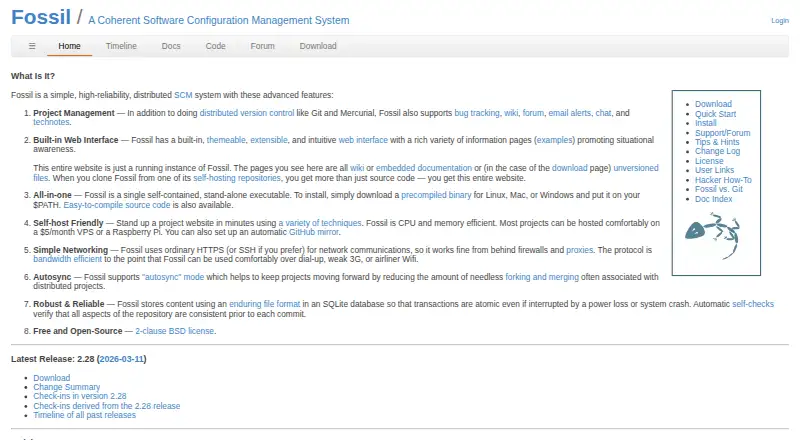
What Fossil is
Fossil is a free, distributed software configuration management system for tracking software projects and their history. It combines version control with bug tracking, a wiki, forums, email alerts, chat, and technical notes. Its built-in web interface includes ticketing, documentation, timelines, full-text search, histories, diffs, ZIP downloads, and access management. Fossil is distributed as a single self-contained executable and can run as a standalone server or through CGI, SCGI, inetd, or stunnel. Official precompiled binaries are provided for Linux, Mac, and Windows; it can also be self-hosted. Network communication uses HTTPS or SSH, and synchronization supports autosync or manual merges, with autosync enabled by default. Repositories use an SQLite database with atomic transactions and consistency checks before commits. The project supports setting up an automatic GitHub mirror. Fossil was originally designed for the SQLite project and has since been adopted by other projects. It is available under a 2-clause BSD license. Listed limitations include no file locking, large-file handling, sparse checkout, or nested repositories.
Who it suits
It suits software projects that want distributed version control alongside built-in project and documentation tools. Self-hosting and binaries for Linux, Mac, and Windows support several deployment choices.
What it does well
- Combines version control with bug tracking and project tools.
- Built-in web interface includes timelines and full-text search.
- Distributed as a single self-contained executable.
- Supports HTTPS or SSH network communication.
- Free under a 2-clause BSD license.
What to know first
- No file locking.
- No large-file handling.
- No sparse checkout or nested repositories.
Limits
The free plan does not include file locking, large-file handling, sparse checkout or nested repositories.
Plans
| Plan | Billed and limits | Price |
|---|---|---|
| Free and Open-Source | 2-clause BSD license · self-hosted | Free |
As fossil-scm.org lists them, read 1 Oct 2026. The maker's own page has the final word.
Getting started
- Visit the Fossil website.
- Download an official precompiled binary for Linux, macOS or Windows.
- Choose a self-hosting mode: standalone server, CGI, SCGI, inetd or stunnel.
- Use HTTPS or SSH for network communication.
- Set up an automatic GitHub mirror if your project needs one.
Fossil is a distributed version-control system for software projects, with a built-in web interface and project-management tools. It is best for teams that want to self-host code history and collaboration in one package. Its integrated approach is a strong fit for ordinary software repositories, but its missing support for large files, sparse checkout and nested repositories narrows that fit.
Overview
Fossil tracks software changes and project history while bringing bug tracking and collaboration into the same system. That can simplify a project’s toolset: tickets, documentation and discussion live alongside the repository rather than requiring separate services. The trade-off is a more opinionated all-in-one environment, which may not suit teams that already rely on distinct tools or need repository features Fossil lacks.
Key features
Its themeable, extensible web interface includes ticketing, wiki, documentation, technical notes, forums, chat, timelines, full-text search, histories, diffs, ZIP downloads and access management. Email alerts add another way to follow project activity. This breadth makes Fossil useful for projects that want code and coordination close together; teams seeking only source control may have little reason to adopt the extra surface area.
Fossil is distributed as a single executable and does not require other software to work effectively. Official precompiled binaries are provided for Linux, Mac and Windows. A project can run it as a standalone server or through CGI, SCGI, inetd or stunnel, giving self-hosters several deployment choices. Automatic GitHub mirroring is supported for projects that also need a mirror there.
Network communication uses HTTPS or SSH, and Fossil is designed to work behind firewalls and proxies. TLS protects credentials and traffic from eavesdropping, in-flight changes and server-identity spoofing. Autosync is enabled by default, while manual merging is also supported; teams should account for the default synchronization behavior when choosing how changes move between repositories.
Repositories use SQLite, with atomic transactions and automatic consistency checks before each commit. Those safeguards are well suited to projects that value repository integrity. Fossil was originally designed for the SQLite project and has since been adopted by others.
Pricing
Fossil’s Free and Open-Source plan costs nothing and is self-hosted under a 2-clause BSD license. It includes the same core system for source control and project tools; there are no paid tiers or seat and storage quotas in the plan information. The cost advantage comes with the responsibility of running the service yourself. Official project documentation includes a Support/Forum entry.
Platforms
Fossil supports Linux, macOS, Windows, web and self-hosted use. Official precompiled desktop binaries cover Linux, Mac and Windows, while self-hosted deployment can use several server modes.
Who it's for
Fossil suits software projects that want distributed version control plus ticketing, documentation and discussion in a self-hosted system, especially when a single executable and flexible server deployment are priorities. It is a poor fit for repositories that depend on file locking, large-file handling, sparse checkout or nested repositories.
Pros and cons
Pros
- Built-in tickets, wiki, forums, chat and project documentation keep collaboration alongside source history.
- A self-contained executable and multiple server modes give self-hosters deployment flexibility without requiring other software for effective use.
- SQLite-backed repositories use atomic transactions and consistency checks before commits.
- The free, open-source plan has no stated seat or storage caps.
Cons
- No file locking can be a blocker for workflows that need to reserve files against concurrent edits.
- No large-file handling, sparse checkout or nested repositories limits its suitability for some repository structures and asset-heavy projects.
- Self-hosting means the project must operate its own service.
Alternatives
Choose Bitbucket Pipelines if a hosted-oriented alternative with a free plan is a better match: its Free plan costs nothing, billed free forever, and includes up to 5 users, unlimited public and private repositories, 1 GB LFS storage and 50 build minutes per month. Codeberg is another free option; its Free/libre software projects plan costs nothing with no payment required, and includes 750 MiB Git storage and 1.5 GiB for packages, LFS and attachments.
GitKraken Desktop is a freemium desktop option with a free Community plan for OSS development, limited to local repositories and public remotes. SmartGit offers a freemium Hobby plan with its full feature set except enterprise integrations, for personal, non-commercial use with free registration. Unity Version Control has a free tier with unlimited cloud seats and 25 GB storage, with usage beyond included limits billed pay-as-you-go. Anchorpoint has a free Personal plan for non-commercial, single-user use, including GitHub Git, local Git, a full-featured file browser and Python API.
Apache Subversion is a free open-source version-control option. BitKeeper is free and open source under the Apache 2.0 License.
Verdict
Choose Fossil if your software project wants distributed source history, built-in collaboration tools and flexible self-hosting in one free package. Its breadth and self-contained design are the main reasons to choose it; look elsewhere if your repository depends on file locking, large files, sparse checkout or nested repositories.
Verdict
Fossil combines distributed version control with a web interface and project tools in a self-contained package. Its listed limitations include no file locking, large-file handling, sparse checkout, or nested repositories.
Questions
How much does Fossil cost?
Fossil is free. Its Free and Open-Source plan is free under a 2-clause BSD license.
Can I host Fossil myself?
Yes. Fossil can run as a standalone server or through CGI, SCGI, inetd or stunnel.
Which desktop platforms have official binaries?
Official precompiled binaries are provided for Linux, Mac and Windows.
What does Fossil include beyond version control?
It combines version control with bug tracking, a wiki, forums, email alerts, chat and technical notes. Its web interface also provides tickets, documentation, timelines, search, histories, diffs, ZIP downloads and access management.
Does Fossil support GitHub?
The project supports setting up an automatic GitHub mirror.
What repository features are unavailable?
Fossil does not provide file locking, large-file handling, sparse checkout or nested repositories.
Facts from Fossil's own pages
- Founded
- 2007 · fossil-scm.org, 28 Sept 2026
- GitHub integration
- The project supports setting up an automatic GitHub mirror. · fossil-scm.org, 1 Oct 2026
- Networking
- Fossil uses HTTPS or SSH for network communications and is designed to work behind firewalls and proxies. · fossil-scm.org, 1 Oct 2026
- Original use
- Fossil was originally designed to support the SQLite project and has since been adopted by other projects. · fossil-scm.org, 1 Oct 2026
- Project management
- It combines distributed version control with bug tracking, wiki, forum, email alerts, chat, and technical notes. · fossil-scm.org, 1 Oct 2026
- Repository reliability
- Repositories are stored in an SQLite database with atomic transactions and automatic consistency checks before each commit. · fossil-scm.org, 1 Oct 2026
- Security
- TLS encrypts Fossil communications and protects credentials, against eavesdropping, in-flight modification, and server-identity spoofing. · fossil-scm.org, 1 Oct 2026
- Self-contained
- Fossil is distributed as a single self-contained executable and does not require other software to use effectively. · www2.fossil-scm.org, 1 Oct 2026
- Self-hosting
- Fossil can run as a standalone server, CGI, SCGI, inetd, or stunnel service. · www2.fossil-scm.org, 1 Oct 2026
- Supported desktop platforms
- Official precompiled binaries are provided for Linux, Mac, and Windows. · fossil-scm.org, 1 Oct 2026
- Support model
- The official site provides a Support/Forum entry as part of the project documentation and navigation. · fossil-scm.org, 1 Oct 2026
- Synchronization
- Fossil supports autosync and manual-merge workflows, with autosync enabled by default. · www2.fossil-scm.org, 1 Oct 2026
- Web features
- The web interface provides ticketing, wiki, documentation, technical notes, forums, timelines, full-text search, histories, diffs, ZIP downloads, and access management. · www3.fossil-scm.org, 1 Oct 2026
- Web interface
- Fossil includes a built-in, themeable and extensible web interface for project development. · fossil-scm.org, 1 Oct 2026
- What it does
- Fossil is a distributed software configuration management system for controlling and tracking software-project development and history. · www2.fossil-scm.org, 1 Oct 2026
Where Fossil stands on Freedom251
- Version Control Software#10 of 62
- Source Code Management#7 of 30
- Game Version Control Software#9 of 28