
SmartGit
by SmartGit
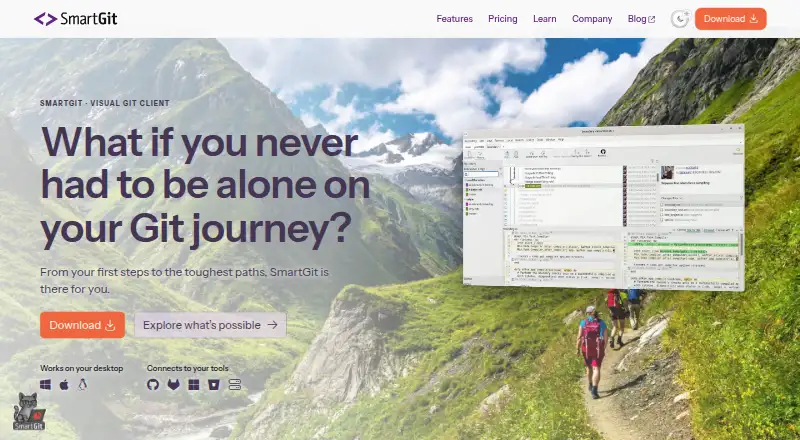
What SmartGit is
SmartGit is a graphical Git client for Windows, macOS, and Linux, supporting work from repository cloning through deployment. It can clone from GitHub, GitLab, Bitbucket, and Azure DevOps. Tools include visual history, pull requests, conflict resolution, Git Flow, cherry-pick, Git LFS, interactive rebase, and drag-and-drop; it also supports large files, file locking, submodules, and offline work. Eligible users can register for a free license for personal, non-commercial use, while students and employees of public educational institutions and qualifying non-commercial projects have separate free-use options with eligibility requirements. The hobby license excludes enterprise integrations for self-hosted GitHub, GitLab, Bitbucket, and Azure DevOps features. Commercial licenses start at $5 per user per month, and perpetual licenses are also offered. A license can be used on up to five physical or virtual machines. Support is by email, usually on workdays from 9 AM to 5 PM CET/CEST; phone support is not offered.
Who it suits
SmartGit suits developers who want a visual client for Git repositories on Windows, macOS, or Linux. Its free options are aimed at eligible non-commercial users, students, educational employees, and qualifying projects.
What it does well
- Supports the full Git workflow through deployment.
- Connects to GitHub, GitLab, Bitbucket, and Azure DevOps.
- Includes visual history and conflict resolution.
- Works offline and supports Git LFS and submodules.
- One license covers up to five machines.
What to know first
- Hobby license excludes enterprise integrations.
- Free non-commercial use requires eligibility and registration.
- Commercial licenses start at $5 per user per month.
- Support is by email, not phone.
Limits
The free Hobby license excludes enterprise integrations for self-hosted GitHub, GitLab, Bitbucket, and Azure DevOps features. Commercial licenses start at $5 per user per month; perpetual licenses are also available.
Plans
| Plan | Billed and limits | Price |
|---|---|---|
| Hobby | Full feature set except enterprise integrations · Personal, non-commercial use · Free registration required | On request |
| Students & Education | Full feature set · Students and employees of public educational institutions · Educational email address required | On request |
| Open Source & Charities | Full feature set · Free for qualifying non-commercial work · Use-case-specific verification required | On request |
| Individuals & Teams | From $5/user/month · Professional and commercial use · Optional add-ons | $5 a month |
| Commercial Individuals & Teams | from $5/user/month | $5 a month |
| Free Non-Commercial Use | — | On request |
| Enterprise Licensing | — | On request |
As smartgit.dev lists them, read 20 Sept 2026. The maker's own page has the final word.
Getting started
- Visit the SmartGit website.
- Choose Windows, macOS, or Linux.
- Select an eligible free license or a commercial license.
- Register if using the free non-commercial license.
- Clone a repository from a supported host.
SmartGit is a desktop Git client for developers who want visual tools alongside a wide range of repository operations. It is best suited to people working across major Git hosting services or using more involved workflows; commercial use starts at $5 per user per month.
Overview
SmartGit supports the Git workflow from cloning through deployment and can clone repositories from GitHub, GitLab, Bitbucket, and Azure DevOps. Visual history, conflict resolution, pull requests, Git Flow, and interactive rebase make it a capable choice for work that extends beyond routine commits.
Its breadth is useful when a team wants one desktop client for varied Git tasks, but the free hobby license excludes enterprise integrations. That matters for organizations relying on self-hosted GitHub, GitLab, Bitbucket, or Azure DevOps features.
Key features
- Visual repository work: Visual history, a conflict editor, and drag-and-drop give users graphical ways to inspect and manage repository changes. Conflict tools are particularly useful when resolving complex changes is a regular part of the workflow.
- Workflow coverage: Pull requests, Git Flow, cherry-pick, and interactive rebase cover collaboration and history-management tasks. This breadth suits developers who want more than a basic commit-and-push interface.
- Large files and linked components: Git LFS, file locking, and submodule support address repositories with large assets or linked code. These features are useful for projects that depend on them, though they may add little for simpler repositories.
- Offline work: SmartGit supports offline mode, so repository work is not limited to periods with a network connection.
Pricing
SmartGit is freemium. Eligible personal, non-commercial users can register for a free Hobby license, which includes the full feature set except enterprise integrations. It is a strong fit for individual hobby work, but not for commercial work or users who need the excluded self-hosted integrations.
Students and employees of public educational institutions can use the Students & Education plan with an educational email address. Qualifying non-commercial work may also be eligible for Open Source & Charities, with use-case-specific verification. These plans have no stated price; their eligibility conditions make them alternatives to the hobby license for specific users and projects.
Individuals and teams doing professional or commercial work can choose a license starting at $5 per user per month, with optional add-ons. SmartGit also offers perpetual licensing valid for unlimited time.
Enterprise Licensing is intended for larger organizations needing centralized administration, purchasing, and licensing; pricing is custom. Each user may use a license on up to five physical or virtual machines. Company licenses can be reassigned once per month without exceeding the number of ordered licenses. Support is by email, usually on workdays from 9 AM to 5 PM CET/CEST; phone support is not offered. Purchase orders are supported only for orders of 50 or more licenses.
Platforms
SmartGit is available for Windows, macOS, and Linux. Its three-platform coverage is useful for teams with mixed desktop environments, while a license’s five-machine limit allows an individual user to install it across several physical or virtual systems.
Who it's for
SmartGit is a good fit for developers who want visual repository tools, broad Git workflow support, and access to the major hosting services in one desktop client. It also suits eligible hobbyists, students, and qualifying non-commercial projects through its free licensing options. Commercial teams can use its paid licenses, while larger organizations needing centralized licensing can consider Enterprise Licensing.
It is a weaker fit for commercial users seeking a free license, or organizations that need self-hosted enterprise integrations but expect to use the hobby tier. Teams that require phone support should also look elsewhere.
Pros and cons
- Pro: Broad workflow coverage, from cloning through deployment, gives developers one client for history, conflicts, pull requests, and advanced Git operations.
- Pro: Git LFS, file locking, and submodule support make it relevant to repositories with large files or linked components.
- Pro: Windows, macOS, and Linux support accommodates mixed-platform teams.
- Con: Free Hobby use is limited to eligible personal, non-commercial work and excludes enterprise integrations.
- Con: Commercial licenses start at $5 per user per month, so professional use is not free.
- Con: Support is limited to email, with no phone channel.
Alternatives
GitKraken Desktop is worth considering if its Community plan fits your work: it is free for open-source development with local repositories and public remotes only. Its free tier is therefore narrower for private-repository work.
Git Cola is a free option for readers who want a Git GUI client without a paid plan.
GitButler is free and open source for standalone use, making it an alternative for readers who prefer that model.
GitComet offers a freemium option for readers comparing another client with a free plan.
Gitember is free and open source, with all features included and no account required, making it a straightforward alternative for readers who want no paid Pro tier.
Gitnuro is free for personal and commercial use without limitations, which may suit readers seeking a free option for either kind of work.
platypusgit is free, GPLv3, and has no account requirement, paywall, or feature tiers; consider it if those terms are priorities.
Git is a free and open-source alternative for readers looking for Git itself rather than a freemium desktop client.
Verdict
Choose SmartGit if you need a cross-platform desktop client with visual history, conflict tools, and broad Git workflow support, and its licensing fits your use. Its free option is useful for eligible non-commercial work, while commercial users pay from $5 per user per month. Look elsewhere if free commercial use or self-hosted enterprise integrations on the hobby license are essential.
Verdict
SmartGit brings a broad set of Git workflow tools to three desktop platforms, with free options for eligible users and commercial licensing from $5 per user per month. Check whether self-hosted enterprise integrations are necessary before choosing the hobby license.
Questions
Does SmartGit have a free plan?
Yes. Eligible users can register for free personal, non-commercial use. The Hobby license excludes enterprise integrations.
How much does commercial SmartGit cost?
Commercial licenses start at $5 per user per month. Perpetual licensing is also available.
Which operating systems does SmartGit support?
SmartGit is available for Windows, macOS, and Linux.
Which repository hosts can it connect to?
Users can clone from GitHub, GitLab, Bitbucket, and Azure DevOps.
Can a license be used on more than one machine?
Each user can use a license on up to five physical or virtual machines.
How is support provided?
Support is by email, usually on workdays from 9 AM to 5 PM CET/CEST. Phone support is not offered.
Facts from SmartGit's own pages
- Commercial Starting Price
- Commercial licenses start at $5 per user per month or offer perpetual licensing. · smartgit.dev, 28 Sept 2026
- Company Identity
- SmartGit is associated with syntevo GmbH in Ainring, Germany. · smartgit.dev, 28 Sept 2026
- Enterprise Integration Scope
- Enterprise integrations cover self-hosted GitHub, GitLab, Bitbucket, and Azure DevOps features. · smartgit.dev, 28 Sept 2026
- Free License Limit
- The free hobby license excludes enterprise integrations. · smartgit.dev, 28 Sept 2026
- Free Noncommercial License
- Free license for eligible personal, non-commercial use with registration. · smartgit.dev, 28 Sept 2026
- Free plan
- Yes · smartgit.dev, 20 Sept 2026
- Git Workflow Coverage
- SmartGit supports the full Git workflow from cloning through deployment. · smartgit.dev, 28 Sept 2026
- Headquarters
- Ainring, Germany · smartgit.dev, 28 Sept 2026
- Company License Assignment
- Company licenses may be reassigned once per month, without exceeding ordered licenses. · smartgit.dev, 28 Sept 2026
- License File Sharing
- One license file is provided for multiple ordered users to share. · smartgit.dev, 28 Sept 2026
- Machine Limit
- Each user can use their license on up to five physical or virtual machines. · smartgit.dev, 28 Sept 2026
- Notable Features
- Features include visual history, conflict resolution, pull requests, Git Flow, LFS, cherry-pick, and drag-and-drop. · smartgit.dev, 28 Sept 2026
- Perpetual License
- Perpetual licenses are valid for unlimited time. · smartgit.dev, 28 Sept 2026
- Purchase Order Threshold
- Purchase orders are supported only for orders with 50 or more licenses. · smartgit.dev, 28 Sept 2026
- Repository Integrations
- Users can clone from GitHub, GitLab, Bitbucket, and Azure DevOps. · smartgit.dev, 28 Sept 2026
- Submodule Support
- SmartGit provides an intuitive approach to Git submodules. · smartgit.dev, 28 Sept 2026
- Support Channel
- Support is provided by email; phone support is not offered. · smartgit.dev, 28 Sept 2026
- Supported Platforms
- SmartGit is available for Windows, macOS, and Linux. · smartgit.dev, 28 Sept 2026
- Support Hours
- The support team is usually available on workdays from 9 AM to 5 PM CET/CEST. · smartgit.dev, 28 Sept 2026
Where SmartGit stands on Freedom251
- Git clients#4 of 24
- Git GUI Clients#18 of 32
- Game Version Control Software#21 of 28