Freedom251 › Version Control Software

platypusgit
What platypusgit is
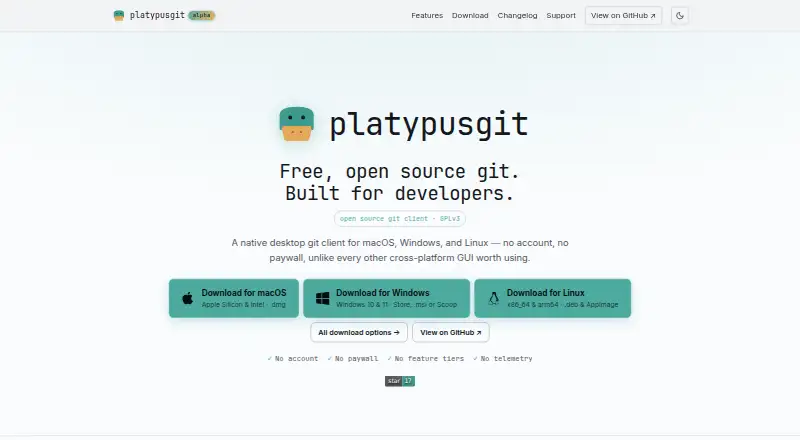
platypusgit is a free, open-source desktop Git client for developers, available on Linux, macOS, and Windows. Users can stage, unstage, or discard files and individual hunks, then commit with amend or author override. For code review, it provides unified and side-by-side diffs, syntax highlighting, a minimap, blame, and a repository file browser. History tools include a commit graph, file history, reflog viewer, reset, cherry-pick, revert, and interactive rebase. It also supports conflict resolution, stashes, submodules, Git LFS, linked worktrees, and bisect. GitHub and GitLab support includes listing, checking out, creating, and opening pull or merge requests, including for self-hosted instances. The GPLv3 project requires no account or paid feature tiers. The maker says repositories and history remain on the user's machine and that there is no telemetry. Development is active, with frequent releases and rough edges expected. The macOS app is ad-hoc signed but not notarized, and the Windows installer is not yet code-signed.
Who it suits
It suits solo developers, teams, and companies seeking a desktop Git client for Linux, macOS, or Windows. Its maker warns users to expect rough edges during active development.
What it does well
- Free and open source under GPLv3
- Supports Linux, macOS, and Windows
- Includes Git LFS and submodules
- Supports interactive rebase and conflict resolution
- No account or feature tiers
What to know first
- Active development may bring rough edges
- macOS app is not notarized
- Windows installer is not yet code-signed
Plans
| Plan | Billed and limits | Price |
|---|---|---|
| Free | No account · no paywall · no feature tiers · GPLv3 | Free |
As platypusgit.com lists them, read 4 Oct 2026. The maker's own page has the final word.
Getting started
- Visit https://www.platypusgit.com/.
- Choose the download for Linux, macOS or Windows.
- Install and open the desktop app; no account is required.
- Connect a repository and use the client to stage changes and commit.
Verdict
platypusgit covers staging, review, history, and forge workflows in a free desktop client. Its development status and unsigned or unnotarized downloads are important considerations before installation.
Questions
How much does platypusgit cost?
The Free plan costs nothing. It has no account requirement, paywall or feature tiers.
Is platypusgit open source?
Yes. The project is open source under GPLv3.
Which platforms does it support?
platypusgit supports Linux, macOS and Windows.
Does it work with GitHub and GitLab?
It can list, check out, create and open pull or merge requests for GitHub and GitLab, including self-hosted instances.
Does platypusgit send repository data away?
The maker says repositories and history stay on the user's machine and that the app has no telemetry. Outbound traffic is limited to configured Git remotes, update checks and configured forge APIs.
What should I know about installing it?
The maker describes the project as under active development, with frequent releases and rough edges. The macOS app is ad-hoc signed but not notarized, and the Windows installer is not yet code-signed.
Facts from platypusgit's own pages
- Audience
- The maker says it is for solo developers, teams, and companies. · platypusgit.com, 4 Oct 2026
- Build signing
- The download page says the macOS app is ad-hoc signed but not notarized and the Windows installer is not yet code-signed. · platypusgit.com, 4 Oct 2026
- Build status
- The maker describes the app as under active development and warns users to expect frequent releases and rough edges. · platypusgit.com, 4 Oct 2026
- Diffs
- The app includes unified and side-by-side diffs, syntax highlighting, a minimap, blame, and a repository file browser. · platypusgit.com, 4 Oct 2026
- GitHub and GitLab
- The app can list, check out, create, and open pull or merge requests for GitHub and GitLab, including self-hosted instances. · platypusgit.com, 4 Oct 2026
- History
- History tools include a commit graph, file history, reflog viewer, reset, cherry-pick, revert, and interactive rebase. · platypusgit.com, 4 Oct 2026
- License
- The project is open source under GPLv3. · platypusgit.com, 4 Oct 2026
- Network behavior
- The features page says outbound traffic is limited to configured Git remotes, the update check, and configured forge APIs. · platypusgit.com, 4 Oct 2026
- Other Git features
- The feature list includes conflict resolution, stashes, submodules, Git LFS, linked worktrees, and bisect. · platypusgit.com, 4 Oct 2026
- Platforms
- The download page lists macOS, Windows, and Linux builds; Linux requires webkit2gtk 4.1. · platypusgit.com, 4 Oct 2026
- Privacy
- The maker says the app has no telemetry and that repositories and history never leave the user's machine. · platypusgit.com, 4 Oct 2026
- Product
- platypusgit is a native desktop Git client for developers. · platypusgit.com, 4 Oct 2026
- Staging and commits
- Users can stage, unstage, or discard files and individual hunks, and commit with amend or author override. · platypusgit.com, 4 Oct 2026
Where platypusgit stands on Freedom251
- Version Control Software#30 of 62
- Git GUI Clients#16 of 32