Git Cola
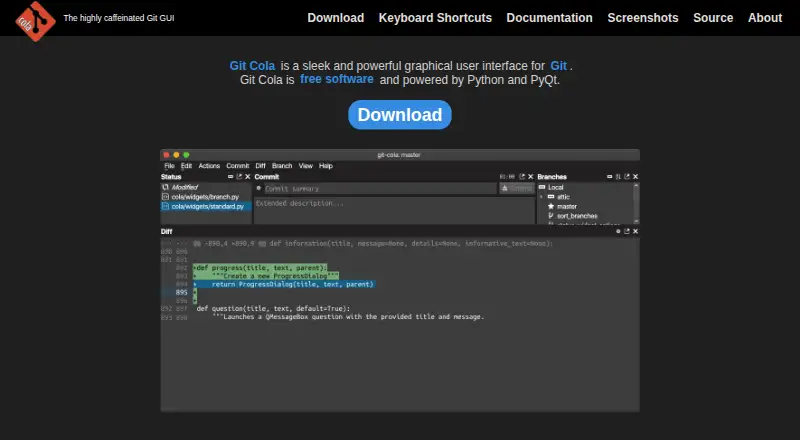
What Git Cola is
Git Cola is a free graphical interface for Git, available on Linux, macOS, and Windows. Its subcommands cover fetch, pull, push, merge, interactive rebase, stash, tags, branches, diff, search, and grep. The git-dag tool displays Git history graphically, and the included git-cola-sequence-editor supports interactive rebases. You can hide, rearrange, or detach interface tools, and the application remembers window layouts for later restoration. Before staging, Git Cola can inspect unmerged files for conflict markers to help prevent unresolved conflicts from being staged. It is Python- and PyQt-powered free software under the GNU General Public License version 2. Documented runtime requirements are Git 2.2.0 or newer, Python 3.9 or newer, QtPy 2.0.0 or newer, and a supported Python Qt library. On FIPS-enabled Python, Git Cola supports FIPS security mode. Gravatar lookups send an author email’s MD5 hash to gravatar.com, but network requests can be disabled.
Who it suits
Git Cola suits people who want a desktop interface for common Git operations, history review, and interactive rebasing. Its documented runtime dependencies make it a fit for users able to meet those requirements.
What it does well
- Available for Linux, macOS, and Windows
- Includes graphical Git history and an interactive rebase editor
- Can check unmerged files for conflict markers before staging
- Supports FIPS mode on FIPS-enabled Python
What to know first
- Requires Git 2.2.0 or newer
- Requires Python 3.9 or newer and QtPy 2.0.0 or newer
- Gravatar lookups can expose information unless network requests are disabled
Plans
| Plan | Billed and limits | Price |
|---|---|---|
| Free | free software | Free |
As git-cola.github.io lists them, read 30 Sept 2026. The maker's own page has the final word.
Getting started
- Visit the Git Cola website.
- Choose the Linux, macOS, or Windows platform.
- Make sure Git 2.2.0 or newer, Python 3.9 or newer, QtPy 2.0.0 or newer, and a supported Python Qt library are available.
- Use Git Cola's interface to fetch, pull, push, or perform other supported Git operations.
Overview
Git Cola is a desktop graphical interface for Git, suited to developers who want visual access to repository operations without giving up interactive rebasing. Its broad toolset and free, cross-platform availability make it a practical choice, provided its Python and Qt requirements fit your setup.
Key features
Git Cola brings fetch, pull, push, merge, stash, tags, branches, diffs, search and grep into a graphical workflow. Interactive rebase is supported through its dedicated git-cola-sequence-editor, while git-dag visualizes Git log history. Together, these tools suit people who want to manage both routine changes and commit history in a desktop interface.
The interface is configurable: tools can be hidden, rearranged or detached, and window layouts are remembered and restored. That helps accommodate different workflows, though it may be unnecessary overhead for someone who prefers a fixed layout. Before staging, Git Cola can inspect unmerged files for conflict markers, helping catch unresolved conflicts before they enter the index.
Git LFS, submodules and offline mode are supported. Git Cola also supports FIPS security mode when used with FIPS-enabled Python. Optional Python modules add Send2Trash, desktop notifications and macOS-specific application themes.
Setup depends on Git 2.2.0 or newer, Python 3.9 or newer, QtPy 2.0.0 or newer, and a supported Python Qt library. That stack is a meaningful consideration for anyone who would rather avoid checking or managing runtime dependencies. Gravatar lookups send an MD5 hash of an author email to gravatar.com, which can reveal information; network requests can be disabled.
Pricing
The Free plan costs nothing and includes free software distributed under the GNU General Public License version 2. There is no paid tier to weigh against it. It suits individuals and teams seeking a no-cost Git GUI, though the community project is maintained by David Aguilar, and problem reports and feature requests go through its issue tracker.
Platforms
Git Cola supports Linux, macOS and Windows. Offline mode makes it usable without network access, while optional macOS-specific themes are available through Python modules.
Who it's for
Git Cola is a strong fit for developers who want a free desktop GUI covering common Git operations, graphical history and interactive rebase, especially those who value a configurable workspace. It is less compelling for users unwilling to meet its documented runtime requirements or to consider the privacy trade-off of Gravatar lookups, although network requests can be turned off.
Pros and cons
- Pros: Free software across Linux, macOS and Windows, with no paid tier to outgrow.
- Pros: Interactive rebasing, history visualization, Git LFS, submodules and offline mode cover a wide range of repository workflows.
- Pros: Adjustable tools and remembered layouts let users shape the workspace around their habits.
- Cons: Git, Python and Qt runtime requirements add setup considerations beyond installing a standalone application.
- Cons: Gravatar lookups transmit an email-derived hash unless network requests are disabled.
Alternatives
For a broader comparison, browse Git GUI Clients.
Choose GitKraken Desktop if its freemium plans suit your needs: its free Community plan is for OSS development and limited to local repositories and public remotes. SmartGit is another freemium option; its Hobby plan has the full feature set except enterprise integrations and is restricted to personal, non-commercial use with free registration.
GitButler is free and open source for standalone use, with a $5 a month Supporter contribution option. GitComet offers a free Open Source plan. Gitember includes all features in its free, open-source plan without an account or paid Pro tier; Gitnuro is free for personal and commercial use without limitations. Gittyup is a free, MIT-licensed open-source Git client, while GitVine is free to use and welcomes donations.
Verdict
Choose Git Cola if you want a free, cross-platform Git GUI with interactive rebase, history visualization and room to tailor the workspace. Its breadth is the main reason to choose it; the runtime requirements and Gravatar privacy consideration are the clearest reasons to look elsewhere.
Verdict
Git Cola brings a broad set of Git operations and adjustable interface tools into a free desktop application. Review its runtime requirements and Gravatar behavior before choosing it.
Questions
How much does Git Cola cost?
Git Cola is free software. Its Free plan is listed as free.
Which operating systems does Git Cola support?
Git Cola supports Linux, macOS, and Windows.
What does Git Cola require to run?
Its documented requirements are Git 2.2.0 or newer, Python 3.9 or newer, QtPy 2.0.0 or newer, and a supported Python Qt library.
Does Git Cola support interactive rebase?
Yes. It includes an interactive rebase editor called git-cola-sequence-editor.
Is Git Cola open source?
Git Cola is free software distributed under the GNU General Public License version 2.
Does Git Cola make network requests?
Gravatar lookups send an MD5 hash of an author email to gravatar.com. Network requests can be disabled.
Facts from Git Cola's own pages
- Conflict protection
- Git Cola can inspect unmerged files for conflict markers before staging them to help prevent unresolved conflicts from being staged. · git-cola.github.io, 30 Sept 2026
- Free plan
- Yes · git-cola.github.io, 20 Sept 2026
- Git operations
- Its subcommands include fetch, pull, push, merge, interactive rebase, stash, tag, branch, diff, search and grep. · git-cola.github.io, 30 Sept 2026
- History visualization
- git-dag presents git log features in a graphical history visualizer. · git-cola.github.io, 30 Sept 2026
- Interface
- Its tools can be hidden, rearranged and detached, and window layouts are remembered and restored. · git-cola.github.io, 30 Sept 2026
- Latest release
- The latest stable release is v4.19.0, released 2026-07-12. · git-cola.gitlab.io, 30 Sept 2026
- License
- Git Cola is distributed under the GNU General Public License version 2. · git-cola.github.io, 30 Sept 2026
- Optional integrations
- Optional Python modules enable Send2Trash, desktop notifications and macOS-specific application themes. · github.com, 30 Sept 2026
- Privacy
- Gravatar lookups send an MD5 hash of an author email to gravatar.com and can leak information; network requests can be disabled. · git-cola.github.io, 30 Sept 2026
- Product
- Git Cola is a graphical user interface for Git. · git-cola.github.io, 30 Sept 2026
- Project model
- Git Cola is a community project written and maintained by David Aguilar. · git-cola.github.io, 30 Sept 2026
- Rebase editor
- Git Cola ships with an interactive rebase editor called git-cola-sequence-editor. · git-cola.github.io, 30 Sept 2026
- Runtime requirements
- The documented runtime requirements are Git 2.2.0 or newer, Python 3.9 or newer, QtPy 2.0.0 or newer, and a supported Python Qt library. · github.com, 30 Sept 2026
- Security
- Git Cola supports FIPS security mode when running on FIPS-enabled Python, including Python 3.9 and newer. · git-cola.github.io, 30 Sept 2026
- Support
- Problem reports and feature requests can be filed in the Git Cola issue tracker. · git-cola.github.io, 30 Sept 2026
- Technology
- Git Cola is free software powered by Python and PyQt. · git-cola.github.io, 30 Sept 2026
Where Git Cola stands on Freedom251
- Git GUI Clients#4 of 32
- Git clients#10 of 24