GitVine
What GitVine is
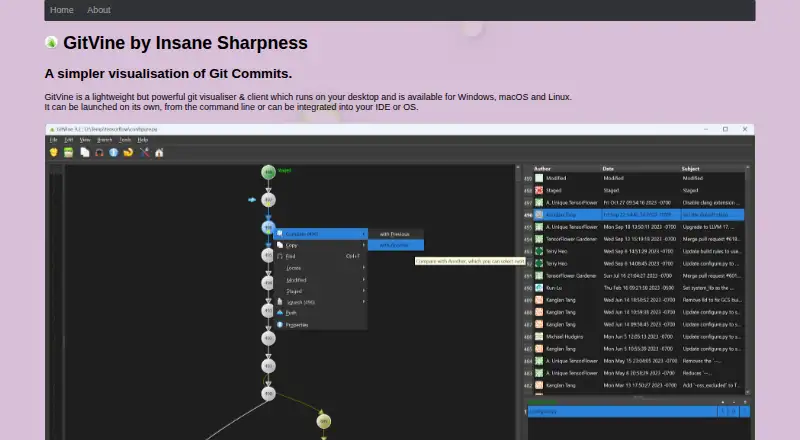
GitVine is a free desktop Git visualizer and client for Windows, macOS, and Linux. It displays the commit tree for a file or folder, with ascending or descending layouts and dark mode. Users can search for commits and compare commits, files, or folders with an internal diff tool or a configured external Git difftool. GitVine also supports staging and unstaging changes, discarding them, committing, pushing, squashing, and amending commits. An integrated terminal is available, though on macOS it launches separately because the docking mechanism is unsupported there. The client can launch from the command line and can be configured as a Visual Studio external tool; a separate download adds a Windows Explorer context menu. Downloads include Windows Store, MSI, and EXE options, Debian and RHEL packages, and a macOS DMG. Git 2.23 or later must be installed and available on the execution path, and diff-tool and editor options need configuration. The displayed history is limited to the last 1,000 commits. Donations are appreciated.
Who it suits
GitVine suits Git users who want a desktop view of file or folder history alongside common commit operations. It supports Windows, macOS, and Linux, with Git 2.23 or later required.
What it does well
- Free desktop Git visualizer and client.
- Compares commits, files, and folders.
- Supports staging, committing, pushing, and amending.
- Downloads are listed for Windows, Linux, and macOS.
- Can launch from the command line.
What to know first
- Requires Git 2.23 or later.
- History display is capped at the last 1,000 commits.
- Integrated terminal opens separately on macOS.
- Diff-tool and editor options need configuration.
Limits
GitVine displays only the last 1,000 commits. It requires Git version 2.23 or later on the execution path, and diff tool and editor options need configuration. The maker no longer updates it for CentOS/RHEL 7.
Plans
| Plan | Billed and limits | Price |
|---|---|---|
| GitVine | Free to use · donations appreciated | Free |
As insanesharpness.gitlab.io lists them, read 5 Oct 2026. The maker's own page has the final word.
Getting started
- Download the version for Windows, macOS, or Linux from the maker’s listed download options.
- Install Git version 2.23 or later and make sure it is available on the execution path.
- Configure Git diff tool and editor options.
- Open a repository in GitVine and view a file’s or folder’s commit tree.
- Optionally configure GitVine as a Visual Studio external tool or install the separate Windows Explorer context-menu download.
Verdict
GitVine combines commit-tree visualization, diffing, and common Git operations in a desktop client. Its commit-history cap and Git and tool configuration requirements are worth noting.
Questions
How much does GitVine cost?
GitVine is free to use, with donations appreciated.
Which operating systems are supported?
GitVine supports Windows, macOS, and Linux. The maker says it is no longer updated for CentOS/RHEL 7 and recommends CentOS Stream 9 or RHEL 9 instead.
What Git version does GitVine require?
Git version 2.23 or later must be installed and available on the execution path.
Can GitVine compare files and commits?
Yes. It compares commits, files, or folders with its internal diff tool or a configured external Git difftool.
Does GitVine have a free trial?
No free trial is listed; GitVine is free to use.
How many commits can it display?
The display is limited to the last 1,000 commits for performance reasons.
Facts from GitVine's own pages
- Commit limit
- The help page says the display is limited to the last 1,000 commits for performance reasons. · insanesharpness.gitlab.io, 5 Oct 2026
- Downloads
- The maker lists Windows Store, MSI and EXE downloads, Debian and RHEL packages, and a macOS DMG. · insanesharpness.gitlab.io, 5 Oct 2026
- External tools
- Beyond Compare and Meld are listed as tested diff tools, while Notepad++ on Windows and TextEdit on macOS are listed as tested editors. · insanesharpness.gitlab.io, 5 Oct 2026
- Git operations
- The client supports staging, unstaging, discarding, committing, pushing, squashing, and amending commits. · insanesharpness.gitlab.io, 5 Oct 2026
- IDE and OS integration
- GitVine can be launched from the command line and configured as a Visual Studio external tool; a separate download adds a Windows Explorer context menu. · insanesharpness.gitlab.io, 5 Oct 2026
- Integrated terminal
- GitVine supports an integrated terminal, but macOS launches the terminal separately because its docking mechanism is unsupported there. · insanesharpness.gitlab.io, 5 Oct 2026
- Latest listed release
- The change log lists version 10.2, dated 02 Aug 2025, with fixes for repositories failing to open from SMB shares and more verbose error messages. · insanesharpness.gitlab.io, 5 Oct 2026
- Linux support limit
- The maker says GitVine is no longer updated for CentOS/RHEL 7 and recommends CentOS Stream 9 or RHEL 9 instead. · insanesharpness.gitlab.io, 5 Oct 2026
- Product
- GitVine is a lightweight desktop Git visualizer and client. · insanesharpness.gitlab.io, 5 Oct 2026
- Repository visualization
- It shows a file’s or folder’s commit tree and lets users change the tree view, including ascending or descending layout and dark mode. · insanesharpness.gitlab.io, 5 Oct 2026
- Requirements
- Git version 2.23 or later must be installed and available on the execution path; Git diff tool and editor options also need configuration. · insanesharpness.gitlab.io, 5 Oct 2026
- Search and comparison
- Users can find commits and compare commits, files, or folders using an internal diff tool or a configured external Git difftool. · insanesharpness.gitlab.io, 5 Oct 2026
- Security information
- The help page links VirusTotal reports for the Windows binary and MSI, Linux binary, and macOS DMG; it does not describe a security certification or compliance program. · insanesharpness.gitlab.io, 5 Oct 2026
- Support
- The maker directs users to email [email protected] for feedback, feature requests, and bug reports. · insanesharpness.gitlab.io, 5 Oct 2026
Where GitVine stands on Freedom251
- Git GUI Clients#13 of 32