Gitember
What Gitember is
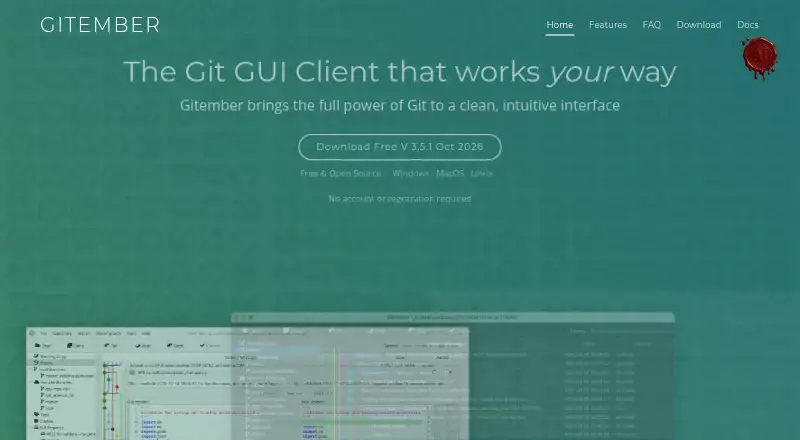
Gitember is a free, open-source desktop client for visual Git workflows on Windows, macOS and Linux. It supports clone, init, commit, push, pull, fetch, branch, merge, rebase, stash and tag over SSH or HTTPS. Workspaces group independent repositories for operations across them and a combined working-copy view. To inspect changes, Gitember offers a visual commit graph, file history, unified, context and side-by-side diffs with syntax highlighting for more than 40 languages, folder comparison and a visual three-way conflict editor. Search covers commit messages, tags, branch names, paths and indexed content from source files, images, PDFs, Office documents and CAD formats. Pull request review is supported for GitHub, GitLab, Bitbucket Cloud and Gitea, including self-hosted Gitea. Git LFS, submodules and offline use with local repositories are supported. Experimental local AI features run through Ollama. No account is required, and all features are included without a paid Pro tier.
Who it suits
Gitember suits Git users who want a visual desktop client across Windows, macOS or Linux, including people working offline with local repositories. It may also suit teams using the listed hosting services for pull request review.
What it does well
- Free and open source with all features included
- Works offline with local repositories
- Includes a three-way conflict editor
- Supports Git LFS and submodules
- No account is required
What to know first
- macOS DMG is an Apple Silicon build
- Local AI features are experimental
- Hosting-provider tokens are needed for some features
Limits
Gitember is free and open source, with all features included and no paid Pro tier. Its macOS DMG is identified as an Apple Silicon build, and its local AI features are experimental and run through Ollama.
Plans
| Plan | Billed and limits | Price |
|---|---|---|
| Gitember | Free and open source · no paid Pro tier · all features included · no account required | Free |
As gitgui.org lists them, read 3 Oct 2026. The maker's own page has the final word.
Getting started
- Visit the Gitember website.
- Choose the build for Windows, macOS, or Linux.
- Open or create a repository, then use SSH or HTTPS for remote Git operations.
- Group independent repositories into workspaces if you want combined operations or a combined working-copy view.
- Connect a hosting-provider token if you need pull request review or authenticated remotes.
- Install Ollama to use the experimental local AI features.
Overview
Gitember is a free, open-source desktop Git client for Windows, macOS and Linux. It suits developers who want a visual way to manage local repositories, inspect history and resolve conflicts without a paid tier. Its breadth is the main attraction; macOS users should verify that the Apple Silicon build fits their hardware.
Key features
The client covers the everyday Git cycle: clone and initialize repositories, commit, push, pull, fetch, create and manage branches, merge, rebase, stash and tag over SSH or HTTPS. Interactive rebase, submodules and Git LFS are also supported. That makes Gitember a credible single desktop workspace for complex repository maintenance rather than just a commit browser.
Workspaces group independent repositories and let you perform operations across them while viewing a combined working copy. This is useful for projects split among several repositories, although it remains a local organizational tool rather than a replacement for a hosted team service.
History and comparison tools are unusually broad for a free client. A visual commit graph and file-level history help trace how code changed, while unified, context and side-by-side diffs provide different review perspectives. Syntax highlighting covers more than 40 languages. Folder comparison goes beyond Git metadata by showing files added, removed or changed between directory trees.
When merges or rebases conflict, the visual three-way editor lets you select, combine or directly edit changes. Search spans commit messages, tags, branch names and file paths, plus indexed content in source files, images, PDFs, Office documents and CAD formats. That wider index can help locate project material that ordinary Git search misses.
Pull-request review integrates with GitHub, GitLab, Bitbucket Cloud and Gitea, including self-hosted Gitea. Git LFS support covers tracking patterns, fetching objects and viewing LFS status. Experimental local AI features, powered through Ollama, can detect secrets in staged files, describe branches and generate commit messages. Inference runs on the machine, and local repositories can be used offline, which is valuable for privacy-conscious or disconnected work; using those AI tools does require an Ollama setup.
No Gitember account is required. A hosting-provider token is optional for pull-request review or authenticated remotes, so users who only work with public or already configured local remotes can avoid another account.
Pricing
Gitember costs free. The single Gitember plan is free and open source, includes all features, has no paid Pro tier and requires no account. There is no trial because the product is free outright. This is a strong fit for individual developers, students and teams that want a full-featured desktop client without seat charges or feature gates. The trade-off is that there is no paid support tier or commercial plan described; questions are directed to Igor Azarny by email.
Platforms
Gitember supports Windows, macOS and Linux and works offline with local repositories. Windows support starts at Windows 8. The maker describes the macOS DMG as an Apple Silicon build, so Intel-Mac owners should confirm compatibility before choosing it.
Who it's for
Choose Gitember if you need extensive local Git operations, visual history and diffs, a conflict editor, repository workspaces or LFS in one no-cost application. It is particularly well suited to multi-repository projects, offline work and users who prefer local AI processing. Look elsewhere if you need a hosted collaboration platform itself, or if your Mac requires an Intel-native build.
Pros and cons
Pros
- Complete free package: every stated feature is included at no cost, with no account or paid Pro tier.
- Deep visual review: graph, file history, three diff modes, folder comparison and a three-way conflict editor support investigation and repair.
- Broad integrations: pull-request review covers GitHub, GitLab, Bitbucket Cloud and hosted or self-hosted Gitea.
- Privacy-friendly operation: offline repositories and local Ollama inference keep source data on the machine.
Cons
- macOS hardware caveat: the stated DMG is an Apple Silicon build.
- AI setup dependency: experimental AI functions require Ollama.
- Not a hosted service: workspaces and review integrations do not replace a central team platform.
Alternatives
SmartGit suits personal, non-commercial users wanting a full-feature Hobby feature set, though free registration is required and enterprise integrations are excluded.
Git Cola is another free cross-platform Git client for readers who prefer a simpler free-software option.
GitButler offers a free open-source standalone client plus a $5.00-per-month Supporter contribution plan.
GitComet is a freemium cross-platform alternative with an Open Source plan priced at €0.
Gitnuro is completely free for personal and commercial use without limitations.
GitQlient is free software for managing one or several Git repositories.
Gittyup is a free, MIT-licensed open-source Git client.
Verdict
Gitember is an excellent choice for developers who want the widest set of visual Git, comparison and conflict tools at no cost, especially when offline use, LFS or local AI privacy matter. Look elsewhere if you need a hosted collaboration product or cannot use the stated Apple Silicon macOS build.
Verdict
Gitember covers everyday Git operations alongside history, comparison and conflict-resolution tools. Check the stated macOS build and optional hosting-token needs if those apply to your setup.
Questions
How much does Gitember cost?
The Gitember plan is free. It is free and open source, with all features included and no paid Pro tier.
Which platforms does Gitember support?
Gitember supports Windows, macOS, and Linux. The maker says it runs on Windows 8 and later and describes its macOS DMG as an Apple Silicon build.
Does Gitember work offline?
Yes. Gitember works offline with local repositories.
Does Gitember require an account?
A Gitember account is not required. A hosting-provider token is optional for pull request review or authenticated remotes.
Which Git hosting services can it review pull requests for?
Gitember supports pull request review for GitHub, GitLab, Bitbucket Cloud, and Gitea, including self-hosted Gitea.
Is Gitember open source?
Yes. Gitember is free and open source, and its plan includes all features.
Facts from Gitember's own pages
- Accounts and tokens
- A Gitember account is not required; a hosting-provider token is optional and used for pull request review or authenticated remotes. · gitgui.org, 3 Oct 2026
- Folder comparison
- The folder comparison tool displays differences between directory trees, including files added, removed or changed. · gitgui.org, 3 Oct 2026
- Git LFS
- Gitember includes Git LFS support for tracking patterns, fetching objects and viewing LFS file status. · gitgui.org, 3 Oct 2026
- Git operations
- The client supports clone, init, commit, push, pull, fetch, branch, merge, rebase, stash and tag over SSH or HTTPS. · gitgui.org, 3 Oct 2026
- History and diffs
- Features include a visual commit graph, file-level history, and unified, context and side-by-side diff views with syntax highlighting for 40+ languages. · gitgui.org, 3 Oct 2026
- Integrations
- Pull request review is supported for GitHub, GitLab, Bitbucket Cloud and Gitea, including self-hosted Gitea. · gitgui.org, 3 Oct 2026
- Local AI
- Experimental AI features run locally through Ollama and include staged-file secret detection, branch descriptions and commit message generation. · gitgui.org, 3 Oct 2026
- Merge
- A visual three-way merge editor helps resolve merge and rebase conflicts by selecting, combining or editing changes. · gitgui.org, 3 Oct 2026
- Platform limit
- The maker says Gitember runs on Windows 8 and later and describes its macOS DMG as an Apple Silicon build. · gitgui.org, 3 Oct 2026
- Platforms
- The maker lists Windows, macOS and Linux builds, including Windows MSI and ZIP, an Apple Silicon DMG, and Linux DEB and fat JAR packages. · gitgui.org, 3 Oct 2026
- Privacy
- The maker says local AI inference runs on the user's machine without sending source code or data to the cloud; the app also works offline with local repositories. · gitgui.org, 3 Oct 2026
- Product
- Gitember is a free, open-source desktop Git GUI client for visual Git workflows. · gitgui.org, 3 Oct 2026
- Search
- Search covers commit messages, tags, branch names, file paths and indexed content from source files, images, PDFs, Office documents and CAD formats. · gitgui.org, 3 Oct 2026
- Support
- The site directs questions to Igor Azarny by email at [email protected]. · gitgui.org, 3 Oct 2026
- Workspaces
- Workspaces group independent repositories so users can perform operations across them and view their combined working copy. · gitgui.org, 3 Oct 2026
Where Gitember stands on Freedom251
- Git GUI Clients#6 of 32
- Version Control Software#17 of 62