
GitComet
What GitComet is
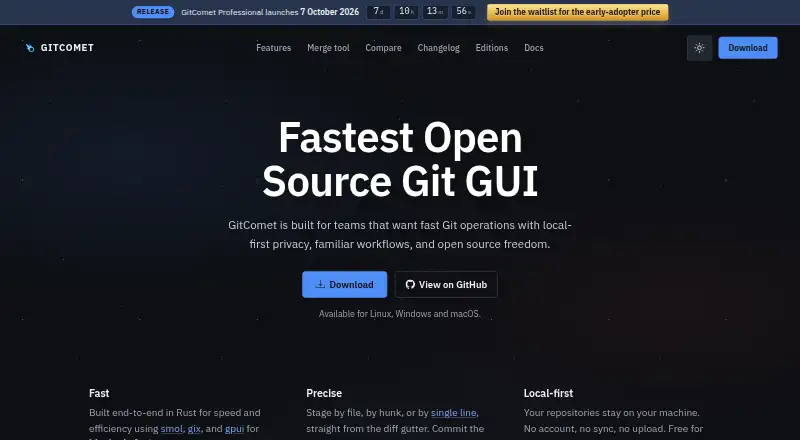
GitComet is an open-source desktop Git client for Linux, macOS, and Windows. It keeps repositories on the user’s computer, with no account, synchronization, or repository upload required, and it works offline. Its diff view lets users stage or unstage files, hunks, or individual lines. History tools cover interactive rebase, cherry-pick, squash, revert, reset, and comparisons across commits, branches, tags, and the working tree. The merge tool automatically resolves some whitespace moves, one-sided edits, and duplicate changes, leaving other conflicts for the user. GitComet also supports branches, remotes, tags, worktrees, submodules, stashes, patches, blame, cloning, and configurable pull policies. The free Open Source plan includes the local desktop workflow and merge tools. Professional is listed at €20 lifetime access and adds integrations such as Claude Code, Codex, GitHub CLI, GitHub, and Azure DevOps. A local Git installation version 2.50 or newer is required.
Who it suits
GitComet suits developers and teams who want a local-first desktop workflow with open-source licensing and familiar Git operations. It is available on Linux, macOS, and Windows.
What it does well
- Repositories stay on the user's machine.
- Works offline and requires no account.
- Stages individual lines from the diff view.
- Includes interactive rebase and conflict resolution.
- Supports Linux, macOS, and Windows.
What to know first
- Requires local Git version 2.50 or newer.
- Does not support Git LFS.
Limits
The free Open Source plan does not include the Professional integrations. GitComet requires local Git version 2.50 or newer and does not support Git LFS.
Plans
| Plan | Billed and limits | Price |
|---|---|---|
| Open Source | €0 forever · Free for personal and commercial use · full local-first desktop workflow · Git remotes, pull/push, staging, commits · worktrees, branching, full history · multi-repository browsing · inline and side-by-side diffs · 2-way and 3-way merge tools | Free |
| Professional | €20 lifetime access · Everything in Open Source · Claude Code, Codex, and GitHub CLI integrations · code test coverage workflows · GitHub and Azure DevOps integrations · priority improvements during early access · limited-time early-adopter offer | €20, paid once |
As gitcomet.dev lists them, read 1 Oct 2026. The maker's own page has the final word.
Getting started
- Visit https://gitcomet.dev/.
- Install GitComet on Linux, macOS, or Windows.
- Install local Git version 2.50 or newer.
- Choose the free Open Source plan or Professional for €20 lifetime access.
- Open a repository or use the cloning workflow.
Overview
GitComet is an open-source desktop Git client for developers who want repository work to remain on their own computer. It is best suited to people who value fine-grained staging, substantial history manipulation, and offline-capable workflows across Linux, macOS, and Windows. The main trade-off is that Git LFS is unsupported and several collaboration integrations require a paid upgrade.
Key features
Diff-gutter controls let you stage or unstage an entire file, a hunk, or a single line. That granularity is valuable when a working file contains unrelated fixes and you want clean, reviewable commits rather than accepting every change together.
History tooling covers interactive rebase, cherry-pick, squash, revert, reset, and comparisons between commits, branches, tags, and the working tree. This gives experienced Git users a desktop interface for rewriting and inspecting history, while newcomers may find the range more demanding than a basic commit-and-push client.
The merge editor automatically resolves whitespace movement, one-sided edits, and duplicate changes before showing conflicts that still need a decision. Branches, remotes, tags, worktrees, submodules, stashes, patches, blame, cloning, and configurable pull policies round out the repository toolkit. Git LFS is not supported, so projects built around large-file storage should use another client.
Repositories stay local: no account, synchronization, or upload is required, and offline mode is supported. GitComet uses the AGPL-3.0 license, and its workspace forbids unsafe Rust code. Those choices suit privacy-conscious teams and users who prefer open-source software, although they do not provide cloud synchronization for people who want it.
Permalinks can target GitHub, GitLab, Bitbucket, Azure DevOps, Gitea, Codeberg, Forgejo, and AWS CodeCommit. Professional also connects to Claude Code, Codex, GitHub CLI, GitHub, and Azure DevOps, extending the client toward hosted and AI-assisted workflows.
Pricing
Open Source
The Open Source plan costs €0 forever and permits personal and commercial use. It includes the full local desktop workflow, remotes, pull and push, staging, commits, worktrees, branching, complete history, multi-repository browsing, inline and side-by-side diffs, plus two-way and three-way merge tools. This is the sensible choice for anyone who needs a capable local Git GUI without integrations or a paid commitment.
Professional
Professional is a one-time €20 payment for lifetime access, rather than a recurring subscription. It adds Claude Code, Codex, and GitHub CLI integrations; code test-coverage workflows; GitHub and Azure DevOps integrations; and priority improvements during early access. The plan is aimed at developers whose daily work benefits from those connections. Users satisfied with local Git operations gain little from upgrading, while the early-adopter offer is described as limited-time.
Platforms
GitComet runs on Linux, macOS, and Windows. Windows provides signed MSI installers and portable x86-64 and ARM64 builds. macOS offers a notarized disk image for both Apple silicon and Intel, while Linux supports multiple package formats on x86-64 and ARM64. Linux Wayland is supported with automatic X11 fallback, and WSLg is supported. A local Git installation version 2.50 or newer is required, so older Git environments must be upgraded first.
Who it's for
Choose GitComet if you want a privacy-oriented, open-source desktop client with serious history editing, precise partial staging, and broad repository support. It fits individuals and teams comfortable installing modern Git and working locally. It is a weaker match for Git LFS projects, users seeking built-in synchronization, or organizations that specifically need the Professional integrations but do not want a desktop-only tool.
Pros and cons
- Pros: precise line-level staging; extensive rebase and history operations; automatic handling of several common merge patterns; support for worktrees, submodules, stashes, and patches; local-only operation with offline support; lifetime Professional pricing; broad platform and architecture coverage.
- Cons: no Git LFS support; Git 2.50 or newer is mandatory; Claude Code, Codex, GitHub CLI, GitHub, and Azure DevOps integrations are paid-only; desktop delivery will not suit users wanting a browser or synchronized workflow.
Alternatives
Browse the Git GUI Clients directory for a wider comparison. GitKraken Desktop is preferable when an OSS-focused Community plan limited to local repositories and public remotes fits your work. Pick SmartGit for its full-featured Hobby edition when personal, non-commercial use and free registration are acceptable. Git Cola is a straightforward free-software alternative.
GitButler suits users seeking a free, open-source client with an optional monthly Supporter contribution. Gitember, Gitnuro, GitQlient, and Gittyup are free cross-platform clients; choose among them when avoiding paid tiers is the priority.
Verdict
GitComet is a strong pick for developers who want local-first privacy, detailed staging, and advanced Git history and merge workflows in one open-source desktop application. Its free plan is unusually complete, and €20 lifetime Professional access is compelling when the listed integrations matter. Look elsewhere if your repositories depend on Git LFS, you need synchronization, or your workflow is not compatible with requiring Git 2.50+ and a desktop client.
Verdict
GitComet combines local repository handling with a broad set of Git history and merge workflows. Its free plan includes core desktop features; Professional adds listed integrations for €20 lifetime access.
Questions
Is GitComet free?
Yes. The Open Source plan is free forever for personal and commercial use. Professional is listed at €20 for lifetime access.
Which operating systems does GitComet support?
It supports Linux, macOS, and Windows.
Does GitComet work offline?
Yes. It works offline and keeps repositories on the user's machine.
Is GitComet open source?
Yes. GitComet is licensed under AGPL-3.0.
What does Professional add?
Professional adds Claude Code, Codex, GitHub CLI, GitHub, and Azure DevOps integrations, along with code test coverage workflows.
What does GitComet require?
It requires a local Git installation version 2.50 or newer.
Facts from GitComet's own pages
- Audience
- GitComet is built for teams wanting fast Git operations, local-first privacy, familiar workflows, and open-source freedom. · gitcomet.dev, 1 Oct 2026
- Desktop requirement
- GitComet is a desktop application, with Linux Wayland support, automatic X11 fallback, and WSLg support. · gitcomet.dev, 1 Oct 2026
- Diff staging
- Users can stage and unstage files, hunks, or individual lines directly from the diff gutter. · gitcomet.dev, 1 Oct 2026
- Forge links
- GitComet can create permalinks for GitHub, GitLab, Bitbucket, Azure DevOps, Gitea, Codeberg, Forgejo, and AWS CodeCommit. · gitcomet.dev, 1 Oct 2026
- Headquarters
- Finland · gitcomet.dev, 28 Sept 2026
- History workflows
- GitComet supports interactive rebase, cherry-pick, squash, revert, reset, and comparisons across commits, branches, tags, and the working tree. · gitcomet.dev, 1 Oct 2026
- Integrations
- The Professional edition lists Claude Code, Codex, GitHub CLI, GitHub, and Azure DevOps integrations. · gitcomet.dev, 1 Oct 2026
- Local-first privacy
- Repositories stay on the user's machine; GitComet requires no account, synchronization, or repository upload. · gitcomet.dev, 1 Oct 2026
- Maker
- GitComet is developed by AutoExplore, a company dedicated to building tools that help software teams deliver high-quality software faster. · gitcomet.dev, 1 Oct 2026
- Merge resolution
- Its merge tool automatically settles whitespace moves, one-sided edits, and duplicate changes before the user resolves remaining conflicts. · gitcomet.dev, 1 Oct 2026
- Platform builds
- Windows has signed MSI and portable x86-64 and ARM64 builds; macOS has a notarized disk image for Apple silicon and Intel; Linux supports multiple package formats on x86-64 and ARM64. · gitcomet.dev, 1 Oct 2026
- Product
- GitComet is an open-source desktop Git client for Linux, macOS, and Windows. · docs.gitcomet.dev, 1 Oct 2026
- Repository support
- GitComet includes branches, remotes, tags, worktrees, submodules, stashes, patches, blame, cloning, and configurable pull policies. · gitcomet.dev, 1 Oct 2026
- Security model
- GitComet keeps repository data local, is licensed under AGPL-3.0, and forbids unsafe Rust code in its workspace. · gitcomet.dev, 1 Oct 2026
- Support channels
- The project links users to Discord, GitHub Discussions, documentation, and GitHub issue reporting. · docs.gitcomet.dev, 1 Oct 2026
- System requirement
- GitComet requires a local Git installation version 2.50 or newer. · gitcomet.dev, 1 Oct 2026
Where GitComet stands on Freedom251
- Git GUI Clients#5 of 32