Sourcetree
What Sourcetree is
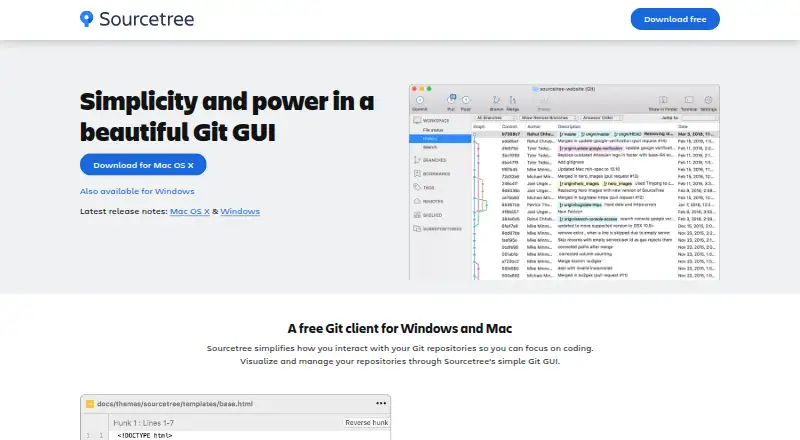
Sourcetree is a free graphical client for visualizing and managing Git repositories on Windows and macOS. It also works with Mercurial. The interface supports creating, cloning, committing, pushing, pulling, and merging repositories, with changes staged or discarded by file, hunk, or line. Other features include Git Large File Storage, Git-flow support, submodules, local commit search, interactive rebase, and remote repository search and cloning. Sourcetree connects with Bitbucket Cloud, Bitbucket Server, GitHub, GitLab, and VSTS, and is described as useful for beginners as well as advanced users. Windows Enterprise edition supports MSI deployment, silent installation, and centrally managed updates. Its users can sign in with existing Bitbucket Data Center credentials without an additional account signup. Pull-request comments, approvals, and repository access changes must be handled in the hosting service, not in Sourcetree.
Who it suits
It suits Git or Mercurial users who want a graphical repository client on Windows or macOS, from beginners to advanced users. Windows Enterprise edition is relevant to organizations that need centrally managed deployment and updates.
What it does well
- Free Windows and macOS desktop client.
- Works with both Git and Mercurial.
- Stages or discards changes by file, hunk, or line.
- Connects to Bitbucket, GitHub, GitLab, and VSTS.
What to know first
- Pull-request comments and approvals happen in the hosting service.
- Repository access changes must be handled in the hosting service.
- Older archived versions may no longer be supported.
Plans
| Plan | Billed and limits | Price |
|---|---|---|
| Free | Windows and Mac desktop client · Git and Mercurial | Free |
As sourcetreeapp.com lists them, read 2 Oct 2026. The maker's own page has the final word.
Getting started
- Open the Sourcetree website.
- Choose the Windows or macOS desktop client.
- Connect to a supported hosting service or work with a repository.
- Use the interface to create or clone a repository, then commit and manage changes.
Verdict
Sourcetree provides a free desktop interface for common Git and Mercurial repository work, with staging controls and several hosting integrations. Remember that pull-request tasks and repository access changes remain in the hosting service.
Questions
How much does Sourcetree cost?
The Free plan costs nothing and includes the Windows and Mac desktop client for Git and Mercurial.
Which operating systems does Sourcetree support?
Sourcetree supports Windows and macOS.
Does Sourcetree support Git and Mercurial?
Yes. It works with both Git and Mercurial.
Which hosting services does Sourcetree connect to?
It connects with Bitbucket Cloud, Bitbucket Server, GitHub, GitLab, and VSTS.
Can I manage pull requests in Sourcetree?
Pull-request comments and approvals must be handled in the hosting service, as must repository access changes.
What does the Windows Enterprise edition add?
It supports MSI deployment, silent installs, and centrally managed updates. Users can use existing Bitbucket Data Center credentials without an additional account signup.
Facts from Sourcetree's own pages
- Branching
- Sourcetree includes Git-flow support for smart branching. · sourcetreeapp.com, 2 Oct 2026
- Change staging
- Sourcetree can stage and discard changes by file, hunk, or line. · sourcetreeapp.com, 2 Oct 2026
- Core operations
- Users can create, clone, commit, push, pull, and merge repositories through the interface. · confluence.atlassian.com, 2 Oct 2026
- Enterprise deployment
- The Windows Enterprise edition supports MSI deployment, silent installs, and centrally managed updates. · sourcetreeapp.com, 2 Oct 2026
- Enterprise sign-in
- Windows Enterprise users can use existing Bitbucket Data Center credentials without an additional account signup. · sourcetreeapp.com, 2 Oct 2026
- Free plan
- Yes · atlassian.com, 20 Sept 2026
- Git LFS
- Sourcetree supports Git Large File Storage for tracking large assets. · sourcetreeapp.com, 2 Oct 2026
- Hosting integrations
- Sourcetree connects with Bitbucket Cloud, Bitbucket Server, GitHub, GitLab, and VSTS. · confluence.atlassian.com, 2 Oct 2026
- Hosting-service limits
- Tasks such as pull-request comments, approvals, and repository access changes must be handled in the hosting service. · confluence.atlassian.com, 2 Oct 2026
- Maker security
- Atlassian states that its products adhere to enterprise-level controls and policies aligned with international standards and that its security program includes independent audits and certifications. · atlassian.com, 2 Oct 2026
- Older versions
- Sourcetree's download archive warns that older versions may no longer be supported by Atlassian. · sourcetreeapp.com, 2 Oct 2026
- Purpose
- Sourcetree is a graphical client for visualizing and managing Git repositories. · sourcetreeapp.com, 2 Oct 2026
- Repository features
- The product supports submodules, local commit search, interactive rebase, and remote repository search and cloning. · sourcetreeapp.com, 2 Oct 2026
- Support
- Atlassian provides Sourcetree documentation and directs users to the Atlassian Community for help. · confluence.atlassian.com, 2 Oct 2026
- Target users
- The product is described as helping both beginners and advanced users. · confluence.atlassian.com, 2 Oct 2026
- Version control
- Sourcetree works with both Git and Mercurial. · sourcetreeapp.com, 2 Oct 2026
Where Sourcetree stands on Freedom251
- Git clients#3 of 24
- Git GUI Clients#23 of 32
- Game Version Control Software#24 of 28