Freedom251 › Version Control Software
GitBreeze
What GitBreeze is
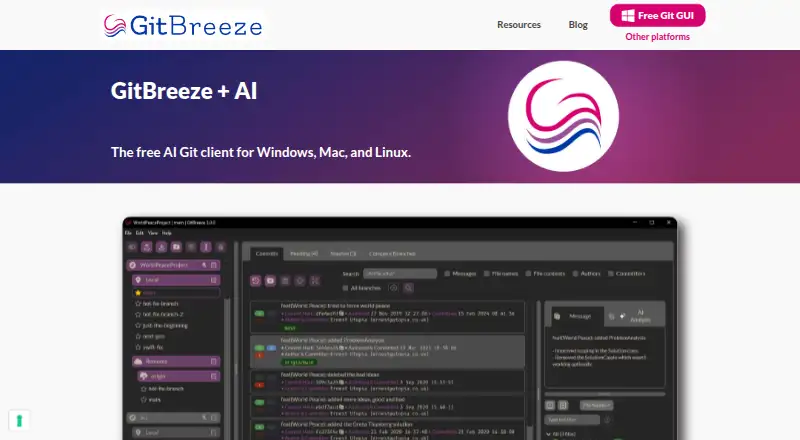
GitBreeze is a desktop Git client for Windows, macOS, and Linux that combines repository workflows with built-in AI. It can assess pending files and commits, describe changes, and recommend changes through a code review. The app previews actions before they happen, so users can see what an operation is expected to do. Its branch comparison view helps identify identical and similar commits across branches, as well as commits that are missing from one branch. For commit work, users can select pending files without managing the Git index, compare files with earlier commits, and amend commits. Revert and reset can undo or delete commits; users can preview these actions and choose whether to keep working files. Stash tools compare stashed files with working files, show what was stashed and when, and can reinstate the index when a stash is popped. GitBreeze works with Git and lets users move between the app and the command line. Downloads are listed for 64-bit Windows 7 or later, macOS 10.10 or later, and Linux in AppImage format. The maker describes itself as a small independent software vendor focused on making Git workflows easier for software engineers. Its Free GitBreeze plan costs nothing, with no time limit on any functionality. The homepage says users can try it free on hundreds of commits.
Who it suits
GitBreeze suits software engineers who want a desktop interface for reviewing pending changes, comparing branches, and managing commits or stashes. It can also fit developers who switch between a Git client and the command line as part of their workflow.
What it does well
- Built-in AI assesses pending files and commits and recommends review changes.
- Previews actions before they are taken.
- Compares branches to identify commits that are missing.
- Commit pending files without managing the Git index.
- Works with Windows, macOS, and Linux.
- Free plan has no time limits for any functionality.
What to know first
- Linux downloads are listed in AppImage format.
- Windows support is listed for 64-bit Windows 7 or later.
- The homepage's free AI allowance is described as hundreds of commits.
Limits
The homepage says users can try the AI for free on hundreds of commits. The listed Free GitBreeze plan is free for any use and has no time limits for any functionality.
Plans
| Plan | Billed and limits | Price |
|---|---|---|
| Free GitBreeze | Free for any use · no time limits for any functionality | Free |
As gitbreeze.dev lists them, read 11 Oct 2026. The maker's own page has the final word.
Getting started
- Visit https://gitbreeze.dev/.
- Choose the download for Windows, macOS, or Linux.
- On Windows, use a 64-bit system running Windows 7 or later; macOS downloads are listed for version 10.10 or later.
- Install or run the download for your platform.
- Use the free plan, listed as free.
Verdict
Choose GitBreeze if you want a free desktop Git client with AI-assisted change review, action previews, and branch comparison. It supports Windows, macOS, and Linux, and its plan has no time limit on functionality. Check the listed download requirements for your operating system before getting started.
Questions
How much does GitBreeze cost?
The Free GitBreeze plan costs nothing.
Is there a free plan?
Yes. The plan is described as free for any use, with no time limits for any functionality.
Which platforms does GitBreeze support?
Downloads are listed for 64-bit Windows 7 or later, macOS 10.10 or later, and Linux in AppImage format.
What does its AI do?
It assesses pending files and commits, describes changes, and recommends changes with a code review. The homepage says users can try it for free on hundreds of commits.
Can I use it alongside the command line?
Yes. GitBreeze works with Git and lets users switch between the app and the command line.
Who makes GitBreeze?
The maker describes itself as a small independent software vendor focused on making Git workflows easier for software engineers. It is located in the United Kingdom.
Facts from GitBreeze's own pages
- Action previews
- The product says it previews what will happen when actions are taken to help protect code. · gitbreeze.dev, 11 Oct 2026
- AI allowance
- The homepage says users can try it for free on hundreds of commits. · gitbreeze.dev, 11 Oct 2026
- Branch comparison
- Its branch comparison view shows identical and similar commits across branches and helps identify commits missing from one branch. · gitbreeze.dev, 11 Oct 2026
- Commit workflow
- Users can select pending files, commit them without managing the Git index, compare files with earlier commits, and amend commits. · gitbreeze.dev, 11 Oct 2026
- Git workflow
- GitBreeze works with Git and lets users switch between the app and the command line. · gitbreeze.dev, 11 Oct 2026
- Headquarters
- United Kingdom · gitbreeze.dev, 28 Sept 2026
- Location
- The maker says it is located in the United Kingdom. · gitbreeze.dev, 11 Oct 2026
- Maker
- The maker describes itself as a small independent software vendor focused on making Git workflows easier for software engineers. · gitbreeze.dev, 11 Oct 2026
- Privacy data
- The linked privacy policy lists Google Analytics, Stripe, Cloudflare, ActiveCampaign, and other services, and names GitBreeze Ltd. as the data controller. · iubenda.com, 11 Oct 2026
- Product
- GitBreeze is a Git client with built-in AI that assesses pending files and commits, describes changes, and recommends changes with a code review. · gitbreeze.dev, 11 Oct 2026
- Rewind
- Users can undo or delete commits using revert or reset, preview actions, and choose whether to keep working files. · gitbreeze.dev, 11 Oct 2026
- Stashes
- Users can compare stashed files with working files, reinstate the index when popping a stash, and see what was stashed and when. · gitbreeze.dev, 11 Oct 2026
- Support contact
- The privacy policy lists [email protected] as the owner contact email. · iubenda.com, 11 Oct 2026
- Supported systems
- Downloads are listed for 64-bit Windows 7 or later, macOS 10.10 or later, and Linux in AppImage format. · gitbreeze.dev, 11 Oct 2026
Where GitBreeze stands on Freedom251
- Version Control Software#12 of 62