Freedom251 › Version Control Software
BitKeeper
What BitKeeper is
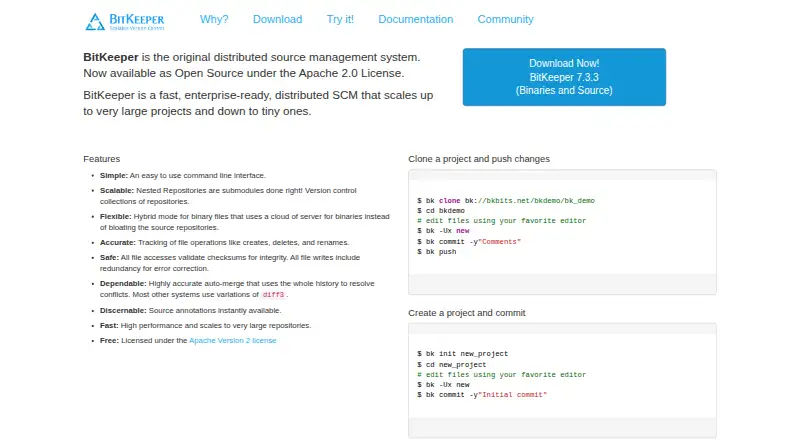
BitKeeper is a free, open-source distributed source management system for version controlling software projects. It supports Windows, macOS, Linux, and self-hosted deployment, with file locking, sparse checkout, and native handling of large files. For large code bases, BK/Nested organizes work into sub-repositories while keeping changesets, libraries, and configuration files in sync with the full project. Its Binary Asset Manager provides local storage for large files such as videos, photos, artwork, office documents, and CAD files. The maker says BitKeeper records who changed source, when and from which computer, along with comments. It also describes its auto-merge as using the full history to resolve conflicts. The maker says revision-controlled filesystem access uses checksums and data is written with redundant encoding to detect and correct common failures. Developers can use graphical tools or the command line; the tutorial says all operations are available from the command line. A self-paced sample-repository demo takes about 30 minutes. The download page also says users can clone the last released BitKeeper source with Git. The maker notes that BitKeeper is not the right choice for every project and that Git suits many use cases.
Who it suits
BitKeeper may suit software teams that want distributed version control, self-hosted deployment, or tools for large projects and binary assets. The maker cautions that it is not a fit for every project.
What it does well
- Free under the Apache 2.0 License.
- Supports Windows, macOS, Linux, and self-hosting.
- Includes native large-file handling and sparse checkout.
- Offers both command-line and graphical tools.
What to know first
- The maker says it is not the best choice for every project.
- The download page refers to cloning the last released source.
Plans
| Plan | Billed and limits | Price |
|---|---|---|
| BitKeeper | Open Source under the Apache 2.0 License | Free |
As bitkeeper.org lists them, read 7 Oct 2026. The maker's own page has the final word.
Getting started
- Visit the BitKeeper website.
- Choose a Windows, macOS or Linux setup, or use self-hosted deployment.
- Use the command line or graphical tools.
- Start the self-paced demo with its sample repository, which takes about 30 minutes.
- Clone the last released BitKeeper source with Git if that is your preferred route.
Verdict
BitKeeper combines distributed version control with repository organization and large-file support. Consider the maker’s project-fit caveat and review the available demo before adopting it.
Questions
Does BitKeeper have a free plan?
Yes. BitKeeper is free under the Apache 2.0 License.
Which platforms does BitKeeper support?
It supports Windows, macOS, Linux and self-hosted deployment.
Is BitKeeper open source?
Yes. The site says it is open source under the Apache 2.0 License.
Can it handle large repositories and binary files?
It includes BK/Nested for organizing large repositories and a Binary Asset Manager for local storage of large assets.
Does BitKeeper have a graphical interface?
Yes. It has graphical tools as well as a command-line interface; all operations can be done from the command line.
Is there a way to learn BitKeeper?
The download page offers a self-paced demo with a sample repository that takes about 30 minutes.
Facts from BitKeeper's own pages
- Audit history
- The maker says BitKeeper records who made each source change, when, from which computer, and with what comments. · bitkeeper.org, 7 Oct 2026
- Binary assets
- BitKeeper’s Binary Asset Manager provides local storage as needed for large binary assets such as videos, photos, artwork, office files, and CAD files. · bitkeeper.org, 7 Oct 2026
- Integration
- The download page says users can clone the last released BitKeeper source with Git. · bitkeeper.org, 7 Oct 2026
- Integrity
- The maker says filesystem accesses to revision-controlled data use checksums and data is written with redundant encoding to detect and correct common failures. · bitkeeper.org, 7 Oct 2026
- Interfaces
- The tutorial says BitKeeper has a command-line interface and graphical tools, and that all operations can be done from the command line. · bitkeeper.org, 7 Oct 2026
- Large projects
- The maker describes BitKeeper as designed for commercial development projects and suitable for very large projects. · bitkeeper.org, 7 Oct 2026
- License
- The site says BitKeeper is open source under the Apache 2.0 License. · bitkeeper.org, 7 Oct 2026
- Merge behavior
- The maker describes BitKeeper’s auto-merge as using the whole history to resolve conflicts. · bitkeeper.org, 7 Oct 2026
- Nested repositories
- BK/Nested organizes large repositories into sub-repositories whose changesets, libraries, and configuration files stay in sync with the full code base. · bitkeeper.org, 7 Oct 2026
- Notable limitation
- The maker says BitKeeper is not the best choice for every project and notes that Git is an excellent solution for many use cases. · bitkeeper.org, 7 Oct 2026
- Platforms
- The download page offers builds for Linux, Windows, OS X, BSD, and Solaris. · bitkeeper.org, 7 Oct 2026
- Support and learning
- The download page offers a self-paced demo with a sample repository that takes about 30 minutes to complete. · bitkeeper.org, 7 Oct 2026
- What it does
- BitKeeper is a distributed source management system for version controlling software projects. · bitkeeper.org, 7 Oct 2026
Where BitKeeper stands on Freedom251
- Version Control Software#6 of 62
- Game Version Control Software#6 of 28