Freedom251 › AI Photo Culling Software

Facet
What Facet is
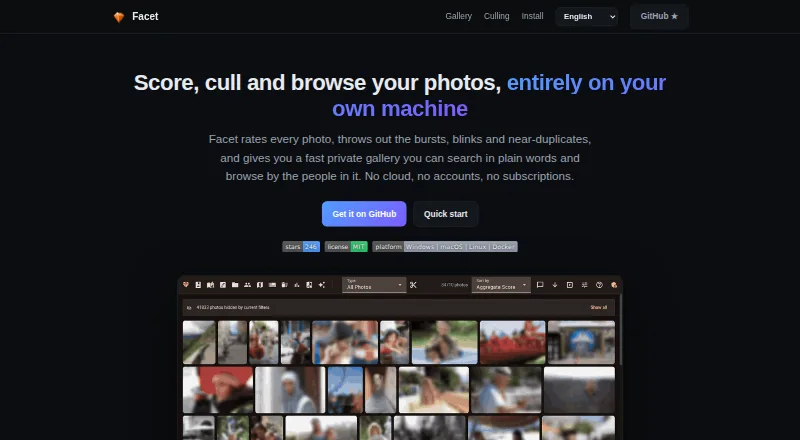
Facet is a free tool for scoring, culling, organizing, and browsing local photo libraries through a web gallery. It runs on the user's machine without cloud services, accounts, or API keys. Its scoring assesses nine dimensions, including aesthetic quality, composition, face quality, sharpness, color, exposure, subject saliency, and dynamic range. Facet can identify bursts, similar photos, blinks, and duplicates, and offers auto-culling with a preview before changes. The gallery provides natural-language search, filters, timeline and map views, albums, and themed slideshows. Face tools detect and group people, with options to search, rename, merge, and organize clusters. Metadata interoperability with Lightroom, Capture One, digiKam, and darktable uses XMP sidecars. Album links can be revoked and do not require recipients to log in; client proofing supports hearts and comments, with an optional PIN. Core features work on CPU, while an NVIDIA GPU enables additional models and features. Facet can be installed using Docker or natively on Linux and macOS, and requires Python.
Who it suits
Facet suits people with large local photo libraries who want to find top shots and remove bursts or near-duplicates. It is also suited to users who prefer local processing without cloud accounts.
What it does well
- Free plan with no cloud, accounts, or API keys
- Scores photos across nine dimensions
- Detects bursts, blinks, similar photos, and duplicates
- Supports XMP metadata with four named photo tools
- Core features run on CPU
What to know first
- No RAW editing or development
- No mobile app or cloud backup
- Setup requires Python
- NVIDIA GPU is needed for additional models and features
Limits
Facet is free, with a free plan and no free trial. It does not include RAW editing or development, a mobile app, or cloud backup.
Plans
| Plan | Billed and limits | Price |
|---|---|---|
| Facet | Free and local · no cloud, accounts, or subscriptions | Free |
| Free | local processing · self-hosted gallery · no cloud account or subscription | Free |
As ncoevoet.github.io lists them, read 28 Sept 2026. The maker's own page has the final word.
Getting started
- Visit the Facet website.
- Choose Docker or a native installation on Linux or macOS.
- Install Python, which Facet requires.
- Run Facet on your machine and use its web gallery.
Overview
Facet is a local-first photo-library manager that combines scoring and culling with face organization and a web gallery. It suits photographers with large collections who want to find keepers and sort near-duplicates without moving their library to a cloud service. Its breadth is compelling for a free tool, but it is not an editor, RAW developer, or cloud backup.
Key features
Scoring and culling
Facet evaluates images across nine dimensions, including composition, face quality, sharpness, color, exposure, and dynamic range. That range gives photographers several angles for reviewing a library, rather than making culling depend on a single quality score. It detects bursts, similar images, blinks, and duplicates, and automatic culling includes a dry-run preview—a sensible check before committing to automated selections.
RAW photos are supported for this workflow, alongside blur detection, closed-eye detection, and subject detection. Support does not mean development: Facet cannot replace an application for adjusting RAW files.
Gallery and people
The web gallery combines natural-language search with filters, a timeline, a map, albums, and themed slideshows. Face detection groups people into clusters that users can search, rename, merge, and organize. This makes Facet useful beyond a one-time cull, particularly for revisiting and arranging a large archive.
Metadata, uploads, and sharing
Facet documents XMP sidecar interoperability with Lightroom, Capture One, digiKam, and darktable, which can help fit it alongside those cataloging tools. Photos can be sent to its WebDAV inbox using PhotoSync or another WebDAV app. Album links work without a recipient login and can be revoked; client proofing adds hearts and comments, with an optional PIN. That is practical for review and delivery, though it is not a cloud-hosted backup or a mobile app.
Hardware and setup
Core scoring, face detection, culling, gallery, search, albums, and metadata export work on CPU, so an NVIDIA GPU is not a prerequisite for the central workflow. An NVIDIA GPU unlocks additional models and features. Installation is available through Docker or natively on Linux and macOS, and Facet requires Python; prospective users should be comfortable setting up self-hosted software.
Pricing
Facet: free. The free plan is local, with no cloud, accounts, or subscriptions. There is no free trial because the product is already free. Facet is distributed under the MIT license.
There is no paid tier or subscription renewal to weigh against the free plan. The trade-off is that users manage the local setup and cannot rely on Facet for cloud backup, RAW development, or a mobile app.
Platforms
Facet supports Linux, macOS, Windows, web, and self-hosted use. Its README describes Docker or native installation on Linux and macOS; the gallery is web-based. Core features work on CPU, while an NVIDIA GPU enables additional models and features.
Who it's for
Facet is a strong fit for photographers with large local libraries who need to identify top shots, clear bursts and near-duplicates, and organize people or albums. It is also relevant to users who want shareable proofing links and metadata interoperability with established photo applications.
Look elsewhere if your priority is RAW editing, automatic cloud backup, or a dedicated mobile app. Facet's local approach favors control over a hosted, ready-to-use service, and setup requires more technical involvement than a typical consumer photo app.
Pros and cons
Pros
- Broad local workflow at no subscription cost: scoring, culling, face organization, search, albums, and sharing are combined in one free tool.
- Multiple ways to assess images: nine scoring dimensions plus blur, blink, duplicate, and burst detection support more deliberate culling.
- Safer automation: a dry-run preview lets users inspect auto-culling choices before applying them.
- Useful archive and client tools: XMP interoperability, WebDAV uploads, revocable album links, and proofing comments extend its use beyond selection.
Cons
- No editing or RAW development: users still need a separate editor to process images.
- No mobile app or cloud backup: it cannot serve as a mobile-first or off-site storage solution.
- Setup is self-hosted in practice: Docker or native installation and a Python requirement may deter users seeking a turnkey application.
- Some capabilities need an NVIDIA GPU: CPU covers the core workflow, but additional models and features are gated behind NVIDIA hardware.
Alternatives
AI Photo Culling Software is a useful starting point for comparing tools in the category. Choose Zno if you want a freemium option spanning Android, iOS, macOS, web, and Windows, with a free start and gallery packages. Choose Optyx for macOS or Windows previews and Lightroom-oriented rating and metadata features; its free plan is monthly, with a Pro option at $6.99 a month billed annually. AccioPix Photo Culling is a web-based free alternative with no sign-up and no photo limit beyond the computer's capacity.
Futura Photo offers a Windows Community plan with unlimited analyses, up to 100 images per analysis, and one concurrent installation. Kepla is a macOS alternative available free through its private preview. OptiCull is another freemium option with a free trial. PhotoCull AI is web-based and free for local-only use, with an 80MB file-size limit and JPEG EXIF only; it does not support RAW files. Selekt is a macOS and Windows option whose free plan includes unlimited imports, culling, and export, on-device focus, exposure, and blur scoring, plus limited cloud AI and sync.
Verdict
Choose Facet if you want a free, local tool that can score and cull a large library, organize faces, and share albums without cloud accounts. Its strongest reason to choose it is the breadth of that workflow without a subscription; its clearest reason to look elsewhere is that it stops short of editing, RAW development, mobile use, and cloud backup.
Verdict
Facet combines local photo scoring, culling, face organization, and a shareable web gallery. It does not edit or develop RAW files, and the maker says it has no mobile app or cloud backup.
Questions
How much does Facet cost?
The Facet plan is free. It is described as free and local, with no cloud, accounts, or subscriptions.
Which platforms does Facet support?
Its listed platforms are Linux, macOS, self-hosted, web, and Windows. Native installation is documented for Linux and macOS.
Does Facet work with Lightroom?
Yes. Facet documents metadata interoperability with Lightroom using XMP sidecars; it also names Capture One, digiKam, and darktable.
Does Facet need a GPU?
Core scoring, face detection, culling, gallery, search, albums, and metadata export work on CPU. An NVIDIA GPU unlocks additional models and features.
Is Facet open source?
Facet is distributed under the MIT license.
Facts from Facet's own pages
- API extensibility
- The documentation describes configurable plugins and a Prometheus metrics endpoint that can be enabled through configuration. · github.com, 15 Oct 2026
- Audience
- The maker describes Facet as a fit for people with large local libraries who want to find top shots and cull bursts and near-duplicates. · github.com, 28 Sept 2026
- Burst culling
- Facet groups rapid-fire shots and recommends keepers using quality, sharpness, and blink signals. · github.com, 15 Oct 2026
- Community technical description
- A Reddit project post describes Facet as a free open-source Python tool using multiple vision models, a web gallery, face clustering, semantic tagging, and GPU-profile detection. · reddit.com, 15 Oct 2026
- Culling
- It detects bursts, similar photos, blinks, and duplicates, and provides auto-culling with a dry-run preview. · github.com, 28 Sept 2026
- Documentation depth
- The project publishes separate guides for installation, commands, configuration, scoring, faces, viewer use, interoperability, Immich, and deployment. · github.com, 15 Oct 2026
- Face recognition
- The gallery detects faces, clusters people, supports naming and merging, and provides blink and expression indicators. · github.com, 15 Oct 2026
- Gallery
- The gallery includes natural-language semantic search, filters, timeline, map, albums, and themed slideshows. · github.com, 28 Sept 2026
- Gallery views
- The web interface includes mosaic and grid galleries, timeline, map, folders, albums, memories, slideshows, and themed capsules. · github.com, 15 Oct 2026
- Hardware
- Core scoring, face detection, culling, gallery, search, albums, and metadata export work on CPU without a GPU; an NVIDIA GPU unlocks additional models and features. · github.com, 28 Sept 2026
- Hardware profiles
- Profiles cover CPU-only legacy mode, NVIDIA GPUs with 8GB, 16GB, or 24GB VRAM, and automatic Apple Silicon sizing. · github.com, 15 Oct 2026
- Independent directory description
- Localhosted lists Facet as a self-hosted AI photo manager that runs on CPU or GPU without cloud services or accounts. · localhosted.com, 15 Oct 2026
- Independent directory metadata
- Localhosted reports Facet as MIT licensed, with Windows, macOS, Linux, Docker, and web availability, and recorded 288 repository stars when fetched on 15 October 2026. · localhosted.com, 15 Oct 2026
- Installation
- Docker is supported on Windows, macOS, and Linux, while native installation is documented for Linux and macOS. · github.com, 15 Oct 2026
- Integrations
- XMP sidecars connect Facet with Lightroom, darktable, digiKam, Capture One, and Immich workflows. · github.com, 15 Oct 2026
- Licence
- The repository distributes Facet under the MIT License, permitting reuse, modification, distribution, sublicensing, and sale subject to the notice. · github.com, 15 Oct 2026
- License
- Facet is distributed under the MIT license. · github.com, 28 Sept 2026
- Lightroom plugin
- The bundled Lightroom Classic plugin exchanges ratings, flags, metadata, burst decisions, and collection information through a manifest. · github.com, 15 Oct 2026
- Limit: Lightroom picks
- The Lightroom integration rejects discarded frames but does not yet mark the recommended burst frame as a Pick automatically. · github.com, 15 Oct 2026
- Limit: Lightroom stacks
- The maintainer explains that the Lightroom SDK cannot create stacks, so Facet cannot automatically build them and users must use Lightroom’s own auto-stack command. · github.com, 15 Oct 2026
- Limit: no editing app
- The project documentation positions Facet as a scoring, organization, and culling tool rather than a RAW development editor or mobile replacement. · github.com, 15 Oct 2026
- Limits
- Facet does not provide RAW editing or development, and its README says it has no mobile app or cloud backup. · github.com, 28 Sept 2026
- Limit: setup reliability
- A Reddit user said an initial trial could not make Facet see their photos, despite trying the project. · reddit.com, 15 Oct 2026
- Maker identity
- The repository owner identifies as Nicolas Coevoet. · github.com, 15 Oct 2026
Where Facet stands on Freedom251
- AI Photo Culling Software#1 of 29