Freedom251 › AI Photo Culling Software
Kepla
What Kepla is
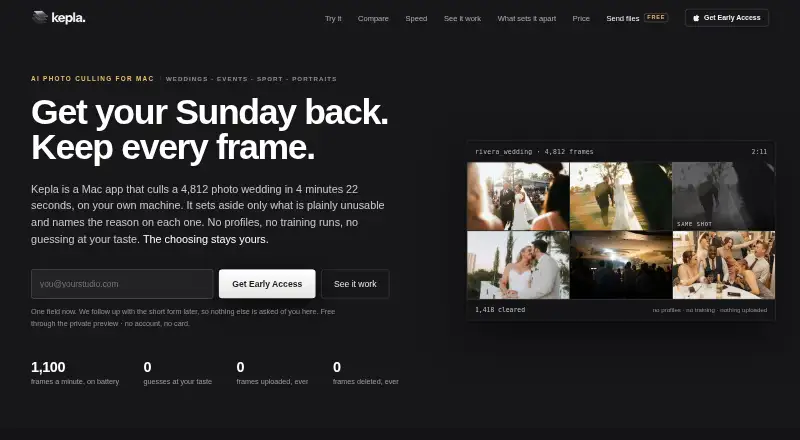
Kepla is a Mac app for AI photo culling that sorts a card while it copies and leaves final selection to the photographer. It groups burst duplicates and flags similar shots, out-of-focus frames, closed eyes, very dark or blown frames, and frames with nobody in them. The maker says it keeps photo files unchanged, recording decisions in XMP sidecars instead of deleting, moving, renaming, or adding reject flags. Culling runs locally on the Mac, works offline, and does not upload photo frames, according to the maker. Kepla supports CR3, NEF, ARW, RAF, DNG, ORF, JPEG, and HEIF, and includes a Lightroom Classic plugin; the maker says Capture One and Bridge can read the same sidecars. It requires macOS 14 Sonoma or later and runs on Apple silicon and Intel Macs. The app is in private preview, free until version 2.0 ships. Listed Solo pricing is $15/mo billed yearly; a monthly option costs $19. Studio is for teams of two or more and is listed at $32 a seat a month billed yearly or $39 a seat monthly.
Who it suits
Kepla suits photographers who shoot weddings, events, sports, portraits, runway and fashion, live music, or wildlife and want help sorting photos while keeping final selection in their hands. Studio is listed for teams of two or more.
What it does well
- Groups burst duplicates and flags common image issues.
- Keeps photo files unchanged and records decisions in XMP sidecars.
- Culling works offline on the Mac.
- Supports RAW formats including CR3, NEF, and ARW.
- Includes a Lightroom Classic plugin.
What to know first
- Requires macOS 14 Sonoma or later.
- Mac app is in private preview.
- No third-party penetration test has been conducted.
- Kepla does not hold its own SOC 2 report.
Limits
The Private preview plan is free through the private preview, with billing starting when version 2.0 ships. The listed paid Solo plan is $15 a month billed yearly; Solo monthly is $19 per month.
Plans
| Plan | Billed and limits | Price |
|---|---|---|
| Private preview | Free through the private preview; billing starts when 2.0 ships. · Mac app in private preview | Free |
| Solo | $15 a month, billed yearly ($180 once a year). · Unlimited cards and frames · every Mac you own · Lightroom plugin and sidecars · decisions sync to iPhone | $180 a year |
| Solo monthly | $19 a month; $228 across a year. · Cancel any time · no founding lock | $19 a month |
| Studio | $32 a seat a month, billed yearly ($384 a seat once a year). · Teams of 2+ · second shooter cards merge into one timeline · shared clients, events and delivery states | $384 a year |
| Studio monthly | $39 a seat; add or drop seats between seasons. · Per seat · teams of 2+ | $39 a month |
| Founding 100 | $99 a year, locked for life; billing begins when 2.0 ships. · First 100 photographers · yearly only · includes every version and tier | $99 a year |
As getkepla.com lists them, read 4 Oct 2026. The maker's own page has the final word.
Getting started
- Visit https://www.getkepla.com/.
- Use the free Private preview plan while the Mac app is in private preview.
- Confirm the Mac runs macOS 14 Sonoma or later.
- Choose Solo or Studio, with monthly and yearly options listed.
- Use the Lightroom Classic plugin or XMP sidecars with compatible apps.
Verdict
Kepla offers local photo sorting with sidecar-based decisions and Lightroom Classic integration, while leaving selection to the photographer. It remains in private preview, and its listed paid plans begin at $15/mo billed yearly.
Questions
How much does Kepla cost?
The Private preview plan is free, with billing starting when version 2.0 ships. Solo is listed at $15 a month billed yearly, or $19 per month; Studio is $32 a seat a month billed yearly, or $39 a seat monthly. Founding 100 is listed at $99 a year, with billing beginning when version 2.0 ships.
Is there a free plan?
Yes. The Private preview plan is free through the private preview; billing starts when version 2.0 ships.
Which computers does Kepla support?
Kepla is a Mac app requiring macOS 14 Sonoma or later. It runs as a universal binary on Apple silicon and Intel Macs.
Which photo formats does Kepla support?
The listed formats are CR3, NEF, ARW, RAF, DNG, ORF, JPEG, and HEIF.
Does Kepla work with Lightroom Classic, Capture One, or Bridge?
Kepla provides a Lightroom Classic plugin and writes XMP sidecars. The maker says Capture One and Bridge read the same sidecars.
Who makes Kepla?
The maker identifies Osmel Contreras as Kepla's founder and photographer; he shoots weddings and events.
Facts from Kepla's own pages
- Culling rules
- Kepla groups burst duplicates and flags same shots, out-of-focus frames, closed eyes, very dark or blown frames, and frames with nobody in them. · getkepla.com, 4 Oct 2026
- File formats
- The Mac app lists support for CR3, NEF, ARW, RAF, DNG, ORF, JPEG, and HEIF. · getkepla.com, 4 Oct 2026
- Integrations
- Kepla writes XMP sidecars and provides a Lightroom Classic plugin; the maker says Capture One and Bridge read the same sidecars. · getkepla.com, 4 Oct 2026
- Local processing
- The maker says culling runs on the Mac, works offline, and does not upload photo frames. · getkepla.com, 4 Oct 2026
- Maker
- The maker identifies Osmel Contreras as Kepla’s founder and photographer, and says he shoots weddings and events. · getkepla.com, 4 Oct 2026
- Originals
- Kepla says it does not delete, move, rename, or write reject flags to photo files; it records decisions in XMP sidecars. · getkepla.com, 4 Oct 2026
- Performance example
- The maker reports sorting 4,812 frames in 4 minutes 22 seconds on a MacBook Pro M3 Max on battery, while the card copied. · getkepla.com, 4 Oct 2026
- Platforms and requirements
- Kepla for Mac requires macOS 14 Sonoma or later and runs as a universal binary on Apple silicon and Intel Macs. · getkepla.com, 4 Oct 2026
- Preview status
- The maker says the Mac app is in private preview and that its performance figures come from one reference wedding, not a multi-shoot study. · getkepla.com, 4 Oct 2026
- Product
- Kepla is a Mac app for AI photo culling that sorts a card while it copies and leaves final photo selection to the photographer. · getkepla.com, 4 Oct 2026
- Security
- Kepla states that traffic uses HTTPS with HSTS, its database and storage providers encrypt data at rest, and production access is limited to the founder behind multi-factor authentication. · getkepla.com, 4 Oct 2026
- Security limits
- Kepla states it does not hold its own SOC 2 report and has not had a third-party penetration test. · getkepla.com, 4 Oct 2026
- Support
- The maker invites questions at [email protected] and says they are answered the same day by the person building the product. · getkepla.com, 4 Oct 2026
- Team tier
- Studio is listed for teams of two or more and includes merging second-shooter cards into one timeline and shared client, event, and delivery states. · getkepla.com, 4 Oct 2026
- Who it serves
- The maker describes Kepla as made for photographers who shoot weddings, events, sport, portraits, runway and fashion, live music, and wildlife. · getkepla.com, 4 Oct 2026
Where Kepla stands on Freedom251
- AI Photo Culling Software#11 of 29