Freedom251 › AI Photo Culling Software

AccioPix Photo Culling
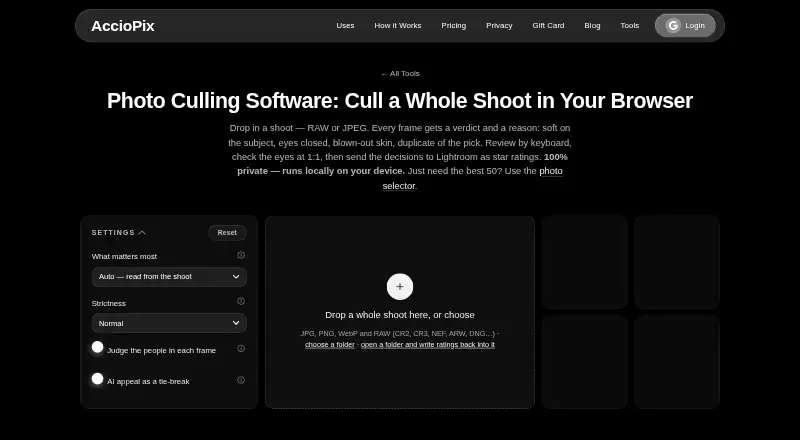
What AccioPix Photo Culling is
AccioPix Photo Culling is a free browser tool for sorting a photo shoot before delivery. It analyzes images on your device and recommends picks, keepers, duplicates, or rejects with a reason for each frame; the page says photos are not uploaded. It accepts JPG, PNG, WebP, and RAW formats including CR2, CR3, NEF, ARW, and DNG. For RAW files, it reads the embedded JPEG preview without conversion. Frames are grouped into bursts, and the tool can flag issues such as softness, closed eyes when a better frame exists, blown highlights, and black frames. Optional people analysis checks face sharpness, eyes, expression, head pose, and skin exposure. Optional NIMA scoring considers composition, subject, and light only when frames are tied on technical criteria. Review options include keyboard controls, eye inspection at 1:1, and manual overrides. Exports include XMP star ratings for RAW files, a keepers list, and a CSV with reasons. Chrome and Edge can write XMP sidecars into the selected folder; Lightroom ignores sidecars beside JPEGs. The free plan has no photo limit beyond your computer’s capacity.
Who it suits
It suits photographers who want to review whole shoots before delivery. It may also fit users who want local browser processing and control over the tool’s recommendations.
What it does well
- Free plan with no sign-up
- Works with common and RAW image formats
- Groups bursts and detects technical issues
- Lets users override its recommendations
- Exports keepers and frame-by-frame reasons
What to know first
- Runs in a browser
- Face and appeal models download once
- Lightroom ignores sidecars beside JPEGs
Limits
There is no photo limit beyond what the user’s computer can hold. The tool is free and requires no sign-up.
Plans
| Plan | Billed and limits | Price |
|---|---|---|
| Free photo culling tool | Free; no sign-up · No photo limit beyond your computer’s capacity | Free |
| Photo Culling free tool | No sign-up or subscription · No stated photo limit beyond computer capacity · JPG, PNG, WebP and RAW | Free |
| AccioPix event delivery | Per photo processed; credits do not expire · Up to 20,000 photos per event · First 100 photos free · Album hosting for 1 year | ₹0.20, paid once |
As acciopix.com lists them, read 2 Oct 2026. The maker's own page has the final word.
Getting started
- Open https://acciopix.com/tools/photo-culling in a web browser.
- Select a shoot’s JPG, PNG, WebP, or supported RAW files.
- Review the recommended picks, keepers, duplicates, and rejects.
- Use keyboard review, inspect eyes at 1:1, and override decisions as needed.
- Export XMP ratings for RAW files, a keepers list, or a CSV; Chrome and Edge can write sidecars into the selected folder.
AccioPix Photo Culling is a browser-based culling tool that evaluates an entire shoot and recommends picks, keepers, duplicates, and rejects with explanations. It suits photographers who want local, no-sign-up processing across common and RAW formats before delivery. Its strongest case is privacy-conscious, high-volume sorting; Lightroom JPEG workflows need a workaround.
Overview
AccioPix performs photo measurements in the browser on your own device, and photos are not uploaded. That is a meaningful advantage for client work or shoots that should stay local. There is no sign-up, no subscription, and no stated photo quota beyond the storage and processing capacity of your computer, so the practical ceiling depends on your hardware rather than an account allowance.
The browser workflow is aimed at culling a whole shoot before delivery. It is less suitable if you need a cloud-based collaboration system or a guaranteed Lightroom metadata path for JPEGs.
Key features
The tool groups frames into bursts and distinguishes likely picks, keepers, duplicates, and rejects. Its technical checks include subject softness, blown highlights, black frames, and closed eyes when a stronger frame exists. Reasons attached to recommendations make decisions auditable instead of presenting an unexplained score.
Optional people analysis examines face sharpness, closed eyes, expression, head pose, and skin exposure. Optional NIMA appeal scoring considers composition, subject, and light only when frames are tied on technical criteria. That makes aesthetic ranking a tie-breaker, not a replacement for technical selection.
JPG, PNG, WebP, and RAW formats are accepted, including CR2, CR3, NEF, ARW, and DNG. RAW files are assessed through their embedded JPEG previews, so conversion is not required. The face-analysis model downloads once at roughly 15 MB and the appeal model once at roughly 13 MB; both remain cached for later use.
Review controls include keyboard navigation, 1:1 eye inspection, and manual overrides for picks, keeps, and rejects. Exports include XMP star ratings for RAW files, a keepers list, and a CSV that gives a reason for each frame. Chrome and Edge can write XMP sidecars directly into the selected folder. Lightroom does not use sidecars placed beside JPEGs, so JPEG-based Lightroom libraries will not receive the same benefit.
Pricing
| Plan | Price | What it includes |
|---|---|---|
| Free photo culling tool | free | No sign-up; no photo limit beyond your computer's capacity |
The free plan is the complete offering described: AI quality scoring, subject detection, duplicate detection, RAW support, blur detection, and closed-eye detection. There is no free trial because the product itself is free. It fits photographers who can process locally and do not need hosted storage or team seats. Its trade-off is dependence on the user's computer for capacity and speed, rather than a provider-managed allowance.
Platforms
AccioPix runs on the web. Chrome and Edge are the browsers specifically identified for direct XMP sidecar writing; other browser support is not established for that export behavior.
Who it's for
Choose AccioPix for photographers sorting weddings, events, portraits, or other burst-heavy shoots before delivery, especially when RAW files and privacy matter. Keyboard review, eye-level inspection, and manual overrides suit users who want automated triage without surrendering final control.
Look elsewhere if you require cloud access across devices, collaborative review, or reliable Lightroom import of JPEG sidecars. The no-quota promise still leaves very large shoots constrained by local disk space and computer resources.
Pros and cons
Pros
- Local processing: images stay on the device, avoiding an upload step for sensitive shoots.
- Broad format support: major RAW variants and web image formats work without RAW conversion.
- Explainable culling: burst grouping and reasons for technical rejects help distinguish weak frames from duplicates.
- Full manual control: keyboard review, 1:1 eye checks, and overrides let you correct automated choices.
- Uncapped free use: no sign-up and no stated photo quota make it practical for complete shoots.
Cons
- Hardware-bound capacity: the computer, not a cloud service, determines how much you can process comfortably.
- JPEG Lightroom limitation: Lightroom ignores sidecars beside JPEGs, reducing export value for JPEG-centric libraries.
- Web-only delivery: there is no stated native desktop or mobile application.
- Aesthetic scoring is narrow: NIMA only settles technical ties, so it will not broadly rank a shoot by appeal.
Alternatives
- AI Photo Culling Software is a useful starting list when you want to compare several culling products.
- Zno is the better fit for a freemium service spanning Android, iOS, macOS, web, and Windows, with a free start and optional paid upgrades.
- Facet suits users seeking a free, local, no-cloud, no-account, no-subscription workflow across desktop platforms and the web.
- PixCull is preferable if MIT-licensed open source and optional API-based model calls matter more than a browser-only workflow.
- Project Kestrel fits users wanting a free, open-source desktop app for Windows, macOS, or Linux.
- Optyx is the alternative for macOS or Windows users who want Lightroom support, with a free tier and a 6.99 USD-per-month Pro plan billed annually.
- ShotSieve is a free, open-source option for Linux, macOS, and Windows.
- Futura Photo suits Windows users who want unlimited analyses capped at 100 images per analysis on its free Community plan, with paid upgrades available.
- Kepla is a macOS alternative from a wedding and events photographer, offered through a private preview.
Verdict
Choose it for uncapped, no-sign-up culling on your own computer; look elsewhere if you need cloud collaboration, native apps, or dependable Lightroom handling for JPEG sidecars.
Verdict
AccioPix combines local photo analysis with review controls and exports for a culling workflow. Its free plan’s practical limit is the capacity of the user’s computer.
Questions
How much does AccioPix Photo Culling cost?
The Free photo culling tool costs nothing, billed Free.
Do I need to sign up?
No sign-up is required.
Which platforms and formats does it support?
It is a web tool. It accepts JPG, PNG, WebP, and RAW files including CR2, CR3, NEF, ARW, and DNG.
Are photos uploaded?
The page says photo measurements run in the browser on the user’s device and photos are not uploaded.
What can I export?
Exports include XMP star ratings for RAW files, a keepers list, and a CSV with a reason for each frame. Chrome and Edge can write XMP sidecars directly into the selected folder.
Does it work with Lightroom JPEG sidecars?
Lightroom ignores XMP sidecars beside JPEGs.
Facts from AccioPix Photo Culling's own pages
- AI tie-break
- Optional NIMA appeal scoring evaluates composition, subject, and light, and only decides between frames tied on technical criteria. · acciopix.com, 2 Oct 2026
- Appeal scoring
- An optional NIMA neural network scores composition, subject and lighting only as a technical tie-breaker. · acciopix.com, 15 Oct 2026
- Browser support detail
- The page says Chrome and Edge can write XMP sidecars directly into the selected folder. · acciopix.com, 2 Oct 2026
- Burst grouping
- Frames are grouped into bursts by capture time and near-identical losers are stacked behind the selected frame. · acciopix.com, 15 Oct 2026
- Company description
- LinkedIn describes AccioPix as an AI-powered event photo delivery platform that sends selfie-matched photos through WhatsApp. · in.linkedin.com, 15 Oct 2026
- Company industry
- LinkedIn categorizes AccioPix under Events Services. · in.linkedin.com, 15 Oct 2026
- Company size
- LinkedIn lists the company size as 2–10 employees. · in.linkedin.com, 15 Oct 2026
- Culling logic
- It groups frames into bursts and can reject technical failures such as subject softness, closed eyes when a better frame exists, blown highlights, and black frames. · acciopix.com, 2 Oct 2026
- Delivery integration
- The wider AccioPix service sends guests their matched event photos through WhatsApp after a selfie. · acciopix.com, 15 Oct 2026
- Event capacity
- The event platform accepts up to 20,000 photos per event. · acciopix.com, 15 Oct 2026
- Face analysis
- Its people option measures eye sharpness, eye openness, expression, head pose and skin exposure at full resolution. · acciopix.com, 15 Oct 2026
- Formats
- The tool accepts JPG, PNG, WebP, and RAW files including CR2, CR3, NEF, ARW, and DNG. · acciopix.com, 2 Oct 2026
- Founded year
- LinkedIn lists AccioPix as founded in 2025. · in.linkedin.com, 15 Oct 2026
- Free allowance
- New event accounts receive the first 100 photos free without requiring a payment card. · acciopix.com, 15 Oct 2026
- Headquarters listing
- LinkedIn lists Delhi, India as AccioPix's headquarters and primary location. · in.linkedin.com, 15 Oct 2026
- JPEG limitation
- Lightroom does not read sidecars beside JPEG files, so JPEG decisions are supplied through the keepers list and CSV. · acciopix.com, 15 Oct 2026
- Keyboard review
- Review supports arrow navigation plus P, K, X and U shortcuts, with a 1:1 eye loupe in the viewer. · acciopix.com, 15 Oct 2026
- Licence status
- The culling logic, RAW extraction, blink scoring and pages are described as AccioPix's own work; the site lists third-party open-source components separately. · acciopix.com, 15 Oct 2026
- Lightroom export
- Exports include RAW XMP sidecars, a keepers text list and a CSV containing the reason for every frame. · acciopix.com, 15 Oct 2026
- Limits
- The page says there is no photo limit beyond what the user's computer can hold. · acciopix.com, 2 Oct 2026
- Local processing
- Photo measurements run in the browser on the user's device and the photos are not uploaded to AccioPix. · acciopix.com, 15 Oct 2026
- Maker legal entity
- The service identifies its provider as LEAP Analytics. · acciopix.com, 15 Oct 2026
- Model downloads
- The face model downloads once at about 15 MB and the appeal model at about 13 MB, after which both are cached. · acciopix.com, 15 Oct 2026
- Named employees
- LinkedIn publicly lists Ayush Patnaik, Himani Patnaik and Priya Verma among AccioPix employees. · in.linkedin.com, 15 Oct 2026
Where AccioPix Photo Culling stands on Freedom251
- AI Photo Culling Software#2 of 29