Freedom251 › Photo Culling Software

Selekt
What Selekt is
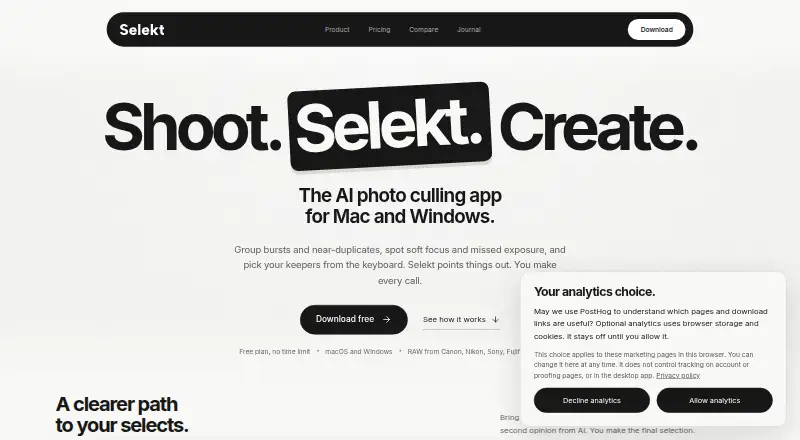
Selekt is a desktop photo library manager for photographers, with tools for importing, organizing, culling, rating, RAW processing, and tagging images. It groups bursts, similar frames, and duplicates for comparison, while on-device scoring checks focus, exposure, and blur using profiles for weddings, portraits, sports, and events. Optional cloud analysis can flag closed eyes, make face close-ups, and tag subjects and scenes for searching. Import, manual culling, and export work offline; cloud AI, sync, and client proofing need an internet connection. It supports a wide range of camera RAW formats as well as JPEG, TIFF, PNG, HEIC, and HEIF, and exports XMP sidecars for Lightroom Classic, Capture One, and Adobe Bridge. Selekt runs on macOS and Windows 10 and 11. Importing, culling, and exporting do not require sign-in, but a free account enables AI scoring and grouping. The Free plan includes cloud AI for 100 photos/month and 1 GB sync and client proofing; Pro is A$16 a month.
Who it suits
Selekt suits photographers who want desktop tools to organize and compare shoots, including working photographers who need client galleries. It is available for macOS and Windows.
What it does well
- Groups bursts, similar frames, and duplicates.
- On-device scoring checks focus, exposure, and blur.
- Import, manual culling, and export work offline.
- Exports XMP sidecars for three named photo apps.
What to know first
- Cloud AI, sync, and proofing need internet.
- Free cloud AI covers 100 photos/month.
- Local catalogue database lacks database-level encryption.
Limits
The Free plan includes cloud AI for 100 photos/month and 1 GB sync and client proofing. Pro costs A$16 a month and includes unlimited cloud AI and 10 GB sync and client proofing.
Plans
| Plan | Billed and limits | Price |
|---|---|---|
| Free | A$0/ forever · Unlimited imports, culling and export · on-device focus/exposure/blur scoring · burst/similar/duplicate grouping · 100 cloud-AI photos/month · 1 GB sync/proofing · XMP export | Free |
| Pro | A$16/ month (about US$11 a month) · Everything in Free · unlimited cloud AI for everyday shooting · 10 GB sync/proofing · priority support · unlimited social-export crops | A$16 a month |
As selekt.photos lists them, read 15 Oct 2026. The maker's own page has the final word.
Getting started
- Visit https://www.selekt.photos/.
- Choose the Free plan or Pro at A$16 a month.
- Install the macOS app for Apple silicon or Intel, or the 64-bit Windows installer for Windows 10 or 11.
- Import photos and begin culling and exporting; these tasks do not require signing in.
- Create a free Selekt account to enable AI scoring and grouping.
Selekt is a desktop photo library app for photographers handling large shoots. It suits Mac and Windows users who want to cull locally and work offline, with cloud features as an option rather than a requirement. Its strongest advantage is that local workflow; its main compromises are limited free cloud allowances and an unencrypted local catalogue.
Overview
Selekt brings importing, organization, rating, RAW processing, tagging, and export into one desktop workflow. It groups bursts, similar frames, and duplicates, then scores focus, exposure, and blur on the computer. That combination can help photographers narrow a shoot before editing, though automated scores are best treated as a selection aid.
Importing, manual culling, and export work offline, and culling, grouping, and quality scoring do not upload photographs. Cloud AI, synchronization, and client proofing need an internet connection. A free account enables AI scoring and grouping; no sign-in is needed for importing, culling, or exporting.
Key features
Culling and image handling
Profiles for weddings, portraits, sports, and events tailor quality scoring to common shoot types. Side-by-side comparison and AI-assisted culling support reviewing similar frames. Selekt supports major camera RAW formats including CR2/CR3, NEF, ARW, RAF, RW2, ORF, PEF, SRW, and DNG, as well as JPEG, TIFF, PNG, HEIC, and HEIF.
Cloud tools and integrations
Cloud analysis can flag closed eyes, create face close-ups, and tag subjects and scenes for later search. This extends the local selection workflow, but depends on a connection and involves cloud processing. XMP sidecar export provides a handoff to Lightroom Classic, Capture One, and Adobe Bridge rather than requiring those tools to be replaced.
Privacy and security
Implemented network paths use HTTPS/TLS. Cloudflare R2 objects and metadata, along with Amazon Rekognition face vectors, are encrypted at rest. The local catalogue is a SQLite database without database-level encryption, a meaningful drawback for photographers who keep sensitive client work on a shared or exposed computer.
Pricing
Selekt is freemium, with a Free plan at no cost (billed A$0/ forever) and Pro at A$16 a month (billed A$16/month (about US$11 a month)).
- Free: Unlimited imports, culling, and export; on-device focus, exposure, and blur scoring; XMP export; 100 cloud AI photos per month; and 1 GB for sync and client proofing. It is a capable starting point for local selection, but the AI quota and storage constrain ongoing cloud use.
- Pro: Unlimited cloud AI, 10 GB for sync and client proofing, priority support, and a high fair-use limit. At 16 AUD per month, it is aimed at working photographers who need more cloud capacity and client galleries; the free tier gives up those larger allowances and priority support.
Platforms
Selekt runs on macOS and Windows. The Mac app supports Apple silicon and Intel, while Windows support is through a 64-bit installer for Windows 10 and 11. Linux and mobile platforms are not supported.
Who it's for
Selekt is a sensible fit for photographers who want local culling and scoring, offline importing and export, and an XMP handoff to an established editor. Working photographers who use client proofing or want cloud AI beyond 100 photos per month have a clearer case for Pro. It is a weaker fit for photographers who need cloud features offline or require encryption for the local catalogue.
Pros and cons
- Pro: Local grouping and scoring keep core culling on the computer, without uploading photographs.
- Pro: Offline import, manual culling, and export support work away from a reliable connection.
- Pro: Broad RAW and image-format support plus XMP export make it useful alongside major editing applications.
- Con: Free cloud AI is capped at 100 photos per month, and sync and client proofing share just 1 GB.
- Con: Cloud AI, sync, and client proofing stop being usable without internet access.
- Con: The local SQLite catalogue has no database-level encryption, despite encryption at rest for specified cloud data.
Alternatives
Photo Culling Software and AI Photo Culling Software are useful starting points for comparing tools by category.
- Photo Curator is the alternative to consider if Linux support or a free, open-source option matters more than Selekt’s stated cloud and client-proofing workflow.
- Vantage is worth considering for iPhone use and its free tools for recent duplicates, monthly best photos, and space saving.
- Cullora may suit readers who prefer monthly filing quotas—50 photos anonymously or 200 with a free account—alongside unlimited viewing, rating, and flagging.
- SnapCuller is another freemium option for Mac and Windows photographers.
- Keeper is a macOS-only alternative with a free tier limited to 10 records and one mobile device.
- OptiCull is another freemium alternative for macOS.
- Culvia is a free alternative that also supports Linux and the web.
- FilterPixel is a freemium Mac and Windows option, with a one-time Extra DeepCull shoot priced at 7.99 USD for up to 5,500 photos.
Verdict
Choose Selekt if you want desktop culling that stays local, offline basics, and a route from free use to larger cloud allowances for client work. Its strongest reason to buy is the combination of on-device scoring and practical export; look elsewhere if you need an encrypted local catalogue or cloud tools that work without an internet connection.
Verdict
Selekt combines local photo culling and scoring with optional cloud tools. Its free plan covers core importing, culling, and export, while Pro adds unlimited cloud AI, more sync space, and priority support.
Questions
Is Selekt free?
Yes. Its Free plan costs nothing and includes unlimited imports, culling, and export, on-device scoring, cloud AI for 100 photos/month, 1 GB sync and client proofing, and XMP export.
How much does Pro cost?
Pro costs A$16 a month. It includes unlimited cloud AI, 10 GB sync and client proofing, priority support, and a high fair-use limit.
Which computers does Selekt support?
Selekt provides a universal app for Apple silicon and Intel Macs, plus a 64-bit installer for Windows 10 and 11.
Can I use Selekt offline?
Importing, manual culling, and exporting work offline. Cloud AI, sync, and client proofing require an internet connection.
Do I need an account to use Selekt?
Importing, culling, and exporting work without signing in. A free Selekt account enables AI scoring and grouping.
Does Selekt work with Lightroom?
Selekt exports XMP sidecars for Lightroom Classic, as well as Capture One and Adobe Bridge.
Facts from Selekt's own pages
- Account requirement
- A free Selekt account enables AI scoring and grouping, while importing, culling, and exporting work without signing in. · selekt.photos, 1 Oct 2026
- AI limitation
- Terms state that AI tags and descriptions may be inaccurate and cloud services can experience maintenance, downtime or discontinuation. · selekt.photos, 15 Oct 2026
- API and SDK
- Public materials document file and XMP export workflows but provide no public API or SDK documentation. · selekt.photos, 15 Oct 2026
- Backup responsibility
- The terms place responsibility for maintaining photo and data backups on the user. · selekt.photos, 15 Oct 2026
- Client proofing
- Synced galleries let clients use browser links, optional PINs, hearts and notes without creating an account. · selekt.photos, 15 Oct 2026
- Cloud AI
- Optional cloud analysis detects closed eyes, creates face close-ups, groups people and adds searchable subject and scene tags. · selekt.photos, 15 Oct 2026
- Cloud data handling
- Cloud features can send developed JPEGs, thumbnails, face crops and metadata; RAW sync uses a developed or embedded JPEG rather than the RAW file. · selekt.photos, 15 Oct 2026
- Cloud providers
- Listed subprocessors include Cloudflare R2, Vercel, Supabase, Clerk, AWS Rekognition, OpenAI, PostHog, Lemon Squeezy and Loops. · selekt.photos, 15 Oct 2026
- Company size
- LinkedIn lists Common Tools as privately held with 2–10 employees. · linkedin.com, 15 Oct 2026
- Download release
- Version 1.3.1 was released September 9, 2026; the macOS download is 23.1 MB and the Windows installer is 11.1 MB. · selekt.photos, 15 Oct 2026
- Editor integrations
- XMP sidecars carry selections and ratings to Lightroom Classic, Capture One and Adobe Bridge. · selekt.photos, 15 Oct 2026
- File formats
- Supported formats include Canon CR2/CR3, Nikon NEF, Sony ARW, Fujifilm RAF, Panasonic RW2, OM System ORF, Pentax PEF, Samsung SRW, Adobe DNG, JPEG, TIFF, PNG, HEIC, and HEIF. · selekt.photos, 1 Oct 2026
- Founder
- Marc Obieglo’s personal site lists him as founder of selekt.photos from 2025 to the present. · obieglo.net, 15 Oct 2026
- Integrations
- Selekt exports XMP sidecars for Lightroom Classic, Capture One, and Adobe Bridge. · selekt.photos, 1 Oct 2026
- Intended users
- The Pro plan is described as being for working photographers and includes room for client galleries. · selekt.photos, 1 Oct 2026
- Keyboard workflow
- Default controls include P/M/X/U for pick, maybe, reject and clear, with Quickview, loupe, EXIF and exposure-overlay shortcuts. · selekt.photos, 15 Oct 2026
- Licence
- The application, code, features and documentation are proprietary Common Tools Co property; copying, modification, distribution and reverse engineering are prohibited. · selekt.photos, 15 Oct 2026
- Local-first
- Culling, grouping, and quality scoring run on the user’s computer without uploading photographs. · selekt.photos, 1 Oct 2026
- Local storage
- The local catalogue is stored in SQLite and includes filenames, locations, previews, EXIF, tags, ratings and culling state. · selekt.photos, 15 Oct 2026
- Maker description
- Common Tools Co. describes Selekt as a desktop photography-library product for professionals and says the company was established in 2025. · common-tools.co, 15 Oct 2026
- Maker headquarters
- The company site gives Marrickville, Sydney as its location. · common-tools.co, 15 Oct 2026
- Manual decisions
- Selekt can suggest a target count, but the photographer makes every final pick or reject decision. · selekt.photos, 15 Oct 2026
- Mobile status
- A mobile companion for viewing synced shoots is described as early development and is not publicly available. · selekt.photos, 15 Oct 2026
- Offline use
- Import, manual culling and export work offline; cloud analysis, sync, proofing and account checks require connectivity. · selekt.photos, 15 Oct 2026
Where Selekt stands on Freedom251
- Photo Culling Software#9 of 26
- AI Photo Culling Software#14 of 29