Freedom251 › Photo Culling Software

Cullora
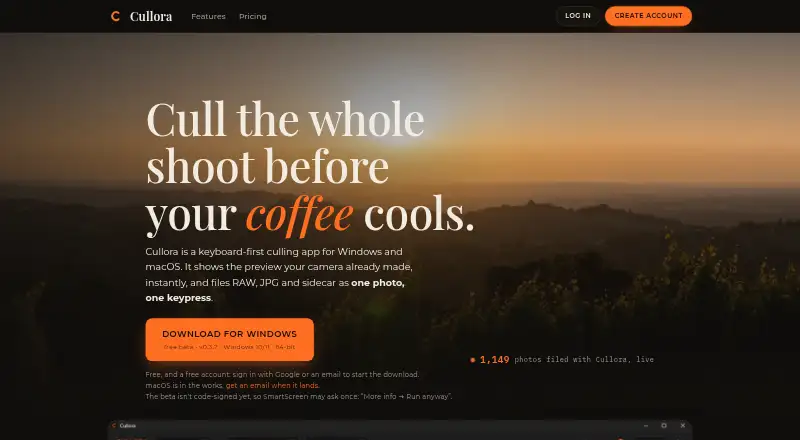
What Cullora is
Cullora is a desktop app for reviewing and sorting photo shoots into folders, rather than editing images or managing a catalog. It shows JPEG previews embedded in RAW files without an import step or catalog database, and supports ARW, CR2, CR3, NEF, RAF, ORF, DNG and JPEG. Burst sequences can appear as one grid tile and open for frame-by-frame review. Culling runs locally and works offline; Cullora says photographs are never uploaded and its servers cannot see them. The Pro plan adds on-device Assist flags for review, burst grouping, XMP ratings and flags for Lightroom or Capture One, and static gallery export. The Assist feature does not choose, move or delete photos. A free account is required to download the app, but the installed app works offline without signing in. The free tier permits filing 50 photos monthly anonymously or 200 with an account, while viewing and rating remain unlimited. Paid plans are €29, paid once for Founder Pro and €49, paid once for Pro. Windows 10/11 64-bit is offered as a beta; the macOS build is in progress and not released.
Who it suits
Cullora suits photographers who want to sort shoots locally and offline, especially those reviewing RAW files. Its Pro features may suit users who want XMP ratings or gallery export alongside their culling workflow.
What it does well
- RAW previews appear without importing files into a catalog.
- Culling works locally and offline.
- Photo files are not uploaded, according to Cullora.
- Pro writes ratings and flags to XMP sidecars.
- Undo supports moves up to 100 deep.
What to know first
- The Windows download is a beta.
- The macOS build is not released.
- Free filing is limited to 50 or 200 photos monthly.
- An account is required to download the app.
Limits
After the 14-day Pro trial, Free allows filing 50 photos per month anonymously or 200 with a free account. Viewing and rating remain unlimited; the Free plan also lists one destination folder and one machine.
Plans
| Plan | Billed and limits | Price |
|---|---|---|
| Free | €0 forever · 14-day Pro trial · 50 filed photos/month anonymously or 200 with account · unlimited viewing/rating/flagging · 1 folder · 1 machine | Free |
| Founder Pro | €29 once · 100 founder licences · future major upgrades capped at €19 · starting AI credits if server AI ships | €29, paid once |
| Pro | €49 once · Unlimited filing · 9 destination folders · XMP ratings/flags · renaming · static gallery export · 2 machines · Cullora 1 updates | €49, paid once |
As cullora.studio lists them, read 15 Oct 2026. The maker's own page has the final word.
Getting started
- Visit https://cullora.studio/.
- Create a free account to download the app.
- Download the Windows beta for Windows 10/11 64-bit.
- Install and use the app offline if needed; signing in is not required after installation.
- Start with the free tier or choose a listed paid plan.
Overview
Cullora is a desktop app for reviewing photo shoots and sorting selected images into folders. It is best suited to photographers who want to cull locally, work offline and preview RAW files without importing them into a catalog. Its focused workflow and file safeguards make a strong case for private, deliberate sorting, though platform availability and the free filing allowance deserve attention.
Key features
Cullora displays the JPEG preview embedded in RAW files, without an import step or catalog database. It handles ARW, CR2, CR3, NEF, RAF, ORF and DNG, as well as JPEG. That keeps review centered on the shoot at hand; photographers who need editing or library management will need separate software.
Burst sequences can be collapsed into one grid tile, then opened to compare individual frames. Pro’s on-device Assist flags possible closed eyes, soft focus, misfires and exposure problems, and groups bursts. It provides prompts for human review, rather than making selections or moving and deleting photos, so it suits photographers who want help spotting candidates while keeping control of the final call.
Pro can write ratings and flags to XMP sidecars for Lightroom or Capture One, and export filtered photos as a static gallery folder that opens without an account or internet. The local, offline workflow is a good fit for shoots that should stay on the photographer’s machine. Cullora says photographs are never uploaded and its servers cannot see them. Usage and performance telemetry is opt-in and excludes photos, filenames, folder paths and EXIF data.
Filing safeguards help protect a shoot from avoidable mistakes: name collisions get an explicit suffix, grouped moves roll back if a file fails, and moves can be undone up to 100 deep. A free account is required to download the app, but the installed app can be used offline without signing in. Feedback goes to a human through an in-app button.
Pricing
The Free plan costs nothing, billed forever. After the 14-day Pro trial, it allows 50 photos filed per month anonymously or 200 with a free account; viewing, rating and flagging remain unlimited. One destination folder and one machine make it suitable for occasional, single-folder work, but the filing cap will constrain regular shoot workflows.
Founder Pro costs €29, paid once, billed one-time, and is limited to a public run of 100 founder licences. Future major upgrades are capped at €19, and the plan includes starting AI credits if server-based AI credits ship. The plan’s listed terms do not spell out the Pro feature bundle, so buyers should compare its checkout terms with Pro before choosing it.
Pro costs €49, paid once, billed one-time. It includes unlimited filing, nine destination folders, on-device Assist AI, XMP ratings and flags, file renaming, static gallery export and use on two machines; updates to Cullora 1 are included. It is the clear fit for photographers who file regularly or need the handoff and export tools. The upgrade terms make the included updates specific to Cullora 1, while future major upgrades may cost extra.
The 14-day trial gives a short period to assess Pro before the free-tier filing cap applies. The one-time Pro price avoids a recurring subscription, but the free plan’s monthly quota is a real limit for anyone sorting multiple shoots.
Platforms
Cullora’s download page offers a Windows beta for 64-bit Windows 10 and 11. The macOS build is in progress and has not been released, so Mac users cannot yet rely on it as an available option. The app is desktop software, and Pro supports two machines compared with one on Free.
Who it's for
Cullora makes sense for photographers who want to review RAW-heavy shoots locally, sort into folders and retain control over each keep-or-reject decision. Its offline operation, privacy approach and rollback safeguards suit workflows where file handling matters. It is less suitable for photographers seeking an editor, a catalog, automatic photo selection, or a released macOS app today.
Pros and cons
- Pros: Embedded RAW previews and broad format support let photographers start reviewing without an import or catalog step.
- Pros: Local offline culling, opt-in telemetry and stated limits on data collection support a privacy-conscious workflow.
- Pros: Collision suffixes, rollback for failed grouped moves and up to 100 levels of undo reduce the risk of filing errors.
- Cons: Free filing is capped at 50 photos monthly anonymously or 200 with an account, despite unlimited viewing, rating and flagging.
- Cons: The macOS build is not released, and the available Windows build is a beta.
- Cons: Assist flags issues but does not choose, move or delete photos, so the final review remains manual.
Alternatives
Photo Culling Software is the broader category page for readers comparing culling tools. Choose Photo Curator if Linux support or open-source software is a priority. Vantage is an option for readers who want an iPhone plan alongside desktop platforms and tools for finding duplicates and cleaning up recent photos. Choose Selekt if unlimited imports, culling and export on its free plan matter more, or if cloud AI and sync are a better fit than Cullora’s local-first approach. SnapCuller is another freemium option for macOS and Windows. Keeper suits readers looking for a macOS-only alternative with a free trial. OptiCull is another macOS freemium option with a free trial. Culvia is a free alternative available across Linux, macOS, web and Windows. FilterPixel is worth considering for readers comparing freemium culling tools with shoot-based and subscription plans.
Verdict
Cullora is a good fit for photographers who want offline, local review, broad RAW preview support and careful folder filing, with Pro adding useful review prompts and export tools for a one-time 49.00 EUR price. The strongest reasons to look elsewhere are the unreleased macOS build, the Windows beta, the free tier’s monthly filing cap, or a need for automatic selection, editing or cataloging.
Verdict
Cullora focuses on local photo review and sorting, with offline use and RAW previews at its core. Check the current platform availability and free-tier filing limit before choosing a plan.
Questions
How much does Cullora cost?
Free costs nothing. Founder Pro is €29, paid once, and Pro is €49, paid once; the listed trial is 14 days.
What does the free plan limit?
It allows 50 photos filed per month anonymously or 200 with a free account. Viewing and rating are unlimited, with one destination folder and one machine.
Which platforms can I use?
The download page offers a Windows beta for Windows 10/11 64-bit. The macOS build is in progress and has not been released.
Does Cullora support RAW files?
Yes. It supports ARW, CR2, CR3, NEF, RAF, ORF, and DNG, as well as JPEG.
Does Cullora connect with Lightroom?
Pro can write ratings and flags to XMP sidecars for Lightroom or Capture One.
Does Cullora upload photographs?
Cullora says culling runs locally and photographs are never uploaded. The app works offline.
Facts from Cullora's own pages
- Account and download
- A free account is required to download the app, while the installed app can be used offline without signing in. · cullora.studio, 7 Oct 2026
- Account requirement
- A free account has been required to download since 8 August 2026, but the installed app can cull without signing in or an internet connection. · cullora.studio, 15 Oct 2026
- AI features
- Pro's on-device Assist flags closed eyes, soft focus, misfires and exposure to review, and groups bursts; it does not choose, move or delete photos. · cullora.studio, 7 Oct 2026
- API and self-hosting
- The reviewed official pages describe no public API, SDK, developer documentation or self-hosting package. · cullora.studio, 15 Oct 2026
- App Store namesake compatibility
- The separate cleaner listing requires iOS 18 or later and supports Macs on macOS 15 or later. · apps.apple.com, 15 Oct 2026
- App Store namesake developer
- Apple lists a separate app called Cullora: Private Photo Cleaner under Fuzhou Buwan Technology Co., Ltd., not Antonio Ivanović. · apps.apple.com, 15 Oct 2026
- App Store namesake features
- That separate iOS app analyzes photos on-device, has no account or media uploads, and asks users to confirm deletions through Apple Photos. · apps.apple.com, 15 Oct 2026
- App Store namesake pricing
- The separate listing shows $3.99 monthly, $9.99 annual and $19.99 lifetime in-app purchases. · apps.apple.com, 15 Oct 2026
- Assist AI
- The Pro Assist feature runs locally and flags possible closed eyes, softness, misfires and exposure issues while grouping bursts; it does not choose, move or delete files. · cullora.studio, 15 Oct 2026
- Beta limitation
- The Windows installer is not yet Authenticode-signed, so Windows SmartScreen may require an extra confirmation. · cullora.studio, 15 Oct 2026
- Burst grouping
- Burst sequences can be represented as one grid tile and opened for individual-frame review. · cullora.studio, 15 Oct 2026
- Burst review
- Burst sequences can be stacked as one grid tile and opened to review their individual frames. · cullora.studio, 7 Oct 2026
- Data processors
- The privacy policy names Supabase for authentication/database, Dodo Payments for payment processing, Resend for email and Google Analytics only with consent. · cullora.studio, 15 Oct 2026
- Fast previews
- It displays the JPEG preview embedded in RAW files, without an import step or catalog database. · cullora.studio, 7 Oct 2026
- File grouping
- RAW, JPEG and matching XMP sidecars are treated as one photo group and moved together. · cullora.studio, 15 Oct 2026
- File safeguards
- Name collisions receive suffixes instead of overwriting, and a failed grouped move is rolled back. · cullora.studio, 15 Oct 2026
- Free quota
- After the trial, filing is capped at 50 photos per month without an account or 200 with a free account; viewing and rating remain unlimited. · cullora.studio, 15 Oct 2026
- Free tier limit
- After the 14-day Pro trial, the free tier allows 50 photos filed per month anonymously or 200 per month with a free account; viewing and rating remain unlimited. · cullora.studio, 7 Oct 2026
- Gallery export
- Pro can export the current filtered selection as a self-contained static gallery that needs no account or internet connection. · cullora.studio, 15 Oct 2026
- Grid
- The browsing grid preserves each image's aspect ratio instead of center-cropping thumbnails. · cullora.studio, 15 Oct 2026
- Integrations
- Pro can write ratings and flags to XMP sidecars for use in Lightroom or Capture One. · cullora.studio, 7 Oct 2026
- Keyboard workflow
- Star ratings and pick/reject flags use Lightroom-style keyboard shortcuts, including number keys and P/X/U. · cullora.studio, 15 Oct 2026
- Licence
- Cullora is proprietary software under a personal, non-exclusive, non-transferable licence; reverse engineering, resale and redistribution are prohibited. · cullora.studio, 15 Oct 2026
- Lightroom/Capture One
- Pro writes ratings and flags into existing XMP sidecars for Lightroom or Capture One while preserving other sidecar edits. · cullora.studio, 15 Oct 2026
Where Cullora stands on Freedom251
- Photo Culling Software#1 of 26