Freedom251 › Photo Culling Software
Culvia
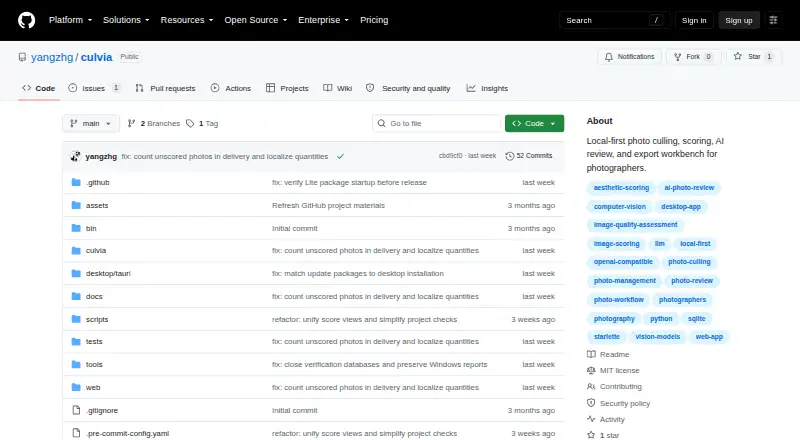
What Culvia is
Culvia is a local-first photo culling, scoring, review, and delivery workbench for photographers. It brings together computer-based scoring, optional AI critique, manual selection, and export tools in one workflow. Import photo folders or temporary uploads, scan subfolders, and deduplicate repeated paths. Local models can score images for aesthetic and technical qualities. If you enable OpenAI-compatible vision review, it can add image critique, aesthetic and technical subscores, retouching advice, and shooting advice.
Reviewers remain in control: mark images as picks, holds, or rejects, add star ratings and color labels, then filter and sort by recommendation, technical quality, AI review, manual status, and other dimensions. Culvia can export selected photos and CSV results for later editing and delivery. Its documented CSV fields map to Lightroom ratings, flags, and color labels, as well as Capture One ratings and color tags. Photos and related working data stay on the user's machine by default; images are sent to an external service only when vision review is enabled. Culvia is an early-stage open-source project for reviewing similar frames across portraits, events, weddings, street sessions, practice shoots, editorial selects, and personal archives. It is not a full RAW editor.
Who it suits
Culvia suits photographers who need to compare similar frames, combine automated scores with their own selections, and export picks for another editing or delivery workflow. It supports a local review workflow, with optional external vision review for photographers who want AI critique.
What it does well
- Local models score aesthetic and technical qualities.
- Manual picks, holds, and rejects remain authoritative.
- Filters cover recommendation, quality, AI review, and manual status.
- Exports selected photos and CSV results.
- CSV fields map to Lightroom and Capture One ratings and labels.
- Working photos and data stay local by default.
What to know first
- Vision review sends photos to an external service when enabled.
- It is not a full RAW editor.
- Writing XMP, sessions, catalogs, and sidecars is future work.
- The project describes itself as early-stage.
Getting started
- Open the project website on GitHub.
- Run Culvia on Linux, macOS, or Windows, or use its web platform.
- Import a photo folder or temporary upload and scan subfolders.
- Use local scoring and make manual picks, holds, or rejects.
- Optionally enable OpenAI-compatible vision review.
- Export picked photos or CSV results.
Verdict
Choose Culvia if you want a local-first workbench for culling similar frames, with local scoring, manual decisions, and export tools. Look elsewhere if you need a full RAW editor or direct writing to XMP, sessions, catalogs, or sidecars.
Questions
Is Culvia free?
Yes. Culvia is free and has a free plan.
Which platforms does it support?
Culvia lists Linux, macOS, web, and Windows.
Does it send photos to an AI service?
Photos stay on the user's machine by default. They go to an external service only when OpenAI-compatible vision review is explicitly enabled.
Can it work with Lightroom or Capture One?
Its CSV fields map to Lightroom ratings, flags, and color labels, and to Capture One ratings and color tags. Writing XMP, sessions, catalogs, or sidecars is future work.
Is Culvia a RAW editor?
No. Culvia says it is not a replacement for a full RAW editor such as Lightroom Classic, Capture One, or darktable.
Who makes Culvia?
Culvia is the open-source project at github.com/yangzhg/culvia.
Facts from Culvia's own pages
- AI review
- An optional OpenAI-compatible vision review can provide image critique, aesthetic and technical sub-scores, retouching advice, and shooting advice. · github.com, 9 Oct 2026
- Credential handling
- The README says API keys should be entered through app configuration or environment variables, not placed in documentation, tests, logs, plaintext SQLite fields, or Git. · github.com, 9 Oct 2026
- Credentials
- The README says API keys should be entered through app configuration or environment variables, not stored in documentation, tests, logs, plaintext SQLite fields, or Git. · github.com, 8 Oct 2026
- Desktop security
- The v0.1.0 release says it includes SHA-256 checksum files and GitHub Artifact Attestations, with a command for verifying release asset provenance. · github.com, 8 Oct 2026
- Desktop signing
- The README says current desktop binaries are not Developer ID signed, notarized, or Windows code signed, and may trigger operating-system warnings. · github.com, 9 Oct 2026
- Exports
- Culvia can export picked photos and CSV results for downstream editing and delivery workflows. · github.com, 9 Oct 2026
- Filtering
- Users can filter and sort by recommendation, technical quality, LLM review, manual status, color label, and other review dimensions. · github.com, 8 Oct 2026
- Integrations
- Exported CSVs include helper columns mapped to Lightroom and Capture One ratings, flags, and color labels; writing XMP, sessions, catalogs, or sidecar files is described as future work. · github.com, 9 Oct 2026
- Intended users
- It is aimed at photographers reviewing similar frames from portraits, events, weddings, street sessions, practice shoots, editorial selects, and personal archives. · github.com, 9 Oct 2026
- Limits and status
- Culvia describes itself as an early-stage open-source project and says it is not a replacement for a full RAW editor such as Lightroom Classic, Capture One, or darktable. · github.com, 8 Oct 2026
- Local scoring
- Culvia can run local aesthetic and technical scoring models and generate thumbnails for gallery browsing. · github.com, 9 Oct 2026
- Manual review
- Users can mark photos as pick, hold, or reject, assign star ratings and color labels, and filter or sort by review dimensions. · github.com, 9 Oct 2026
- Photo handling
- Users can import photo folders or temporary uploads, scan subfolders, and deduplicate repeated paths. · github.com, 8 Oct 2026
- Platforms
- The v0.1.0 release lists desktop packages for Linux, Windows, and Apple Silicon macOS; the README also describes a local web app. · github.com, 8 Oct 2026
- Privacy
- Local models, thumbnails, previews, SQLite data, uploads, and exports stay on the user's machine by default, and photos are sent to an external service only when the user explicitly enables OpenAI-compatible vision review. · github.com, 9 Oct 2026
- Project maturity
- Culvia is described as an early-stage open-source project whose workflow, desktop packaging, and model integrations are still maturing. · github.com, 9 Oct 2026
- Purpose
- Culvia is a local-first photo culling, scoring, review, and delivery workbench for photographers. · github.com, 8 Oct 2026
- Release verification
- The v0.1.0 release includes SHA-256 checksum files and GitHub Artifact Attestations for release assets. · github.com, 9 Oct 2026
- Scope limit
- The project says it is not a replacement for a full RAW editor such as Lightroom Classic, Capture One, or darktable. · github.com, 9 Oct 2026
- Scoring
- Culvia can run local aesthetic and technical scoring models. · github.com, 8 Oct 2026
- Supported systems
- The project publishes desktop packages for macOS, Windows, and Linux and also offers a local web app through its Python package. · github.com, 9 Oct 2026
- What it does
- Culvia is a local-first photo culling, scoring, review, and delivery workbench for photographers. · github.com, 9 Oct 2026
- Workflow
- It combines local scoring, optional vision-model critique, manual pick/hold/reject decisions, and export tools. · github.com, 8 Oct 2026
Where Culvia stands on Freedom251
- Photo Culling Software#2 of 26