Freedom251 › Online whiteboards
Explain Everything
What Explain Everything is
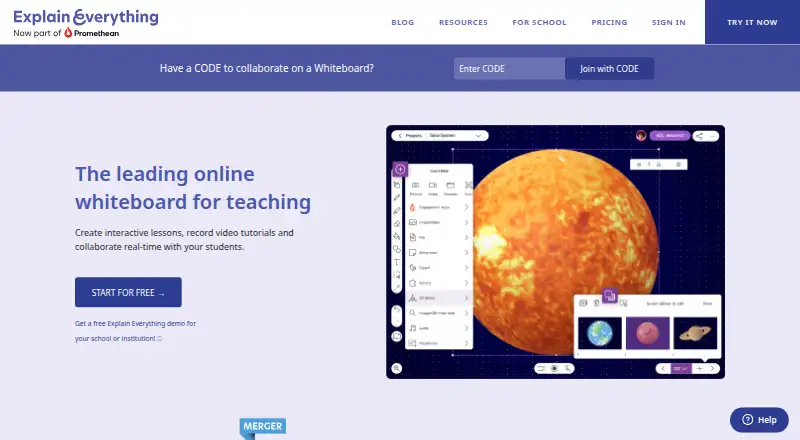
Explain Everything is an online whiteboard for teaching, creating interactive lessons, recording tutorials, and collaborating. Its infinite canvas accepts documents, presentations, images, audio, and video for users to import and work with. Users can record narration and canvas activity, edit recordings, and render videos in Explain Drive. Collaboration can be live or asynchronous, with invitations by link or access code and built-in voice chat. Integrations include Dropbox, Google Drive, YouTube, OneDrive, and Schoolwork, plus LMS assignment tools such as Canvas, Schoology, Moodle, and Blackboard. Schools can provision licenses through Google Admin, and students can sign in with Google EDU accounts. The product runs on Android, iOS, and the web. The free plan allows up to three projects, one slide per project, videos up to three minutes, and 500 MB of cloud storage. Pro costs $9.99 a month; Team costs $9.99 per user, billed monthly.
Who it suits
Explain Everything suits teachers and schools creating lessons or video tutorials, as well as tutors, creatives, facilitators, and business consultants. Its collaboration and LMS features also support group and school workflows.
What it does well
- Infinite canvas supports varied media.
- Recordings can include narration and board activity.
- Collaboration works synchronously or asynchronously.
- Integrates with named cloud services and LMS platforms.
- Available on Android, iOS, and web.
What to know first
- Free plan limits users to three projects.
- Free projects allow one slide each.
- Free videos are limited to three minutes.
- Free cloud storage is 500 MB.
Limits
The Free plan allows up to three projects, one slide per project, videos up to three minutes, one collaborator, 15-minute collaboration sessions, and 500 MB of cloud storage. Advanced is listed with 7.5 GB storage, one collaborator, and 30-minute collaboration sessions.
Plans
| Plan | Billed and limits | Price |
|---|---|---|
| Free | €0; no credit card required · Up to 3 projects · 1 slide per project · 3-minute videos · 1 collaborator · 15-minute collaboration · 500 MB storage | Free |
| Pro | Billed yearly; €9.99/month billed monthly · Unlimited projects and slides · unrestricted video length · 20 GB storage · up to 8 collaborators · email support | $7.49 a month |
| Team | Per user, billed yearly; €9.99/month billed monthly · Team settings and management · shared folders · 20 GB pooled storage per person · data-region choice · onboarding for teams above 50 | $7.49 a month |
| School | 100 student licenses per teacher license | On request |
| Advanced | €59 / year · Unlimited projects and slides · unrestricted video length · 1 collaborator · 30-minute collaboration · 7.5 GB storage · Polling, Timer and Spinner | €59 a year |
| Custom Pricing for Schools | Custom features and volume pricing · LMS integrations · Flexible license deployment · Expanded collaboration · Professional development | On request |
As explaineverything.com lists them, read 19 Oct 2026. The maker's own page has the final word.
Getting started
- Visit the Explain Everything website.
- Choose the Free, Pro, or Team plan, or review the listed school options.
- Open Explain Everything on Android, iOS, or the web.
- Create a project and import lesson materials onto the canvas.
- Invite collaborators by link or access code.
Explain Everything suits teachers, tutors, and facilitators who want to build explanations on a shared canvas and turn them into videos. Its flexible, media-rich workflow is a clear strength, but the free plan’s small project and storage allowances make it better for occasional use than a sustained teaching library.
Overview
Explain Everything brings an open-ended whiteboard, lesson recording, and collaboration into one service. Users can place documents, presentations, images, audio, and video on an infinite canvas, then record narration and canvas activity, edit the recording, and render it in Explain Drive. That makes it a more natural fit for visual teaching and guided demonstrations than for a basic notes board.
Collaboration works synchronously or asynchronously. People can join by link or access code, and built-in voice chat supports live sessions. Presentation mode, diagramming, guest collaboration, and voting tools broaden its use for structured lessons and group work. The tradeoff is a three-board limit, even as the canvas itself is infinite.
Key features
Canvas and recording
The canvas can bring varied teaching materials into one explanation instead of separating them across files. Recording both narration and canvas activity gives a teacher a route from a live explanation to a tutorial; editing and cloud rendering help complete that workflow. The free plan sharply limits how far this can go: one slide per project and videos no longer than three minutes.
Collaboration and integrations
Link- or code-based access and asynchronous collaboration can accommodate people who are not available at the same time, while voice chat serves live work. External cloud integrations include Dropbox, Google Drive, YouTube, OneDrive, and Schoolwork. LMS assignment integrations cover Canvas, Schoology, Moodle, and Blackboard, a practical advantage for institutions already using those systems.
Schools can provision licenses through Google Admin, and students can sign in with Google EDU accounts. On iPad, Split View drag and drop, Sketchfab 3D objects, FaceTime SharePlay, and screen mirroring extend the lesson workflow. These are platform-specific strengths rather than reasons to choose the service for every device.
Pricing
The free plan costs nothing and allows three projects, one slide per project, videos up to three minutes, one collaborator, 15-minute collaboration sessions, and 500 MB of cloud storage. That is enough to try a small teaching workflow, but not much room for a growing set of lessons or longer recordings.
Pro costs $9.99 a month, billed monthly. It removes project, slide, and video-length limits, adds 20 GB of storage, permits up to eight collaborators without a time limit, and includes email support. It fits individual tutors, creatives, facilitators, and consultants who need regular use beyond the free caps.
Team also costs $9.99 a month, per user, billed monthly. It adds team settings and management, shared folders, 20 GB of pooled cloud storage per person, and a choice of data residency region. Teams above 50 people receive an account manager and onboarding. The per-user term matters for growing groups; compared with Pro, its case is shared administration and team storage rather than an individual’s expanded workspace.
Advanced has custom pricing and includes 7.5 GB storage, one collaborator, and 30-minute collaboration sessions. School has custom pricing and provides 100 student licenses per teacher license. Custom Pricing for Schools also has custom pricing, with custom features and volume pricing, LMS integrations, flexible license deployment, expanded collaboration, and professional development. These school-oriented plans may suit institutions needing deployment and licensing arrangements, while their price depends on a custom quote.
All plans include an online Help Center; Pro adds email support, and school custom plans add priority email support. The maker says data is stored in an AWS SOC2-certified data center in North Virginia and that Promethean complies with GDPR for personal information from EU member countries. The service is not certified by an FTC-approved COPPA safe harbor program, a point schools serving children should weigh.
Platforms
Explain Everything is available on Android, iOS, and the web. Its iPad-specific features are especially relevant to educators who rely on Apple tablets; the broad web and mobile availability gives teams more than one way to access the whiteboard.
Who it's for
Teachers and tutors are the clearest fit: they can combine media, explain material on a canvas, and make a recording from that work. Facilitators and business consultants may value the same mix for group explanations, while schools and universities can use the education-oriented provisioning and LMS connections. It is less compelling for someone who only needs a large collection of free projects or long free videos, or for a team that wants predictable per-seat costs without weighing the monthly per-user charge.
Pros and cons
- Pro: An infinite canvas accepts documents, presentations, images, audio, and video, supporting mixed-media explanations in one workspace.
- Pro: Recording narration and canvas activity, then editing and rendering, connects lesson creation with tutorial production.
- Pro: Synchronous and asynchronous collaboration, guest access, and LMS integrations serve both live teaching and course assignment workflows.
- Con: Free users are limited to three projects, one slide per project, three-minute videos, one collaborator, 15-minute sessions, and 500 MB of storage.
- Con: The three-board limit can constrain users who want multiple persistent workspaces.
- Con: Team pricing is per user, while school plans use custom pricing, so broader institutional use requires budget planning beyond the individual Pro price.
Alternatives
For a different emphasis, Explainer Video Software, Presentation Recording Software, Collaborative Whiteboard Software, and Online Whiteboard Tools collect options by category.
Choose Animaker instead if animation production is the priority: its free plan includes basic animation tools and limited premium assets, with watermarked exports. Powtoon is another option for short screen-recorded presentations; its free plan supports 720p videos up to three minutes, but exports carry a watermark. Doratoon may suit someone seeking a free-forever animation plan with 150+ templates and 10 downloads per month, accepting a watermark and 720p output.
Explideo is worth considering for browser-based exports: its free plan allows unlimited browser exports, but server exports are limited to one per month and watermarked, with five-minute videos and 150 MB storage. Mango Animation Maker is a Windows- and macOS-based alternative whose free plan limits resolution to 576P and includes a watermark. Renderforest Slideshow Maker offers a free HD video plan with a watermark and basic features, making it a simpler slideshow-oriented alternative. Scribe Animator and Steve AI are additional alternatives to compare.
Verdict
Explain Everything is a strong choice for educators and tutors who need one place to assemble mixed media, explain it on a canvas, collaborate, and produce a video. Its breadth is the main reason to choose it; the strict free caps, three-board ceiling, and per-user Team pricing are reasons to look elsewhere if you need a large ongoing workspace or low-cost institutional rollout.
Verdict
Explain Everything combines whiteboard, video creation, and collaboration features across web and mobile platforms. The free plan has firm project, video, and storage limits; Pro and Team plans are listed with monthly pricing.
Questions
Is Explain Everything free?
Yes. The Free plan costs nothing and includes up to three projects, one slide per project, three-minute videos, one collaborator, 15-minute collaboration sessions, and 500 MB of cloud storage.
How much do Pro and Team cost?
Pro costs $9.99 a month, billed monthly. Team costs $9.99 a month per user, billed monthly.
Which platforms does it support?
Explain Everything is available on Android, iOS, and the web.
Which services and learning systems does it integrate with?
Listed cloud integrations are Dropbox, Google Drive, YouTube, OneDrive, and Schoolwork. LMS project assignment integrations are Canvas, Schoology, Moodle, and Blackboard.
Who makes Explain Everything?
Explain Everything identifies Promethean as its parent brand and lists Wrocław, Poland as its headquarters.
What does the maker say about privacy and data storage?
Promethean says it complies with GDPR for collecting, using, and retaining personal information from EU member countries. The maker says data is stored in an AWS SOC2-certified data center in North Virginia and that the service is not certified by an FTC-approved COPPA safe harbor program.
Facts from Explain Everything's own pages
- API and SDKs
- The official site and Help Center pages opened describe integrations and deployment controls but do not list a public API or SDK. · help.explaineverything.com, 19 Oct 2026
- Apple features
- On iPad, the product lists Split View drag and drop, 3D objects through Sketchfab, SharePlay on FaceTime, and screen mirroring. · explaineverything.com, 4 Oct 2026
- Audience
- The maker describes Pro as designed for tutors, creatives, facilitators, and business consultants, and says schools, universities, and companies use the product. · explaineverything.com, 4 Oct 2026
- Collaboration
- Users can invite others by link or access code, collaborate synchronously or asynchronously and use built-in voice chat. · explaineverything.com, 19 Oct 2026
- Company
- The About page says Explain Everything has been a teaching platform since 2010, lists Wrocław, Poland as its headquarters, and identifies Promethean as its parent brand. · explaineverything.com, 4 Oct 2026
- Company facts
- LinkedIn lists Explain Everything as privately held, founded in 2015, headquartered in New York and sized at 51–200 employees. · linkedin.com, 19 Oct 2026
- Company legal name
- Crunchbase lists the legal name as Explain Everything, Inc. · crunchbase.com, 19 Oct 2026
- Company locations
- LinkedIn lists a primary New York address and an additional location in Wrocław, Poland. · linkedin.com, 19 Oct 2026
- Company ownership
- Crunchbase lists Explain Everything as acquired by and a sub-organization of Promethean. · crunchbase.com, 19 Oct 2026
- Data storage
- The maker states that data is stored in an AWS SOC2-certified data center in North Virginia. · explaineverything.com, 4 Oct 2026
- Documentation and support
- The Help Center provides quick-start, account, media, licensing and platform articles; paid plans include email support, while larger teams can receive onboarding and training. · help.explaineverything.com, 19 Oct 2026
- Founded
- 2010 · explaineverything.com, 28 Sept 2026
- Free-plan limits
- The free plan allows up to three projects, one slide per project, videos up to three minutes, and 500 MB of cloud storage. · explaineverything.com, 4 Oct 2026
- Google for Education
- Schools can provision Explain Everything licenses through the Google Admin console, and students can sign in with Google EDU accounts. · explaineverything.com, 4 Oct 2026
- Group controls
- Administrators can set parental gates, browser passwords, analytics preferences, import/export destinations, voice-chat controls and ad-hoc iOS collaboration. · help.explaineverything.com, 19 Oct 2026
- Headquarters
- Wrocław, Poland · explaineverything.com, 28 Sept 2026
- Infinite canvas
- The whiteboard provides an expandable infinite canvas for drawings and visual notes. · explaineverything.com, 19 Oct 2026
- Integrations
- Official integrations include Google Drive, Dropbox, YouTube, OneDrive, Schoolwork and LMS connections for Canvas, Schoology, Moodle and Blackboard. · explaineverything.com, 19 Oct 2026
- Interactive presentations
- Users can import presentations, draw on them and add slides for interactive teaching. · explaineverything.com, 19 Oct 2026
- Licence
- The terms grant permission to use the service and prohibit copying or distributing it; Explain Everything is described as a proprietary Promethean trademark. · explaineverything.com, 19 Oct 2026
- Limit: Android reliability
- A Google Play reviewer reported reverted changes, an unexpected app closure and lost edits on the Android version. · play.google.com, 19 Oct 2026
- Limit: free-plan restrictions
- A Google Play reviewer objected that the free plan limits users to one slide and requires payment for broader functionality. · play.google.com, 19 Oct 2026
- Limit: Google Drive workflow
- A G2 reviewer reports that importing Google Drive files on iPad requires installing the Drive app, which complicates shared-device use. · g2.com, 19 Oct 2026
- Limit: learning curve
- G2 reviewers say first-time users and younger students may need instruction because the feature set can initially feel difficult. · g2.com, 19 Oct 2026
Where Explain Everything stands on Freedom251
- Online whiteboards#3 of 58
- Presentation Recording Software#2 of 26
- Explainer Video Software#4 of 40
- Online Whiteboard Tools#8 of 56
- Collaborative Whiteboard Software#8 of 29