Freedom251 › Explainer Video Software
Scribe Animator
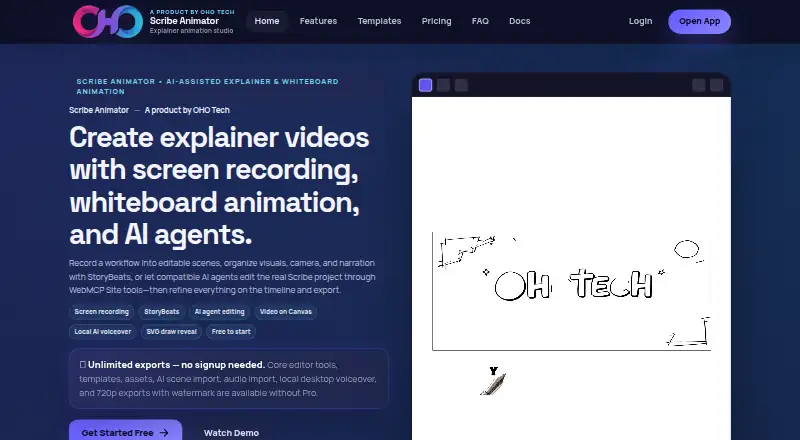
What Scribe Animator is
Scribe Animator is a browser-based editor for building whiteboard explanations from editable scenes and turning them into videos. Its desktop web editor records a browser tab, window, or screen in steps; each accepted step becomes a scene that can be edited. StoryBeats bring related objects, drawing steps, keyframes, camera keys, and optional narration together around one explanation.
For footage work, you can import a local video, trim it, freeze frames, then add annotations, drawings, and camera moves. ChatGPT or Gemini can produce project, scene, or reusable-block JSON for validated import. Compatible WebMCP clients can inspect and edit the visible project within its normal controls, permissions, and supported undo. Desktop local voiceover is available through Kokoro, Pocket, or Supertonic, with the chosen model downloaded on first use.
The Free plan costs nothing and includes unlimited exports up to 720p with a watermark, 200 MB cloud storage with an account, AI scene import, assets, templates, audio import, and local desktop AI voiceover. Pro exports are unlimited up to 1080p without a watermark and include 5 GB cloud storage and an SVG cloud library; its price loads in the billing flow, and there is no annual plan currently. Mobile Lite works on iOS, Android, and mobile web. You can try the editor and test exports without signing up; an account is needed to save projects, sync assets to the cloud, or use paid features.
Who it suits
Scribe Animator suits people creating whiteboard explainers who want to build editable scenes from screen recordings or imported footage. It also fits solo creators who need narration and AI-assisted scene import, with mobile access through Mobile Lite.
What it does well
- Screen recordings turn accepted steps into editable scenes.
- StoryBeats group objects, drawing steps, keyframes, camera keys, and narration.
- Import and annotate local footage, with trimming and freeze frames.
- Unlimited exports are available on both Free and Pro.
- Try the editor and test exports without an account.
What to know first
- Free exports are limited to 720p and carry a watermark.
- Pro pricing loads in the billing flow; no annual plan currently.
- Shared editable workspaces and team roles are unavailable.
Limits
Free exports are unlimited up to 720p with a watermark, and cloud storage is 200 MB with an account. Pro raises exports to 1080p without a watermark and includes 5 GB cloud storage and an SVG cloud library; its price loads in the billing flow.
Plans
| Plan | Billed and limits | Price |
|---|---|---|
| Free creator workflow | Unlimited exports up to 720p with watermark · 200 MB cloud storage with an account · AI scene import, assets, templates, audio import, and local desktop AI voiceover | Free |
| Pro publishing upgrade | Price loads in the billing flow; no annual plan currently · Unlimited exports up to 1080p · No watermark · 5 GB cloud storage · SVG cloud library | On request |
As scribeanimator.com lists them, read 4 Oct 2026. The maker's own page has the final word.
Getting started
- Open https://scribeanimator.com/ in a browser to try the editor and test exports without signing up.
- Use the desktop web editor for screen capture, scene editing, and local voiceover.
- Use Mobile Lite on iOS, Android, or mobile web for mobile access.
- Create an account to save projects, sync assets to the cloud, or use paid features.
- Choose Free or Pro; Free costs nothing, while Pro pricing loads in the billing flow.
Verdict
Choose Scribe Animator if you want a browser-based editor for whiteboard explanations, screen recording, or annotated local footage, with unlimited exports on Free. Look elsewhere if you need shared editable workspaces or team roles; Free exports also carry a watermark and cap at 720p.
Questions
Is Scribe Animator free?
Yes. The Free plan costs nothing and includes unlimited exports up to 720p with a watermark.
What does Pro cost?
The Pro price loads in the billing flow. There is no annual plan currently.
Which platforms does it support?
Mobile Lite is available on iOS, Android, and mobile web. Desktop editing is also supported in the web editor.
Do I need an account to start?
No account is required to try the editor and test exports. You need an account to save projects, sync assets to the cloud, or use paid features.
Does it support team collaboration?
Shared editable workspaces and team roles are unavailable. Read-only project sharing and embeds are supported.
Who makes Scribe Animator?
The site identifies it as a product of OHO Tech. Its terms name Ohotech Solutions Private Limited as the operator.
Facts from Scribe Animator's own pages
- Account requirement
- Signup is not required to try the editor and test exports, but is required to save projects, sync assets to the cloud, or use paid features. · scribeanimator.com, 4 Oct 2026
- AI agent editing
- Compatible WebMCP clients can inspect and edit the visible project, with normal controls, permissions, and supported undo remaining in force. · scribeanimator.com, 4 Oct 2026
- AI integrations
- Users can generate project, scene, or reusable-block JSON with ChatGPT or Gemini and import it as validated JSON. · scribeanimator.com, 4 Oct 2026
- Exports
- Export count is unlimited on Free and Pro; Free exports are up to 720p with a watermark and Pro exports are up to 1080p without one. · scribeanimator.com, 4 Oct 2026
- Maker
- The site identifies Scribe Animator as a product of OHO Tech, and its terms name Ohotech Solutions Private Limited as the operator. · scribeanimator.com, 4 Oct 2026
- Mobile support
- Mobile Lite is available on iOS, Android, and mobile web, while desktop editing is also supported. · scribeanimator.com, 4 Oct 2026
- Privacy
- The privacy policy says the service does not sell personal data and identifies Cloudflare, Razorpay, RevenueCat, Apple, and Google among service providers or payment platforms that may receive data. · scribeanimator.com, 4 Oct 2026
- Product
- Scribe Animator is a browser-based whiteboard and explainer animation editor for creating editable scenes and videos. · scribeanimator.com, 4 Oct 2026
- Screen recording
- Its desktop web editor can capture a browser tab, window, or screen in steps, with each accepted step becoming an editable scene. · scribeanimator.com, 4 Oct 2026
- StoryBeats
- StoryBeats organize related objects, draw steps, keyframes, camera keys, and optional narration around one explanation. · scribeanimator.com, 4 Oct 2026
- Support
- The privacy policy lists support availability as Monday to Friday, 11 AM to 10 PM IST. · scribeanimator.com, 4 Oct 2026
- Team collaboration
- Shared editable workspaces and team roles are not currently available; read-only project sharing and embeds are supported. · scribeanimator.com, 4 Oct 2026
- Video editing
- Users can import local footage, trim it, freeze frames, and add annotations, drawings, and camera moves; the product does not download social-platform video URLs. · scribeanimator.com, 4 Oct 2026
- Voiceover
- Desktop local voiceover uses Kokoro, Pocket, or Supertonic providers, and the selected model downloads on first use. · scribeanimator.com, 4 Oct 2026
Where Scribe Animator stands on Freedom251
- Explainer Video Software#17 of 40