Freedom251 › AI video generators

Steve AI
by Steve AI
What Steve AI is
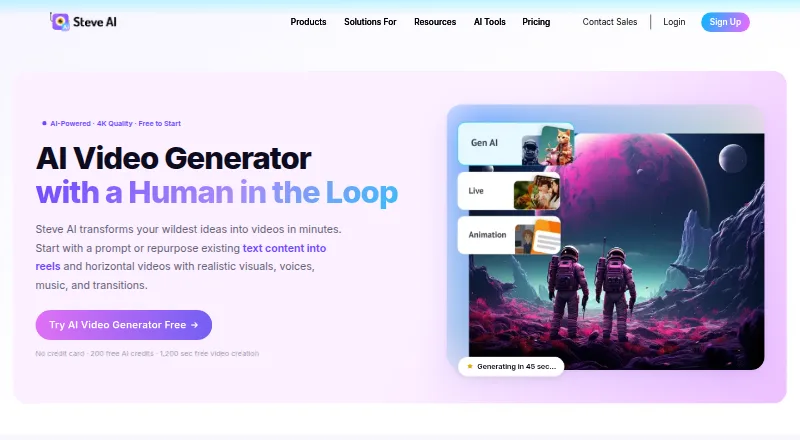
Steve AI is a generative video platform that turns text, images, prompts, scripts, blogs, and audio into videos. Users can change individual scenes without regenerating a whole video, and select AI visuals, stock media, or animated explainer styles. Listed uses include marketing, social media, education, storytelling, and business training. Videos can be downloaded or shared to YouTube, Instagram, LinkedIn, and other channels. The web and iOS platform includes AI presenters, script-to-video, scene generation, brand kits, and subtitle generation. The free plan provides 200 AI credits and 1,200 seconds of AI video creation, though downloads are limited. The Basic plan costs $120 a year, billed yearly and shown as $10/month; it includes 100 minutes of AI video per month and 720p resolution. Paid plans include commercial rights to videos, while resell rights are limited to Enterprise. Steve AI says it encrypts data in transit and at rest and that its processes comply with GDPR and CCPA.
Who it suits
Steve AI may suit people creating marketing, social media, education, storytelling, or business training videos. It offers scene-level edits and sharing options for several social platforms.
What it does well
- Accepts text, images, scripts, blogs, prompts, and audio.
- Individual scenes can be changed without regenerating the whole video.
- Includes AI presenters and subtitle generation.
- Paid plans include commercial video rights.
- Free plan includes 200 AI credits.
What to know first
- Free exports have limited downloads.
- Free plan has 1,200 seconds of AI video creation.
- Basic is limited to 720p resolution.
- Resell rights are exclusive to Enterprise.
Limits
The Free plan provides 200 AI credits and 1,200 seconds of AI video creation, and exports have limited downloads. The Basic plan is billed yearly at $120 a year and includes 100 minutes of AI videos per month at 720p. Paid plans include commercial rights; resell rights are exclusive to Enterprise.
Plans
| Plan | Billed and limits | Price |
|---|---|---|
| Free | 200 AI credits · 1,200 seconds video creation · 10M+ stock library · watermark/download restrictions may apply | Free |
| Basic | $120 billed yearly · 720p · 100 minutes AI video/month · 800 AI images and premium stock/month · 120 seconds generative credits · unlimited exports · no watermark | $10 a month |
| Starter | $360 billed yearly · 1080p · 100 minutes AI video/month · 800 AI images and premium stock/month · 120 seconds generative credits · unlimited exports · no watermark · 300+ animated characters | $30 a month |
| Pro | $480 billed yearly · 2K · 300 minutes AI video/month · 2,400 AI images and premium stock/month · 120 seconds generative credits · 95% human-like voices · unlimited exports · 300+ animated characters | $40 a month |
| Generative AI | 400 minutes AI video/month · 3,200 AI images and premium stock/month · 15 minutes generative credits · 2K · 100% human-like voices · unlimited exports | $40 a month |
| Enterprise | Custom limits · 6,000 minutes AI video/month · 48,000 AI images and premium stock/month · 50 minutes generative credits · 4K · team collaboration · dedicated infrastructure · commercial and reselling rights | On request |
As steve.ai lists them, read 21 Oct 2026. The maker's own page has the final word.
Getting started
- Open the Steve AI video generator website.
- Choose the Free plan or review the paid plans.
- Use the web platform or iOS app.
- Start with text, images, prompts, scripts, a blog, or audio.
- Edit scenes, then download or share the video.
Steve AI turns scripts, blog posts, prompts, images, and audio into videos, with scene-level editing for targeted revisions. It suits creators and teams making marketing, social, education, or training content. Its range of inputs is a strong starting point, but the free tier’s limited downloads and paid plans’ quotas make the right plan important.
Overview
Steve AI is a generative video platform from Animaker Inc., a Delaware corporation with a stated principal address in San Francisco. The company was founded in 2014 and is headquartered in San Francisco, California. Users can build videos from several source types and change individual scenes without regenerating the whole video, a useful way to refine a draft without redoing unaffected sections.
Outputs can use AI visuals, stock media, or animated explainer styles. Videos can be downloaded or shared to YouTube, Instagram, LinkedIn, and other channels. AI presenters, subtitles, script-to-video, AI scene generation, and a brand kit broaden the workflow beyond prompt-based video creation.
Key features
Flexible creation and revision
Starting from text, images, prompts, scripts, blogs, or audio gives Steve AI a place in both new-creation and content-repurposing workflows. Scene-level visual editing is especially useful when a small part of a video needs revision; users need not regenerate the entire piece. AI presenters and subtitle generation add options for videos that need a speaker or on-screen text.
Visual styles and publishing
AI visuals, stock media, and animated explainers accommodate different kinds of content, from promotional clips to instructional material. Direct sharing to major social and professional channels shortens the path from creation to publication. Getty media and ElevenLabs voiceovers are integrations, while direct publishing to YouTube is in beta; neither should be treated as a substitute for checking whether a particular workflow is supported.
Security and rights
Steve AI says it encrypts data in transit using 256-bit encryption and at rest using AES-256, uses TLS/SSL for application endpoints, and follows GDPR and CCPA processes and procedures. Enterprise adds AI data privacy and advanced security, with SSO reserved for that plan. Paid plans include commercial rights to videos; resell rights are exclusive to Enterprise.
Pricing
Steve AI has a free plan and paid tiers with different monthly production allowances and resolution ceilings. Paid prices below are billed yearly unless the plan is explicitly monthly, so the annual commitment matters when comparing the monthly-equivalent figures.
| Plan | Price | Included limits and features |
|---|---|---|
| Free | free | 200 AI credits, 1,200 seconds of AI video creation, limited downloads; Basic support |
| Basic | $120 a year, billed yearly; shown as $10/month | 100 mins AI videos/month, 800 AI images and premium stock/month, 120 sec generative credits, 720p resolution; Basic support |
| Starter | $360 a year, billed yearly; shown as $30/month | 100 mins AI videos/month, 800 AI images and premium stock/month, 120 sec generative credits, 1080p resolution; Advanced support |
| Pro | $480 a year, billed yearly; shown as $40/month | 300 mins AI videos/month, 2,400 AI images and premium stock/month, 120 sec generative credits, 2K resolution; Premium support |
| Enterprise | Custom pricing | 6,000 mins AI videos/month, 48,000 AI images and premium stock/month, 50 mins generative credits; Priority support, AI data privacy, advanced security, and SSO |
| Generative AI | $40 a month | 400 mins AI videos/month, 3,200 AI images and premium stock/month, 15 min generative credits, 2K video |
Free is suited to trying the workflow, but limited downloads constrain finished use. Basic is the entry point for regular production, with 720p output and 100 minutes of video a month. Starter keeps the same video and image allowances but raises resolution to 1080p and support to Advanced, making it a poor fit if resolution is not worth the higher annual price. Pro raises video and image allowances and reaches 2K, for heavier monthly output. Generative AI is a separate monthly-priced option with higher video and image quotas and 15 minutes of generative credits. Enterprise is for large-volume use or organizations needing its security and SSO features; reselling videos also requires this tier.
There is no free trial. Free and Basic receive Basic support, Starter Advanced, Pro Premium, and Enterprise Priority.
Platforms
Steve AI is available on web and iOS. That covers browser-based production and an iOS option, but not Android in the listed platform set.
Who it's for
Steve AI is a sensible choice for marketers, educators, and business teams converting existing material into videos, particularly when a workflow benefits from several input types and scene-by-scene revision. Its animated explainer styles also suit instructional content. It is less compelling for occasional users who need unrestricted exports, or teams that need to know a per-seat cost: the free tier limits downloads, and seat counts are not part of the plan allowances above.
Pros and cons
- Pros: Inputs include text, images, prompts, scripts, blogs, and audio, which supports both repurposing and new video creation.
- Pros: Scene-level editing avoids regenerating an entire video to change one scene.
- Pros: Paid plans include commercial rights, and higher tiers add substantial monthly video and image allowances.
- Cons: Free exports have limited downloads, so the free tier is constrained for regular publishing.
- Cons: Basic and Starter both allow 100 mins AI videos/month and 800 AI images and premium stock/month; Starter’s higher annual cost mainly buys 1080p resolution and better support.
- Cons: Basic, Starter, and Pro are billed yearly, which is a significant commitment for users still assessing their output needs.
Alternatives
For a wider range of video-making options, browse AI video generators. Readers focused on animated instruction can compare AI Explainer Video Makers and Explainer Video Software; slideshow-first projects may fit AI Slideshow Makers better.
FlexClip is worth considering if Android or Windows support matters, or if its free plan’s 12 online projects and 10-minute-per-video cap fit the job. Animoto offers a free plan with unlimited videos, 50+ music tracks, and a watermark, so it may suit users who prioritize making many basic videos without paying. Ambience AI has a free trial and a free plan with 100 credits and one seat, which may suit a solo user evaluating a credit-based workflow. Focal offers a Starter plan at $10 a month with 1,000 monthly credits, up to 1,000 seconds of video per month, and commercial use, for users who prefer a monthly-priced slideshow maker. MemoBloom is more relevant to mobile users making memory films: its free plan supports up to 10 memories and includes a watermark. SlideLabs AI is a slideshow alternative, with five free slideshows a month and paid scheduling on Growth. Cinematic Slideshow Studio offers a free tier with unlimited projects and three monthly 720p exports with a watermark, useful when project volume matters more than export count. InVideo AI is another web-based option with a free plan whose quota resets weekly.
Verdict
Choose Steve AI if you need to turn varied source material into video and value targeted scene edits, multiple visual styles, and commercial rights on paid plans. The free tier is best treated as a limited introduction; ongoing use means choosing a quota and resolution level, with yearly billing on the principal tiers. Look elsewhere if unrestricted free downloads, a short commitment, or a clearly defined seat allowance is central to your decision.
Verdict
Steve AI supports video creation from several input types, with scene editing and multiple visual styles. The free plan is limited, and the listed Basic plan costs $120 a year, billed yearly and shown as $10/month.
Questions
Does Steve AI have a free plan?
Yes. The Free plan is listed as free and includes 200 AI credits and 1,200 seconds of AI video creation.
How much does the Basic plan cost?
Basic costs $120 a year, billed yearly and shown as $10/month.
Which platforms can I use?
The listed platforms are iOS and web.
Can I use Steve AI videos commercially?
Paid plans include commercial rights to videos. Resell rights are exclusive to Enterprise.
What video sharing options are listed?
Videos can be shared directly to YouTube, Instagram, LinkedIn, and other channels.
Who makes Steve AI?
Steve AI is a product of Animaker Inc., a Delaware corporation whose stated principal address is in San Francisco, California.
Facts from Steve AI's own pages
- API availability
- The pricing comparison lists a Steve AI API as a custom Enterprise capability; no public API reference or SDK documentation is provided on the cited official pages. · app.steve.ai, 21 Oct 2026
- Audio and image inputs
- Users can create videos from uploaded audio or images, including image-to-video and motion effects workflows. · steve.ai, 21 Oct 2026
- Characters and avatars
- The feature page lists more than 300 animated characters, while the product also offers talking-head avatars. · steve.ai, 21 Oct 2026
- Commercial use
- Steve AI says paid plans include commercial rights to videos, while resell rights are exclusive to Enterprise. · steve.ai, 29 Sept 2026
- Company
- Steve AI is a product of Animaker Inc., a Delaware corporation whose stated principal address is in San Francisco, California. · steve.ai, 29 Sept 2026
- Company founding
- LinkedIn lists Animaker Inc., the maker of Steve AI, as founded in 2015. · linkedin.com, 21 Oct 2026
- Company headquarters and size
- Crunchbase lists San Francisco, California as headquarters and 101–250 employees, while LinkedIn lists Animaker Inc. at 51–200 employees. · crunchbase.com, 21 Oct 2026
- Company legal name
- Crunchbase lists Animaker Inc. as Steve AI's legal name and identifies RS Raghavan as a founder. · crunchbase.com, 21 Oct 2026
- Compliance
- The security FAQ says the service follows GDPR and California Consumer Privacy Act requirements. · steve.ai, 21 Oct 2026
- Documentation and support
- The help center is organized into getting started, video creation, editing, exporting, team collaboration, billing and security collections. · steve.ai, 21 Oct 2026
- Editing and publishing
- The workspace supports camera movements, transitions, auto-subtitles, one-click resizing and direct YouTube publishing. · steve.ai, 21 Oct 2026
- Enterprise security
- The Enterprise plan lists AI data privacy and advanced security, while SSO is listed only for Enterprise. · app.steve.ai, 29 Sept 2026
- Founded
- 2014 · steve.ai, 28 Sept 2026
- Free plan
- Yes · app.steve.ai, 22 Sept 2026
- Free tier limits
- The free plan provides 200 AI credits and 1,200 seconds of AI video creation, and its exports have limited downloads. · steve.ai, 29 Sept 2026
- Headquarters
- San Francisco, California, United States · steve.ai, 28 Sept 2026
- Integrations
- Official pages state that videos can be shared directly to YouTube, Instagram and LinkedIn, and the pricing comparison lists custom integrations for Enterprise. · steve.ai, 21 Oct 2026
- Legal terms
- Steve AI's terms identify the service as a product of Animaker Inc., a Delaware corporation with a principal address in San Francisco. · steve.ai, 21 Oct 2026
- Licence
- The cited official terms grant use of the hosted Steve AI service and do not state an open-source licence. · steve.ai, 21 Oct 2026
- Limit: Apple app complaints
- App Store reviewers report that publishing or downloading videos sometimes fails and that annual renewals were not refunded under the stated policy. · apps.apple.com, 21 Oct 2026
- Limit: G2 free access and editing
- G2 review summaries identify free-plan download limits, limited options, download issues and file-management issues; one reviewer could not upload a reference image for text-to-video. · g2.com, 21 Oct 2026
- Limit: Software Advice pricing and output
- Reviewers report that download allowances and extra charges feel expensive, themes may not persist reliably, generated images can contain visual defects and some renders take many hours. · softwareadvice.com, 21 Oct 2026
- Limit: Trustpilot reliability and refunds
- Negative Trustpilot reviews report video-settings or API errors, failed rendering or downloads, slow support, robotic voiceovers, short slideshow outputs and disputes over refunds or renewals. · trustpilot.com, 21 Oct 2026
- Mobile app pricing
- The iOS listing shows in-app purchases from $4.99 for five credits to $129.00 monthly for Generative AI, plus $19.00 Mobile iStock monthly and $59.00 MobilePro monthly subscriptions. · apps.apple.com, 21 Oct 2026
Where Steve AI stands on Freedom251
- AI video generators#22 of 242
- AI Explainer Video Makers#11 of 27
- Explainer Video Software#18 of 40
- AI Slideshow Makers#15 of 22
- Text-to-Video Generators#16 of 23