Freedom251 › AI Slideshow Makers

Cinematic Slideshow Studio
What Cinematic Slideshow Studio is
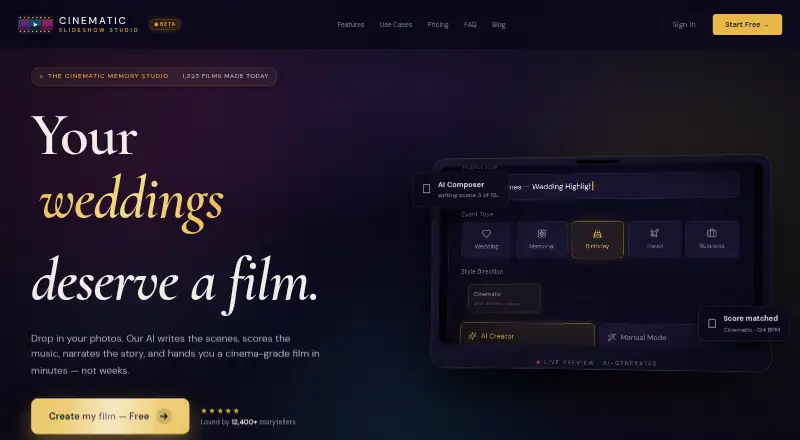
Cinematic Slideshow Studio is a browser-based tool for creating photo and video slideshows with music, narration, and AI-assisted composition. It is presented for uses ranging from weddings, memorials, birthdays, and travel reels to real estate, business decks, and family stories. Users can upload 20–200 photos or videos in JPG, PNG, HEIC, and MP4 formats. An optional script can guide the AI in building scenes, transitions, and timing; image analysis detects faces for crop placement, and the service groups images by topic, mood, and emotional beat. The editor includes a multi-track timeline, scene inspector, asset library, real-time preview, and 50-step undo and redo. Users can add supported audio files or choose music from the Jamendo library, with music ducking under narration. Projects save to the cloud every 30 seconds. Free exports are 720p at 30 fps with a watermark; Pro exports reach 1080p or 4K at up to 60 fps without one. Free costs nothing; Pro is $14 a month.
Who it suits
It suits people making personal occasion slideshows, travel reels, real estate presentations, or business and pitch decks. The browser editor and AI scene composition may help users who want narration, music, and arranged scenes in one project.
What it does well
- Accepts 20–200 photos or videos in four formats.
- AI groups images by topic, mood, and emotional beat.
- Editor has a multi-track timeline and 50-step undo/redo.
- Cloud auto-save runs every 30 seconds.
- Pro supports 4K exports up to 60 fps.
What to know first
- Free exports have a watermark.
- Free exports are limited to 720p at 30 fps.
- Free includes three exports per month.
- Pro costs $14 a month.
Limits
The Free plan includes 1 GB of cloud storage, 720p exports at 30 fps with a watermark, and three exports per month, with no length cap. Pro provides 10 GB of storage and unlimited exports without a watermark, up to 1080p or 4K at 60 fps.
Plans
| Plan | Billed and limits | Price |
|---|---|---|
| Free | $0 · Unlimited projects · 1 GB cloud storage · 720p at 30 fps · 3 exports/month with watermark · no length cap | Free |
| Pro | $14/mo · Unlimited exports without watermark · 10 GB cloud storage · 1080p and 4K up to 60 fps · 40+ premium borders and transitions · medium and long AI scripts · 8 premium ElevenLabs voices | $14 a month |
As cinematicslideshowstudio.com lists them, read 1 Oct 2026. The maker's own page has the final word.
Getting started
- Open the studio website in a browser; no installation is required.
- Choose the Free plan or Pro plan.
- Upload 20–200 photos or videos in JPG, PNG, HEIC, or MP4 format.
- Optionally paste a script for AI scene composition or enter text for voice narration.
- Edit scenes, audio, and effects in the browser editor, then export the slideshow.
Verdict
Cinematic Slideshow Studio combines AI composition, narration, audio, and a browser-based editor for personal and business slideshows. The free plan allows unlimited projects but limits monthly exports and includes a watermark; Pro adds higher-resolution exports and more cloud storage.
Questions
Is there a free plan?
Yes. Free costs nothing and includes unlimited projects, 1 GB of cloud storage, and three exports per month.
How much does Pro cost?
Pro costs $14 a month, billed at $14/mo.
What export quality is available?
Free exports are 720p at 30 fps with a watermark. Pro supports 1080p and 4K exports up to 60 fps without a watermark.
Which platforms can I use it on?
Cinematic Slideshow Studio runs in a browser on the web and requires no download or installation.
Can I add voice narration and music?
Yes. Users can generate narration from a typed script and upload MP3, WAV, or M4A audio or use the Jamendo library. Standard voices are included on Free; Pro includes eight premium ElevenLabs voices.
Does it include stock media integrations?
Pro includes full library access to Pexels, Unsplash, and ElevenLabs.
Facts from Cinematic Slideshow Studio's own pages
- AI composition
- Users can paste an optional script and the AI builds scenes, chooses transitions, and sets timing. · cinematicslideshowstudio.com, 1 Oct 2026
- AI photo analysis
- Vision AI detects faces and chooses crops to keep subjects centered. · cinematicslideshowstudio.com, 1 Oct 2026
- Audio
- Users can upload MP3, WAV, or M4A files, use a built-in royalty-free Jamendo library, and automatically duck music under narration. · cinematicslideshowstudio.com, 1 Oct 2026
- Browser access
- The studio runs in a browser with no download or installation required. · cinematicslideshowstudio.com, 1 Oct 2026
- Cloud saving
- Cloud-authoritative save auto-saves projects every 30 seconds and allows users to open projects anywhere. · cinematicslideshowstudio.com, 1 Oct 2026
- Core function
- Cinematic Slideshow Studio creates cinematic photo and video slideshows with music, voice narration, and AI-driven photo composition. · cinematicslideshowstudio.com, 1 Oct 2026
- Editor
- The browser editor includes a multi-track timeline, scene inspector, asset library, real-time preview, and 50-step undo/redo. · cinematicslideshowstudio.com, 1 Oct 2026
- Effects
- The studio offers seeded fairy dust, AI face-aware cropping, green-screen chroma key stickers, butterflies that land on visual elements, and Ken Burns motion. · cinematicslideshowstudio.com, 1 Oct 2026
- Export
- Free exports are 720p at 30 fps with a watermark, while Pro supports 1080p and 4K exports up to 60 fps without a watermark. · cinematicslideshowstudio.com, 1 Oct 2026
- Integrations
- Pro includes full library access to Pexels, Unsplash, and ElevenLabs. · cinematicslideshowstudio.com, 1 Oct 2026
- Intended users
- The service is presented for weddings, memorials, birthdays, travel reels, real estate, business and pitch decks, and family stories. · cinematicslideshowstudio.com, 1 Oct 2026
- Smart organization
- The AI groups photos by topic, mood, and emotional beat. · cinematicslideshowstudio.com, 1 Oct 2026
- Upload formats
- Users can upload 20–200 photos or videos in JPG, PNG, HEIC, and MP4 formats. · cinematicslideshowstudio.com, 1 Oct 2026
- Voice narration
- Users can type a script and generate studio-grade voice narration, with standard voices on Free and premium ElevenLabs voices on Pro. · cinematicslideshowstudio.com, 1 Oct 2026
Where Cinematic Slideshow Studio stands on Freedom251
- AI Slideshow Makers#7 of 22