Freedom251 › Tax Deduction Tracking Software

Everlance
What Everlance is
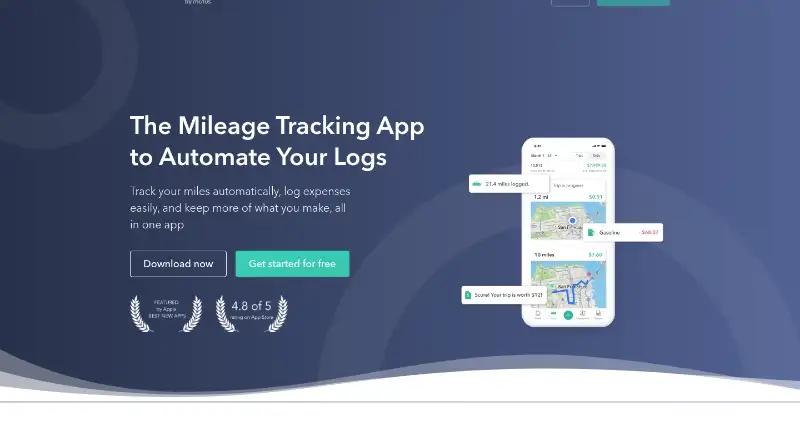
Everlance is an app and web dashboard for tracking mileage and expenses for individuals and businesses. Its GPS-based mileage tool records business-related trips to support tax deductions, while users can photograph receipts and attach them to expense records. Reports summarize mileage and expenses for weekly, monthly, yearly or custom periods. Mileage features include route maps, automatic classification, favorite-place detection, custom purposes and tags, and one-swipe classification. Businesses can use a team dashboard where Account Owners, Admins and Managers oversee team expenses and mileage. Expense management supports more than 1,500 bank and credit-card institutions in the United States, Canada, the United Kingdom, Australia and New Zealand. Bank connections use Plaid, and transaction sync currently reaches only the last three months. The Basic plan is free; Starter costs $10.99 a month, and Professional costs $19.99 a month. A 7-day trial is available. Everlance runs on Android, iOS and web.
Who it suits
Everlance suits self-employed workers, employees and company fleets that need mileage and expense records. Its team dashboard is intended for business roles overseeing team expenses and mileage.
What it does well
- Free Basic plan includes mileage and expense reports.
- GPS mileage tracking records business-related trips.
- Reports support weekly, monthly, yearly and custom periods.
- Receipt uploads and Excel and CSV exports are included in Basic.
- Available on Android, iOS and web.
What to know first
- Bank transaction sync currently covers only the last three months.
- Work Hours supports only one schedule per day.
- Work Hours does not support multiple separate shifts in one day.
- Starter costs $10.99 a month.
Limits
Basic includes 30 automatically detected trips per month per user, though manual start-and-stop tracking is unlimited. Bank transaction sync currently allows only the last three months, and Work Hours supports one schedule per day.
Plans
| Plan | Billed and limits | Price |
|---|---|---|
| Basic | No payment required · 30 auto-detected trips/month · unlimited manual trips · unlimited receipt uploads · unlimited manual expense and revenue tracking · unlimited CSV exports | Free |
| Starter | $10.99 monthly or $89.99 annually · unlimited automatic trips · Work Hours · advanced CSV/PDF reports | $10.99 a month |
| Professional | $19.99 monthly or $119.99 annually · Starter features · automatic bank/card expense tracking · TaxSlayer Classic tax filing · $1 million audit protection | $19.99 a month |
As everlance.com lists them, read 15 Oct 2026. The maker's own page has the final word.
Getting started
- Visit https://www.everlance.com/.
- Choose the free Basic plan or review the paid plans starting at $10.99 per month.
- Use Everlance on Android, iOS, or the web dashboard.
- Connect a supported bank or credit-card institution through Plaid, if needed.
- Track trips, upload receipt photos, and create mileage or expense reports.
Everlance brings mileage logging and expense tracking together for self-employed workers, employees, and company fleets. It is most compelling for people who want trips, receipts, and reports in one workflow, provided its automatic-trip limits fit their driving habits.
The combination is practical, but not every tier gives frequent drivers much automatic capture: Basic and Starter allow 30 detected trips per user each month, with manual tracking as the unlimited fallback.
Overview
Everlance pairs GPS-based mileage records with expense tracking in Android and iOS apps and a web dashboard. Individuals can create mileage and expense summaries for weekly, monthly, yearly, or custom periods; businesses get a dashboard for owners, admins, and managers to oversee team mileage and expenses. Reimbursement rates, vehicle profiles, and Excel and CSV exports support reimbursement and record-keeping workflows.
Bank-linked expense tracking uses Plaid and supports more than 1,500 bank and credit-card institutions in the United States, Canada, the United Kingdom, Australia, and New Zealand. The three-month transaction-sync window makes it a weaker fit for anyone who needs to import a longer bank history at once. Everlance says it uses 256-bit encryption, tokenizes and encrypts sensitive data, and keeps the app read-only without storing login information. It also says it does not sell or share users’ email or data. Everlance is now a Motus company.
Key features
Mileage and expense records
GPS tracking logs business-related trips and supports tax deductions. Route maps, automatic classification, favorite-place detection, custom purposes and tags, and one-swipe classification help users sort journeys. That range should suit people with recurring routes and varied business purposes, but the 30-trip automatic cap on Basic and Starter means frequent drivers must classify or start some trips manually.
Users can photograph receipts with a smartphone and attach them to expense records. Together with mileage and expense reports, this gives individuals and teams a shared record-keeping workflow rather than a mileage-only log.
Team oversight and work hours
The business dashboard gives account owners, admins, and managers visibility into team mileage and expenses. Work Hours has a sharper limitation: it supports only one schedule per day, so it does not suit users who need to record multiple separate shifts in a day.
Bank sync and support
Plaid connections cover institutions across five countries, a useful reach for users whose banks are supported. However, only the last three months of transactions can sync. The mileage-tracking product advertises 24/7 customer service with a prompt response regardless of day or time.
Pricing
Everlance is freemium, with a free plan, paid plans, and a 7-day trial. Basic costs nothing, with no payment required. It includes 30 automatically detected trips per month per user, unlimited manual start-and-stop tracking, mileage and expense reports, receipt uploads, and Excel and CSV exports. It is a sensible starting point for occasional drivers who can stay within the detection cap.
Starter costs $10.99 a month and includes the same stated trip limit and listed features as Basic. Since the listed package does not add an automatic-trip allowance over the free tier, its fit depends on paid-plan terms beyond those shared features; it is not an obvious upgrade for someone whose main need is more detected trips.
Professional costs $19.99 a month. It adds automatic expense tracking, free tax filing, and $1 million dollar audit defense, making it the more relevant option for users who want expense automation and tax support. The 30-trip cap is stated for Basic and Starter, not Professional.
Platforms
Everlance is available on Android, iOS, and the web. The mobile apps handle GPS trip logging and receipt photography, while the web dashboard supports individual reporting and business oversight.
Who it's for
Self-employed workers who need mileage records, receipts, and tax-oriented reporting can get a useful set of tools in one service, especially if manual tracking can supplement the lower plans’ automatic-trip quota. Employees seeking reimbursement records can use mileage reports and reimbursement rates, while managers of company fleets can use the team dashboard. Frequent drivers who rely on automatic capture, users needing more than three months of bank transactions, and workers with split shifts should weigh those limits before choosing it.
Pros and cons
- Pros: Mileage, receipts, expense records, and reports sit in one service, reducing the need to keep separate records for each.
- Pros: Route maps and several classification tools give users practical ways to sort business trips.
- Pros: Team oversight and support for more than 1,500 financial institutions broaden its use beyond individual mileage logging.
- Cons: Basic and Starter cap automatic detection at 30 trips per user per month, which can push regular drivers to manual tracking.
- Cons: Bank sync reaches back only three months, limiting catch-up imports.
- Cons: Work Hours cannot represent multiple separate shifts in a single day.
Alternatives
For a broad set of mileage-tracking options, browse Mileage Tracking Software. Choose Expensify instead if you want a free plan with receipt scanning, mileage tracking, and expense reports across Android, iOS, macOS, web, and Windows. Driversnote is another mileage-focused option, with a Pro plan at $11 a month that includes unlimited trips and reports, an edit log, and a public API.
Hurdlr may suit users seeking unlimited semi-automatic mileage tracking and real-time tax estimates on its free plan. Consider MileIQ if its free tier of 40 drives every month and automatic mileage tracking better match your needs. TripLog offers a free Basic plan with unlimited automatic GPS mileage tracking and basic expense management, making it a relevant alternative for users prioritizing uncapped automatic trips.
Brex is an alternative with a free Essentials plan that covers up to two entities and one local card program. MileLog offers a free Basic plan with automatic drive detection, basic classification, CSV export, and up to 15 free cloud trips per month. MyCarTracks is another option to compare.
Verdict
Everlance is a strong fit for self-employed workers and teams that want mileage, receipts, expenses, and reporting under one roof, with team oversight for business use. Its mix of GPS logging, manual tracking, and reporting is the main reason to choose it; frequent drivers who need unrestricted automatic capture, users importing older bank transactions, or workers with split shifts have clear reasons to look elsewhere.
Verdict
Everlance combines trip logging, expense records, receipts and reporting, with options for individual and team use. Users relying on bank transaction sync should note its three-month window, and Work Hours has a one-schedule-per-day limit.
Questions
Is Everlance free?
Yes. Basic costs $0.00 per free and requires no payment. It includes 30 automatically detected trips per month per user.
How much do paid plans cost?
Starter costs $10.99 per month, and Professional costs $19.99 per month.
Which platforms does Everlance support?
Everlance is available on Android, iOS, and web.
Which banks and cards can connect?
Expense management supports more than 1,500 bank and credit-card institutions in the United States, Canada, the United Kingdom, Australia, and New Zealand. Connections use Plaid, and transaction sync currently allows only the last three months.
What does Professional include?
Professional lists automatic expense tracking, free tax filing, and $1 million dollar audit defense.
Who makes Everlance?
Everlance states that it is now a Motus company.
Facts from Everlance's own pages
- API authentication
- API calls require a bearer access token supplied by Everlance after an account manager or support request. · everlance.readme.io, 15 Oct 2026
- Audience
- Everlance describes use cases for self-employed workers, employees, and company fleets. · everlance.com, 1 Oct 2026
- Automatic mileage
- GPS automatically detects and records drives in the background, removing the need to start and stop each trip manually. · everlance.com, 15 Oct 2026
- Bank integration
- Everlance uses Plaid for bank connections, and the transaction sync currently allows only the last three months to sync. · help.everlance.com, 1 Oct 2026
- Business API
- The public Business API uses the base URL https://api.everlance.com/apps/v1/ and documents a separate sandbox endpoint. · everlance.readme.io, 15 Oct 2026
- Business dashboard
- Business accounts provide a central dashboard for account owners, administrators and managers to oversee team mileage and expenses. · help.everlance.com, 15 Oct 2026
- Company facts
- LinkedIn lists Everlance as a privately held software company founded in 2015, headquartered in San Francisco, with 51–200 employees. · linkedin.com, 15 Oct 2026
- Company status
- Everlance states that it is now a Motus company. · everlance.com, 1 Oct 2026
- Compliance checks
- Business compliance tools verify drivers’ auto insurance and driving records and expose compliance history. · help.everlance.com, 15 Oct 2026
- Data exports
- Basic accounts export trips and transactions as CSV, while paid accounts add Excel and PDF formats plus filters for purpose and business line. · help.everlance.com, 15 Oct 2026
- Data imports
- Everlance imports MileIQ and QuickBooks Self-Employed reports plus custom CSV files; custom kilometer imports are not supported on the web dashboard. · help.everlance.com, 15 Oct 2026
- Data protection
- Everlance says data is stored securely in the cloud, while Google Play reports encryption in transit and user-requested deletion. · play.google.com, 15 Oct 2026
- Deduction finder
- Everlance scans transactions and suggests potentially tax-deductible expenses for review. · everlance.com, 15 Oct 2026
- Expense synchronization
- Professional users can link bank accounts or credit cards to import transactions automatically. · help.everlance.com, 15 Oct 2026
- FAVR programs
- Everlance offers customized fixed-and-variable-rate reimbursement programs designed to be tax-free and compliant. · help.everlance.com, 15 Oct 2026
- Funding and founders
- Crunchbase lists Alex Marlantes and Gabriel Garza Rodriguez as co-founders and shows seed, convertible-note and Series A rounds, with 19 investors. · crunchbase.com, 15 Oct 2026
- Headquarters
- San Francisco, California, United States · everlance.com, 28 Sept 2026
- iOS requirements
- The App Store listing requires iOS 15.0 or later and supports iPhone, iPad, iPod touch and Apple Vision. · apps.apple.com, 15 Oct 2026
- IRS mileage logs
- The service creates IRS-compliant mileage logs that can be exported from phone or computer. · everlance.com, 15 Oct 2026
- Licence status
- The public API documentation describes hosted endpoints and does not identify an open-source licence. · everlance.readme.io, 15 Oct 2026
- Limit: battery and performance
- G2 reviewers report slow performance and substantial phone-battery drain during background tracking. · g2.com, 15 Oct 2026
- Limit: false trips and battery drain
- Google Play reviewers report false drive detections, trips ending prematurely and noticeable standby battery drain. · play.google.com, 15 Oct 2026
- Limit: missed or duplicate trips
- GetApp’s review summary says some users experience missed or duplicated trips, extra steps for tolls or gas, and subscription-cost concerns. · getapp.com, 15 Oct 2026
- Limit: sales and cancellation dispute
- A Trustpilot reviewer alleged that promised business features were unavailable after onboarding and reported a dispute over cancellation. · trustpilot.com, 15 Oct 2026
Where Everlance stands on Freedom251
- Tax Deduction Tracking Software#3 of 49
- Mileage Tracking Software#4 of 43
- Expense Tracking#3 of 28