Freedom251 › System Information Software

EtreCheckPro
What EtreCheckPro is
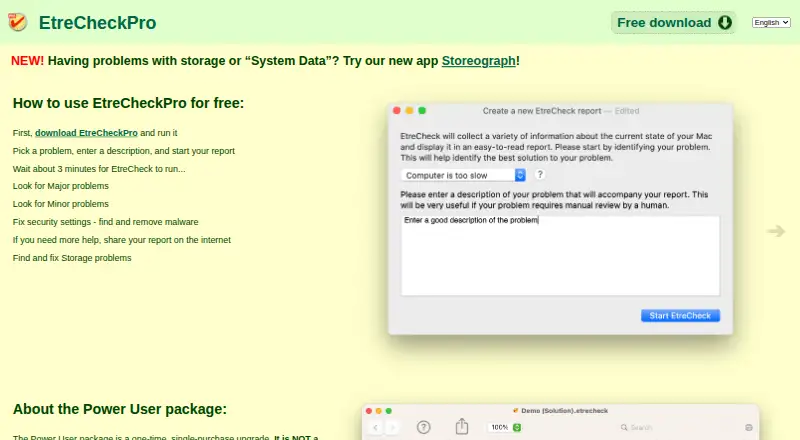
EtreCheckPro is a macOS diagnostic tool for investigating Mac problems. It detects over 70 specific issues, identifies major and minor problems, and creates an anonymous text report intended for sharing online. It can identify security configuration problems and detect and remove malware. The app also displays storage use and helps address storage problems, though those features require Full Disk Access. The free download includes basic reports and diagnostics, and supports command-line use from Terminal or ssh. It can run from the Downloads folder without installation. The optional Power User package adds computer-generated step-by-step solutions, detailed system displays, and Analytics and Insights charts. That upgrade costs $19.99 once and covers up to six different computers. EtreCheckPro supports Intel and Apple Silicon Macs running macOS 10.13 through macOS 27. The maker says Power User is primarily intended for end users and does not offer a multiuser license for consultants or IT support. Technical support is by email.
Who it suits
It suits Mac users investigating system, security, or storage problems, including those who want a shareable report. The maker says consultants and IT support can use the free mode.
What it does well
- Detects over 70 specific problems
- Creates an anonymous text report
- Runs without installation from the Downloads folder
- Free mode supports Terminal or ssh use
What to know first
- Storage features require Full Disk Access
- No multiuser license for consultants or IT support
- Power User package costs $19.99 once
Limits
The free download provides basic reports and diagnostics. The Power User upgrade costs $19.99 USD once and covers up to six different computers; storage features require Full Disk Access.
Plans
| Plan | Billed and limits | Price |
|---|---|---|
| Free download | Unlimited use · basic reports and diagnostics · command-line use | Free |
| Power User package | One-time, single-purchase upgrade · Up to 6 different computers · detailed displays and charts · computer-generated solutions | $19.99, paid once |
As etrecheck.com lists them, read 30 Sept 2026. The maker's own page has the final word.
Getting started
- Visit the EtreCheckPro website and get the free download.
- Run the app from the Downloads folder; installation is not required.
- Use the free app for basic diagnostics and reports, including command-line use from Terminal or ssh.
- Grant Full Disk Access to use storage features.
- Purchase the Power User package once for its additional features, if needed.
EtreCheckPro is a macOS utility for diagnosing system, security, and storage problems. It is best suited to Mac owners who want to investigate an issue and share findings, while support staff can use its free command-line mode. The paid upgrade is aimed at individual users who want guided fixes and deeper system views.
Overview
The app checks for more than 70 specific problems, separates major issues from minor ones, and produces an anonymous text report for sharing online. That makes it useful both for initial troubleshooting and for handing findings to someone who can help. Security checks and malware detection and removal extend its reach beyond basic system information.
Storage inspection and correction features require Full Disk Access, which users must grant to use them. EtreCheckPro can run from the Downloads folder without installation, a practical option for occasional diagnostics or a Mac where adding software is undesirable. Its privacy approach aims to collect only the personal information needed; online submissions that may transfer personally identifiable information are preceded by a notice.
Key features
- Problem diagnostics: More than 70 checks and major/minor classifications help users focus on potential causes instead of sorting through an undifferentiated inventory.
- Shareable reports: Anonymous text output is suited to sending diagnostic findings online when a second person needs to review them.
- Security and malware: The app identifies security configuration problems and detects and removes malware, making it relevant when a Mac issue may involve more than hardware or storage.
- Storage help: It shows storage use and helps address storage problems, but this part of the app depends on Full Disk Access.
- Power User displays and solutions: The upgrade adds computer-generated step-by-step solutions and detailed hardware, operating system, storage, networking, software, and performance displays. It also unlocks system Analytics charts and Insights charts with information from other users.
- Command-line access: The free app can be used from Terminal or ssh, a useful distinction for support workflows that do not need the paid displays.
Pricing
Free download — free. Unlimited use includes basic reports and diagnostics as well as command-line use. This is the sensible choice for support staff and anyone who needs problem checks and shareable reports but not the deeper displays or generated solutions.
Power User package — $19.99, paid once. This single-purchase upgrade covers up to 6 different computers and adds detailed displays and charts plus computer-generated solutions. It fits an individual Mac user who wants guided next steps or broader system analysis. The one-time license is not a multiuser license for consultants or IT support, so teams should not treat the six-computer allowance as a shared support-seat plan.
The free tier gives up the Power User package's detailed views, charts, and generated solutions, but retains unlimited basic diagnostics and command-line use. Email technical support is provided, with the company striving to respond within 48 hours.
Platforms
EtreCheckPro runs on macOS 10.13 through macOS 27 and supports Intel and Apple Silicon processors. It is Mac-only, so it is not an option for diagnosing Windows, Linux, or Android systems.
Who it's for
Mac owners who want to identify problems, review security and storage, or pass a diagnostic report to a helper are the clearest fit. The free mode also makes sense for consultants and IT support that need basic diagnostics or command-line access, but the lack of a multiuser license limits its suitability for organizations buying a shared team tool. Power User is primarily designed for end users who want more detailed views and computer-generated repair guidance.
Pros and cons
- Pros: Unlimited free use includes basic diagnostics, reports, and command-line access, so routine checks do not require an upgrade.
- Pros: Security checks, malware detection and removal, and storage guidance cover several common Mac troubleshooting needs in one utility.
- Pros: The app can run without installation, and the paid upgrade is a one-time purchase for up to 6 computers.
- Cons: Detailed displays, charts, and generated solutions require the paid upgrade, so users seeking guided fixes must pay.
- Cons: Storage features require Full Disk Access, a permission some users may prefer not to grant.
- Cons: Mac-only availability and no multiuser license make it a poor fit for cross-platform support teams or consultants seeking shared licensing.
Alternatives
Compare system information software if you want to consider a broader range of tools.
- Fastfetch is a free, open-source command-line option with 75+ system information modules and support for Android, Linux, macOS, and Windows; choose it when cross-platform system summaries matter more than EtreCheckPro's Mac diagnostics and generated solutions.
- Facter is a free choice for fewer than 25 nodes, with custom pricing for Puppet Core Commercial at 25+ nodes; it suits readers evaluating system information across Linux, macOS, Windows, or self-hosted environments.
- ASTRA32 is a Windows-only freemium option with a free plan for non-commercial use, so consider it for personal Windows system information instead of Mac troubleshooting.
- htop is a freely available Linux and macOS tool distributed with source code and binaries; choose it if that free platform coverage is the priority.
- hw-probe is a free Linux and self-hosted option from a project that anonymously collects Linux/BSD hardware details and supports collaborative hardware debugging; consider it for that community-oriented workflow.
- HWMonitor offers a free Windows hardware-sensor monitor, with a free trial also available; it is the more relevant choice for monitoring PC sensors on Windows.
- SIW is a Windows alternative with a free viewer and a trial version for specified recent Windows systems; consider it when your system-information needs are on Windows.
- Speccy provides free advanced PC insights for home use and a one-time Professional edition with automatic updates and premium support; it suits Windows home users seeking PC insights.
Verdict
Choose EtreCheckPro if you use a Mac and want free, unlimited basic diagnostics with a report you can share, or if you are an individual user willing to pay once for guided solutions and detailed system charts. Look elsewhere if you need Windows or Linux coverage, a multiuser support license, or a team-oriented purchasing model.
Verdict
EtreCheckPro offers basic diagnostics for free, with a one-time upgrade for detailed displays and generated solutions. Its Mac-only availability and lack of a multiuser license are important considerations for support teams.
Questions
Is EtreCheckPro free?
Yes. The free download costs nothing and includes unlimited use, basic reports and diagnostics, and command-line use.
How much is the Power User package?
It costs $19.99 USD as a one-time purchase and covers up to six different computers.
Which Macs can run EtreCheckPro?
It supports Intel and Apple Silicon processors and runs on macOS 10.13 through macOS 27.
Does it need to be installed?
No. It can run from the Downloads folder without installation.
What does Power User add?
It adds computer-generated step-by-step solutions, detailed system displays, and Analytics and Insights charts.
Is there a multiuser license for consultants or IT support?
No. The maker says it does not offer a multiuser license for consultants or IT support.
Facts from EtreCheckPro's own pages
- Analytics
- The Power User package provides full access to system Analytics charts and Insights charts containing information from other users. · etrecheck.com, 30 Sept 2026
- Diagnostics
- The app detects over 70 specific problems and identifies major and minor issues. · etrecheck.com, 30 Sept 2026
- Headquarters
- Oshawa, Ontario, Canada · etrecheck.com, 28 Sept 2026
- Installation
- EtreCheckPro does not need to be installed and can run from the Downloads folder. · etrecheck.com, 30 Sept 2026
- Integrations
- The free app supports command-line use from Terminal or ssh. · etrecheck.com, 30 Sept 2026
- Intended users
- The maker says the Power User package is primarily designed for end users and expects consultants and IT support to use the free mode. · etrecheck.com, 30 Sept 2026
- License limit
- The maker says it does not offer a multiuser license for consultants or IT support. · etrecheck.com, 30 Sept 2026
- Platform support
- The current app runs on a Mac with macOS 10.13 through macOS 27 and supports Intel and Apple Silicon processors. · etrecheck.com, 30 Sept 2026
- Power User features
- The optional Power User package adds computer-generated step-by-step solutions and detailed hardware, operating system, storage, networking, software, and performance displays. · etrecheck.com, 30 Sept 2026
- Privacy
- Etresoft says it aims to collect the minimum personal information needed and that online submissions that may transfer personally identifiable information are preceded by a notice. · etrecheck.com, 30 Sept 2026
- Purpose
- EtreCheckPro is a macOS diagnostic tool used to investigate Mac problems. · etresoft.com, 30 Sept 2026
- Reports
- It generates an anonymous text report designed for easy sharing online. · etrecheck.com, 30 Sept 2026
- Security
- It identifies security configuration problems and detects and removes malware. · etrecheck.com, 30 Sept 2026
- Storage
- It shows storage use and helps users correct storage problems; Full Disk Access is required for these features. · etrecheck.com, 30 Sept 2026
- Support
- Technical support is provided by email, and the company strives to respond within 48 hours. · etrecheck.com, 30 Sept 2026
Where EtreCheckPro stands on Freedom251
- System Information Software#10 of 34