Freedom251 › System Information Software

Speccy
What Speccy is
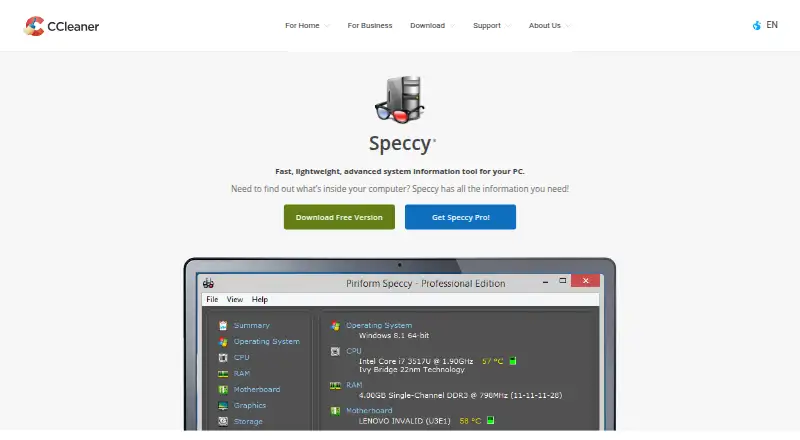
Speccy is a Windows system information tool that summarizes PC hardware and provides details about a computer’s components. It reports on the CPU, motherboard, RAM, and graphics card, and displays real-time temperatures for critical components. Its system coverage also includes the operating system, audio, storage, network, peripherals, and environmental settings. Info Finder helps users locate particular system details, while S.M.A.R.T. support provides hard-drive diagnostic data. Scan results can be saved as a snapshot, XML, or text file. Publish Snapshot can make specifications available at a public internet address without publishing the computer’s public IP address. Speccy has a free plan for home use and a Professional plan priced at $19.95, paid once, which includes automatic updates and premium support. The listed Windows requirements include Windows XP through Windows 10 in 32-bit and 64-bit versions, excluding RT tablet editions. The download page lists version 1.34.84, released June 22, 2026, as a maintenance update for EU regulatory compliance. Business customers are directed to a business edition.
Who it suits
Speccy suits Windows home users who want a summary of PC hardware, component temperatures, or exportable system details. Business customers should note that the Free and Professional versions are for home use only.
What it does well
- Reports CPU, motherboard, RAM, and graphics.
- Displays real-time temperatures for critical components.
- Exports results as snapshots, XML, or text.
- Includes S.M.A.R.T. hard-drive diagnostic data.
- Free plan available for home use.
What to know first
- Windows only.
- Free and Professional versions are for home use only.
- Professional costs $19.95, paid once.
Limits
The free plan is for home use. Professional is also for home use and costs $19.95, paid once; business customers are directed to a business edition.
Plans
| Plan | Billed and limits | Price |
|---|---|---|
| Speccy Free | Advanced PC insights · Speccy Free is for home use only | Free |
| Speccy Professional | Advanced PC insights · Automatic updates · Premium support · Speccy Professional is for home use only | $19.95, paid once |
| CCleaner Professional Plus | Up to 3 PCs · Includes CCleaner Professional and Recuva Professional · Complete cleaning · CCleaner for Android Pro and Mac Pro | $59.95, paid once |
As ccleaner.com lists them, read 8 Oct 2026. The maker's own page has the final word.
Getting started
- Visit the Speccy website.
- Choose the Free or Professional home-use plan.
- Download the Windows version matching the PC’s Windows version and 32-bit or 64-bit system.
- Run a scan to view system and hardware details.
- Save scan results as a snapshot, XML, or text file if needed.
Verdict
Speccy combines hardware summaries, temperature readings, and exportable system details in a Windows tool. Home users can start with the free plan; the Professional plan adds automatic updates and premium support for $19.95, paid once.
Questions
Is Speccy free?
Yes. Speccy Free costs nothing and is for home use.
How much does Speccy Professional cost?
Speccy Professional costs $19.95, paid once. It includes automatic updates and premium support.
Which operating systems does Speccy support?
The listed requirements cover Windows 10, 8.1, 7, Vista, and XP in 32-bit and 64-bit versions, excluding RT tablet editions.
Can Speccy export scan results?
Yes. Results can be saved as a snapshot, XML, or text file.
Is Speccy intended for business use?
The Free and Professional plans are for home use. Business customers are directed to Speccy for business.
Facts from Speccy's own pages
- Analytics
- The product policy lists Logentries as a third-party analytics tool used for Speccy. · ccleaner.com, 8 Oct 2026
- Business edition
- The download page directs business customers to get Speccy for business and says Free and Professional are for home use only. · ccleaner.com, 8 Oct 2026
- Data handling
- The product policy says Speccy processes location, application version, install date or time, and hardware data for specified service and product-improvement purposes. · ccleaner.com, 8 Oct 2026
- Disk diagnostics
- Speccy includes S.M.A.R.T. support for hard-drive diagnostic data. · ccleaner.com, 8 Oct 2026
- Export and sharing
- Scan results can be saved as a snapshot, XML, or text file for sharing. · ccleaner.com, 8 Oct 2026
- Hardware reporting
- Speccy reports on hardware including the CPU, motherboard, RAM, and graphics card. · ccleaner.com, 8 Oct 2026
- Headquarters
- Tempe, Arizona, United States, and Prague, Czech Republic · ccleaner.com, 28 Sept 2026
- Info Finder
- Info Finder helps users locate specific information about their system. · ccleaner.com, 8 Oct 2026
- Purpose
- Speccy is a fast, lightweight system information tool for PCs that provides a quick summary and details about computer hardware. · ccleaner.com, 8 Oct 2026
- Release
- The download page lists Speccy v1.34.84, released June 22, 2026, as a maintenance update for EU regulatory compliance. · ccleaner.com, 8 Oct 2026
- Snapshot publishing
- Publish Snapshot can make PC specifications available at a public internet address, and the computer’s public IP address is not published with that data. · ccleaner.com, 8 Oct 2026
- Support and updates
- The Professional version includes automatic updates and priority support. · ccleaner.com, 8 Oct 2026
- System specs
- The product policy says System Specs covers the operating system, CPU, RAM, motherboard, graphics, audio, storage, network, peripherals, and environmental settings. · ccleaner.com, 8 Oct 2026
- Temperature monitoring
- Speccy displays real-time temperatures of critical components. · ccleaner.com, 8 Oct 2026
- Windows requirements
- The download page lists Windows 10, 8.1, 7, Vista, and XP, in 32-bit and 64-bit versions, excluding RT tablet editions. · ccleaner.com, 8 Oct 2026
Where Speccy stands on Freedom251
- System Information Software#22 of 34
- Hardware Diagnostic Software#19 of 26