Freedom251 › Hardware Monitoring Software

HWMonitor
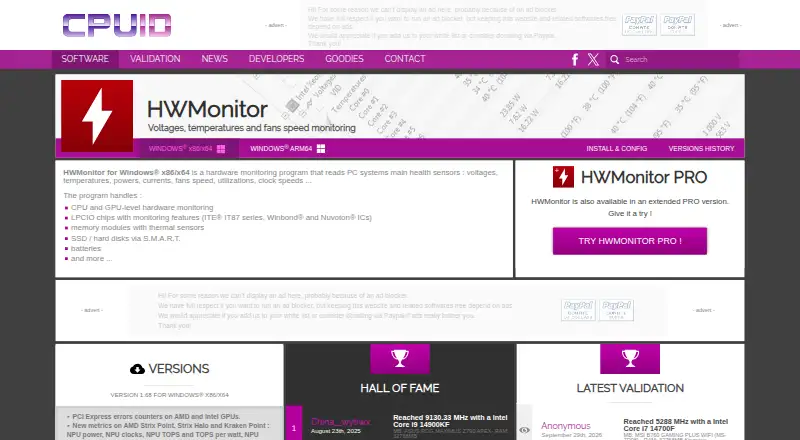
What HWMonitor is
HWMonitor reads PC sensor data related to system health, including temperature, voltage, power, current, fan speed, utilization, and clock speeds. It covers CPUs and GPUs, supported LPCIO chips, memory modules with thermal sensors, S.M.A.R.T. storage devices, and batteries. The listed Windows release is version 1.68 for x86/x64, with installer and ZIP downloads; a separate Windows ARM64 download is also listed. Version 1.68 adds PCI Express error counters for AMD and Intel GPUs, NPU and platform metrics, HDD IOPS and average latency, and the option to retain the device and sensor tree state. CSV logging is listed among its features. The free HWMonitor plan is for Windows x86/x64. HWMonitor PRO adds remote monitoring of distant PCs and Android devices over TCP/IP, saved monitoring data, bitmap logging graphs, sensor tray icons, and editable sensor labels. The Android PRO app reports device temperatures, battery details, CPU clock and utilization, and GPU clock on supported devices. Remote connections from Android require local Wi-Fi and are limited to 10 Windows PCs or Android devices. PRO Standard costs $19.95, paid once; PRO Extended costs $34.95, paid once.
Who it suits
HWMonitor may suit Windows users who want to read PC hardware sensor data. HWMonitor PRO adds remote monitoring for users who also want to check PCs or Android devices over TCP/IP.
What it does well
- Reads temperatures, voltages, power, and fan speeds.
- Windows release offers installer and ZIP downloads.
- Separate Windows ARM64 download is listed.
- CSV logging is listed as a feature.
- PRO can monitor remote PCs and Android devices.
What to know first
- Free HWMonitor plan is for Windows x86/x64.
- Android remote connections require local Wi-Fi.
- Android monitoring is limited to 10 devices.
- PRO Standard costs $19.95, paid once.
Limits
The free HWMonitor plan covers Windows x86/x64. PRO Standard allows up to 10 remote connections and includes one year of unlimited updates; PRO Extended allows up to 20 and includes two years. The Android app's remote monitoring also has a 10-device limit and requires local Wi-Fi.
Plans
| Plan | Billed and limits | Price |
|---|---|---|
| HWMonitor Free | Local hardware sensor monitoring | Free |
| HWMonitor | Windows x86/x64; monitors PC hardware sensors | Free |
| HWMonitor PRO Standard | Unlimited usage; one year of unlimited updates · Up to 10 remote connections | $19.95, paid once |
| HWMonitor PRO Extended | Unlimited usage; two years of unlimited updates · Up to 20 remote connections | $34.95, paid once |
As cpuid.com lists them, read 19 Sept 2026. The maker's own page has the final word.
Getting started
- Open https://www.cpuid.com/softwares/hwmonitor.html.
- Choose the Windows x86/x64 installer or ZIP download, or the separate ARM64 download.
- Use the free HWMonitor plan for PC sensor monitoring.
- For PRO features, choose Standard or Extended; the registration page offers a 30-day trial, with the period potentially varying.
- For Android remote monitoring, connect over local Wi-Fi and configure a Windows PC or Android device.
HWMonitor is a focused hardware-sensor utility for checking the health of PCs and supported Android devices. It suits users who need component telemetry rather than a software inventory, with the free Windows edition covering routine checks and PRO editions adding remote access and retained monitoring data.
Its broad sensor coverage and portable downloads make it a practical first stop for diagnosing temperatures, power behavior, fan response, storage activity, and similar hardware questions. Choose elsewhere if you need installed-software inventory or a Linux-native monitor.
Overview
HWMonitor brings voltages, temperatures, power, current, fan speed, utilization, and clock speeds into a hardware-centered view. It can read CPU and GPU sensors, supported LPCIO chips, memory modules that expose thermal sensors, S.M.A.R.T. storage devices, and batteries. That range is valuable when investigating overheating, throttling, charging behavior, or drive activity, but readings naturally depend on the sensors exposed by each machine.
The current Windows release is version 1.68 for x86/x64, offered as both an installer and a ZIP package. CPUID also provides a separate Windows ARM64 download. Version 1.68 adds PCI Express error counters for AMD and Intel GPUs, NPU and platform metrics, HDD IOPS and average latency, and preservation of the device and sensor-tree state. CSV logging extends the utility beyond a momentary snapshot.
Key features
- Detailed component telemetry: CPU, GPU, battery, storage, memory thermal sensors, and motherboard-related LPCIO readings give technically minded users a single place to inspect system health. It is a monitoring tool, not a catalogue of installed applications.
- Recent diagnostic metrics: GPU PCI Express error counters, NPU and platform values, plus HDD IOPS and average latency make the 1.68 release more useful for tracing performance and hardware faults than a basic temperature viewer.
- Logging: CSV logging lets you retain readings for later comparison, while saved device and sensor-tree state avoids rebuilding a preferred view between sessions.
- Remote monitoring in PRO: HWMonitor PRO connects to distant PCs and Android devices over TCP/IP. This is the important upgrade for administrators or anyone checking machines away from the desk.
- Graphs and interface controls: PRO can save monitoring data, create bitmap logging graphs, place sensors in the system tray, and use editable sensor labels. Those controls make recurring observation easier than repeatedly reading a raw sensor tree.
- Android monitoring: HWMonitor PRO for Android reports device temperatures, battery voltage, battery temperature and charge, CPU clock and utilization, and GPU clock where the device supports it. Android can monitor up to 10 Windows PCs or Android devices, and remote Android connections require a local Wi-Fi network.
- Technical access: A portable version, HTML report export, command-line interface, and firmware details support scripted checks and documentation alongside the graphical monitor.
Pricing
HWMonitor: free. The Windows x86/x64 edition covers PC hardware-sensor monitoring at no cost, making it the sensible starting point for one-off checks and local troubleshooting.
HWMonitor PRO Standard: $19.95 USD once, with unlimited usage, one year of unlimited updates, and up to 10 remote connections. It fits a small set of machines or a user who specifically needs remote viewing, graphs, tray icons, or editable labels.
HWMonitor PRO Extended: $34.95 USD once, with unlimited usage, two years of unlimited updates, and up to 20 remote connections. The extra cost is justified when the 10-connection ceiling is too restrictive or a longer update period matters; Standard is the leaner choice for smaller deployments.
The PRO registration trial lasts 30 days, although the stated delay can vary, and includes all registered features. The one-time prices are not subscriptions, but updates are unlimited only for the period attached to each edition.
Platforms
HWMonitor supports Windows and Android. Windows users get x86/x64 installer and ZIP packages plus a distinct ARM64 build. Android remote monitoring is constrained to a local Wi-Fi network, and the Android application’s remote device count is capped at 10.
Who it's for
HWMonitor is a strong fit for PC builders, troubleshooters, enthusiasts, and support staff who need direct sensor values without paying for local monitoring. PRO Standard suits people supervising up to 10 remote endpoints; Extended is aimed at larger sets of up to 20. Android users benefit when phone and PC readings need to be viewed together, provided the local-network requirement works for them.
It is a poor match for software-inventory work, and Linux users should look at a platform-specific alternative instead.
Pros and cons
Pros
- Wide coverage across CPU, GPU, storage, battery, memory thermal sensors, and motherboard-related chips.
- Free Windows edition with installer, ZIP, and ARM64 options.
- Version 1.68 adds useful GPU error, NPU, platform, and storage-latency metrics.
- PRO adds TCP/IP remote monitoring, bitmap graphs, tray icons, and label editing.
- Portable use, CSV logging, HTML export, and a command-line interface support repeatable diagnostics.
Cons
- Sensor availability varies with hardware, so coverage is not uniform across PCs or Android devices.
- Remote monitoring and saved PRO features require a paid edition after the 30-day trial.
- Android remote connections require local Wi-Fi, and Android monitoring is limited to 10 devices.
- The tool focuses on hardware readings and does not provide installed-software inventory.
Alternatives
Browse System Information Software for broader system-information tools, or Hardware Monitoring Software for a wider hardware-monitoring shortlist.
- Fastfetch is a free, MIT-licensed command-line utility with more than 75 system-information modules across Android, Linux, macOS, and Windows; choose it for concise inventory output rather than live sensor monitoring.
- Facter is free below 25 nodes and supports Linux, macOS, self-hosted deployments, and Windows; it is the better direction for cross-platform node facts and larger managed environments.
- ASTRA32 offers a free non-commercial Windows plan; choose it when hardware identification is the priority.
- EtreCheckPro is a macOS diagnostic utility with a free download and a $19.99 one-time Power User upgrade; pick it for Mac-focused reports.
- htop is a free Linux/macOS process viewer; choose it when process and resource activity, rather than broad sensor coverage, is the main concern.
- hw-probe is a free Linux and self-hosted project for anonymously collecting hardware details and collaborative troubleshooting.
- Network Activity Indicator is a free Windows utility for displaying network activity, not a replacement for HWMonitor’s component sensors.
- SIW provides Windows system information with a free viewer and a 14-day trial option; choose it when inventory and diagnostics are more important than continuous sensor monitoring.
Verdict
Choose HWMonitor for focused, wide-ranging hardware telemetry on Windows, especially when the free edition is enough or PRO’s remote connections and graphs solve a specific monitoring need. Look elsewhere for installed-software inventories, Linux-first workflows, or diagnostics centered on a different platform.
Verdict
HWMonitor covers a broad set of PC sensors, with a free Windows x86/x64 plan and a separate ARM64 download. Remote monitoring and additional PRO features are available at listed one-time prices.
Questions
Is HWMonitor free?
Yes. HWMonitor is free for Windows x86/x64 sensor monitoring.
What does HWMonitor PRO cost?
PRO Standard costs $19.95, paid once, and PRO Extended costs $34.95, paid once.
Which platforms are supported?
The listed platforms are Windows and Android. Windows downloads include x86/x64 and a separate ARM64 version.
Can I try PRO before registering?
The PRO registration page says the trial period is 30 days, though the delay may vary, and that the trial includes all registered features.
What is the difference between PRO Standard and Extended?
Standard allows up to 10 remote connections and includes one year of unlimited updates. Extended allows up to 20 remote connections and includes two years of unlimited updates.
Can HWMonitor monitor devices remotely?
HWMonitor PRO can monitor distant PCs and Android devices over TCP/IP. Android remote connections require local Wi-Fi, and the Android app can monitor up to 10 Windows PCs or Android devices.
Facts from HWMonitor's own pages
- Android app
- HWMonitor PRO for Android reports device temperatures, battery voltage, temperature and charge level, CPU clock and utilization, and—in supported devices—GPU clock. · cpuid.com, 3 Oct 2026
- Android network limit
- The Android app can monitor up to 10 Windows PCs or Android devices, and Android remote connections require a local Wi-Fi network. · cpuid.com, 3 Oct 2026
- Hardware coverage
- It handles CPU and GPU monitoring, supported LPCIO chips, memory modules with thermal sensors, S.M.A.R.T. storage devices, and batteries. · cpuid.com, 3 Oct 2026
- Headquarters
- Dunkerque, France · cpuid.com, 28 Sept 2026
- Logging
- The version history lists CSV logging as a feature added to HWMonitor. · cpuid.com, 3 Oct 2026
- PRO graphs
- HWMonitor PRO can save monitoring data and generate logging graphs as bitmap files. · cpuid.com, 3 Oct 2026
- PRO interface
- HWMonitor PRO supports sensor tray icons and editable sensor labels. · cpuid.com, 3 Oct 2026
- PRO remote monitoring
- HWMonitor PRO can monitor distant PCs and Android devices over a TCP/IP connection. · cpuid.com, 3 Oct 2026
- Purpose
- HWMonitor reads PC system health sensors, including voltages, temperatures, power, current, fan speed, utilization, and clock speeds. · cpuid.com, 3 Oct 2026
- Recent features
- Version 1.68 adds PCI Express error counters for AMD and Intel GPUs, new NPU and platform metrics, HDD IOPS and average latency, and saved device and sensor tree state. · cpuid.com, 3 Oct 2026
- Support
- CPUID directs users to a bug report form for inconsistent readings and to contact support for registration issues. · cpuid.com, 3 Oct 2026
- Trial
- The PRO registration page says the trial period is 30 days, with the delay potentially varying, and that trial includes all registered features. · cpuid.com, 3 Oct 2026
- Windows ARM64
- CPUID lists a separate Windows ARM64 HWMonitor download. · cpuid.com, 3 Oct 2026
- Windows versions
- The current listed Windows release is version 1.68 for x86/x64, with installer and ZIP downloads. · cpuid.com, 3 Oct 2026
Where HWMonitor stands on Freedom251
- Hardware Monitoring Software#26 of 59
- Hardware monitoring tools#46 of 59