Freedom251 › Hardware monitoring tools
MSI Afterburner
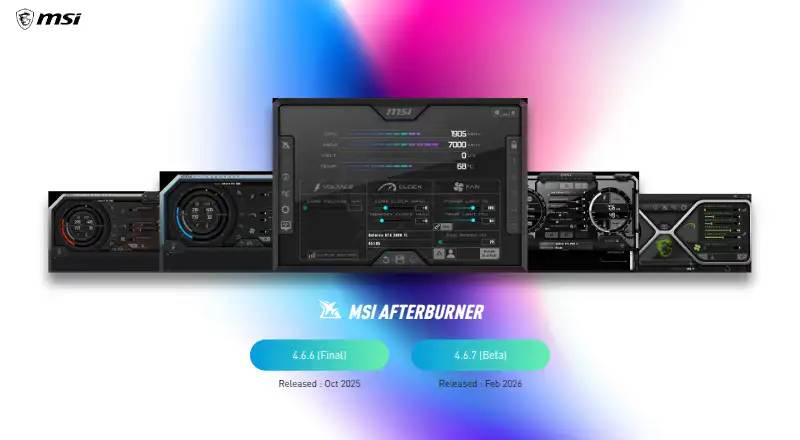
What MSI Afterburner is
MSI Afterburner is a free Windows utility for tuning and monitoring graphics hardware from multiple vendors. Its controls cover GPU overclocking and undervolting, custom voltage adjustments, power limits, and fan curves. Users can monitor hardware, display information in an on-screen overlay, and save tuning profiles. The listed Free plan costs nothing and includes GPU overclocking and undervolting, hardware monitoring, custom fan control, and an on-screen display. Windows is the listed operating system. The maker is identified as MSI Afterburner, with headquarters in New Taipei City, Taiwan, and a founding year of 1986. This combination of tuning controls and monitoring features makes the utility relevant to people adjusting graphics hardware settings on Windows. Its multi-vendor GPU support means the listed support is not restricted to one graphics card maker. The product is offered as a free plan, with the listed features covering tuning, monitoring, fan control, and display information.
Who it suits
MSI Afterburner suits Windows users who want to tune and monitor graphics hardware from multiple vendors. It is also a fit for users who want voltage, power limit, fan curve, and tuning profile controls alongside an on-screen display.
What it does well
- Free plan costs nothing.
- Supports GPU overclocking and undervolting.
- Includes hardware monitoring and on-screen display.
- Offers custom voltage and power limit controls.
- Supports fan curves and tuning profiles.
- GPU support is multi-vendor.
What to know first
- The listed operating system is Windows.
- The listed plan is the Free plan.
Plans
| Plan | Billed and limits | Price |
|---|---|---|
| Free | GPU overclocking and undervolting · Hardware monitoring · Custom fan control · On-screen display | Free |
| MSI Afterburner | GPU overclocking and monitoring · works with graphics cards from all brands · Windows desktop utility | Free |
As us.msi.com lists them, read 20 Sept 2026. The maker's own page has the final word.
Getting started
- Visit the MSI Afterburner website.
- Use a Windows system.
- Choose the Free plan, listed as free.
- Use its GPU tuning, monitoring, fan control, or on-screen display features.
MSI Afterburner is a free Windows utility for tuning graphics cards and monitoring them while you play. It is best suited to gamers and PC builders who want clock, voltage, power, cooling, and overlay controls in one application. Its broad card compatibility and unusually complete control set make it a strong general-purpose choice, provided Windows is part of your setup.
Overview
Afterburner brings overclocking, undervolting, fan management, hardware monitoring, and an in-game display together instead of requiring separate utilities. MSI says it works with graphics cards from every brand, including non-MSI models. That makes it practical for mixed-brand systems and for owners who do not use an MSI graphics card.
The controls are meaningful rather than cosmetic: you can adjust GPU clock frequency, voltage, power limits, and fan behavior. Those options suit experienced users who want to tune performance or efficiency. OC Scanner can automatically identify the highest stable overclock settings, reducing manual trial and error for users who want a guided starting point. Automatic scanning is not a substitute for watching temperatures and stability when applying the result.
Key features
GPU tuning and profiles
Clock and voltage controls support both performance overclocking and undervolting, while power-limit control adds another way to balance speed and power use. Tuning profiles let you save configurations and switch between preferred setups without recreating them.
Cooling control
A customizable fan-speed curve lets you decide how aggressively cooling responds as the GPU heats up. This is useful when you want quieter behavior at lower loads or more assertive cooling during sustained gaming, but it also puts responsibility for sensible temperature targets on the user.
Monitoring and overlay
The in-game On Screen Display presents real-time system performance information over gameplay. It is a good fit for players who want to watch system behavior without leaving a game or relying on a second monitor.
Capture
The included Predator software records games or overclocking in H.264 and supports WMV and AVI formats. That adds straightforward capture to a tuning utility, although the published feature set does not position it as a full video-production suite.
Release choices and safety
MSI lists Afterburner 4.6.6 (Final) and 4.6.7 (Beta), both released in September 2026. The beta is the option for users who specifically want the newer test release; the final build is the more conservative choice. MSI warns that phishing sites can steal data and identifies msi.com and Guru3D as the correct download locations.
Pricing
Afterburner is free, with no trial period because the product is already offered at no cost. The Free plan includes GPU overclocking and undervolting, hardware monitoring, custom fan control, and the on-screen display. The MSI Afterburner plan is also free, is free to use, and works with graphics cards from all brands. There are no paid tiers, seat charges, quotas, or renewal terms stated, so it fits individual users who want the complete published feature set without a subscription.
Platforms
MSI Afterburner is available for Windows. That is a straightforward advantage for Windows gaming PCs, but users on Linux, macOS, Android, or iOS need a different utility.
Who it's for
Choose it if you want multi-vendor GPU tuning, automatic overclock discovery, saved profiles, fan-curve control, live monitoring, and an overlay in one free Windows package. It also suits builders managing systems with cards from different manufacturers. It is less suitable if you need a non-Windows platform or prefer a tightly vendor-specific tool designed only for one GPU family.
Pros and cons
- Pros: Works with graphics cards from all brands, not only MSI.
- Pros: Combines clock, voltage, power-limit, fan-curve, profile, monitoring, and overlay controls at no cost.
- Pros: OC Scanner can find a highest stable overclock starting point automatically.
- Pros: Predator adds H.264, WMV, and AVI game or overclocking capture.
- Cons: Windows is the only supported operating system.
- Cons: Manual tuning and fan curves still require users to manage heat and stability responsibly.
- Cons: The beta release is less conservative than the listed final version.
Alternatives
For a broader directory of options, see GPU Tuning Software, GPU Overclocking Software, and Hardware Monitoring Software.
- GALAX Xtreme Tuner Plus is free across Android, iOS, and Windows, with an iPhone app for GALAX graphics cards that requires Xtreme Tuner PC software.
- AMD GPU Tuner is a free, MIT-licensed Windows 10 or 11 (64-bit) project for AMD Radeon GPUs with a compatible Adrenalin driver.
- ASUS GPU Tweak III is a free Windows alternative with no price or usage limits stated.
- Gainward ExperTool is free for Nvidia GPUs and has stated driver requirements for 64-bit and 32-bit systems.
- Inno3D TuneIT is free for specified INNO3D GeForce series on Windows 11 or 10 64-bit.
- Intel VTune Profiler is a free standalone or Intel oneAPI tool for Windows, Linux, or self-hosted use, with commercial and non-commercial use permitted.
- NVIDIA_OC Daemon is a free MIT-licensed Linux option.
- CoreCtrl is a free, open-source GNU/Linux application with no paid plans stated.
Verdict
Choose MSI Afterburner if you want the widest combination of free GPU controls, multi-brand compatibility, monitoring, fan management, profiles, and an in-game overlay on Windows. Look elsewhere when Windows is not your platform or when a vendor-specific or Linux-focused utility is a better fit.
Verdict
Choose MSI Afterburner if you want a free Windows utility with GPU tuning, hardware monitoring, fan control, and an on-screen display. Look elsewhere if Windows is not your operating system, since Windows is the only platform listed.
Questions
How much does MSI Afterburner cost?
The Free plan costs nothing.
What operating system does it support?
Windows is the listed operating system.
Which GPU vendors does it support?
GPU vendor support is listed as multi-vendor.
What tuning controls are included?
The listed controls include GPU overclocking and undervolting, custom voltage control, power limit control, fan curve control, and tuning profiles.
Does it include hardware monitoring?
Yes. Hardware monitoring and an on-screen display are included in the Free plan.
Who makes MSI Afterburner?
The maker is listed as MSI Afterburner. Its headquarters are in New Taipei City, Taiwan, and its founding year is listed as 1986.
Facts from MSI Afterburner's own pages
- Documentation
- Official help covers installation, OC Scanner, monitoring setup, profiles, fan control and restoring defaults, with links to two walkthroughs. · msi.com, 15 Oct 2026
- Download safety
- MSI warns that phishing Afterburner sites may steal data and says the correct sites are msi.com and Guru3D. · msi.com, 11 Oct 2026
- Download security
- MSI recommends downloading Afterburner only from MSI.com or Guru3D because phishing sites distribute modified installers. · msi.com, 15 Oct 2026
- Fan curves
- Users can create software-controlled fan curves by editing points on a temperature-versus-speed graph. · msi.com, 15 Oct 2026
- Fan profiles
- Afterburner lets users customize a fan speed curve to control cooling performance. · msi.com, 11 Oct 2026
- Founded
- 1986 · us.msi.com, 23 Sept 2026
- Free availability
- MSI says Afterburner is completely free and supports graphics cards from every brand. · msi.com, 15 Oct 2026
- Free plan
- Yes · us.msi.com, 20 Sept 2026
- GPU compatibility
- MSI states that Afterburner works with non-MSI graphics cards, although some MSI cards unlock extra functions. · event.msi.com, 15 Oct 2026
- Hardware monitoring
- The software displays GPU frequency, VRAM frequency, voltage, temperature, driver version and related hardware information. · msi.com, 15 Oct 2026
- Headquarters
- New Taipei City, Taiwan · us.msi.com, 23 Sept 2026
- Laptop limitation
- Laptop GPUs generally cannot use Afterburner's custom fan curves because their curves are set in firmware by the manufacturer. · msi.com, 15 Oct 2026
- Latest beta
- The official page lists version 4.6.7 as a beta released in September 2026. · msi.com, 15 Oct 2026
- Latest final release
- The official page lists version 4.6.6 as the final release from September 2026. · msi.com, 15 Oct 2026
- Licence classification
- Wikipedia identifies MSI Afterburner as freeware rather than open-source software. · en.wikipedia.org, 15 Oct 2026
- Limit: limited options
- PCWorld listed few options as a drawback compared with competing utilities. · pcworld.com, 15 Oct 2026
- Limit: no integrated-GPU support in app
- The official mobile FAQ says the app works only with discrete graphics and cannot overclock integrated AMD or Intel graphics. · event.msi.com, 15 Oct 2026
- Limit: overlay conflicts
- PC Gamer reported that Afterburner's FPS overlay has been known to conflict with Steam and Origin overlays. · pcgamer.com, 15 Oct 2026
- Limit: stability work
- Softpedia noted that achieving a stable undervolt or overclock can require time-consuming stress testing. · softpedia.com, 15 Oct 2026
- Maker founded
- Crunchbase says Micro-Star International was founded in 1986. · crunchbase.com, 15 Oct 2026
- Maker headquarters
- Crunchbase places the company's headquarters in New Taipei, Taiwan. · crunchbase.com, 15 Oct 2026
- Maker legal name
- Crunchbase identifies the maker's legal name as Micro-Star INT'L CO., LTD., also known as MSI. · crunchbase.com, 15 Oct 2026
- Maker public status
- LinkedIn identifies MSI as a public company operating in computers and electronics manufacturing. · linkedin.com, 15 Oct 2026
- Maker size
- LinkedIn lists MSI's company size as 1,001–5,000 employees. · linkedin.com, 15 Oct 2026
Where MSI Afterburner stands on Freedom251
- Hardware monitoring tools#12 of 59
- Hardware Monitoring Software#36 of 59
- GPU Overclocking Software#12 of 19
- GPU Tuning Software#11 of 16