Freedom251 › Hardware monitoring tools
XStat
What XStat is
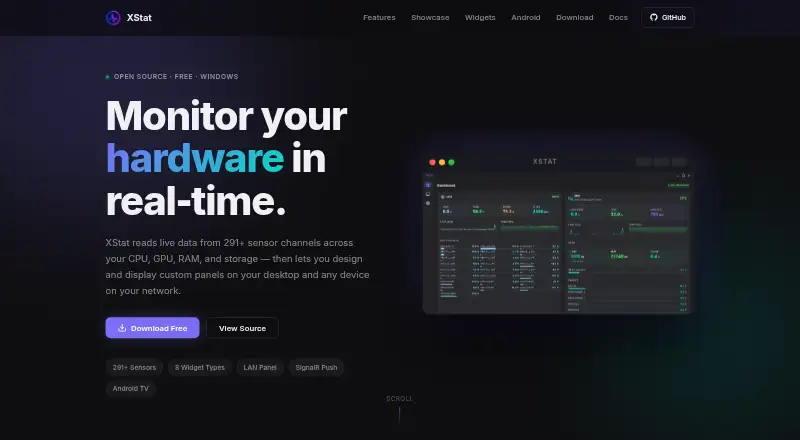
XStat is a free hardware monitoring app for Windows 10 and 11, with an Android companion and browser access for devices on the same local network. It reads more than 291 sensor channels across CPU, GPU, RAM, storage, motherboard, and network hardware. Its dashboard organizes readings by hardware category and includes live history graphs and per-core load data. Users can build sensor panels by arranging and styling widgets, binding them to sensors, and importing or exporting layouts as JSON. Available widgets include readings, bars, sparklines, gauges, clocks, text, images, and custom HTML. A built-in Monaco editor supports custom HTML, CSS, and JavaScript widgets, with live preview and sensor data passed through postMessage. The Windows service can serve panels as browser pages on the local network; the Android app discovers the PC over UDP and displays a panel in a full-screen WebView. XStat uses LibreHardwareMonitor for sensor readings and SignalR WebSockets for live updates. The maker says it runs without cloud services or telemetry. The project is MIT-licensed. Its service has no authentication, and its documentation advises limiting access to a trusted local network.
Who it suits
XStat suits Windows users who want live hardware readings and customizable sensor panels on their PC or other devices on their local network. It also fits users who want to keep data in a portable app folder and work with MIT-licensed software.
What it does well
- Reads more than 291 channels across major hardware categories.
- Dashboard includes history graphs and per-core load data.
- Panels support eight widget types and JSON layout import and export.
- Android companion discovers the PC over UDP.
- Maker says it has no telemetry and does not use cloud services.
- Released under the MIT License.
What to know first
- Desktop app requires 64-bit Windows 10 or 11.
- Hardware sensor access requires administrator privileges.
- Android APK must be sideloaded.
- Service has no authentication and is intended for trusted local networks.
Plans
| Plan | Billed and limits | Price |
|---|---|---|
| XStat | Free · Windows 10/11 64-bit · administrator rights required for hardware sensor access | Free |
As xstat.ddns.net lists them, read 7 Oct 2026. The maker's own page has the final word.
Getting started
- Visit the XStat website.
- On Windows 10 or 11 64-bit, download the installer or portable ZIP.
- Run the desktop app with administrator privileges for hardware sensor access.
- For Android, download and sideload the APK.
- Open a served panel in a browser on the same network, or use the Android companion to discover the PC.
Verdict
Choose XStat if you want free, customizable hardware monitoring across a Windows PC and devices on its local network. Consider its network setup carefully: the service has no authentication, and hardware sensor access requires administrator privileges.
Questions
How much does XStat cost?
XStat is free, with a free plan priced at $0.
Which platforms does it support?
It supports Windows 10/11, Android, and web access through a browser on the local network.
Does XStat have a free trial?
No. XStat has a free plan and no free trial.
Is XStat open source?
XStat is released under the MIT License.
Does it require a cloud connection?
The maker says XStat runs without cloud services and has no telemetry.
How can I get support?
The project page links to GitHub issues for reporting problems.
Facts from XStat's own pages
- Android companion
- The Android companion discovers the PC over UDP, displays the panel in a full-screen WebView, and automatically resumes discovery if the PC goes offline. · xstat.ddns.net, 7 Oct 2026
- Custom widgets
- A built-in Monaco editor supports custom HTML, CSS, and JavaScript widgets with live preview and sensor data via postMessage. · xstat.ddns.net, 7 Oct 2026
- Dashboard
- The dashboard groups sensors by hardware category and includes real-time history graphs and per-core load data. · xstat.ddns.net, 7 Oct 2026
- Data handling
- The maker says XStat runs without cloud services, and the portable build keeps data inside the app folder. · xstat.ddns.net, 7 Oct 2026
- Distribution
- The maker offers a Windows installer and portable ZIP, plus a directly downloaded Android APK that requires sideloading. · xstat.ddns.net, 7 Oct 2026
- Free plan
- Yes · xstat.ddns.net, 24 Sept 2026
- Integrations
- XStat uses LibreHardwareMonitor for sensor data and SignalR WebSockets to send live updates to connected clients. · xstat.ddns.net, 7 Oct 2026
- LAN access
- The hardware service serves panels as web pages that devices on the same network can open in a browser without installing an app. · xstat.ddns.net, 7 Oct 2026
- License
- XStat is released under the MIT License. · xstat.ddns.net, 7 Oct 2026
- Panel editor
- Users can drag, resize, layer, style, and bind widgets to sensors, and import or export panel layouts as JSON. · xstat.ddns.net, 7 Oct 2026
- Purpose
- XStat monitors live hardware data and lets users create custom sensor panels for their desktop and devices on their local network. · xstat.ddns.net, 7 Oct 2026
- Remote monitoring
- Yes · xstat.ddns.net, 24 Sept 2026
- Requirements
- The desktop app requires Windows 10 or 11 64-bit and administrator privileges for hardware sensor access. · xstat.ddns.net, 7 Oct 2026
- Security and privacy
- The maker says XStat has no telemetry; its documentation says the service has no authentication and should only be exposed on a trusted local network. · xstat.ddns.net, 7 Oct 2026
- Sensor coverage
- It reads 291+ sensor channels covering CPU, GPU, RAM, storage, motherboard, and network data. · xstat.ddns.net, 7 Oct 2026
- Support
- The project page links to GitHub issues for reporting issues. · xstat.ddns.net, 7 Oct 2026
- Supported platforms
- Windows 10/11; Android companion; web browser on local network · xstat.ddns.net, 24 Sept 2026
- Widgets
- The eight widget types are Sensor Value, Sensor Bar, Sparkline, Gauge, Clock, Text, Image, and Custom HTML. · xstat.ddns.net, 7 Oct 2026
Where XStat stands on Freedom251
- Hardware monitoring tools#10 of 59
- Hardware Monitoring Software#46 of 59