Freedom251 › Hardware monitoring tools
Supermicro SuperDoctor 5
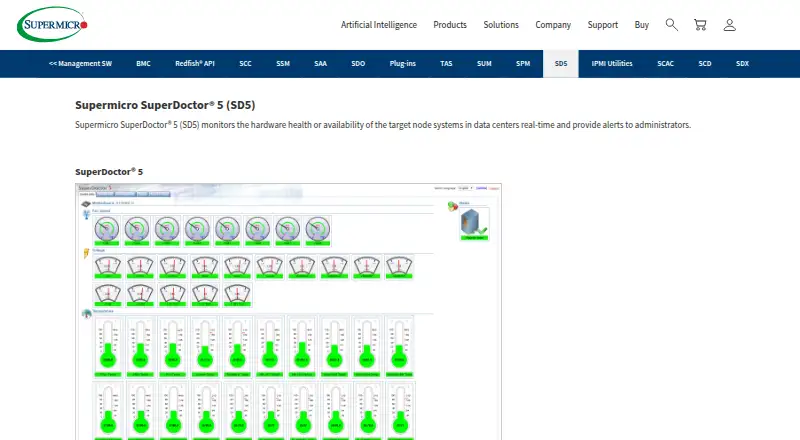
What Supermicro SuperDoctor 5 is
Supermicro SuperDoctor 5 monitors server hardware health and system availability in data centers, with alerts for administrators. It tracks components and conditions including fans, temperature, voltage, chassis intrusion, power, disks, RAID, and memory, and provides system information such as BIOS, network, storage, and services. The software has web-based and command-line interfaces, and can send email or SNMP trap notifications. SNMP extensions connect with network management systems, and it is compatible with Nagios plug-ins. Pluggable hardware and software monitoring plug-ins, REST APIs, and CSV or HTML exports are also supported. Remote management includes graceful power off or reboot, software updates, and BIOS or BMC updates. SuperDoctor 5 is free and is listed for Windows and Linux. It requires Supermicro servers, an Ethernet interface, 200 MB of free disk space, and 64 MB of RAM. The listed Standard plan includes the software without a license requirement.
Who it suits
SuperDoctor 5 is suited to data-center administrators monitoring Supermicro servers and system availability. It may suit teams that need email or SNMP alerts and remote server-management functions.
What it does well
- Monitors fans, temperature, voltage, disks, RAID, and memory.
- Sends email and SNMP trap alerts.
- Provides web and command-line interfaces.
- Exports logs and reports in CSV and HTML.
- Free, with no license required.
What to know first
- Requires Supermicro servers.
- Requires an Ethernet interface.
- Requires 200 MB disk space and 64 MB RAM.
- Uses one-to-one management.
Limits
The free plan includes SuperDoctor 5 and requires no license. It is limited to one-to-one management and requires Supermicro servers.
Plans
| Plan | Billed and limits | Price |
|---|---|---|
| Standard | SD5 included · no license required | Free |
As supermicro.com lists them, read 4 Oct 2026. The maker's own page has the final word.
Getting started
- Visit the Supermicro SuperDoctor 5 website.
- Choose the Windows or Linux version listed on the download page.
- Install it on a Supermicro server with Ethernet, 200 MB of free disk space, and 64 MB of RAM.
- Use its web-based or command-line interface to monitor the server.
Supermicro SuperDoctor 5 is a real-time hardware and availability monitor designed for Supermicro servers in data centers. It is best suited to administrators responsible for those machines who need component alerts and direct remote maintenance without a license fee. The product’s focused hardware scope is useful, but its server-specific, one-to-one model limits its role in mixed or large heterogeneous estates.
Overview
SuperDoctor 5 watches target nodes continuously and reports the condition of fans, temperature, voltage, chassis intrusion, power, disks, RAID and memory. It also presents 20 categories of system information, including BIOS, memory, networking, storage and services. That combination gives operators both low-level hardware visibility and broader server context, making it practical for diagnosing issues close to the machine.
Administrators can use a web interface or command line, export logs and reports in CSV or HTML, and send notifications by email or SNMP traps. SNMP extensions connect it to network-management systems, while compatibility with Nagios plug-ins and pluggable hardware and software monitoring plug-ins provide integration options. PostgreSQL 9.1.13 and later is supported. REST APIs are available for automation, although the one-to-one management relationship means this remains direct server management rather than fleet orchestration.
Key features
- Hardware health coverage: Monitoring spans fans, thermal and voltage readings, chassis intrusion, power, disks, RAID and memory. This is valuable for operators who need actionable component-level warnings instead of only uptime checks.
- Live availability monitoring: Real-time checks of target-node health and availability suit data-center teams that must spot failures promptly.
- Alerts and integrations: Email and SNMP-trap alerts can feed existing operational workflows. SNMP extensions, Nagios plug-in compatibility and extensible monitoring plug-ins make it more adaptable than a closed dashboard.
- Remote administration: The tool can perform graceful power-off or reboot operations and remote software, BIOS and BMC updates. Those functions can reduce trips to the server, but they are most useful where each Supermicro system is managed individually.
- Interfaces and reporting: Web and command-line interfaces support different operating styles, while CSV and HTML exports simplify handoff and record keeping. REST APIs add a route for custom automation.
- Security consideration: Supermicro states that version 5.13.0 was affected by CVE-2023-26795 and that version 5.14.0 fixed it. The download page lists version 5.23.0, updated April 28, 2026, so administrators should use a current release rather than the affected version.
Pricing
| Plan | Price | Terms |
|---|---|---|
| Standard | free | SD5 included; no license required |
The free Standard plan removes licensing cost and is the clear fit for teams already operating Supermicro servers that want monitoring and remote controls. There are no paid tiers or published seat quotas to compare, so the main trade-off is product scope rather than price. A linked pricing page returns a 404, and additional information is directed to [email protected].
Platforms
SuperDoctor 5 has Windows and Linux versions. It requires Supermicro servers, 200 MB of free disk space, 64 MB of available RAM and an Ethernet interface. The hardware dependency is decisive: organizations standardizing on another vendor, or combining several server brands, should not treat this as a universal monitoring layer.
Who it's for
This is a strong fit for data-center administrators maintaining Supermicro systems who want detailed hardware telemetry, conventional email or SNMP alerting, and remote reboot or firmware-related maintenance at no license cost. It also suits teams that already use Nagios-compatible plug-ins, SNMP management systems, PostgreSQL, or scripts that can use REST APIs. It is less suitable when one console must manage a heterogeneous fleet or coordinate many machines as a single pool; one-to-one management is a fundamental boundary.
Pros and cons
Pros
- No license fee: The Standard plan costs nothing and requires no license.
- Deep Supermicro hardware coverage: Sensors include power, intrusion, RAID and memory as well as the usual thermal and fan readings.
- Useful operational connectivity: SNMP traps, extensions, Nagios plug-ins, REST APIs and plug-in support can fit established monitoring practices.
Cons
- Vendor-specific requirement: It requires Supermicro servers, excluding mixed-vendor deployments as a primary use case.
- One-to-one management: Direct server relationships do not replace a fleet-wide provisioning or orchestration platform.
- Version diligence required: The stated CVE affecting 5.13.0 makes keeping deployments on a fixed release important.
Alternatives
For provisioning workflows rather than hardware health, consider the Bare Metal Provisioning Software list. For broader component-monitoring choices, see Hardware Monitoring Software.
- AuroraBoot is a free, Apache-licensed self-hosted option spanning API, Linux, macOS, Windows and web environments; choose it when provisioning flexibility matters more than Supermicro-specific telemetry.
- FOG Project is free for commercial use with community support and broad platform coverage, making it a better fit for imaging-oriented administration.
- Canonical MAAS offers a free self-support plan for all machines, but without HA, RBAC, a Knowledge Base, Sev 1 SLA, phone or ticket support; choose it when machine provisioning is the priority.
- Clonezilla is free and open source under GPL; it is the simpler choice for imaging and cloning rather than ongoing server health management.
- Foreman is free, open source and self-managed, suited to users seeking a broader infrastructure-management platform.
- openQRM Enterprise provides a free community edition and a paid Enterprise tier; choose it when its plugin ecosystem and enterprise add-ons are more important.
- iVentoy has a free edition with no usage time limit but limits commercial use and 20 clients; it is aimed at network deployment, not server telemetry.
- NVIDIA Base Command Manager offers a free-to-use tier for eight accelerators per server, node or system; choose it for accelerator-focused environments.
Verdict
Choose SuperDoctor 5 if you operate Supermicro servers and want detailed hardware monitoring, standard alert channels and remote maintenance without licensing cost. Look elsewhere when your environment is mixed-vendor or needs centralized fleet provisioning, because the Supermicro requirement and one-to-one management model are the product’s defining limits.
Verdict
SuperDoctor 5 offers free monitoring and remote management for administrators working with Supermicro servers. Its server requirement and one-to-one management model are important fit considerations.
Questions
How much does SuperDoctor 5 cost?
The Standard plan is free, with SuperDoctor 5 included and no license required.
Which operating systems does it support?
The download page lists Windows and Linux versions.
What hardware does it require?
It requires Supermicro servers, an Ethernet interface, 200 MB of free disk space, and 64 MB of RAM.
How does it send alerts?
It sends notifications by email and SNMP traps.
Can it connect to other monitoring tools?
It provides SNMP extensions for network management systems and is compatible with Nagios plug-ins.
Who makes SuperDoctor 5?
The copyright holder is Super Micro Computer, Inc.
Facts from Supermicro SuperDoctor 5's own pages
- Alert channels
- Email,SNMP traps · supermicro.com, 24 Sept 2026
- Alert notifications
- Sends notifications through email and SNMP traps. · supermicro.com, 27 Sept 2026
- Alerts
- It can send notifications by email and SNMP traps. · supermicro.com, 4 Oct 2026
- API support
- Provides REST APIs. · supermicro.com, 27 Sept 2026
- Company name
- The copyright holder is Super Micro Computer, Inc. · supermicro.com, 27 Sept 2026
- Current listed release
- The download page lists SuperDoctor 5 version 5.23.0, updated April 28, 2026. · supermicro.com, 4 Oct 2026
- Customization
- It supports pluggable hardware and software monitoring plug-ins. · supermicro.com, 4 Oct 2026
- Custom sensor support
- Yes · supermicro.com, 24 Sept 2026
- Database support
- Supports PostgreSQL version 9.1.13 and above. · supermicro.com, 27 Sept 2026
- Founded
- 1993 · supermicro.com, 28 Sept 2026
- Free plan
- Yes · supermicro.com, 24 Sept 2026
- Hardware monitoring
- It monitors fan speed, temperature, voltage, chassis intrusion, redundant power failure, power consumption, disk and RAID health, and memory health. · supermicro.com, 4 Oct 2026
- Hardware requirements
- Requires Supermicro servers, 200 MB free disk space, 64 MB RAM, and an Ethernet interface. · supermicro.com, 27 Sept 2026
- Headquarters
- San Jose, California, United States · supermicro.com, 28 Sept 2026
- Integrations
- It provides SNMP extensions for network management systems and is compatible with Nagios plug-ins. · supermicro.com, 4 Oct 2026
- Interfaces
- It provides web-based and command-line interfaces. · supermicro.com, 4 Oct 2026
- Management relationship
- Provides one-to-one management. · supermicro.com, 27 Sept 2026
- Monitoring plug-ins
- Supports pluggable hardware and software monitoring plug-ins. · supermicro.com, 27 Sept 2026
- Nagios compatibility
- Compatible with Nagios plug-ins. · supermicro.com, 27 Sept 2026
- Network management
- Provides SNMP extensions for network management systems. · supermicro.com, 27 Sept 2026
- Notable limit
- The product page specifies Supermicro servers as the hardware requirement and lists 200 MB free disk space and 64 MB available RAM. · supermicro.com, 4 Oct 2026
- Pricing page status
- The linked pricing page returns a 404 error. · supermicro.com, 27 Sept 2026
- Purpose
- SuperDoctor 5 monitors hardware health and system availability in data centers in real time and alerts administrators. · supermicro.com, 4 Oct 2026
- Real-time monitoring
- Monitors target-node hardware health or availability in data centers in real time. · supermicro.com, 27 Sept 2026
Where Supermicro SuperDoctor 5 stands on Freedom251
- Hardware monitoring tools#9 of 59
- Data Center Automation#13 of 22
- Bare Metal Provisioning Software#17 of 28
- Hardware Monitoring Software#50 of 59