Freedom251 › Bare Metal as a Service (BMaaS) Software

Foreman
What Foreman is
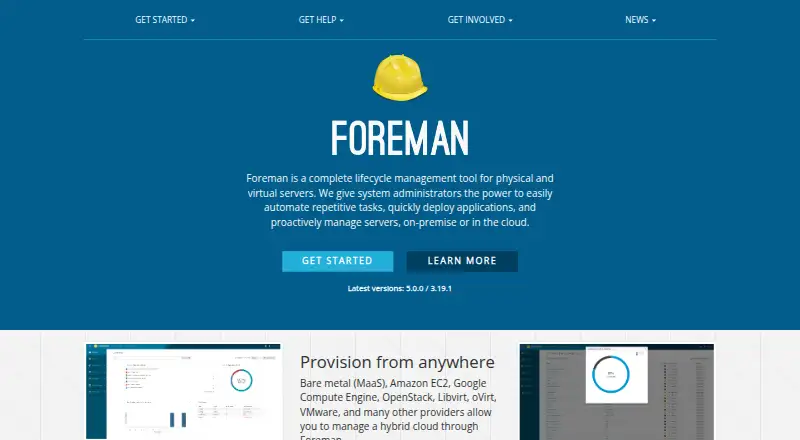
Foreman is free, open-source lifecycle management software for physical and virtual servers. It helps system administrators automate repetitive work, deploy applications and manage infrastructure on-premise or in the cloud. It can provision bare-metal systems and resources across providers including Amazon EC2, Google Compute Engine, OpenStack, Libvirt, oVirt and VMware. Configuration integrations include Puppet, Ansible, Chef and Salt; Foreman also collects Ansible reports and facts. Administrators can use a web frontend, REST API or Linux CLI, including Hammer CLI for API tasks. Host groups, bulk management, reports and audits help organize systems and review changes. Access controls include roles and authentication integrations such as LDAP, FreeIPA and Microsoft Active Directory. A typical installation includes a Foreman server, Smart Proxy servers and managed hosts. The quickstart lists Enterprise Linux 9, Debian 12 and 13, and Ubuntu 22.04 and 24.04, with 4 GB of memory required. The project says setup requires Linux system administration knowledge. Foreman can run on a FIPS-enabled host but is not FIPS-certified.
Who it suits
Foreman is aimed at system administrators managing physical or virtual servers across on-premise and cloud environments. The project says getting started requires Linux system administration knowledge.
What it does well
- Free and open-source self-managed installation.
- Provisions bare-metal and cloud resources.
- Supports Puppet, Ansible, Chef and Salt.
- Offers web, REST API and Linux CLI interfaces.
- Audits record how, who and when changes occurred.
What to know first
- Setup requires Linux system administration knowledge.
- Installation requires 4 GB of memory.
- Foreman itself is not FIPS-certified.
- Community packages are provided only for x86_64.
Limits
The free Foreman plan is open source and self-managed. The quickstart requires 4 GB of memory, and community packages are provided only for x86_64.
Plans
| Plan | Billed and limits | Price |
|---|---|---|
| Foreman | Free and open source; self-managed installation | Free |
As theforeman.org lists them, read 1 Oct 2026. The maker's own page has the final word.
Getting started
- Visit the Foreman website.
- Choose a supported installation platform, such as Enterprise Linux 9, Debian 12 or 13, or Ubuntu 22.04 or 24.04.
- Provide at least 4 GB of memory for installation.
- Install the Foreman server and, for a typical deployment, Smart Proxy servers.
- Use the web frontend, REST API, or Linux CLI to register and manage hosts.
Overview
Foreman is a self-hosted lifecycle management platform for physical and virtual servers, built for system administrators overseeing on-premises and cloud infrastructure. It brings provisioning, configuration integrations and fleet administration together at no software charge, but it expects Linux administration skills and a capable installation environment.
Key features
Foreman can provision bare-metal systems and resources across Amazon EC2, Google Compute Engine, OpenStack, Libvirt, oVirt and VMware. That breadth suits teams managing a mixed estate; organizations seeking only a narrow deployment utility may find its lifecycle scope more than they need. Host groups and bulk management help organize larger fleets, while reports flag healthy or outdated hosts and historical audit records support change reviews and troubleshooting.
Configuration management integrations span Puppet, Ansible, Chef and Salt. Foreman includes support for Puppet and Salt and collects Ansible facts and reports, giving administrators a common management view without replacing the tools themselves. A web frontend, RESTful API and Hammer CLI provide interactive and automated administration, including tasks such as host registration and role assignment.
Fine-grained role-based access control can work with LDAP, FreeIPA or Microsoft Active Directory. Smart Proxy can run OpenSCAP compliance scans and send reports to Foreman, and the platform also supports patch management and remediation automation. Foreman can run on a FIPS-enabled host, but Foreman itself is not FIPS-certified—a material distinction for organizations with certification requirements.
The architecture typically includes a Foreman server, Smart Proxy servers and managed hosts. The Foreman 5.0 quickstart names Enterprise Linux 9, Debian 12 and 13, and Ubuntu 22.04 and 24.04 as supported installation platforms; it calls for 4 GB of memory and warns that the installer configures multiple system components. Enterprise Linux 9 is supported for the server and Smart Proxy, while community packages are provided only for x86_64. These requirements make deployment planning and Linux operational expertise important, even though the project says Foreman is used across fleets ranging from tens to tens of thousands of servers.
Pricing
Foreman is free and open source under its self-managed plan, priced at $0. There is no paid tier to trade against: teams get the platform without a software charge, but must run and maintain their own installation. That arrangement fits organizations with Linux administration capacity; teams seeking vendor-managed operation should look elsewhere.
Platforms
Foreman is self-hosted, with web, API and Linux CLI interfaces. Supported platforms include Amazon Linux, Debian, Enterprise Linux 8–10, Fedora, openSUSE/SUSE Linux Enterprise Server and Ubuntu. The server and Smart Proxy requirements still narrow practical deployment choices, so check the installation target against the supported release and architecture requirements before rollout.
Who it's for
Foreman is best suited to system administrators responsible for provisioning and maintaining physical or virtual fleets across local infrastructure and cloud providers. It is a strong fit when teams need multiple configuration integrations, audit trails, access controls and automation interfaces in one self-managed system. The project itself says getting started requires a degree of Linux system administration knowledge, making it a poor match for teams looking for a low-maintenance hosted service. Community help is available through Discourse and a public Matrix room, but the project says the Matrix room is not an official support channel.
Pros and cons
- Pros: Broad provisioning coverage across bare metal and named cloud and virtualization providers helps manage heterogeneous infrastructure from one platform.
- Pros: Web, API and CLI access, plus role controls and audit history, give administrators options for both routine operations and scripted workflows.
- Pros: OpenSCAP scanning, patch management and remediation automation add security and maintenance workflows alongside server lifecycle management.
- Cons: Self-managed deployment and the Linux expertise requirement put a meaningful operational burden on teams without systems administration capacity.
- Cons: The installer changes multiple system components, and deployment requires at least 4 GB of memory, so installation is not a lightweight setup.
- Cons: Running on a FIPS-enabled host does not make Foreman itself FIPS-certified, which may rule it out where product-level certification is required.
Alternatives
For a different provisioning focus, AuroraBoot is a free, self-hosted option that requires Docker or another container engine. FOG Project is also free for commercial use and offers free community support. Canonical MAAS has a free self-support plan for all machines, but that tier excludes HA support, RBAC, a Knowledge Base, a Sev 1 response SLA and phone or ticket support.
Clonezilla is a free and open-source option under GPL version 2. openQRM Enterprise offers a free community edition with community support and a plugin library, alongside a custom-priced Enterprise plan with a full plugin library and enterprise add-ons. Supermicro SuperDoctor 5 has a free Standard plan with SD5 included and no license required.
iVentoy offers a free edition with no time limit, but it prohibits commercial use and caps clients at 20. NVIDIA Base Command Manager offers a free-to-use plan limited to eight accelerators per server, node or system, with no limit on the number of servers, nodes or systems.
Readers comparing broader categories can also browse Bare Metal Provisioning Software, OS Deployment Software, IT Automation Software and IT Configuration Management Software.
Verdict
Choose Foreman if your administrators need a no-cost, self-managed control point for provisioning and operating a varied server fleet, and your team can handle Linux deployment and upkeep. Its breadth of infrastructure integrations and administration options is the central draw. Look elsewhere if you need turnkey hosting or require Foreman itself to carry FIPS certification.
Verdict
Foreman offers server provisioning, configuration integrations and several administration interfaces without a listed software charge. Its installation requirements and Linux expertise needs make deployment planning important.
Questions
How much does Foreman cost?
The Foreman plan is free. It is free and open source, with a self-managed installation.
Is Foreman open source?
Yes. The listed Foreman plan is free and open source.
Where can Foreman run?
Foreman is self-hosted. The installation platforms listed include Amazon Linux, Debian, Enterprise Linux 8–10, Fedora, openSUSE/SUSE Linux Enterprise Server, and Ubuntu. The quickstart specifically lists Enterprise Linux 9, Debian 12 and 13, and Ubuntu 22.04 and 24.04.
What interfaces does Foreman provide?
It provides a web frontend, a RESTful API, and a Linux CLI. The Hammer CLI provides access to API calls for administration and automation.
Which configuration management tools does it support?
Foreman supports Puppet, Ansible, Chef, and Salt. It also collects Ansible reports and facts.
Does Foreman provide official support?
Community support is available through the Discourse support board and a public Matrix room. The project says its support room is not an official support channel.
Facts from Foreman's own pages
- Access control
- Foreman provides role-based access control and can use LDAP or FreeIPA for authentication and authorization. · theforeman.org, 30 Sept 2026
- Access controls
- Foreman supports fine-grained role-based access control and authentication integrations including LDAP, FreeIPA, and Microsoft Active Directory. · theforeman.org, 1 Oct 2026
- Architecture
- A typical Foreman deployment contains a Foreman server, Smart Proxy servers, and managed hosts. · docs.theforeman.org, 30 Sept 2026
- Auditing
- Foreman includes an audits system that records how, who, and when changes occurred. · theforeman.org, 30 Sept 2026
- Automation
- Foreman helps system administrators automate repetitive tasks, deploy applications, and manage servers on-premise or in the cloud. · theforeman.org, 30 Sept 2026
- CLI
- The Hammer CLI provides access to Foreman API calls for administration and automation. · theforeman.org, 30 Sept 2026
- Cloud integrations
- The product page lists Amazon EC2, Google Compute Engine, OpenStack, Libvirt, oVirt, VMware, and other providers for hybrid cloud management. · theforeman.org, 1 Oct 2026
- Configuration integrations
- Foreman supports Puppet, Ansible, Chef, and Salt for configuration management. · theforeman.org, 1 Oct 2026
- Configuration management
- Foreman includes configuration management support for Puppet and Salt and collects Ansible reports and facts. · theforeman.org, 30 Sept 2026
- Extensibility
- Foreman has a pluggable architecture that allows it to be extended in many directions. · theforeman.org, 30 Sept 2026
- Installation platforms
- The Foreman 5.0 quickstart lists Enterprise Linux 9, Debian 12 and 13, and Ubuntu 22.04 and 24.04 as supported platforms. · theforeman.org, 1 Oct 2026
- Installation requirements
- The quickstart says installation requires 4 GB of memory and warns that the installer configures multiple system components. · theforeman.org, 1 Oct 2026
- Intended users
- Foreman is aimed at system administrators, and the project says getting started requires a degree of Linux system administration knowledge. · theforeman.org, 1 Oct 2026
- Inventory and audits
- Foreman supports host groups and bulk management, and provides historical changes for auditing or troubleshooting. · theforeman.org, 1 Oct 2026
- Management interfaces
- Foreman provides a web frontend, a RESTful API, and a CLI for Linux. · theforeman.org, 1 Oct 2026
- Monitoring
- Foreman reports show what happened on nodes and indicate which hosts are healthy or outdated. · theforeman.org, 30 Sept 2026
- Project history
- Ohad Levy created an empty Rails project and named it the Foreman project on July 15, 2009. · theforeman.org, 30 Sept 2026
- Provisioning
- Foreman provisions bare-metal systems and instances across virtualization environments and public or private clouds. · theforeman.org, 1 Oct 2026
- Purpose
- Foreman is an open-source tool for managing servers through provisioning, configuration, orchestration, and monitoring. · theforeman.org, 1 Oct 2026
- REST API
- Foreman provides a RESTful API for tasks such as registering hosts and assigning user roles. · theforeman.org, 30 Sept 2026
- Security compliance
- Smart Proxy can perform OpenSCAP security compliance scans on hosts and upload compliance reports to Foreman. · docs.theforeman.org, 30 Sept 2026
- Security limitation
- Foreman can run on a FIPS-enabled host, but Foreman itself is not FIPS-certified. · docs.theforeman.org, 30 Sept 2026
- Security process
- The project accepts vulnerability reports privately and says it aims to fix high-severity issues in the current stable release. · theforeman.org, 1 Oct 2026
- Server scale
- The project says Foreman is used by organizations managing from tens to tens of thousands of servers. · theforeman.org, 1 Oct 2026
Where Foreman stands on Freedom251
- Bare Metal as a Service (BMaaS) Software#2 of 12
- IT Automation Software#13 of 77
- OS Deployment Software#6 of 29
- Bare Metal Provisioning Software#6 of 28
- OS Imaging & Deployment Software#6 of 24
- Data Center Automation#6 of 22
- Orchestration / Provisioning Software#8 of 27
- IT Configuration Management Software#9 of 27