Freedom251 › Disk Cloning Software

Clonezilla
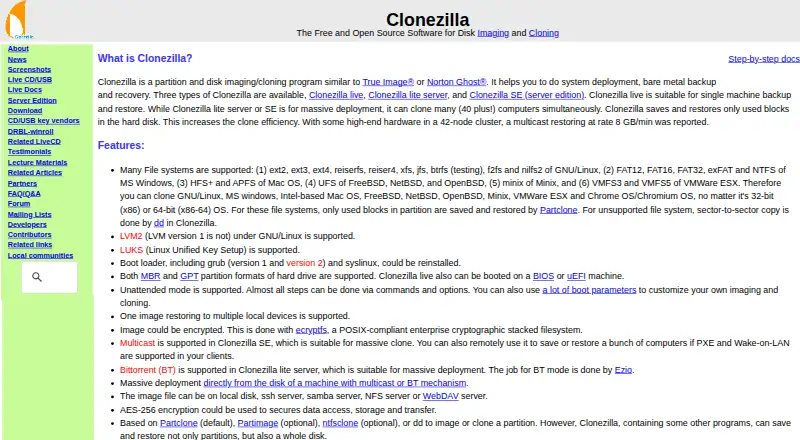
What Clonezilla is
Clonezilla is a free partition and disk imaging and cloning program for system deployment, bare-metal backup, and recovery. Clonezilla live is intended for one machine, while Clonezilla lite server and Clonezilla SE can clone many computers at once; the site describes deployments of 40 or more. It saves and restores used blocks on supported file systems, and uses sector-to-sector copying for unsupported ones. Listed file systems span Linux, Windows, Mac, BSD, Minix, and VMware, including ext4, NTFS, APFS, and VMFS3/5. Images can be kept on a local disk or SSH, Samba, NFS, or WebDAV servers, and can be encrypted with AES-256. Clonezilla SE supports multicast, and lite server supports BitTorrent deployment. Clonezilla live supports MBR and GPT and can boot on BIOS or UEFI machines. It requires an x86 or x86-64 processor, 196 MB RAM, and a boot device. The destination partition must be at least as large as the source. Differential or incremental backups and online imaging are not implemented, and images cannot be mounted or explored for direct recovery of individual files. Clonezilla is free software under GPL version 2.
Who it suits
Clonezilla suits people deploying systems or creating disk images for backup and recovery, from a single computer to multi-computer cloning. Its server editions support larger deployments, while Clonezilla live is for one machine.
What it does well
- Clonezilla is free software under GPL version 2.
- Server editions can clone many computers simultaneously.
- Images can be stored on local or network locations.
- AES-256 encryption is available for images.
- Clonezilla live supports BIOS and UEFI booting.
What to know first
- Destination partitions must be at least source size.
- Differential and incremental backups are not implemented.
- Online imaging is not implemented.
- Images cannot be mounted for direct file recovery.
Limits
The destination partition must be at least as large as the source. Differential or incremental backups and online imaging are not implemented. Images cannot be mounted or explored for direct recovery of individual files.
Plans
| Plan | Billed and limits | Price |
|---|---|---|
| Clonezilla | Free and open source software · GPL version 2 | Free |
As clonezilla.org lists them, read 29 Sept 2026. The maker's own page has the final word.
Getting started
- Visit https://clonezilla.org/.
- Choose Clonezilla live for one machine, or lite server or SE for multi-computer cloning.
- Prepare an x86 or x86-64 machine with at least 196 MB RAM for Clonezilla live.
- Prepare a boot device such as CD/DVD, USB, PXE, or a hard drive.
- Store images on a local disk or an SSH, Samba, NFS, or WebDAV server.
Overview
Clonezilla is a bootable disk and partition imaging tool for deploying systems and recovering machines from bare-metal failures. It suits administrators and technically comfortable users who need to clone one computer or roll out images to many; it is a poor fit for everyday file-level backup or work that must happen while systems stay online.
Its breadth of file-system support and no-cost license make it useful across mixed environments. The trade-off is a recovery workflow centered on whole partitions or disks: there are no incremental images, and an image cannot be browsed to retrieve an individual file.
Explore Disk Cloning Software, OS Deployment Software, Disk Imaging Software, Bare Metal Provisioning Software, and Backup software.
Key features
Imaging across file systems
For supported file systems, Clonezilla saves and restores used blocks, avoiding a full sector copy. Unsupported file systems are copied sector by sector, which can mean a less selective image. Support spans Linux, Windows, Mac, BSD, Minix, and VMware file systems, including ext4, NTFS, APFS, and VMFS3/5. Chrome OS and Chromium OS file systems are also included in the supported range.
Images can be stored locally or on SSH, Samba, NFS, and WebDAV servers. MBR and GPT are supported, and Clonezilla live boots on BIOS or UEFI machines. Images can be encrypted; AES-256 is offered to secure data access, storage, and transfer. These options suit administrators who need to work across varied systems and storage destinations, though they do not turn Clonezilla into an online backup service.
Single-machine and mass deployment
Clonezilla live targets one machine, while Clonezilla lite server and Clonezilla SE can clone many computers simultaneously; the project describes deployments to 40-plus computers. SE supports multicast, and lite server supports BitTorrent for massive deployment. That makes the server editions more relevant for fleet rollout than a one-machine recovery, but they require choosing the deployment approach that fits the environment.
Boot requirements and constraints
Clonezilla live requires an x86 or x86-64 processor, 196 MB of RAM, and a boot device such as CD/DVD, USB, PXE, or hard drive. Its bootable design is useful when restoring a machine outside its normal operating system, but it rules out online imaging. A destination partition must be at least as large as the source, limiting direct restoration to smaller partitions. Because images cannot be explored or mounted, retrieving one file means the image cannot provide a direct file-recovery path.
Pricing
Clonezilla costs nothing. The software is free and open source under GPL version 2, with the same no-cost offering covering Clonezilla live, lite server, and SE rather than reserving mass deployment for a paid tier. This is a strong fit when budget matters more than incremental backups or browseable images; there are no paid plan tiers to weigh against those limitations.
Platforms
Clonezilla runs in a Linux-based bootable environment, while imaging support covers file systems used by Linux, Windows, Mac, BSD, Minix, VMware ESX, and Chrome OS/Chromium OS. It is therefore not a native Windows or macOS backup app: those systems enter the picture through the file systems Clonezilla can image. The listed platforms include Linux, macOS, self-hosted, and Windows. The downloads page offers stable Clonezilla live 3.3.3-37 based on Debian and alternative stable 20260913-resolute based on Ubuntu; checksum files are GPG-signed by the DRBL project.
Who it's for
Choose Clonezilla for bare-metal backup, disk duplication, and operating-system deployment when a bootable workflow and whole-disk or partition restoration suit the job. A systems administrator can use the server editions for simultaneous rollouts, while an individual can use live for one machine. Look elsewhere for scheduled online imaging, incremental or differential backups, or convenient recovery of a single document from an image.
Pros and cons
Pros
- Broad file-system coverage, including ext4, NTFS, APFS, and VMFS3/5, helps when managing machines across different operating systems.
- Used-block imaging on supported file systems avoids copying unused space; local, SSH, Samba, NFS, and WebDAV destinations offer flexible image storage.
- Live, lite server, and SE cover one-machine cloning through deployments to 40-plus computers, with multicast or BitTorrent options for large rollouts.
- Free and open source under GPL version 2, with AES-256 encryption and both BIOS and UEFI boot support.
Cons
- No online imaging or incremental and differential backups, so it cannot serve as a continuing, low-disruption backup routine.
- Images cannot be mounted or browsed for individual-file recovery, making it unsuitable when restoring a few files is the priority.
- The destination partition must be at least as large as the source, restricting restores to smaller partitions.
- Unsupported file systems require sector-to-sector copying rather than used-block imaging.
Alternatives
- HDClone is worth considering for private use if its free edition's up-to-4-TB capacity and 70 MB/s limit suit the job; its Basic Edition is €19.90, paid once for private use on up to 2 PCs.
- Lazesoft Recovery Suite fits home users seeking recovery tools alongside disk imaging and cloning, with its Home Edition for non-commercial use.
- Redo Rescue is another free option for Linux, macOS, and Windows users; its maker identifies the code as GNU GPLv3 and says it can be audited, modified, and copied at no cost.
- Rescuezilla is a free alternative for users who want a tool that runs from a bootable USB or CD-ROM without a license or serial number.
- AOMEI Backupper suits Windows users seeking a perpetually free PC-backup plan rather than a Linux-based bootable workflow.
- Lazesoft Disk Image & Clone offers a free Home Edition for personal, non-commercial use on up to 3 PCs in one household.
- Casper is a Windows alternative with a free trial.
- doClone is another free option for Linux.
Verdict
Clonezilla is a strong choice for technically capable users who need free, broad-compatibility disk imaging or large-scale cloning, especially when bootable recovery and deployment matter more than convenience. Its main reason to choose is that one free tool covers used-block imaging and multi-machine deployment; its main reason to look elsewhere is the absence of online and incremental backups and direct access to individual files inside images.
Verdict
Clonezilla provides imaging and cloning options for single machines and larger deployments, with broad file-system support. It does not support online or incremental imaging, and image contents cannot be browsed for direct file recovery.
Questions
Is Clonezilla free?
Yes. Clonezilla is listed as free and is free and open-source software under GPL version 2.
Which editions does Clonezilla offer?
The site lists Clonezilla live, Clonezilla lite server, and Clonezilla SE, also called server edition.
Which systems and file systems does it support?
It runs in a Linux-based bootable environment and lists file systems used by Linux, Windows, Mac, BSD, Minix, and VMware, including ext4, NTFS, APFS, and VMFS3/5.
Can Clonezilla clone multiple computers at once?
Clonezilla live is suited to one machine. Lite server and SE can clone many computers simultaneously; the site describes deployments of 40-plus computers.
Where can Clonezilla store images?
Images can be stored on a local disk or on SSH, Samba, NFS, or WebDAV servers.
What hardware does Clonezilla live require?
It requires an x86 or x86-64 processor, 196 MB RAM, and a boot device such as CD/DVD, USB, PXE, or a hard drive.
Facts from Clonezilla's own pages
- Backup scope
- mixed · clonezilla.org, 23 Sept 2026
- Boot and partition support
- The site lists MBR and GPT support, and says Clonezilla live can boot on BIOS or UEFI machines. · clonezilla.org, 29 Sept 2026
- Computer backup
- Yes · clonezilla.org, 23 Sept 2026
- Current release
- The downloads page lists stable Clonezilla live 3.3.3-37 as Debian-based and alternative stable 20260913-resolute as Ubuntu-based. · clonezilla.org, 29 Sept 2026
- Deployment scale
- Clonezilla live is suitable for one machine; lite server and SE can clone many computers simultaneously, with the site describing 40-plus computers. · clonezilla.org, 29 Sept 2026
- Download verification
- The downloads page says checksum files are GPG-signed by the DRBL project. · clonezilla.org, 29 Sept 2026
- Editions
- The site lists Clonezilla live, Clonezilla lite server, and Clonezilla SE (server edition). · clonezilla.org, 29 Sept 2026
- Encryption
- The site says images can be encrypted and that AES-256 encryption can secure data access, storage, and transfer. · clonezilla.org, 29 Sept 2026
- File systems
- The site lists support for Linux, Windows, Mac, BSD, Minix, and VMware file systems, including ext4, NTFS, APFS, and VMFS3/5. · clonezilla.org, 29 Sept 2026
- Free plan
- Yes · clonezilla.org, 23 Sept 2026
- Image access limitation
- The site says Clonezilla images cannot be explored or mounted, so individual file recovery from an image is not directly supported. · clonezilla.org, 29 Sept 2026
- Limitations
- The destination partition must be at least as large as the source; differential or incremental backups and online imaging are not implemented. · clonezilla.org, 29 Sept 2026
- Mass deployment
- Clonezilla SE supports multicast; Clonezilla lite server supports BitTorrent for massive deployment. · clonezilla.org, 29 Sept 2026
- Minimum requirements
- Clonezilla live requires an x86 or x86-64 processor, 196 MB RAM, and a boot device such as CD/DVD, USB, PXE, or hard drive. · clonezilla.org, 29 Sept 2026
- Mobile backup
- No · clonezilla.org, 23 Sept 2026
- Supported platforms
- Linux-based bootable environment; can image supported file systems used by Linux,Windows,Mac,BSD,Minix,VMware ESX,and Chrome OS/Chromium OS · clonezilla.org, 23 Sept 2026
- Purpose
- Clonezilla is a partition and disk imaging and cloning program for system deployment, bare metal backup, and recovery. · clonezilla.org, 29 Sept 2026
- Ransomware protection
- No · clonezilla.org, 23 Sept 2026
- Restore modes
- mixed · clonezilla.org, 23 Sept 2026
- Server backup
- Yes · clonezilla.org, 23 Sept 2026
- Storage and transfer
- Image files can be stored on a local disk or on SSH, Samba, NFS, or WebDAV servers. · clonezilla.org, 29 Sept 2026
- Used blocks
- Clonezilla saves and restores only used blocks on supported file systems; it uses sector-to-sector copying for unsupported file systems. · clonezilla.org, 29 Sept 2026
Where Clonezilla stands on Freedom251
- Disk Cloning Software#2 of 26
- Backup software#15 of 151
- Disk Imaging Software#3 of 30
- OS Deployment Software#4 of 29
- Bare Metal Provisioning Software#4 of 28
- OS Imaging & Deployment Software#4 of 24