Freedom251 › Disk Imaging Software

FOG Project
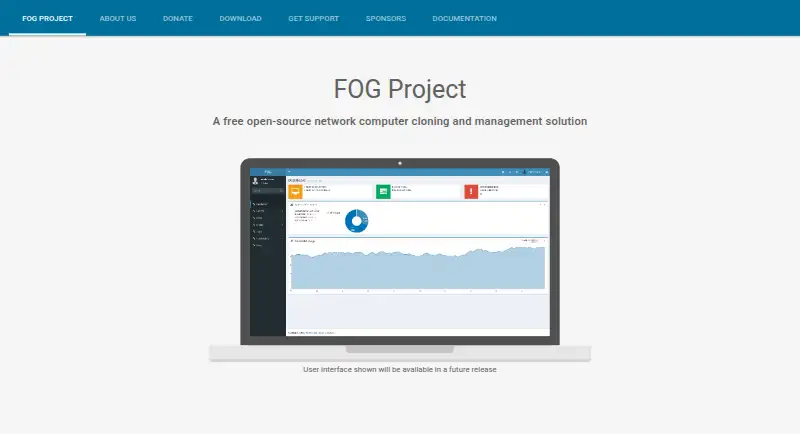
What FOG Project is
FOG Project is free, open-source software for cloning and managing computers over a network. It captures and deploys Windows, Mac OSX, and Linux distributions, including hardware-independent images for use across different computer models. It also supports multi-site installations and remote computer management when the FOG server is publicly reachable. The server must run on Linux; FOG recommends server-oriented LTS distributions such as Ubuntu, Debian, Rocky Linux, or AlmaLinux. Configuring client computers to PXE boot first allows imaging tasks to be deployed without visiting each machine. The FOG Client supports host registration, hostname changes, scheduled power management, snapin installation, and user tracking, with documented installations for Windows, Linux, and OSX. Client-server communications use public-key infrastructure and AES-256 encryption after an RSA-4096 key exchange. The client documentation notes that its Linux client lacks the FOG Tray, Active Directory joining, and PrinterManager. The software is free for commercial use, with community support through forums, a wiki, and IRC.
Who it suits
FOG Project suits administrators who need to image and manage networked Windows, Mac OSX, or Linux computers across one or more sites. It requires a Linux server and is most useful when client computers can be configured to PXE boot.
What it does well
- Free for commercial use.
- Supports hardware-independent images across computer models.
- Multi-site installations are listed.
- Client supports host registration and scheduled power management.
- Client-server traffic uses AES-256 encryption after RSA-4096 exchange.
What to know first
- Server installation requires a Linux computer.
- Linux client lacks FOG Tray and PrinterManager.
- Linux client does not support Active Directory joining.
Plans
| Plan | Billed and limits | Price |
|---|---|---|
| FOG Project | Free for commercial use · free community support | Free |
| Free | commercial use · unlimited computers · community support | Free |
As fogproject.org lists them, read 5 Oct 2026. The maker's own page has the final word.
Getting started
- Visit https://fogproject.org/.
- Install the FOG server on a Linux computer; the project recommends a server-oriented LTS distribution.
- Configure client computers to PXE boot first so imaging tasks can be deployed remotely.
- Install the FOG Client on Windows, Linux, or OSX computers that need its management functions.
- Use the project security guide to configure firewall rules and secure the MySQL database and captured image directory.
FOG Project is free, open-source software for imaging and managing networked computers. It is best suited to administrators who can run a Linux server and configure client machines for network boot. Its combination of deployment and client-management tools is compelling for planned fleet work, but Linux client limitations and server security responsibilities narrow its fit.
Overview
FOG captures and deploys Windows, Mac OSX, and Linux distributions, and supports hardware-independent images for deployment across different computer models. It can also manage computers remotely when its server is publicly reachable. That makes it more than a cloning tool, though the benefits depend on a properly configured server and network.
Key features
Network imaging
FOG recommends configuring clients to PXE boot first, so administrators can send imaging tasks without visiting each computer. Multi-site installations are supported as well. These features suit coordinated deployments across a fleet or multiple locations better than occasional, one-machine cloning.
Client management
The FOG Client supports host registration, hostname changes, scheduled power management, snapin installation, and user tracking. That gives administrators ongoing management functions alongside imaging. The client documentation covers Windows, Linux, and OSX, but Linux clients lack the FOG Tray, Active Directory joining, and PrinterManager; organizations relying on those functions should account for that gap.
Security and support
Client-server communications use public-key infrastructure and AES-256 encryption after an RSA-4096 key exchange. The security guide also recommends firewall rules and securing the MySQL database and captured image directory, so encryption does not remove the need for careful server administration. Community forums are the recommended support route, with the project saying posts are often answered within an hour and developers and moderators are present daily; its wiki and IRC channel are additional resources.
Pricing
FOG Project is free for commercial use. Its FOG Project plan costs nothing and includes free community support. There are no paid tiers or trial terms to weigh; the practical cost is the effort of running and securing a Linux server and preparing client machines for deployment.
Platforms
The server runs only on Linux, with server-oriented LTS distributions such as Ubuntu, Debian, Rocky Linux, or AlmaLinux recommended. The client documentation describes Windows, Linux, and OSX installations. FOG is self-hosted, so its web access and remote-management capability depend on the server setup; remote management requires the server to be publicly reachable. The download page lists version 1.6.0-RC-3, released October 02, 2026.
Who it's for
FOG is a strong fit for organizations that need free, self-hosted imaging across different hardware and can maintain a Linux server, PXE boot configuration, and the related security controls. Its client-management functions add value for administrators maintaining a fleet after deployment. It is less suitable where a Linux server cannot be operated or where Linux endpoints need the client functions FOG does not support.
Pros and cons
- Pros: Free for commercial use, with no per-device plan cost stated.
- Pros: Hardware-independent images, PXE-based task deployment, and multi-site installations support organized work across a varied fleet.
- Pros: Host registration, scheduled power management, snapin installation, and user tracking extend the product beyond imaging.
- Cons: The server must run Linux, creating an operational requirement for teams standardized on other server platforms.
- Cons: Linux clients lack the FOG Tray, Active Directory joining, and PrinterManager.
- Cons: Public reachability for remote management and the recommended database, firewall, and image-directory safeguards put security work on the operator.
Alternatives
OPSI is worth considering if its freemium model, free trial, and Community plan with unlimited devices, core features, and one worker process better suit the deployment; its Basic plan is capped at 30 devices.
Canonical MAAS may suit teams looking for a freemium option with a self-support plan free for all machines, provided its lack of HA support, RBAC, Knowledge Base, Sev 1 response SLA, phone, and ticket support is acceptable.
Clonezilla is another free, open-source choice for readers comparing cloning software.
Foreman is a free, self-managed option for readers comparing infrastructure-management software.
iVentoy has a free edition with no usage time limit, but it is non-commercial and capped at 20 clients, making it a poor fit for commercial deployments or larger client groups.
AOMEI Backupper offers a perpetually free Windows PC backup plan, so it is an alternative to consider when Windows backup rather than network imaging is the priority.
ManageEngine OS Deployer has a free plan capped at four workstations and one server; it may suit a small deployment that fits within that limit.
OSDCloud is a free Windows 11 deployment tool that requires WinPE and internet access, an option for Windows-focused deployments that meet those requirements.
Browse OS Deployment Software, Disk Cloning Software, Bare Metal Provisioning Software, or Disk Imaging Software to compare more tools by category.
Verdict
Choose FOG Project if you need free commercial-use network imaging and client management across a fleet, and can support its Linux server and deployment setup. Its broad deployment and management scope is the main reason to choose it; look elsewhere if Linux client feature gaps or the responsibility of securing a publicly reachable server do not fit your environment.
Verdict
FOG Project combines network imaging with client management at no software cost. Its Linux server requirement and documented Linux client limitations are worth weighing against the deployment needs.
Questions
How much does FOG Project cost?
The listed plan is free. The project describes FOG as free for commercial use.
Which operating systems can FOG image?
It can capture and deploy Windows, Mac OSX, and various Linux distributions.
What operating system does the server require?
The FOG server must run on a computer running Linux. The project recommends server-oriented LTS distributions such as Ubuntu, Debian, Rocky Linux, or AlmaLinux.
Which computers can run the FOG Client?
The client documentation describes installation on Windows, Linux, and OSX. Its Linux client does not support the FOG Tray, Active Directory joining, or PrinterManager.
Where can users get support?
The project points users to its community forums, wiki, and IRC channel. It says forum posts are often answered within an hour, with developers and moderators present daily.
Does remote management work from outside the local network?
The project supports remote management from anywhere in the world when the FOG server is publicly reachable.
Facts from FOG Project's own pages
- API
- The REST API exposes host, task, multicast-session, image and system-information routes. · docs.fogproject.org, 15 Oct 2026
- API authentication
- API requests can use a server API token plus per-user tokens; HTTP Basic authentication is also documented. · docs.fogproject.org, 15 Oct 2026
- Client limitations
- The client documentation says its Linux client does not support the FOG Tray, Active Directory joining, or PrinterManager. · wiki.fogproject.org, 5 Oct 2026
- Client management
- The FOG Client supports functions including host registration, hostname changes, scheduled power management, snapin installation, and user tracking. · wiki.fogproject.org, 5 Oct 2026
- Client platforms
- The FOG Client documentation describes installation on Windows, Linux, and OSX. · wiki.fogproject.org, 5 Oct 2026
- Company leadership
- The official about page names Chuck Syperski and Jian Zhang as project founders and Tom Elliott as senior developer. · fogproject.org, 15 Oct 2026
- Deployment method
- The project recommends configuring clients to PXE boot first so imaging tasks can be deployed without visiting each client. · wiki.fogproject.org, 5 Oct 2026
- Disk tools
- Built-in tasks include memory tests, disk tests, surface scans, disk wiping, deleted-file recovery and bad-block scans. · docs.fogproject.org, 15 Oct 2026
- Documentation
- Official documentation covers installation, management, knowledge-base troubleshooting, integrations and development. · docs.fogproject.org, 15 Oct 2026
- Domain management
- The client can change hostnames and join Windows domains. · docs.fogproject.org, 15 Oct 2026
- Forum limitation
- A FOG forum discussion says support generally focuses on core Debian and RHEL-family distributions, while unusual distributions may not work. · forums.fogproject.org, 15 Oct 2026
- Hardware independent images
- The project lists hardware-independent images as a feature for deploying images across different computer models. · fogproject.org, 5 Oct 2026
- Image types
- FOG supports partition, full-disk, multiple-disk, resizable and raw images. · docs.fogproject.org, 15 Oct 2026
- Imaging
- It can capture and deploy Windows, Mac OSX, and various Linux distributions. · fogproject.org, 5 Oct 2026
- Independent assessment
- OpenMSP describes FOG as free, open-source, self-hosted software with a free tier. · openmsp.ai, 15 Oct 2026
- Installation
- Installation is performed by cloning or downloading the repository and running installfog.sh as root. · github.com, 15 Oct 2026
- Inventory
- FOG records hardware and software inventory for managed hosts. · docs.fogproject.org, 15 Oct 2026
- License
- The main project and its public repositories use GNU GPL version 3.0. · github.com, 15 Oct 2026
- Limit: learning curve
- A SourceForge reviewer says Linux beginners face a difficult initial learning curve. · sourceforge.net, 15 Oct 2026
- Limit: Linux server
- OpenMSP says the server requires Linux and is not Windows-compatible as a server installation. · openmsp.ai, 15 Oct 2026
- Limit: missing features
- A SourceForge reviewer says FOG lacks some features available in competing products. · sourceforge.net, 15 Oct 2026
- Limit: network setup
- OpenMSP warns that correct DHCP and PXE network configuration is required. · openmsp.ai, 15 Oct 2026
- Multicast
- Multicast deployment lets many computers receive one image stream simultaneously. · docs.fogproject.org, 15 Oct 2026
- Multi-site
- The official site highlights hardware-independent images, remote computer management and multi-site installations. · fogproject.org, 15 Oct 2026
Where FOG Project stands on Freedom251
- Disk Imaging Software#1 of 30
- Disk Cloning Software#1 of 26
- OS Deployment Software#2 of 29
- Bare Metal Provisioning Software#2 of 28
- OS Imaging & Deployment Software#2 of 24