Freedom251 › GPU Tuning Software
AMD GPU Tuner
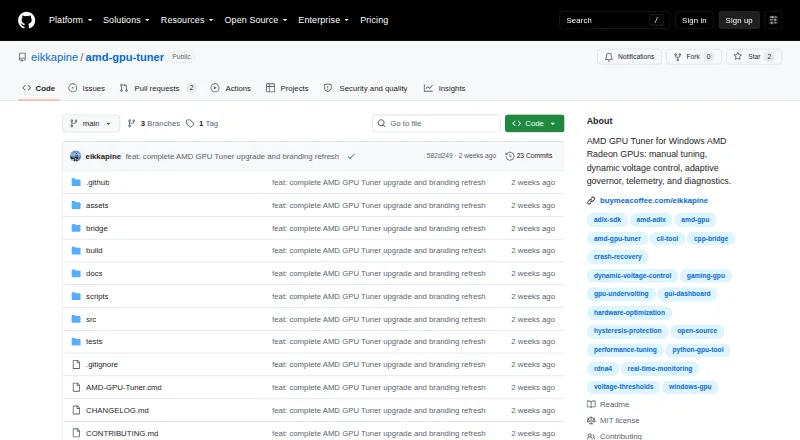
What AMD GPU Tuner is
AMD GPU Tuner is a Windows desktop and command-line tool for monitoring and tuning AMD Radeon GPUs. Manual controls cover GPU voltage, core and VRAM clocks, memory timing, power limits, and driver fan curves. Monitoring can show clocks, temperature, hotspot, power, fan speed, voltage, load, and frame statistics when a compatible frame-data source is available. Users can save supported driver settings to JSON profiles and see which settings were applied or skipped when loading them. Automatic tuning compares candidate settings with a baseline while a workload runs, though the maker describes it as experimental. An adaptive governor can apply locally learned per-game settings and optionally run live tuning experiments. Benchmark tuning guides manually started 3DMark runs; it does not install or automatically launch 3DMark. The project requires 64-bit Windows 10 or 11, an AMD Radeon GPU, and an Adrenalin driver with ADLX runtime. Hardware tuning requires an elevated terminal. The project code is MIT licensed, and settings and diagnostic data remain local.
Who it suits
It suits Windows users with an AMD Radeon GPU and compatible Adrenalin driver who want to monitor or adjust GPU settings. Hardware tuning also requires an elevated terminal.
What it does well
- Controls include voltage, clocks, power limits, and fan curves.
- Profiles save supported settings in JSON.
- Configuration and diagnostic data are stored locally.
- Project code is MIT licensed.
What to know first
- Automatic tuning is described as experimental.
- Requires Windows 10 or 11 64-bit and an AMD Radeon GPU.
- Hardware tuning requires an elevated terminal.
- No selector for multi-GPU tuning is provided.
Limits
The free plan is the MIT-licensed project code for Windows 10 or 11 (64-bit) with an AMD Radeon GPU and compatible Adrenalin driver. The bridge selects the first discrete GPU reported by ADLX, falling back to the first GPU, and offers no GPU selector or simultaneous multi-GPU tuning.
Plans
| Plan | Billed and limits | Price |
|---|---|---|
| Free and open source | MIT-licensed project code · Windows 10 or 11 (64-bit) · AMD Radeon GPU and compatible Adrenalin driver | Free |
As github.com lists them, read 28 Sept 2026. The maker's own page has the final word.
Getting started
- Open the project website.
- Use a 64-bit Windows 10 or 11 system with an AMD Radeon GPU.
- Install an Adrenalin driver with the ADLX runtime.
- Run the desktop app or command-line tool; use an elevated terminal for hardware tuning.
Overview
AMD GPU Tuner is a free Windows desktop and command-line utility for monitoring and tuning AMD Radeon GPUs. It suits Radeon owners who want direct control over clocks, voltage, power and fan curves, along with optional profiles and workload-based tuning. Its breadth is appealing, but the first-GPU-only selection and elevated-terminal requirement make it a poor fit for multi-GPU systems or anyone seeking a hands-off setup.
Key features
Manual controls and monitoring
The app can adjust GPU voltage, core and VRAM clocks, VRAM timing, power limits and driver fan curves. That makes it useful for users who want several tuning controls in one tool; these are hardware-level adjustments, so the requirement to run an elevated terminal is a meaningful setup and access constraint.
Telemetry covers core and memory clocks, temperature, hotspot, power, fan speed, voltage, load and frame statistics when a compatible frame source is available. Per-frame data can come from PresentMon, with RTSS as a fallback if PresentMon is unavailable. The range gives tuning decisions more context than clock and temperature readings alone, while frame statistics depend on that integration.
Profiles and automatic tuning
Profiles save supported driver settings as JSON and report which settings were applied or skipped when loaded. That is useful for keeping repeatable configurations, though a saved profile does not guarantee every setting will apply.
Auto-Tune compares candidate settings against a baseline while a workload is running. The maker describes this feature as experimental, so users wanting predictable results should treat it as an experiment rather than a substitute for manual tuning. Dynamic Voltage selects validated offsets according to live core-clock thresholds and requires the ADLX MGT2_1 interface. Adaptive mode can apply locally learned per-game settings and optionally run live tuning experiments, offering automation for users willing to accept that experimental character.
Benchmark and local data
Benchmark tuning guides manually started 3DMark runs and compares graphics scores; it does not buy, install or launch 3DMark for you. That suits users who already have the benchmark and want help comparing settings, not those expecting an all-in-one benchmark workflow.
Configuration, profiles, learned settings, telemetry, recovery journals and diagnostic logs stay on the local machine. Creating a diagnostics report saves it locally rather than uploading it, but reports and logs may contain GPU identifiers, executable names and local paths. Review those contents before sharing them.
Pricing
AMD GPU Tuner is free and open source: free. The MIT-licensed project code is available at no charge, with no paid plan or free trial. The free offering requires Windows 10 or 11 (64-bit), an AMD Radeon GPU and a compatible Adrenalin driver; its platform and hardware requirements are the main limits for prospective users.
Platforms
AMD GPU Tuner runs on Windows 10 or 11, 64-bit, with an AMD Radeon GPU and an Adrenalin driver that includes the ADLX runtime. Hardware tuning requires an elevated terminal. The bridge selects the first discrete GPU reported by ADLX, or the first GPU if none is reported as discrete; there is no GPU selector and no simultaneous multi-GPU tuning. That rules it out for users who need to choose among several GPUs or tune them together.
Who it's for
This is best for Windows Radeon users comfortable with manual tuning who want telemetry, reusable settings and optional automation without paying for a license. It is less suitable for people who need non-Windows support, do not have the required driver runtime, cannot use an elevated terminal for hardware tuning, or need explicit control over which GPU is tuned. The project is MIT licensed; its maker says it is independent and not affiliated with or endorsed by AMD or Intel.
Pros and cons
- Pros: Broad manual controls cover voltage, clocks, VRAM timing, power limits and fan curves, so users can adjust several aspects of Radeon behavior in one app.
- Pros: Profiles save supported driver settings to JSON and identify applied or skipped settings, which helps users manage repeatable configurations.
- Pros: Telemetry spans clocks, temperatures, power, fans, voltage, load and, with a compatible source, frame statistics.
- Cons: Hardware tuning requires an elevated terminal, which adds friction and may not suit users without the necessary access.
- Cons: The bridge offers no GPU selector or simultaneous multi-GPU tuning, limiting its usefulness on multi-GPU systems.
- Cons: Auto-Tune is experimental, and Dynamic Voltage depends on the ADLX MGT2_1 interface; users should not assume either feature will suit every setup.
- Cons: Frame statistics require a compatible source, while benchmark guidance depends on users manually starting 3DMark.
Alternatives
GPU Tuning Software is the broader category to explore if you want to compare other tuning tools.
- ASUS GPU Tweak III is another free Windows option; consider it if you want an alternative Windows utility without a stated price or usage limit.
- Intel VTune Profiler is free for commercial and non-commercial use and supports Windows, Linux and self-hosted setups; choose it if those platform options or its standalone and oneAPI Toolkit availability better fit your needs.
- NVIDIA_OC Daemon is a free Linux alternative under the MIT License; choose it if you need a Linux tool rather than a Windows Radeon utility.
- CoreCtrl is a free, open-source GNU/Linux application; choose it if you need Linux support.
- LACT is a free Linux GPU configuration and monitoring tool; choose it if Linux is your platform.
- MoreClockTool is a free Windows option aimed at newer AMD graphics cards and experienced users; consider it if that focus better matches your hardware and experience.
- TuxClocker is a free GNU/Linux option with hardware-specific GPU and CPU support; choose it if Linux support and that hardware-specific approach matter more.
- MSI Afterburner is free and offers GPU overclocking and undervolting, hardware monitoring, custom fan control and an on-screen display; consider it if those capabilities match what you need.
Verdict
Choose AMD GPU Tuner if you have a compatible Windows Radeon system and want a free tool with deep manual controls, telemetry and reusable profiles. Its experimental automation can extend that toolkit, but users who need multi-GPU selection, a non-Windows platform or tuning without an elevated terminal should look elsewhere.
Verdict
AMD GPU Tuner offers manual controls, telemetry, profiles, and experimental automatic tuning for compatible AMD Radeon systems. Its Windows and driver requirements, elevated-terminal requirement for hardware tuning, and lack of a GPU selector are important constraints.
Questions
How much does AMD GPU Tuner cost?
The Free and open source plan is free.
Which systems does it support?
It requires Windows 10 or 11 64-bit, an AMD Radeon GPU, and an Adrenalin driver with the ADLX runtime.
What can it tune?
Supported manual controls include GPU voltage, core clocks, VRAM clock and timing, power limits, and driver fan curves.
Does it tune automatically?
Auto-Tune compares candidate settings with a baseline under a running workload, and the maker describes it as experimental. The adaptive governor can also apply locally learned per-game settings and optionally run live experiments.
Does the project code have an open-source license?
Yes. The project code is MIT licensed.
Where are settings and diagnostic information stored?
Configuration, profiles, learned settings, telemetry, recovery journals, and diagnostic logs are stored locally. A diagnostics report is saved locally and is not uploaded.
Facts from AMD GPU Tuner's own pages
- Adaptive mode
- The adaptive governor can apply locally learned per-game settings and optionally run live tuning experiments. · github.com, 28 Sept 2026
- Automatic tuning
- Auto-Tune compares candidate settings with a baseline under a running workload, and the maker describes automatic tuning as experimental. · github.com, 28 Sept 2026
- Benchmark integration
- Benchmark tuning guides manually started 3DMark runs and compares graphics scores; the app does not purchase, install, or automatically launch 3DMark. · github.com, 28 Sept 2026
- Dynamic Voltage
- Dynamic Voltage selects validated voltage offsets by live core-clock thresholds and requires the ADLX MGT2_1 interface. · github.com, 28 Sept 2026
- Frame data integrations
- Per-frame data can come from PresentMon, with RTSS as a fallback when PresentMon is unavailable. · github.com, 28 Sept 2026
- License and affiliation
- The project code is MIT licensed, and the maker states it is independent and not affiliated with or endorsed by AMD or Intel. · github.com, 28 Sept 2026
- Local data
- Configuration, profiles, learned settings, telemetry, recovery journals, and diagnostic logs are stored locally. · github.com, 28 Sept 2026
- Manual tuning
- Supported controls include GPU voltage, core clocks, VRAM clock and timing, power limits, and driver fan curves. · github.com, 28 Sept 2026
- Notable limit
- The bridge selects the first discrete GPU reported by ADLX, falling back to the first GPU, and provides no GPU selector or simultaneous multi-GPU tuning. · github.com, 28 Sept 2026
- Privacy
- Creating a diagnostics report saves it locally and does not upload it; reports and logs may contain GPU identifiers, executable names, and local paths. · github.com, 28 Sept 2026
- Profiles
- Profiles save supported driver settings to JSON and report applied or skipped settings when loaded. · github.com, 28 Sept 2026
- Purpose
- AMD GPU Tuner monitors and tunes AMD Radeon GPUs on Windows through a desktop app and command line. · github.com, 28 Sept 2026
- Requirements
- The project requires Windows 10 or 11 64-bit, an AMD Radeon GPU, and an Adrenalin driver with the ADLX runtime; hardware tuning requires an elevated terminal. · github.com, 28 Sept 2026
- Telemetry
- Monitoring can show core and memory clocks, temperature, hotspot, power, fan speed, voltage, load, and frame statistics when a compatible frame source is available. · github.com, 28 Sept 2026
Where AMD GPU Tuner stands on Freedom251
- GPU Tuning Software#2 of 16