Freedom251 › GPU Overclocking Software
Gainward ExperTool
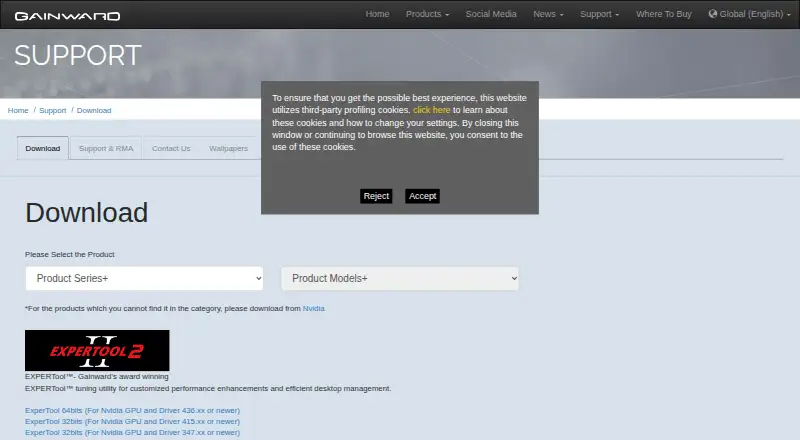
What Gainward ExperTool is
Gainward ExperTool is a free Windows utility for tuning Nvidia graphics cards and managing desktop performance. Gainward describes it as a tool for customized performance enhancements and efficient desktop management, and positions its dedicated Expert Tool for overclocking. ExperTool II adds flexible fan curve control and BIOS saving; it also offers LED lighting control for personalizing ARGB effects. Gainward says the fans stop during multimedia or general workloads and start under heavier loads when GPU temperature exceeds 60°C. Download choices depend on system architecture and Nvidia driver version: the 64-bit version is listed for Nvidia GPUs with driver 436.xx or newer, while 32-bit downloads specify drivers 415.xx or newer and 347.xx or newer. The current 64-bit package is version 11.13, dated 2025-02-19, and is 16.5 MB. It is listed for Windows 7 (64-bit), Windows 10 (64-bit), and Windows 11. Gainward was founded in 1984 and is headquartered in Taipei, Taiwan.
Who it suits
ExperTool suits Windows users with Nvidia GPUs who want performance tuning, overclocking, fan controls, or ARGB lighting options. Check the driver and system requirements for the relevant download before choosing a package.
What it does well
- Offers overclocking tools.
- ExperTool II adds flexible fan curve control.
- ExperTool II includes BIOS saving.
- Provides LED lighting control for ARGB effects.
What to know first
- Downloads are specified for Nvidia GPUs.
- 64-bit download requires Nvidia driver 436.xx or newer.
- 32-bit downloads require driver 415.xx or 347.xx or newer.
Limits
The free download requires an Nvidia GPU and a minimum driver version: 436.xx or newer for 64-bit, or 415.xx or 347.xx or newer for 32-bit.
Plans
| Plan | Billed and limits | Price |
|---|---|---|
| EXPERTool | Nvidia GPU; driver 436.xx or newer for 64-bit, or 415.xx / 347.xx or newer for 32-bit | Free |
As gainward.com lists them, read 7 Oct 2026. The maker's own page has the final word.
Getting started
- Open Gainward’s product download page.
- Choose the 64-bit or 32-bit download that matches your system and Nvidia driver version.
- Confirm that your Windows version is supported by the selected package.
- Download the listed ExperTool package.
Gainward ExperTool is a free Windows utility for overclocking and managing compatible Nvidia GPUs. It is best for Nvidia users who want tuning alongside fan and lighting controls; its GPU and driver requirements make it a poor fit for other graphics hardware.
Overview
Gainward positions ExperTool for customized performance tuning and desktop management. Its clearest use is overclocking a supported Nvidia GPU, with ExperTool II extending the utility to fan curves, BIOS saving, and LED lighting. That combination makes it more useful for owners who want to adjust several aspects of a compatible setup in one utility, but it is not a vendor-neutral choice.
Gainward describes a fan-stop behavior during multimedia or general workloads, with fans starting under heavier loads once GPU temperature exceeds 60°C. This offers a defined approach to light-load fan operation, while users who want a different response can use ExperTool II's flexible fan curve control.
Key features
- Overclocking and tuning: Gainward describes ExperTool as a utility for overclocking and customized performance enhancements. It suits users who want to tune a supported Nvidia GPU; AMD and Intel GPU owners are outside its stated compatibility.
- Fan curves: ExperTool II adds flexible fan control, as well as the described fan-stop behavior at lighter workloads. This is useful for users who want control over GPU cooling rather than a tuning utility limited to performance settings.
- BIOS saving: ExperTool II includes a BIOS saving feature, a useful addition for users who want that capability alongside tuning and fan management.
- Lighting: ExperTool II offers LED control and ARGB effects, extending its reach to users who want to personalize lighting as well as GPU behavior.
Pricing
ExperTool is free: the EXPERTool plan costs nothing, with no free trial because there is no paid plan to trial. Its value is straightforward for compatible hardware owners, but the free price does not widen GPU or driver compatibility.
The 64-bit download requires an Nvidia GPU and driver 436.xx or newer. Gainward also lists 32-bit downloads for Nvidia GPUs with drivers 415.xx or newer and 347.xx or newer. The current 64-bit package is version 11.13, dated 2025-02-19, and is 16.5 MB.
Platforms
ExperTool is for Windows. Gainward lists the current 64-bit package for Windows 7 (64-bit), Windows 10 (64-bit), and Windows 11. The stated Nvidia GPU and driver thresholds are important practical limits: owners of other GPU vendors, or Nvidia users on older drivers, should look elsewhere.
Who it's for
ExperTool makes the most sense for Windows users with a compatible Nvidia GPU who want overclocking, fan curve control, BIOS saving, or ARGB lighting in one free utility. It is not the right choice for AMD or Intel GPU users, or for anyone whose hardware or driver falls outside the listed requirements.
Warranty and return matters are handled through authorized distributors or the original store. Gainward says warranty coverage applies to hardware component defects under normal use and may be void if product stickers are removed.
Pros and cons
- Pros: Free to use. The free plan avoids a purchase cost for supported systems.
- Pros: Multiple controls in one utility. ExperTool II combines fan curves, BIOS saving, and LED or ARGB control with the tuning purpose.
- Cons: Nvidia-only compatibility. The download requirements exclude AMD and Intel GPUs.
- Cons: Driver thresholds vary by package. Users need to match the 64-bit or 32-bit download to the applicable Nvidia driver requirement.
Alternatives
For another free GPU tuning option, GPU Tuning Software and GPU Overclocking Software are broader category starting points. Consider these named alternatives when their stated platform or hardware fit is more suitable:
- GALAX Xtreme Tuner Plus is free and spans Android, iOS, and Windows; its iPhone app requires a GALAX graphics card and Xtreme Tuner PC software.
- AMD GPU Tuner is a free, MIT-licensed Windows project for AMD Radeon GPUs with a compatible Adrenalin driver, making it the relevant option for AMD owners.
- ASUS GPU Tweak III is a free Windows alternative.
- Inno3D TuneIT is free for specified INNO3D GeForce series on 64-bit Windows 10 or 11.
- Intel VTune Profiler is a free download for Windows, Linux, or self-hosted use, with commercial and non-commercial use permitted.
- MSI Afterburner is a free Windows option with GPU overclocking and undervolting, hardware monitoring, custom fan control, and on-screen display.
- NVIDIA_OC Daemon is a free Linux alternative.
- CoreCtrl is a free, open-source GNU/Linux application.
Verdict
Choose Gainward ExperTool if you use a supported Nvidia GPU on Windows and want free overclocking with fan, BIOS, and lighting features. Its focused bundle is the main reason to choose it; Nvidia-only compatibility and driver thresholds are the reasons to look elsewhere.
Verdict
ExperTool combines tuning with fan, BIOS, and lighting features, but its downloads are tied to Nvidia GPUs and specified driver versions. Gainward directs hardware warranty and return matters to an authorized distributor or the original store.
Questions
How much does Gainward ExperTool cost?
The listed EXPERTool plan is free.
Is there a free trial?
No. ExperTool is offered as a free plan, and no free trial is listed.
Which GPUs and drivers are supported?
The listed downloads are for Nvidia GPUs. The 64-bit version requires driver 436.xx or newer; 32-bit downloads require driver 415.xx or newer or 347.xx or newer.
Which Windows versions are listed for the current 64-bit package?
Gainward lists Windows 7 (64-bit), Windows 10 (64-bit), and Windows 11.
What does ExperTool II add?
ExperTool II adds flexible fan curve control, BIOS saving, and LED lighting control for ARGB effects.
Where can I get warranty or return help?
Gainward directs customers to their authorized distributor or original store for warranty and return procedures.
Facts from Gainward ExperTool's own pages
- 32-bit compatibility
- Gainward lists 32-bit downloads for Nvidia GPUs with driver 415.xx or newer and 347.xx or newer. · gainward.com, 7 Oct 2026
- 32-bit downloads
- Gainward lists 32-bit ExperTool downloads for Nvidia GPUs with drivers 415.xx or newer and 347.xx or newer. · gainward.com, 7 Oct 2026
- 64-bit compatibility
- The 64-bit download is labeled for Nvidia GPUs and driver 436.xx or newer. · gainward.com, 7 Oct 2026
- 64-bit download
- Gainward lists a 64-bit ExperTool download for Nvidia GPUs with driver 436.xx or newer. · gainward.com, 7 Oct 2026
- BIOS feature
- ExperTool II includes a BIOS saving feature. · gainward.com, 7 Oct 2026
- BIOS saving
- A Gainward product datasheet says Expertool II adds a BIOS saving feature. · gainward.com, 7 Oct 2026
- Current package
- On a product download page, Gainward lists ExperTool 64-bit version 11.13, dated 2025-02-19, at 16.5 MB for Windows 7 64-bit, Windows 10 64-bit, and Windows 11. · gainward.com, 7 Oct 2026
- Fan control
- A Gainward product datasheet says Expertool II adds flexible fan curve control. · gainward.com, 7 Oct 2026
- Fan stop behavior
- Gainward says the fans stop during multimedia or general workloads and start under heavier loads when GPU temperature exceeds 60°C. · gainward.com, 7 Oct 2026
- Founded
- 1984 · gainward.com, 28 Sept 2026
- Headquarters
- Taipei, Taiwan · gainward.com, 28 Sept 2026
- Integrations
- The opened Gainward product and download pages list no ExperTool integrations. · gainward.com, 7 Oct 2026
- Latest listed version
- Gainward lists ExperTool version 11.13, dated 2025-02-19, with a download size of 16.5 MB. · gainward.com, 7 Oct 2026
- Lighting control
- ExperTool II offers LED lighting control, and Gainward says its utility can personalize ARGB lighting effects. · gainward.com, 7 Oct 2026
- Nvidia requirement
- The listed ExperTool downloads specify compatibility with Nvidia GPUs and minimum Nvidia driver versions. · gainward.com, 7 Oct 2026
- Overclocking
- Gainward says its dedicated Expert Tool is for overclocking. · gainward.com, 7 Oct 2026
- Purpose
- Gainward describes EXPERTool as a tuning utility for customized performance enhancements and efficient desktop management. · gainward.com, 7 Oct 2026
- Security and compliance
- The opened Gainward product and download pages state no security certification or compliance claim for ExperTool. · gainward.com, 7 Oct 2026
- Support
- Gainward directs product warranty and return handling to authorized distributors or the original store. · gainward.com, 7 Oct 2026
- Support channel
- Gainward says product warranty is managed by authorized distributors and directs customers to their local distributor or original store for return procedures. · gainward.com, 7 Oct 2026
- Supported Windows versions
- A current product download page lists ExperTool 64-bit for Windows 7 (64-bit), Windows 10 (64-bit), and Windows 11. · gainward.com, 7 Oct 2026
- Target users
- Gainward presents EXPERTool as a tool for users seeking performance tuning and desktop management. · gainward.com, 7 Oct 2026
- Warranty limit
- Gainward says warranty coverage applies to hardware component defects under normal use and may be void if product stickers are removed. · gainward.com, 7 Oct 2026
Where Gainward ExperTool stands on Freedom251
- GPU Overclocking Software#8 of 19
- GPU Tuning Software#8 of 16