Freedom251 › GPU Overclocking Software
Arc Power
What Arc Power is
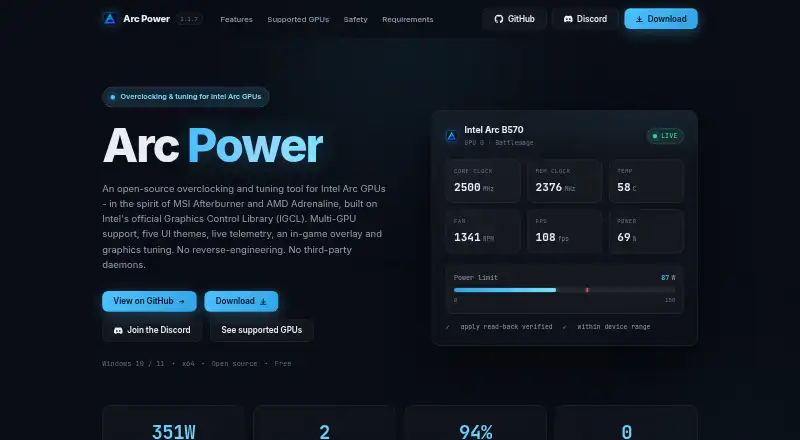
Arc Power is a free Windows utility for adjusting and monitoring supported Intel Arc graphics hardware. It offers driver-backed controls for clocks, power, temperatures, fan behavior, and telemetry, bounded by the selected device and driver capabilities. The overlay can show clocks, temperatures, power, utilization, VRAM, FPS, 1% Low / 99% FPS, and frame time. Users can save named tuning profiles and set one to load when Arc Power starts. Graphics options include XeSS Frame Generation, frame synchronization, frame limits, low latency, and supported display settings. On Alchemist GPUs, a negative voltage offset is available up to -200 mV. Reversible Windows graphics options appear in the Tweaks section. Arc A3/A5/A7 and B580/B570 are listed as verified working; Arc Pro B50 and integrated Arc graphics offer tweaks and telemetry only. AMD and NVIDIA adapters may be visible for telemetry when vendor libraries are available, but tuning requires Intel Arc. The stated requirement is 64-bit Windows 10 or 11 with an Intel graphics driver for Arc features. Installer and portable downloads are available.
Who it suits
It suits Windows users with a supported Intel Arc GPU who want tuning controls, graphics settings, telemetry, or named profiles. Arc Pro B50 and integrated Arc users are limited to tweaks and telemetry.
What it does well
- Free plan is available.
- Overlay shows performance readings including FPS and frame time.
- Profiles can be saved and loaded at startup.
- Windows graphics tweaks can be reverted.
- Installer and portable downloads are offered.
What to know first
- Arc tuning requires an Intel Arc GPU.
- Arc Pro B50 and integrated Arc are limited to tweaks and telemetry.
- Requires 64-bit Windows 10 or 11.
Getting started
- Open the Arc Power project website.
- Choose the installer or portable download.
- Use a 64-bit Windows 10 or 11 system; Arc features require an Intel graphics driver.
- Start Arc Power and use the available controls for your GPU and driver.
Verdict
Arc Power combines Arc GPU tuning, monitoring, profiles, and graphics options in a free Windows utility. Check the listed GPU scope first, particularly if you have Arc Pro B50 or integrated Arc graphics.
Questions
Is Arc Power free?
Yes. It is listed as free, with a free plan and no free trial.
Which GPUs can it tune?
Tuning requires an Intel Arc GPU. Arc A3/A5/A7 and B580/B570 are listed as verified working; Arc Pro B50 and Arc integrated graphics are limited to tweaks and telemetry.
Does it work with AMD or NVIDIA adapters?
They may be visible for telemetry when their vendor libraries are available. Arc tuning requires an Intel Arc GPU.
Which operating systems does it support?
The listed requirement is 64-bit Windows 10 or 11. Arc features also require an Intel graphics driver.
Is Arc Power open source?
The repository identifies its license as GPL-2.0.
How can I install it?
The project offers installer and portable downloads.
Facts from Arc Power's own pages
- GPU compatibility
- Arc A3/A5/A7 and B580/B570 are listed as verified working; Arc Pro B50 and Arc integrated graphics are listed for tweaks and telemetry only. · github.com, 30 Sept 2026
- GPU limitation
- Arc tuning requires an Intel Arc GPU, though AMD and NVIDIA adapters may remain visible for telemetry when their vendor libraries are available. · github.com, 30 Sept 2026
- GPU tuning
- It supports overclocking and fan control where the selected GPU and driver expose those capabilities. · github.com, 30 Sept 2026
- Graphics features
- The Graphics section includes XeSS Frame Generation, frame synchronization, frame limits, low latency, and supported display settings. · github.com, 30 Sept 2026
- Graphics settings
- Graphics options include XeSS Frame Generation, frame synchronization, frame limits, low latency, and supported display settings. · github.com, 30 Sept 2026
- Installation and support
- The maker lists Windows 10 or 11 64-bit as a requirement and offers installer and portable downloads; troubleshooting guidance and an issue tracker are available through the project repository. · github.com, 30 Sept 2026
- Integrations
- The project says it is powered by IGCL, RTSS, LibreHardware Monitor, and OBS, and credits Ascent OBS for OBS integration. · github.com, 30 Sept 2026
- License
- The repository identifies its license as GPL-2.0. · github.com, 30 Sept 2026
- Maker
- The repository is published under the GitHub account YamsSE. · github.com, 30 Sept 2026
- Monitoring
- The overlay can display clocks, temperatures, power, utilization, VRAM, FPS, 1% Low / 99% FPS, and frame time. · github.com, 30 Sept 2026
- Notable limitation
- Arc tuning requires an Intel Arc GPU, while AMD and NVIDIA adapters are visible for telemetry only when their vendor libraries are available. · github.com, 30 Sept 2026
- Profiles
- Users can save and load named tuning profiles and configure a profile to apply when Arc Power starts. · github.com, 30 Sept 2026
- Purpose
- Arc Power provides driver-backed tuning, monitoring, graphics settings, profiles, and an in-game overlay for Intel Arc GPUs. · github.com, 30 Sept 2026
- Requirements and downloads
- The stated requirements are 64-bit Windows 10 or 11 and an Intel graphics driver for Arc features; the project offers installer and portable downloads. · github.com, 30 Sept 2026
- Safety
- The project warns that overclocking can damage hardware and may void warranties, and says extended ranges require confirmation and applied values are checked against driver read-backs. · github.com, 30 Sept 2026
- Supported GPUs
- The project lists Arc A3/A5/A7 and Arc B580/B570 as verified working, while Arc Pro B50 and Arc integrated graphics are limited to tweaks and telemetry. · github.com, 30 Sept 2026
- Tuning
- It offers driver-backed controls for supported clocks, power, temperature, fan behavior, and telemetry, with device-reported limits and read-back verification. · github.com, 30 Sept 2026
- Undervolting
- Alchemist GPUs support a driver-backed negative voltage offset bounded to -200 mV. · github.com, 30 Sept 2026
- Windows tweaks
- The Tweaks section offers reversible Windows graphics options that can be enabled, disabled, or reverted. · github.com, 30 Sept 2026
Where Arc Power stands on Freedom251
- GPU Overclocking Software#9 of 19