Freedom251 › System Information Software

Fastfetch
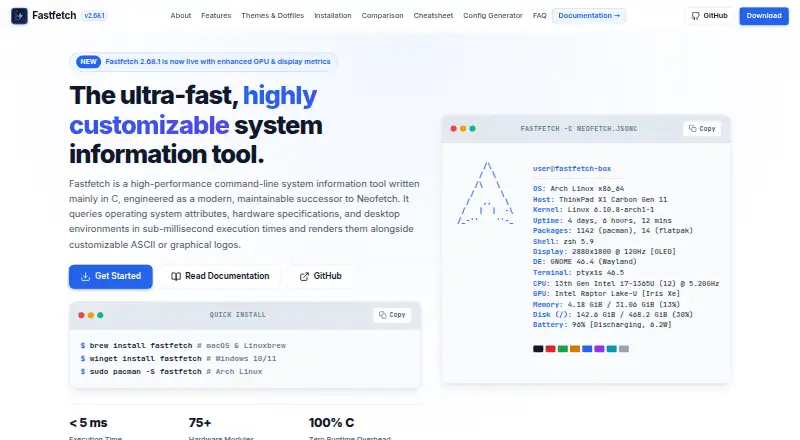
What Fastfetch is
Fastfetch is a free, open-source command-line tool that displays operating system, hardware, and software information in a terminal, alongside customizable logos. Its more than 75 modules cover details such as CPU, GPU, memory, disks, battery, TPM, audio, and Wi-Fi. It can show ASCII logos or render images through supported terminal graphics protocols. Configuration uses JSONC, and an official schema supports editor autocomplete and validation. The maker lists native support for Windows, macOS, Linux, BSD, and Android through Termux, with installation options through package managers or downloads. Fastfetch can be integrated with shell startup for Bash, Zsh, Fish, PowerShell, and Nushell, and is described as compatible with Starship and Oh My Posh. Use cases include terminal startup greetings, hardware auditing and diagnostics, and desktop screenshot showcases. A sample configuration can query Spotify, MPD, MPRIS, or Apple Music for media information. One caution: unconditional output from a shell startup file can disrupt SCP, SFTP, and other non-interactive shell operations.
Who it suits
Fastfetch suits command-line users who want system details displayed in a terminal, including for diagnostics or desktop screenshots. It may also fit users who want customizable logos and shell-startup integration.
What it does well
- More than 75 built-in information modules.
- Supports Windows, macOS, Linux, BSD, and Android.
- JSONC configuration includes an official schema.
- Available as a free MIT-licensed tool.
What to know first
- Unconditional shell-startup output can disrupt SCP and SFTP.
- The page does not describe dedicated support.
Plans
| Plan | Billed and limits | Price |
|---|---|---|
| Fastfetch | MIT-licensed open-source command-line tool · 75+ system information modules | Free |
| Free | open-source CLI · all documented modules and platforms | Free |
As fastfetch.dev lists them, read 30 Sept 2026. The maker's own page has the final word.
Getting started
- Choose a supported system: Windows, macOS, Linux, BSD, or Android through Termux
- Install through a listed package manager or download option, such as winget, Homebrew, APT, Pacman, or Termux
- Configure Fastfetch with JSONC and use the official schema for editor autocomplete and validation
- Optionally add it to a supported shell startup setup, taking care with non-interactive operations
Overview
Fastfetch is a free, open-source command-line utility that prints operating-system, hardware and software details alongside a logo in the terminal. It suits people who want a tailored system readout as part of a terminal workflow, rather than a graphical dashboard. Its wide module selection and broad operating-system support are useful strengths, provided shell startup is configured with care.
Use it for a terminal greeting, a hardware audit or a compact system summary for a desktop screenshot. The command-line presentation is also its main limitation: readers seeking a visual hardware-monitoring app should look elsewhere. Browse our System Information Software directory for more options.
Key features
System details in one readout
More than 75 built-in modules span CPU, GPU, memory, disk, battery, TPM, audio and Wi-Fi information. Fastfetch can also report firmware details and installed software, making it useful for assembling a broad inventory or checking a machine without opening a separate app. TPM status is a reporting module, not evidence of a security certification or compliance program.
Tailored terminal output
Fastfetch uses JSONC configuration, and its official JSON schema supports editor autocomplete and validation. That is a practical aid for users who want to shape the output and catch configuration errors, though customization still requires working with configuration rather than a graphical interface. It supports ASCII logos and image rendering through Kitty, Sixel, iTerm2 or Chafa protocols.
Shell and media integrations
Shell startup integration covers Bash, Zsh, Fish, PowerShell and Nushell, with compatibility for Starship and Oh My Posh. A sample configuration can query Spotify, MPD, MPRIS or Apple Music for media information. These integrations make Fastfetch a natural fit for a personalized terminal, but printing it unconditionally from a shell startup file can disrupt SCP, SFTP and other non-interactive operations; startup configuration needs to account for those sessions.
Container option
A Docker command can run Fastfetch in a container to inspect host, container and runtime metrics. This gives users a container-based route alongside ordinary installation, without changing the tool's terminal-first nature.
Pricing
Fastfetch is free, with an MIT-licensed open-source command-line tool and more than 75 system-information modules. There is no paid tier to compare: the free plan is the product. The plan has no stated seat or usage quota in the published terms, and no free trial is offered because the tool itself is free. Readers who need a dedicated support service should note that Fastfetch points users to documentation and its GitHub organization rather than describing one.
Platforms
The maker lists native support for Windows, macOS, Linux, BSD and Android through Termux. Installation options include winget, Scoop, Homebrew, MacPorts, APT, Pacman, DNF, FreeBSD pkg and Termux. This range makes Fastfetch practical across varied personal systems, although the Android route is specifically through Termux.
Who it's for
Fastfetch is a strong fit for terminal users who want a configurable system summary, developers and administrators who value a broad set of hardware and software details, and people building a shell greeting or desktop screenshot. Its open-source license and multi-platform reach are particularly useful for users who want the same style of readout across different operating systems.
It is less suitable for people who expect a graphical interface, or who want a dedicated support service. Anyone adding it to shell startup should also take care not to interfere with non-interactive access such as SCP or SFTP.
Pros and cons
- Pros: More than 75 modules combine common components with details such as TPM status, firmware and installed software, supporting more than a minimal system summary.
- Pros: JSONC configuration, schema-backed editor assistance, and several logo-rendering protocols give users meaningful control over terminal output.
- Pros: Free, MIT-licensed availability and support across Windows, macOS, Linux, BSD and Android through Termux suit mixed-platform use.
- Cons: The terminal interface will not suit readers who want a graphical system-information or monitoring app.
- Cons: Unconditional startup output can disrupt SCP, SFTP and other non-interactive shell operations, so integration requires care.
- Cons: The maker points users to documentation and GitHub rather than describing a dedicated support service.
Alternatives
ASTRA32 is a Windows-only freemium option with a free plan for non-commercial use; consider it if that platform and use condition fit better.
EtreCheckPro is a macOS alternative with a free download for unlimited basic reports, diagnostics and command-line use, plus a 19.99 USD one-time Power User upgrade; choose it if you want that Mac-focused reporting route.
hw-probe is a free Linux and self-hosted project that anonymously collects Linux/BSD hardware details to help people collaboratively debug hardware problems; it is the more relevant choice for that collaborative debugging purpose.
HWMonitor offers a free Windows x86/x64 edition for monitoring PC hardware sensors, with a paid PRO option; choose it if sensor monitoring on Windows is the priority.
AppControl is a free Windows application; consider it if you want a Windows-focused alternative.
Btrfsmaintenance is a free Linux and self-hosted set of scripts for Btrfs filesystem maintenance, so it is aimed at a different task.
inxi is a free Perl-based tool focused on GNU/Linux; it is worth considering if you want a Linux-focused system-information alternative.
WinAudit is free Windows freeware that requires no setup; consider it if a no-setup Windows option is more suitable.
Verdict
Choose Fastfetch if you want a free, configurable terminal readout with broad system coverage across several operating systems. Its module range and output controls give it real flexibility for shell customization and hardware checks. Look elsewhere if you need a graphical monitoring experience or dedicated support, and configure startup carefully to keep non-interactive shell operations working.
Verdict
Fastfetch offers customizable terminal displays of system information across several operating systems. Configure shell startup carefully to avoid disrupting non-interactive operations.
Questions
How much does Fastfetch cost?
Fastfetch is free. Its listed plan is free.
Is Fastfetch open source?
Yes. It is written mainly in C and licensed under MIT.
Which operating systems does it support?
The maker lists Windows, macOS, Linux, BSD, and Android through Termux.
How can Fastfetch be installed?
Listed options include winget, Scoop, Homebrew, MacPorts, APT, Pacman, DNF, FreeBSD pkg, and Termux.
Can Fastfetch show media information?
A sample configuration can query Spotify, MPD, MPRIS, or Apple Music.
What should I consider before adding it to shell startup?
Unconditionally printing Fastfetch can disrupt SCP, SFTP, and other non-interactive shell operations.
Facts from Fastfetch's own pages
- Architecture support
- The project says it is actively tested only on x86-64 and AArch64; other architectures are not guaranteed. · github.com, 15 Oct 2026
- Build requirements
- Current source builds require CMake with GCC 13 or newer or Clang 16 or newer; MSVC is unsupported. · fastfetch.dev, 15 Oct 2026
- Config generation
- The --gen-config command creates an interactive configuration at ~/.config/fastfetch/config.jsonc. · fastfetch.dev, 15 Oct 2026
- Configuration
- Configuration uses JSONC files and an official JSON schema that supports editor completion and validation. · github.com, 15 Oct 2026
- Containers
- The maker provides a Docker command for running Fastfetch in a container to inspect host, container, and runtime metrics. · fastfetch.dev, 30 Sept 2026
- Hardware modules
- The product page lists more than 75 built-in modules, including CPU, GPU, memory, disk, battery, TPM, audio, and Wi-Fi information. · fastfetch.dev, 30 Sept 2026
- Implementation
- Fastfetch is an open-source system information tool written mainly in C and licensed under MIT. · fastfetch.dev, 30 Sept 2026
- Independent documentation
- The fastfetch.dev resource describes itself as a community-written guide independent of and unaffiliated with the fastfetch-cli project. · fastfetch.dev, 15 Oct 2026
- Install channels
- Install methods include distribution packages, Homebrew, MacPorts, winget, Scoop, Chocolatey, Termux and GitHub release archives. · fastfetch.dev, 15 Oct 2026
- Install options
- The maker lists package-manager or download options including winget, Scoop, Homebrew, MacPorts, APT, Pacman, DNF, FreeBSD pkg, and Termux. · fastfetch.dev, 30 Sept 2026
- Integrations
- The installation documentation lists package-manager integrations including APT, pacman, DNF, Homebrew, MacPorts, Scoop, Chocolatey, winget and Termux. · fastfetch.dev, 15 Oct 2026
- Latest release
- Release 2.69.0 was published September 25, 2026. · github.com, 15 Oct 2026
- License
- The project is distributed under the MIT License. · github.com, 15 Oct 2026
- Limit: iOS availability
- An unofficial iOS port states it is jailbreak-oriented and is not intended as a normal App Store application. · github.com, 15 Oct 2026
- Limit: output and icons
- Softpedia says enabling all modules can require scrolling or terminal resizing and that icons may need Nerd Fonts. · linux.softpedia.com, 15 Oct 2026
- Limit: support boundaries
- Hysen Labs notes that only x86-64 and AArch64 are actively tested and that outdated distribution packages are unsupported. · hysenlabs.com, 15 Oct 2026
- Limit: terminal focus
- OMG! Ubuntu notes that default output can become lengthy and that Ubuntu repositories may lag behind current releases. · omgubuntu.co.uk, 15 Oct 2026
- Logos
- The documentation lists 540 built-in logos and supports image logos through Kitty, Sixel, iTerm2 and Chafa protocols. · fastfetch.dev, 15 Oct 2026
- Maintainers
- The project identifies Carter Li as maintainer and Linus Dierheimer as original author. · github.com, 15 Oct 2026
- Media integrations
- A sample configuration is described as querying Spotify, MPD, MPRIS, or Apple Music for media information. · fastfetch.dev, 30 Sept 2026
- Modules
- Version 2.69.0 documents 76 information modules. · fastfetch.dev, 15 Oct 2026
- Operating systems
- The maker lists native support for Windows, macOS, Linux, BSD, and Android through Termux. · fastfetch.dev, 30 Sept 2026
- Optional dependencies
- Missing optional library headers cause the related feature to be omitted instead of making the build fail. · github.com, 15 Oct 2026
- Output formats
- Fastfetch can emit machine-readable JSON with --format json for scripts. · github.com, 15 Oct 2026
Where Fastfetch stands on Freedom251
- System Information Software#2 of 34