Freedom251 › System Information Software
hw-probe
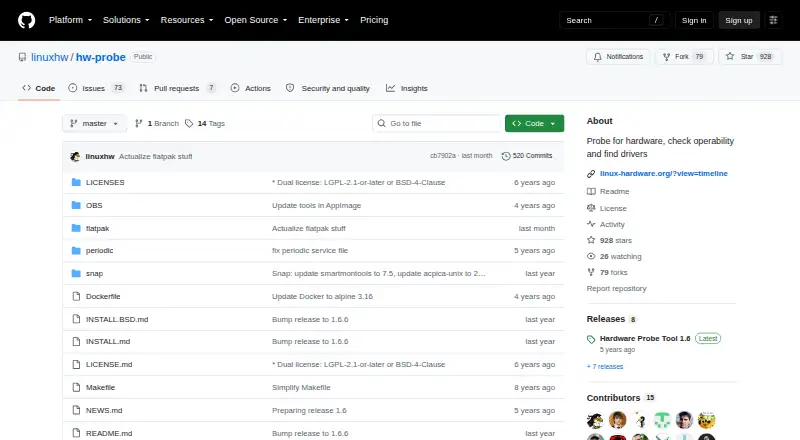
What hw-probe is
hw-probe is a free hardware probing tool for Linux and BSD systems. It captures a snapshot of hardware state and logs, then provides a permanent URL for viewing the probe. If a device lacks a driver, it can suggest a Linux kernel version or third-party driver using LKDDb data. Users can create an inventory ID and mark probes to locate computers on Linux-Hardware.org. Its monitoring command schedules a daily cron probe and emails alerts about operating-system failures, configuration changes, or hardware degradation. Optional tests cover graphics, drive read speed, CPU performance, and RAM. Installation choices include AppImage, Docker, Snap, Flatpak, Live CD/USB, and native packages. The tool uploads probes over HTTPS, masks private information before upload, and represents MAC addresses and serial numbers with prefixes of salted hashes; it acknowledges that privacy decoration can fail in edge cases. Users can disable collection of selected logs. The Snap package has limited functionality in its sandbox, and drive SMART checks require disk block-device access. The project is dual-licensed under LGPL-2.1-or-later and BSD-4-Clause.
Who it suits
It is intended for Linux and BSD developers debugging computer problems and organizations simplifying hardware inventory. It may also suit administrators who want scheduled hardware and system monitoring with email alerts.
What it does well
- Provides permanent URLs for hardware snapshots.
- Suggests kernel versions or third-party drivers for missing drivers.
- Daily monitoring can email alerts about failures and changes.
- Optional tests cover graphics, drives, CPU, and RAM.
- Available in several package and deployment formats.
What to know first
- Snap runs in a sandbox with limited functionality.
- Drive SMART checks require disk block-device access.
- Privacy masking may fail in edge cases.
- No report export is listed.
Limits
The software is free. The Snap package runs with limited functionality in a sandbox, and checking drive SMART attributes requires disk block device access.
Plans
| Plan | Billed and limits | Price |
|---|---|---|
| hw-probe | Open-source hardware probing tool · dual-licensed under LGPL 2.1-or-later or BSD-4-Clause | Free |
As github.com lists them, read 2 Oct 2026. The maker's own page has the final word.
Getting started
- Open the hw-probe project website on GitHub.
- Choose an available package or deployment format, such as AppImage, Docker, Snap, Flatpak, Live CD/USB, or a native distribution package.
- Install or run it on a supported Linux distribution or BSD system.
- Create a probe to capture hardware state and logs.
- Use an inventory ID and mark probes if you want to locate computers on Linux-Hardware.org.
- Configure the monitoring command to schedule daily probes and email notifications.
hw-probe is a free command-line hardware inventory and diagnostic tool for Linux and BSD systems. It suits developers tracking down device and driver problems and organizations that need a searchable record of machines. Its combination of permanent probe pages, driver suggestions, and scheduled checks is compelling, provided uploading decorated hardware data and Snap’s restrictions fit your policy.
Overview
Each probe records a snapshot of hardware state and logs, then returns a permanent URL for reviewing it. When a device is missing a working driver, the tool uses LKDDb data to suggest a Linux kernel version or a third-party driver. That makes it particularly useful during Linux troubleshooting, where a concrete next step is more valuable than a bare component list.
You can generate an inventory ID and mark probes so computers can be found on Linux-Hardware.org. LHWM extends the one-off snapshot into operational monitoring: its monitoring command installs a daily cron job, probes the server, and emails alerts about operating-system failures, configuration changes, or hardware degradation. This is a practical lightweight check for administrators, although it is narrower than a full infrastructure-monitoring system.
Key features
- Hardware inventory: Firmware details and installed software are included in the probe, helping teams identify machines and compare their configurations.
- Driver guidance: Suggested kernel versions or third-party drivers turn a missing-driver report into an actionable troubleshooting path.
- Optional sanity tests: You can run graphics checks with glxgears, drive read-speed checks with hdparm, CPU checks using dd and md5sum, and memory checks with memtester. These are useful spot checks, not a replacement for a complete benchmarking suite.
- Recurring monitoring: Daily cron-based probes and email notifications surface important failures or changes without repeated manual commands.
- Command-line deployment: AppImage, Docker, Snap, Flatpak, Live CD/USB, and native distribution packages accommodate servers, portable media, and standard Linux installations.
- Privacy controls: Usernames, hostnames, IP addresses, MAC addresses, UUIDs, and serial numbers are decorated before upload. MAC and serial identifiers are sent as 32-byte prefixes of salted SHA-512 hashes, uploads use HTTPS, and selected logs can be disabled with -disable. The project acknowledges that edge cases can still defeat privacy decoration, so highly sensitive environments should assess that risk.
Pricing
The sole hw-probe plan costs free. It is an open-source tool under LGPL-2.1-or-later and BSD-4-Clause, with no paid tier or seat charge described. That makes it suitable for individual troubleshooters and organizations that want to deploy probing across their own Linux or BSD machines without a software subscription. The trade-off is that there is no hosted premium layer or report-export option; probe results are viewed through their permanent web URLs.
Platforms
hw-probe targets Linux and self-hosted use, and the project supports Linux distributions plus BSD systems including FreeBSD, OpenBSD, NetBSD, DragonFly, MidnightBSD, GhostBSD, NomadBSD, FreeNAS, and pfSense. Installation choices include AppImage, Docker, Snap, Flatpak, Live CD/USB, and native Linux packages. BSD users are directed to separate installation instructions and bsd-hardware.info.
Choose the Snap package carefully: its sandbox limits functionality and it needs disk block-device access to inspect drive SMART attributes. A different package format is the safer choice when complete disk diagnostics matter.
Who it's for
Linux and BSD developers get a focused way to capture reproducible hardware states and investigate driver failures. IT teams and system administrators can use inventory IDs and daily alerts to keep track of servers and detect configuration or hardware changes. It is less suitable for users who need a polished graphical dashboard, downloadable reports, or strictly local data retention.
Pros and cons
Pros
- Permanent probe URLs make snapshots easy to revisit and share during troubleshooting.
- LKDDb-backed kernel and third-party-driver suggestions provide practical remediation guidance.
- Inventory IDs, optional tests, and cron-based email monitoring extend the tool beyond a one-time hardware listing.
- Broad Linux/BSD coverage and many deployment formats support servers and portable environments.
- Free, dual-licensed open-source software avoids per-machine licensing costs.
Cons
- Probe information is uploaded, even with decoration and hashed identifiers, which may conflict with strict data-residency rules.
- There is no report export, limiting offline documentation and integration with teams that require portable files.
- Snap’s sandbox can restrict functionality and SMART inspection unless block-device access is granted.
- The optional tests are targeted sanity checks rather than a complete performance-testing platform.
Alternatives
Browse System Information Software if you want a wider field of system-information tools. Fastfetch is the better pick for a free, MIT-licensed command-line summary across Android, Linux, macOS, and Windows, with 75-plus modules but no hw-probe-style driver guidance or monitoring described.
Choose Facter when cross-platform inventory for Puppet environments is the priority; its free Puppet Core Developer plan covers fewer than 25 nodes, while larger commercial deployments use custom pricing. ASTRA32 is a Windows-only freemium option, including free non-commercial use.
EtreCheckPro fits macOS users seeking basic reports and diagnostics, with a free download and a 19.99 USD one-time Power User upgrade. htop is a free Linux/macOS process viewer rather than a hardware inventory and driver tool. HWMonitor targets Windows and Android sensor monitoring, with a free edition and a 19.95 USD one-time PRO Standard option.
Network Activity Indicator is a Windows freeware utility, while SIW serves Windows users with a free viewer and a 14-day trial version. Neither is a direct substitute for hw-probe’s Linux/BSD probing workflow.
Verdict
Choose hw-probe if you administer Linux or BSD systems and want free, repeatable hardware snapshots paired with driver advice, inventory, and lightweight email monitoring. Look elsewhere if probe data must stay entirely local, if you require exported reports, or if your installation depends on unrestricted Snap functionality.
Verdict
hw-probe combines hardware inventory, driver guidance, optional tests, and scheduled monitoring for Linux and BSD environments. Review its upload behavior and Snap limitations before choosing an installation method.
Questions
How much does hw-probe cost?
The listed plan is free.
Which systems does it support?
It supports Linux distributions and BSD systems, including FreeBSD, OpenBSD, NetBSD, DragonFly, MidnightBSD, GhostBSD, NomadBSD, FreeNAS, and pfSense.
What does hw-probe do with a probe?
It captures a snapshot of hardware state and logs, then returns a permanent URL for viewing it.
Does it suggest drivers?
When a device lacks a driver, it can suggest a Linux kernel version or a third-party driver using LKDDb data.
Is hw-probe open source?
It is dual-licensed under LGPL-2.1-or-later and BSD-4-Clause.
How does it handle uploaded identifying details?
Uploads use HTTPS. The tool decorates private information before upload and represents MAC addresses and serial numbers with prefixes of salted hashes; selected logs can also be disabled.
Facts from hw-probe's own pages
- Audience
- The project is intended for Linux/BSD developers debugging computer problems and organizations simplifying hardware inventory. · github.com, 30 Sept 2026
- BSD support
- The repository links to separate installation instructions for BSD users and directs them to bsd-hardware.info. · github.com, 2 Oct 2026
- Data identification
- The tool uploads a 32-byte prefix of salted SHA512 hashes of MAC addresses and serial numbers to identify computers and drives. · github.com, 2 Oct 2026
- Deployment formats
- The project provides AppImage, Docker, Snap, Flatpak, Live CD/USB and native distribution packages. · github.com, 30 Sept 2026
- Driver guidance
- When a device lacks a driver, hw-probe suggests a Linux kernel version or third-party driver using LKDDb data. · github.com, 30 Sept 2026
- Driver suggestions
- When a device does not work because a driver is missing, hw-probe suggests a Linux kernel version or third-party driver. · github.com, 2 Oct 2026
- Hardware tests
- Optional sanity tests cover graphics, drive read speed, CPU performance, and RAM. · github.com, 2 Oct 2026
- Integrations
- The project provides AppImage, Docker, Snap, Flatpak, Live CD/USB, and native Linux package installation options. · github.com, 2 Oct 2026
- Inventory
- Users can associate probes with an inventory ID to find their computers and receive email notifications about detected hardware failures. · github.com, 2 Oct 2026
- License
- The software is dual-licensed under LGPL 2.1 or later and BSD-4-Clause. · github.com, 2 Oct 2026
- Licensing
- The software is dual-licensed under LGPL-2.1-or-later and BSD-4-Clause. · github.com, 30 Sept 2026
- Linux support
- The README lists Linux distributions and supported versions for its AppImage, Snap, and Flatpak options. · github.com, 2 Oct 2026
- Log controls
- Users can disable collection of selected logs with the -disable option. · github.com, 2 Oct 2026
- Maker
- Linux Hardware Project is a project that anonymously collects hardware details from Linux/BSD computers and helps people collaboratively debug hardware problems. · github.com, 30 Sept 2026
- Monitoring
- Linux Hardware Monitoring can schedule daily probes of servers or personal stations and email alerts about hardware failures or important hardware-related changes. · github.com, 2 Oct 2026
- Monitoring schedule
- The monitoring command adds a daily cron job that probes the server and sends email notifications for detected failures or important changes. · github.com, 30 Sept 2026
- Operating systems
- The project supports Linux distributions and BSD systems including FreeBSD, OpenBSD, NetBSD, DragonFly, MidnightBSD, GhostBSD, NomadBSD, FreeNAS and pfSense. · github.com, 30 Sept 2026
- Operational limits
- The project says the Snap package runs in a sandbox with limited functionality and requires disk block device access to check drive SMART attributes. · github.com, 2 Oct 2026
- Privacy
- The project says it attempts to mask private information before upload, warns this can fail in edge cases, and uploads data over HTTPS. · github.com, 2 Oct 2026
- Probe output
- A probe is a snapshot of hardware state and logs, and the tool returns a permanent URL for viewing it. · github.com, 30 Sept 2026
- Purpose
- hw-probe snapshots computer hardware and logs, checks device operability, and returns a permanent URL for viewing the probe. · github.com, 2 Oct 2026
- Runtime tests
- Additional tests cover graphics with glxgears, drive read speed with hdparm, CPU performance with dd and md5sum, and RAM with memtester. · github.com, 30 Sept 2026
- Transport and identifiers
- Uploads use HTTPS, while MAC addresses and serial numbers are represented by 32-byte prefixes of salted SHA-512 hashes. · github.com, 30 Sept 2026
Where hw-probe stands on Freedom251
- System Information Software#12 of 34