Freedom251 › Event Lead Capture Software
BoothIQ
What BoothIQ is
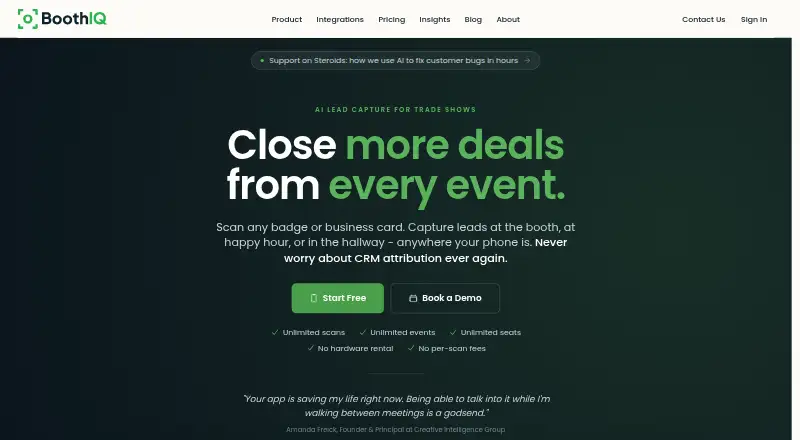
BoothIQ captures event leads from badges, business cards, LinkedIn profiles, and handwritten notes, then helps organize and follow up with them. It can scan multiple badges in one photo, import badge photos from the camera roll, and keep collecting leads offline until the device reconnects. Its AI features summarize notes and voice memos and prepare personalized follow-up emails for review. The free Individual plan includes unlimited leads, enrichment, voice-to-text notes, AI summaries and drafts, offline mode, and contact-information CSV export. Team costs $999 a month and adds a shared workspace, event organization, premium enrichment, full CSV export, and up to three months of pausing. HubSpot and Salesforce sync and API access are Enterprise features; Individual and Team plans use CSV export. Other listed connections include calendars, email, Slack, and Claude through MCP. BoothIQ says its MCP access is read-only and scoped, and describes encryption, access controls, monitoring, and audits for security.
Who it suits
Individual is positioned for solo reps, Team for event teams, and Enterprise for revenue teams. It suits users who need offline event lead capture and structured follow-up.
What it does well
- Captures leads offline and syncs after reconnection
- Scans multiple badges in one photo
- Summarizes notes and drafts follow-up emails
- Individual plan includes unlimited leads
- Lists calendar, email, CRM, and Slack integrations
What to know first
- No free trial
- Team costs $999 a month
- CRM sync is limited to Enterprise
- Individual CSV export includes contact information only
Limits
Individual CSV export is limited to contact information. HubSpot and Salesforce CRM sync and API access are Enterprise features. BoothIQ offers no free trial; Team costs $999 a month and Enterprise pricing is available by contacting the company.
Plans
| Plan | Billed and limits | Price |
|---|---|---|
| Individual | Unlimited leads · AI summaries and follow-up drafts · Email/LinkedIn enrichment · Voice-to-text notes · Offline mode · CSV export (contact info only) | Free |
| Team | Billed monthly · Unlimited seats, events, and scans · Shared team workspace · Event lead organization · Premium enrichment · Full CSV export · Pause up to 3 months | $999 a month |
| Enterprise | Contact Us · CRM sync · API access · Event ROI tracking · Custom reports and mappings · SSO · Dedicated account manager, setup, and training | On request |
As getboothiq.com lists them, read 30 Sept 2026. The maker's own page has the final word.
Getting started
- Visit https://getboothiq.com/.
- Choose the Individual, Team, or Enterprise plan.
- Use the Android or iOS app to capture event leads.
- Capture badge photos, business cards, profiles, or handwritten notes; offline captures sync when the device reconnects.
- Review AI summaries and follow-up drafts, then export to CSV or use plan-specific connections.
BoothIQ is event lead-capture software for collecting contacts from badges, cards, profiles, and notes, then preparing follow-up. It suits solo reps and event teams that want offline capture and AI-assisted outreach. Its strongest case is the capture-to-follow-up workflow; its main trade-off is that CRM sync sits behind Enterprise.
Overview
BoothIQ brings several event lead sources into one workflow: scan badges, capture business cards and LinkedIn profiles, or record handwritten notes. It can summarize notes and voice memos and draft personalized follow-up emails for review. Offline capture is useful at venues with unreliable connectivity, with leads syncing once the device is back online.
Badge scanning supports multiple badges in one photo, and photos can also be uploaded from the camera roll. That makes collection more flexible, though the plan choice matters if the resulting contacts need to flow directly into a CRM.
Key features
Capture, enrichment, and follow-up
BoothIQ combines lead qualification and enrichment with voice-to-text notes, AI summaries, and draft emails. Drafts are for review, so the software assists with follow-up rather than sending messages on the user's behalf. Team adds premium enrichment, while Individual includes email and LinkedIn enrichment.
Integrations and data handling
HubSpot and Salesforce synchronization is reserved for Enterprise; Individual and Team rely on CSV export. Enterprise also includes API access. The MCP connection offers read-only, scoped access to meetings, contacts, events, and conversation summaries. Other listed connections include Google and Microsoft calendars and email, plus Slack notifications.
BoothIQ says personal data is encrypted in transit and at rest, with access controls, security monitoring, and regular audits. It says AI providers cannot use submitted data to train their models under contract, and BoothIQ does not train AI models on customer data. After a deletion request, data is removed from active systems within 30 days and backups within 90 days, subject to stated exceptions.
Pricing
BoothIQ has a free Individual plan, a paid Team plan, and custom pricing for Enterprise. There is no free trial.
| Plan | Price | What it includes | Best fit |
|---|---|---|---|
| Individual | free | Unlimited leads, AI summaries and follow-up drafts, email and LinkedIn enrichment, voice-to-text notes, offline mode, and CSV export of contact information only; community support. | Solo reps who can work from exported contact details rather than CRM sync. |
| Team | $999 a month, billed monthly | Unlimited seats, events, and scans; shared workspace; event lead organization; premium enrichment; full CSV export; pause for up to 3 months; priority support. | Event teams needing shared organization and broader exports, but not direct CRM sync. |
| Enterprise | Custom pricing | CRM sync, API access, event ROI tracking, custom reports and mappings, SSO, and a dedicated account manager, setup, and training. | Revenue teams that need CRM connectivity or the additional controls and support. |
The free plan has no lead cap, but its CSV export is limited to contact information and it does not include CRM sync. Team removes the listed seat, event, and scan limits, yet its $999 a month price is a substantial step up for teams that only need capture and exports. Enterprise is the necessary tier for HubSpot or Salesforce sync.
Platforms
BoothIQ is available on Android and iOS, with API access included in Enterprise. The API listing should not be confused with CRM synchronization, which is also an Enterprise feature.
Who it's for
BoothIQ is most suitable for solo sales representatives who want a free way to capture and follow up on event leads, and for event teams willing to pay for shared workspaces, unlimited scans, and premium enrichment. Revenue teams that depend on CRM sync, API access, or SSO should consider Enterprise. It is a weaker fit for teams that need direct CRM integration but cannot justify custom Enterprise pricing.
Pros and cons
- Pro: Offline capture and later syncing keep lead collection usable when event connectivity is poor.
- Pro: Multiple badges can be scanned in one photo, and badge photos can be uploaded from the camera roll.
- Pro: The free Individual plan includes unlimited leads, enrichment, AI drafts, and offline mode.
- Con: CRM sync is Enterprise-only, leaving lower tiers with CSV export instead.
- Con: Team costs $999 a month even though its listed exports remain CSV-based.
- Con: Individual's CSV export contains contact information only, limiting its usefulness for fuller event-data workflows.
Alternatives
For a broader category comparison, browse Event Lead Capture Software. Choose LeadSuccess if its free Basic plan's 5 app licenses, ticket QR capture, and Excel export better suit a marketing package. ExpoPlatform offers a free plan for up to 30 participants, which may suit a small event with that cap.
LeadLens is worth considering if 25 lifetime scans and one show workspace on its free plan are enough, or if its Starter plan at $29 a month better matches a lower-volume budget. Pick Meetopio if its free seat limits—one active event, 10 voice captures and scans per month, and 15 AI drafts—fit your usage. Cvent is an alternative with a registration product that can be tried for free. Grip Onsite, Webex Events Onsite, and Bravura Onsite Check-In are other paid options.
Verdict
BoothIQ is a strong fit for solo reps and event teams that value offline lead capture, enrichment, and prepared follow-up, especially if CSV export is enough. Choose it for the free Individual plan or Team's shared workspace and unlimited scans; look elsewhere or budget for Enterprise if direct CRM sync is essential.
Verdict
BoothIQ combines event lead capture, enrichment, and follow-up drafting, including offline use. Check plan limits carefully: CRM synchronization requires Enterprise, while Team starts at $999 a month.
Questions
Is BoothIQ free?
Yes. The Individual plan is free and includes unlimited leads, AI summaries and follow-up drafts, email and LinkedIn enrichment, voice-to-text notes, offline mode, and contact-information CSV export.
How much does BoothIQ Team cost?
Team costs $999 a month, billed monthly. It includes unlimited seats, events, and scans, a shared team workspace, event lead organization, premium enrichment, and full CSV export.
Which platforms does BoothIQ support?
The listed platforms are Android, iOS, and API.
Does BoothIQ connect to HubSpot or Salesforce?
HubSpot and Salesforce CRM synchronization is an Enterprise feature. Individual and Team plans use CSV export.
What integrations does BoothIQ list?
Listed connections include Claude through MCP, HubSpot and Salesforce CRM, Google Calendar and Gmail, Microsoft 365 Calendar and Outlook, and Slack notifications. The MCP connection has read-only, scoped access to meetings, contacts, events, and conversation summaries.
Does BoothIQ offer a free trial?
No. BoothIQ lists no free trial.
Facts from BoothIQ's own pages
- AI data handling
- BoothIQ says its AI providers are contractually prohibited from using submitted data to train their models, and BoothIQ does not use customer data to train AI models. · getboothiq.com, 30 Sept 2026
- AI follow-up
- It summarizes notes and voice memos and drafts personalized follow-up emails for review. · getboothiq.com, 30 Sept 2026
- Badge scanning
- BoothIQ can scan multiple badges in one photo and upload badge photos from the camera roll. · getboothiq.com, 30 Sept 2026
- CRM availability
- HubSpot and Salesforce CRM sync are Enterprise features; Individual and Team plans use CSV export. · getboothiq.com, 30 Sept 2026
- Data deletion
- BoothIQ says it removes data from active systems within 30 days of a deletion request and backups within 90 days, subject to stated exceptions. · getboothiq.com, 30 Sept 2026
- Headquarters
- Dover, Delaware, United States · getboothiq.com, 28 Sept 2026
- Integrations
- The integrations page lists Claude through MCP, HubSpot and Salesforce CRM, Google Calendar and Gmail, Microsoft 365 Calendar and Outlook, and Slack notifications. · getboothiq.com, 30 Sept 2026
- Intended users
- The maker describes Individual as best for solo reps, Team as best for event teams, and Enterprise as best for revenue teams. · getboothiq.com, 30 Sept 2026
- MCP
- The MCP connection provides read-only, scoped access to meetings, contacts, events, and conversation summaries. · getboothiq.com, 30 Sept 2026
- Offline use
- The app captures leads offline and syncs them when the device is back online. · getboothiq.com, 30 Sept 2026
- Purpose
- BoothIQ captures and manages event leads from badges, business cards, LinkedIn profiles, and handwritten notes. · getboothiq.com, 30 Sept 2026
- Security
- BoothIQ says personal data is encrypted in transit and at rest, with access controls, security monitoring, and regular security audits. · getboothiq.com, 30 Sept 2026
- Support
- The pricing page lists community support for Individual, priority support for Team, and a dedicated account manager for Enterprise. · getboothiq.com, 30 Sept 2026
Where BoothIQ stands on Freedom251
- Event Lead Capture Software#2 of 27