Freedom251 › Event Lead Capture Software

LeadLens
What LeadLens is
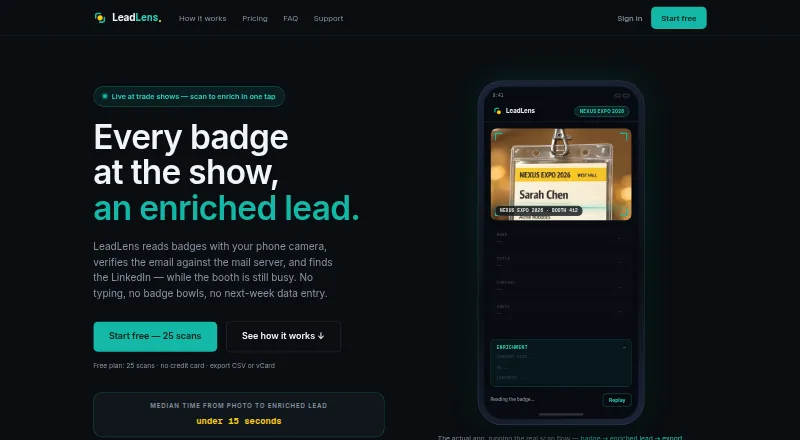
LeadLens captures trade show contacts by scanning badges and enriching the resulting lead details. Its vision-model OCR reads names, titles, and companies from printed or handwritten badges and provides a confidence score for each field. It can derive email addresses from company conventions, find LinkedIn profiles, and check email domains against MX records. Users can import email signatures or CSVs and export leads as CSV, XLSX, or vCard. Scans captured offline are queued on-device and sync when connectivity returns. LeadLens runs in a phone browser and can be installed as a PWA; paid plans also list a native iOS app. The free plan costs nothing and includes 25 lifetime scans, one show workspace, and basic enrichment. Starter costs $29/mo or $279/yr and includes 200 scans per month. Higher plans add options such as HubSpot sync, analytics, team seats, shared contact databases, and Slack alerts. The maker says badge images are not retained after extraction and account deletion requests result in data removal within seven days. It states its SOC 2 audit is not yet complete.
Who it suits
LeadLens suits solo reps who need to capture trade show contacts, as well as event marketers and teams sharing booth lead capture. Offline scanning may help people working where connectivity is intermittent.
What it does well
- OCR reads printed and handwritten badges.
- Offline scans sync when connectivity returns.
- Exports include CSV, XLSX, and vCard.
- Badge images are removed after extraction completes.
- Free plan includes 25 lifetime scans.
What to know first
- Free plan is limited to 25 lifetime scans.
- Free plan provides only one show workspace.
- SOC 2 audit is not yet complete.
- Starter costs $29/mo or $279/yr.
Limits
The Free plan includes 25 lifetime scans, one show workspace, and basic enrichment. Starter costs $29 a month and includes 200 scans per month, unlimited shows, and full AI enrichment.
Plans
| Plan | Billed and limits | Price |
|---|---|---|
| Free | $0/forever · 25 lifetime scans · 1 show workspace · basic enrichment | Free |
| Team | $149/mo · 5 seats · 500 pooled scans/mo · shared contact database · team dashboard | $149 a month |
| Unlimited | $179/mo or $143.25/mo billed annually · Unlimited scans · unlimited shows · HubSpot sync · Slack alerts · analytics | $179 a month |
| Team Pro | $249/mo · 10 seats · 1,000 pooled scans/mo · shared contact database · HubSpot sync | $249 a month |
| Starter | $29/mo or $279/yr · 200 scans/mo · unlimited shows · full AI enrichment | $29 a month |
| Team Max | $449/mo · 20 seats · unlimited pooled scans · shared contact database · HubSpot sync | $449 a month |
| Pro | $99/mo or $948/yr · 750 scans/mo · unlimited shows · HubSpot sync · analytics | $99 a month |
| Volume plan | Quoted for 20+ seats, 5,000+ monthly scans, multi-show rollouts, or procurement-heavy teams · Flat volume plan | On request |
As leadlens.neural-forge.io lists them, read 29 Sept 2026. The maker's own page has the final word.
Getting started
- Visit https://leadlens.neural-forge.io/.
- Use the phone browser or install LeadLens as a PWA; paid plans also list a native iOS app.
- Choose the Free plan or a paid plan based on scan volume and team needs.
- Scan a badge; offline captures queue on-device and sync when connectivity returns.
- Import email signatures or CSV files if needed, then export leads as CSV, XLSX, or vCard.
Overview
LeadLens is a trade-show lead-capture app for representatives and event teams collecting contacts from badges. It is best suited to solo reps and small teams that need offline capture and flexible exports. Its appeal is a broad capture workflow with clear scan-based tiers; organizations requiring completed SOC 2 certification should look elsewhere.
Badge OCR reads names, job titles, and companies from printed or handwritten badges, and assigns confidence scores to individual fields. That gives reps a way to identify uncertain entries before follow-up. Email and LinkedIn enrichment can add useful paths to a contact, but addresses are derived from company conventions rather than established as confirmed addresses; MX checks verify domains, not the person behind an address.
Imports cover email signatures and CSVs; exports include CSV, XLSX, and vCard. Offline scans wait on the device and sync once connectivity returns, a worthwhile safeguard at venues with unreliable service. Integration options vary by tier: the pricing page names HubSpot, Slack, Google Sheets, and webhooks, while support also names Zapier, Make, and n8n presets for other CRMs.
LeadLens says it stores data in US-East using Supabase PostgreSQL with row-level security, does not sell scan data, and removes badge images after extraction. Account deletion requests result in data removal within seven days. Email support responds within one business day. The maker says its SOC 2 audit is incomplete and does not claim certifications it has not earned, which is a material limitation for buyers with certification requirements.
Key features
- Badge scanning and qualification: Vision-model OCR reads printed and handwritten badges, with per-field confidence scores; lead qualification is also included. Confidence scores help prioritize review, but do not remove the need to check uncertain details.
- Contact enrichment: LeadLens derives email addresses from company patterns, finds LinkedIn profiles, and checks email domains against MX records. This can speed up follow-up research, though derived contacts merit verification.
- Capture and transfer: Email-signature and CSV imports, plus CSV, XLSX, and vCard exports, support moving lead records into other workflows.
- Offline capture: Scans queue on-device and sync when a connection returns, reducing dependence on venue connectivity.
- Integrations: HubSpot, Slack, Google Sheets, and webhook paths are named on supported tiers; Zapier, Make, and n8n presets are also named for other CRMs. Buyers should match the desired connection to the specific tier.
Pricing
LeadLens has a free plan and paid plans from $29/mo. The free allowance is 25 lifetime scans, one show workspace, and basic enrichment: useful for a small evaluation, but too limited for recurring events. Paid plans add monthly scan capacity, broader enrichment, and collaboration or integration features at different thresholds.
- Free — free: Billed $0/forever, with 25 lifetime scans, one show workspace, and basic enrichment. Best for trying a small number of captures; the lifetime cap rules it out for ongoing use.
- Starter — $29 a month: Billed $29/mo or $279/yr, with 200 scans/mo, unlimited shows, and full AI enrichment. It suits solo reps with modest monthly volume; it does not include the listed HubSpot sync or analytics of Pro.
- Pro — $99 a month: Billed $99/mo or $948/yr, with 750 scans/mo, unlimited shows, HubSpot sync, and analytics. A better fit for event marketers and reps running several shows a year who need CRM sync, though scan volume remains capped.
- Team — $149 a month: Billed $149/mo, with five seats, 500 pooled scans/mo, a shared contact database, and team dashboard. It is aimed at shared booth capture, but the pool is smaller than Pro's individual scan allowance despite the higher price.
- Unlimited — $179 a month: Billed $179/mo or $143.25/mo billed annually, with unlimited scans and shows, HubSpot sync, Slack alerts, and analytics. It fits a high-volume individual or operation that does not need the explicitly listed multi-seat package.
- Team Pro — $249 a month: Billed $249/mo, with 10 seats, 1,000 pooled scans/mo, a shared contact database, and HubSpot sync. Choose it when shared records and CRM sync matter more than unlimited capture.
- Team Max — $449 a month: Billed $449/mo, with 20 seats, unlimited pooled scans, a shared contact database, and HubSpot sync. It is the clearest fit among the listed plans for larger teams with unpredictable scan volume.
- Volume plan: Custom pricing, quoted for 20+ seats, 5,000+ monthly scans, multi-show rollouts, or procurement-heavy teams. Consider it when scale or purchasing requirements outgrow the fixed plans.
Platforms
LeadLens runs in a phone browser and can be installed as a PWA. The pricing page lists a native iOS app on paid plans; the platform listing includes iOS and web. Android is not among the listed platforms.
Who it's for
Solo reps can start with Starter if 200 scans a month is enough; the free tier is better treated as a small trial than a durable workflow. Pro suits event marketers and reps managing recurring shows who need HubSpot sync and analytics. Teams sharing booth capture should compare seat counts and pooled quotas carefully: Team starts at five seats, while Team Pro and Team Max raise both capacity and price. Buyers with strict certification requirements should not treat the stated SOC 2 audit as complete.
Pros and cons
Pros
- Handwritten and printed badge OCR with field confidence scores helps users flag uncertain captures.
- Offline queueing and later sync suit event floors where connectivity can drop.
- CSV, XLSX, and vCard exports, plus signature and CSV imports, give several ways to move records.
- Plan options distinguish solo scan limits from shared team seats and pooled capacity.
Cons
- The free plan stops at 25 lifetime scans, limiting its usefulness beyond evaluation.
- Enriched email addresses are derived from conventions, so they should not be treated as verified contact details.
- Team's 500 pooled scans/mo may constrain a busy booth, while unlimited pooled scans require the $449 a month Team Max plan.
- The SOC 2 audit is incomplete, which may disqualify it for organizations requiring that certification.
Alternatives
For a wider comparison, see Event Lead Capture Software.
- LeadSuccess is worth comparing if Android or Windows support matters, or if its marketing-package Basic plan's five app licenses and ticket QR capture better match the workflow.
- xh is an open-source command-line HTTP client, rather than a direct badge-capture choice.
- BoothIQ is an alternative with an Individual free plan that includes unlimited leads, offline mode, enrichment, voice-to-text notes, and CSV export.
- ExpoPlatform is a broader event platform alternative, with a free plan for up to 30 participants and web, iOS, and Android support.
- Meetopio offers a free seat with one active event, 10 voice captures and 10 scans per month, and 15 AI follow-up drafts; consider it if those smaller caps fit.
- Mela is an iOS alternative with a free tier and a $9.99 a month Individual plan.
- Bravura Onsite Check-In is a paid Android, iOS, and web option with enterprise pricing tailored to event scale and requirements.
- Cvent is a paid event-platform alternative whose registration product can be tried for free.
Verdict
LeadLens is a strong fit for reps and event teams that need badge capture to keep working offline, want enrichment and practical export options, and can choose a plan around clear scan or seat limits. Its most compelling reason to choose it is that combination of resilient capture and tiered workflow support. Look elsewhere if completed SOC 2 certification is mandatory, or if the free plan's 25 lifetime scans are all the budget allows for sustained use.
Verdict
LeadLens combines badge scanning with contact enrichment, imports, and offline capture. Its free allowance is limited, and the maker says its SOC 2 audit is still incomplete.
Questions
Does LeadLens have a free plan?
Yes. It is listed as free and includes 25 lifetime scans, one show workspace, and basic enrichment.
How much do paid plans cost?
Paid plans start at $29/mo. Listed monthly prices include Starter at $29 a month, Pro at $99 a month, Team at $149 a month, Unlimited at $179 a month, Team Pro at $249 a month, and Team Max at $449 a month.
Which devices can I use?
LeadLens runs in a phone browser and can be installed as a PWA. Its paid plans also list a native iOS app.
Can I scan badges offline?
Yes. Offline scans are queued on-device and sync when connectivity returns.
What integrations are listed?
The pricing page lists HubSpot, Slack, Google Sheets, and webhook paths on supported tiers. Support also names Zapier, Make, and n8n presets for other CRMs.
What does the maker say about data and compliance?
The maker says it does not sell scan data and that badge images are not retained after extraction. It says its SOC 2 audit is not yet complete and does not claim certifications it does not hold.
Facts from LeadLens's own pages
- Compliance
- The maker states its SOC 2 audit is not yet complete and says it does not claim certifications it does not hold. · leadlens.neural-forge.io, 29 Sept 2026
- Data storage
- Support says data is stored in Supabase in US-East, in PostgreSQL with row-level security. · leadlens.neural-forge.io, 29 Sept 2026
- Deletion
- The homepage says account deletion requests result in data removal within 7 days. · leadlens.neural-forge.io, 29 Sept 2026
- Enrichment
- The service derives email addresses from company email conventions, finds LinkedIn profiles, and checks email domains against MX records. · leadlens.neural-forge.io, 29 Sept 2026
- Headquarters
- Texas, United States · leadlens.neural-forge.io, 23 Sept 2026
- Imports and exports
- Users can import email signatures or CSVs and export leads as CSV or vCard. · leadlens.neural-forge.io, 29 Sept 2026
- Integrations
- The pricing page lists HubSpot, Slack, Google Sheets, and webhook paths on supported tiers; support also names Zapier, Make, and n8n presets for other CRMs. · leadlens.neural-forge.io, 29 Sept 2026
- Intended users
- The pricing page describes Starter for solo reps, Pro for event marketers and reps running 5–10 shows a year, and team plans for shared booth lead capture. · leadlens.neural-forge.io, 29 Sept 2026
- OCR
- Its vision-model OCR reads names, titles, and companies from printed or handwritten badges and gives per-field confidence scores. · leadlens.neural-forge.io, 29 Sept 2026
- Offline use
- Scans captured offline are queued on-device and sync when connectivity returns. · leadlens.neural-forge.io, 29 Sept 2026
- Platform details
- LeadLens runs in a browser on phones and can be installed as a PWA; the pricing page also lists a native iOS app on paid plans. · leadlens.neural-forge.io, 29 Sept 2026
- Privacy
- The maker says it does not sell scan data and that badge images are not retained after extraction completes. · leadlens.neural-forge.io, 29 Sept 2026
- Purpose
- LeadLens captures trade show leads by scanning badges and enriching contact details. · leadlens.neural-forge.io, 29 Sept 2026
- Support
- Support says it responds to email inquiries within one business day. · leadlens.neural-forge.io, 29 Sept 2026
Where LeadLens stands on Freedom251
- Event Lead Capture Software#6 of 27