Freedom251 › Healthcare CRM Software

BizzField Healthcare CRM
What BizzField Healthcare CRM is
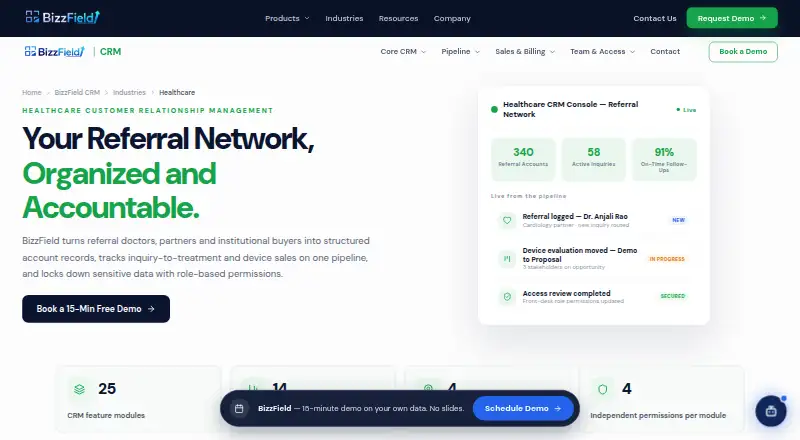
BizzField Healthcare CRM helps hospitals and clinics organize referral doctors, partners, and institutional buyers, then follow inquiry-to-treatment and device sales opportunities. Account profiles keep activity timelines, while referral sources can be tagged by region, state, city, and area. Existing referral doctor lists can be imported in bulk from Excel. A Kanban board tracks pipeline stages, opportunity types, priorities, and loss reasons; one opportunity can include multiple contacts and line-item products for equipment deals. Permissions can separately govern reading, creating, updating, and deleting records, with role templates and hierarchy-aware visibility. Listed reports cover account health, sales rep and department performance, revenue forecasts, and dashboard KPIs. The healthcare page lists 25 feature modules, 14 built-in reports, four location levels, and four permissions per module. The service is available on Android, iOS, and the web, with a responsive web app accessible in mobile and tablet browsers without an installation. Pricing depends on team size and enabled features and is provided after a demo; a 7-day trial is listed.
Who it suits
It suits hospitals and clinics managing referral networks, institutional buyers, and device or service sales. Teams needing role-based access and pipeline reporting may also find its tools relevant.
What it does well
- Tracks referrals and sales pipelines.
- Bulk imports referral doctor lists from Excel.
- Supports multi-contact equipment opportunities.
- Separates four permissions by module.
- Responsive web app works in mobile browsers.
What to know first
- Pricing requires a demo and quote.
- Pricing depends on team size and enabled features.
Limits
The listed trial lasts 7 days. Pricing is quoted after a demo and depends on team size and enabled features.
Plans
| Plan | Billed and limits | Price |
|---|---|---|
| Custom quote | Price depends on team size and enabled features; request a quote through a demo | On request |
As bizzfield.com lists them, read 4 Oct 2026. The maker's own page has the final word.
Getting started
- Open https://www.bizzfield.com/crm/healthcare-crm.
- Request a demo to discuss team size, enabled features, and pricing.
- Start the listed 7-day trial.
- Arrange migration, pipeline and role setup, and team training with BizzField.
- Use the responsive web app in a browser on desktop, mobile, or tablet; Android and iOS are also listed.
BizzField Healthcare CRM is a sales CRM for managing healthcare referrals, institutional buyers, and device or service opportunities. It is best suited to hospitals, clinics, and sales teams that need structured referral records and role-based pipeline management. Its breadth is appealing, but custom pricing after a demo makes cost and fit worth settling before a rollout.
Overview
The CRM connects referral doctors, partners, and institutional buyers to accounts, then tracks opportunities from inquiry toward treatment or device sales. Referral profiles carry activity timelines, and sources can be organized by region, state, city, and area. Excel bulk import gives teams a route to bring existing referral lists into the system rather than rebuild them manually.
Healthcare teams can use it for referral management and patient and provider relationships. Its emphasis is on organizing commercial relationships and sales cycles; it is not presented as a general-purpose patient care system.
Key features
Referral and pipeline management
The Kanban pipeline supports inquiry-to-treatment and device sales cycles, with opportunity type, priority, and loss reasons. That structure can help sales teams distinguish different kinds of work and review stalled or lost opportunities. A single deal can include multiple contacts and line-item products, which suits equipment sales involving several stakeholders and items.
Permissions and reporting
Permissions can separately govern reading, creating, updating, and deleting records by module. Role templates and hierarchy-aware visibility offer a way to reflect different responsibilities without giving every user the same access. Reporting spans account health, sales-rep and department performance, revenue forecasts, and dashboard KPIs. The healthcare page also describes 25 CRM modules and 14 built-in reports, a substantial toolkit for teams that will use it; smaller teams may not need that breadth.
Integrations, security, and rollout
Named integrations include Gmail, Outlook, Google Calendar, WhatsApp, Slack, Tally, SAP, Excel, Power BI, Mailchimp, and Zapier. BizzField says customer data is encrypted in transit and at rest, access is role-scoped, and customer accounts are logically isolated. The company says most CRM teams are live within 1–2 weeks with migration, pipeline and role setup, and training; larger rollouts are scoped individually. That implementation support may help teams moving established workflows, though it still requires time for setup and training.
Pricing
BizzField Healthcare CRM is paid, with custom pricing based on team size and enabled features. The maker provides a quote after a demo, so buyers should establish the required features and expected seat count during that process. A 7-day trial offers a short window to assess fit before committing. No lower-priced or free tier is described, so teams seeking a published entry price or a free plan should compare alternatives.
Platforms
The CRM is listed for Android, iOS, and web. Its healthcare page also describes a responsive web app for mobile and tablet browsers without installing an app, which gives browser-based access alongside the listed mobile platforms.
Who it's for
BizzField is a strong candidate for hospitals and clinics coordinating referral networks, or healthcare sales teams managing multi-contact device and service deals. Its location tagging, permissions, and reports are particularly relevant where teams divide coverage by geography, department, or role. It is less compelling for buyers who need transparent per-user pricing, a substantial free tier, or a clearly defined product focused on clinical care rather than relationship and sales workflows.
Pros and cons
- Pros: Referral profiles combine activity timelines with four levels of location tagging, useful for organizing geographically distributed referral sources.
- Pros: Kanban pipelines, multiple contacts, and line-item products accommodate both referral progression and complex equipment opportunities.
- Pros: Granular module permissions and hierarchy-aware visibility support teams that need differentiated access.
- Cons: Custom pricing requires a demo, making it harder to compare costs before speaking with the vendor.
- Cons: The 7-day trial is brief for evaluating a CRM that may involve migration, role configuration, and team training.
- Cons: The breadth of modules and reports may exceed the needs of small teams with straightforward referral tracking.
Alternatives
Healthcare CRM Software is the broader category to browse when comparing products for a healthcare CRM shortlist.
- Zoho CRM is worth considering for buyers who want a free plan for up to three users, with freemium pricing instead of a demo-based custom quote.
- FrontDesk may suit teams focused on call handling and booking, with a free plan that includes AI and staff calling minutes, texts, a booking page, and a basic dashboard.
- Exeevo Omnipresence CRM is an alternative for buyers seeking all-in-one licensing, selectable apps, and no data metering or fees to access new features.
- IQVIA SmartSolve Complaint Management is another paid option to compare for complaint management.
- TikaMobile CRM is another paid CRM option.
- Trail CRM is an alternative to consider for sales and customer-management workflows.
- IQVIA Orchestrated Customer Engagement is another paid option for customer engagement.
- Pega CRM is another paid CRM option, with a free trial.
Verdict
Choose BizzField Healthcare CRM if your hospital, clinic, or healthcare sales team needs referral organization, configurable access, and pipelines that can handle multi-stakeholder device or service deals. Its strongest case is the combination of healthcare-oriented referral tracking and structured sales controls. Look elsewhere if a published price, a longer evaluation period, or a free starting plan is central to your decision.
Verdict
BizzField Healthcare CRM combines referral organization, pipeline tracking, access controls, and reporting for healthcare sales workflows. Consider the demo-based pricing process and the team’s required features before proceeding.
Questions
How much does BizzField Healthcare CRM cost?
Pricing depends on team size and enabled features. BizzField provides a quote after a demo.
Is there a free plan or trial?
A 7-day trial is listed. No free plan is stated in the provided plan facts.
Which platforms can I use?
Android, iOS, and web are listed. The responsive web app works in mobile and tablet browsers without an app installation.
Can referral records be imported?
Yes. Excel bulk import can bring in existing referral-doctor lists.
Which integrations are listed?
The integrations page lists Gmail, Outlook, Google Calendar, WhatsApp, Slack, Tally, SAP, Excel, Power BI, Mailchimp, and Zapier.
Who makes BizzField Healthcare CRM?
The provided facts identify the product as BizzField Healthcare CRM but do not name its maker.
Facts from BizzField Healthcare CRM's own pages
- Access controls
- Permissions can independently control Read, Create, Update, and Delete by module, with role templates and hierarchy-aware visibility. · bizzfield.com, 4 Oct 2026
- Bulk import
- The healthcare page says Excel bulk import can bring in existing referral doctor lists. · bizzfield.com, 4 Oct 2026
- Headquarters
- BizzField says it is based in Kanpur, Uttar Pradesh, India. · bizzfield.com, 4 Oct 2026
- Healthcare focus
- The healthcare page describes use by hospitals and clinics to manage referral networks, device or service sales pipelines, and role-based data access. · bizzfield.com, 4 Oct 2026
- Integrations
- The CRM integrations page lists Gmail, Outlook, Google Calendar, WhatsApp, Slack, Tally, SAP, Excel, Power BI, Mailchimp, and Zapier. · bizzfield.com, 4 Oct 2026
- Mobile access
- The healthcare CRM is described as a responsive web app usable in mobile and tablet browsers without installing an app. · bizzfield.com, 4 Oct 2026
- Multi-stakeholder deals
- A single opportunity can include multiple contacts and line-item products for device or equipment deals. · bizzfield.com, 4 Oct 2026
- Pipeline
- A Kanban board tracks inquiry-to-treatment or device sales cycles, with opportunity type, priority levels, and loss reasons. · bizzfield.com, 4 Oct 2026
- Pricing
- The maker says CRM pricing depends on team size and enabled features and is provided after a demo. · bizzfield.com, 4 Oct 2026
- Purpose
- BizzField Healthcare CRM organizes referral doctors, partners, and institutional buyers as accounts and tracks inquiry-to-treatment and device sales pipelines. · bizzfield.com, 4 Oct 2026
- Referral records
- Account profiles include activity timelines, and referral sources can be tagged by Region, State, City, and Area. · bizzfield.com, 4 Oct 2026
- Reporting
- The page lists Account Health, Sales Rep Performance, Department Performance, Revenue Forecast, and dashboard KPI reporting. · bizzfield.com, 4 Oct 2026
- Scale
- The healthcare page lists 25 CRM feature modules, 14 built-in reports, four location hierarchy levels, and four independent permissions per module. · bizzfield.com, 4 Oct 2026
- Security
- The CRM page states that customer data is encrypted in transit and at rest, access is role-scoped, and customer accounts are logically isolated. · bizzfield.com, 4 Oct 2026
- Support and implementation
- BizzField says most CRM teams are live within 1–2 weeks with migration, pipeline and role setup, and team training; larger rollouts are scoped individually. · bizzfield.com, 4 Oct 2026
Where BizzField Healthcare CRM stands on Freedom251
- Healthcare CRM Software#10 of 23