
BentoPDF Hyper Compress
What BentoPDF Hyper Compress is
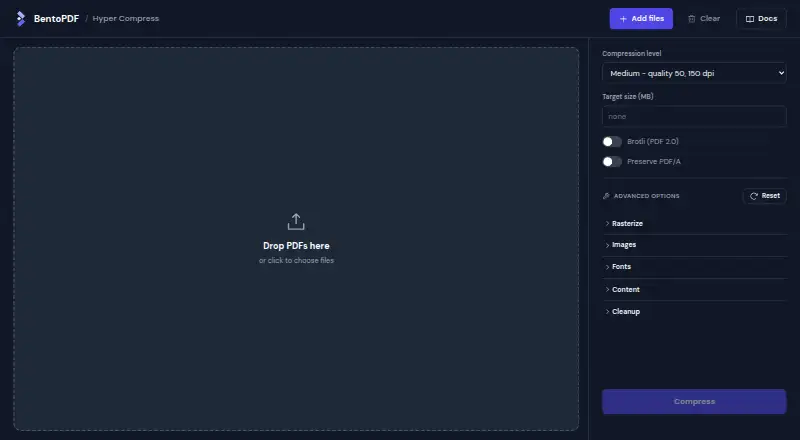
BentoPDF Hyper Compress is a PDF compression engine intended to reduce file size while preserving document content. It is available as a CLI, Node SDK, C library, self-hosted service, and WebAssembly build, with web, Windows, macOS, Linux, API, and self-hosted options listed. It includes a true lossless mode and is stated never to return a file larger than the original. The maker reports a 0.39% corruption rate across 2,104 real-world PDFs in its benchmark. Open-source use under an AGPL-compatible license, self-hosting, and internal use are covered by AGPL-3.0. A commercial license is required only to ship it inside closed-source software. Annual plans are Solo at $99 a year, Indie at $199 a year, Business at $499 a year, and OEM at $1,999 a year. The tiers vary by developer count, company revenue, product scope, support, and redistribution rights. A commercial purchase provides a ZIP archive containing the complete source code, not a license key. Active licenses include releases published during their term; if a license lapses, buyers retain perpetual rights to the last version received.
Who it suits
It suits developers and organizations compressing PDFs in applications or self-hosted workflows. Open-source projects, internal users, and those shipping it in closed-source software have different licensing options and requirements.
What it does well
- Includes a true lossless mode.
- Stated never to return a larger file.
- Available as a CLI, SDK, C library, and service.
- Open-source use and self-hosting are covered by AGPL-3.0.
What to know first
- Closed-source software distribution requires a commercial license.
- Solo costs $99 a year.
- OEM costs $1,999 a year.
- Commercial licenses include releases only while active.
Limits
The free AGPL-3.0 option is for compatible open-source projects, self-hosting, and internal use. Shipping Hyper Compress inside closed-source software requires a paid commercial license; the Solo tier covers one developer and one closed-source product.
Plans
| Plan | Billed and limits | Price |
|---|---|---|
| AGPL-3.0 / Self-hosted | Open-source projects under an AGPL-compatible license, self-hosting, and interna | On request |
| AGPL-3.0 / Self-hosted | Open-source projects under an AGPL-compatible license, self-hosting, and interna | On request |
| Solo | annually · one developer · under $100k annual revenue · one closed-source product · updates while active · email support | $99 a year |
| Indie | annually · companies under $1M annual revenue · unlimited developers · one closed-source product · updates while active · email support | $199 a year |
| Business | annually · companies at $1M annual revenue or more · unlimited developers · one closed-source product · updates while active · priority email support | $499 a year |
| OEM | annually, from · redistribution rights · reselling as an SDK or hosted service · terms shaped to product · priority support | $1,999 a year |
| AGPL-3.0 open-source use | Open-source projects under an AGPL-compatible license · self-hosting · internal use | Free |
As hyper.bentopdf.com lists them, read 19 Sept 2026. The maker's own page has the final word.
Getting started
- Visit the Hyper Compress website.
- Choose AGPL-3.0 use for compatible open-source projects, self-hosting, or internal use.
- Select a commercial tier if shipping it inside closed-source software.
- Use the CLI, Node SDK, C library, self-hosted service, or WebAssembly build.
BentoPDF Hyper Compress is a developer-focused PDF compression engine for shrinking files without changing their content. It suits teams embedding compression in products, internal pipelines, or self-hosted services. The decisive question is whether AGPL-3.0 terms cover your use or your distribution requires a paid commercial license.
Overview
Hyper Compress concentrates on compression rather than editing or document management. It is designed to reduce PDF size while preserving content, includes a true lossless mode, and guarantees that its output will not be larger than the input. That last safeguard is valuable in automated workflows where a failed compression pass should not increase storage or transfer costs. Lossless processing is the safer choice when fidelity is paramount, although it does not promise a particular reduction in size.
The maker reports a 0.39% corruption rate across 2,104 real-world PDFs in its benchmark, the lowest among the engines it evaluated. That is a useful signal for teams assessing reliability, but it remains a reported benchmark result rather than a guarantee for every document set.
Key features
- Broad integration choices: A CLI, Node SDK, C library, self-hosted service, and WebAssembly build let developers choose application integration, local deployment, or a browser-oriented build. This flexibility is a strength for software teams, not a substitute for a full PDF editor.
- Lossless compression: The true lossless mode is appropriate for archival, regulated, or document-sensitive workflows where altered content is unacceptable.
- Output-size guarantee: Hyper Compress will not return a file larger than the original, reducing the need for separate regression checks in batch jobs.
- API access: An API option supports service-based integration, while self-hosting keeps deployment under the customer’s control.
- Source delivery for commercial buyers: A commercial purchase supplies a ZIP archive with the complete source code and does not use a license key. Bundled PDFium, qpdf, jpegli, and Leptonica components are stated to carry permissive licenses.
Pricing
The free AGPL-3.0 open-source-use plan costs nothing and covers open-source projects under an AGPL-compatible license, self-hosting, and internal use. It is the natural fit for teams that can comply with those terms; it does not cover shipping Hyper Compress inside closed-source software.
Commercial plans are billed annually and include releases published while the license is active. If a subscription lapses, the buyer keeps a perpetual right to the last version received.
| Plan | Price | Best fit and limits |
|---|---|---|
| Solo | $99 a year | One developer, companies under $100,000 annual revenue, one closed-source product, email support. |
| Indie | $199 a year | Companies under $1 million annual revenue, unlimited developers, one closed-source product, email support. |
| Business | $499 a year | Companies at $1 million annual revenue or more, unlimited developers, one closed-source product, priority email support. |
| OEM | $1,999 a year | Redistribution, SDK resale, or offering Hyper Compress as a service, with priority support. |
The Solo plan keeps the entry price low but restricts both team size and revenue eligibility. Indie removes the developer cap without adding products, while Business is aimed at larger companies and improves support response. OEM is the relevant choice when customers will receive the engine, an SDK, or a compression service; the other commercial plans are for using it in one closed-source product. Payments and business VAT invoices are handled through Polar.
Platforms
Hyper Compress supports web, Windows, macOS, Linux, API, and self-hosted deployments. The CLI, native C library, Node SDK, and WebAssembly build make it adaptable across server, desktop, and application environments. Buyers should select the deployment form that matches their stack rather than expecting a single consumer application.
Who it's for
This is a strong match for developers building PDF handling into closed-source products, engineering teams running internal compression services, and open-source projects able to use AGPL-compatible licensing. It also suits organizations that need self-hosting or a lossless path. It is a poor fit for readers seeking a general-purpose editor, visual document workflow, or a simple consumer utility without licensing decisions.
Pros and cons
- Pros: True lossless mode protects content-sensitive workflows; the no-larger-output guarantee helps automated pipelines; multiple interfaces cover native, JavaScript, command-line, hosted, and WebAssembly deployments; the reported benchmark shows a low corruption rate.
- Cons: Closed-source distribution requires an annual commercial plan; Solo allows only one developer and one product; every commercial tier is limited to one closed-source product except OEM-style redistribution rights; the free route depends on AGPL-3.0 compatibility.
Alternatives
For a broader set of compression tools and services, browse the PDF Compression Software list. Readers who also need editing should compare the PDF editors list.
- PDF Candy is a freemium web and desktop option with Android and iOS apps; its free tier has page, hourly, batch-processing, and file-size restrictions, so choose it for general-purpose access rather than embedded engine integration.
- PDF24 Compare PDF is free, supports major desktop and mobile platforms, and advertises no limits, registration, or time restrictions; it is better for unrestricted comparison work than for licensing a compression engine.
- PDF2Go offers most tools on its free tier with limited file processing; choose it when you want an online toolset instead of developer APIs.
- Xodo Compress PDF provides a free online compressor with one low-compression action per day; it suits occasional browser use, not high-volume integration.
- Foxit PDF Compressor has a free online upload capped at 150 MB and paid editor software; pick it when a document editor surrounds compression needs.
- Smallpdf combines 30 free tools with a seven-day trial; it is aimed at broad document tasks rather than source-level integration.
- AvePDF offers more than 50 tools but limits free use to two operations per six hours and 128 MB files; it fits occasional multi-tool web work.
- PDFOptim has a free plan with three operations per day and 25 MB files; choose it for small, private desktop or web jobs.
Verdict
Choose BentoPDF Hyper Compress when you need a compression engine you can embed, self-host, or run through an API, especially when lossless output and a non-growing file guarantee matter. Its main drawback is licensing: closed-source products must budget for an annual plan, and teams distributing the engine need the OEM tier. If you only need occasional consumer compression or full PDF editing, a general-purpose alternative is the better destination.
Verdict
Hyper Compress offers several integration forms and a lossless option, with licensing that depends on how it is used or distributed. Buyers shipping it in closed-source software should account for the annual commercial plan terms.
Questions
Is there a free option?
Yes. AGPL-3.0 covers open-source projects using an AGPL-compatible license, self-hosting, and internal use at no cost.
What do the commercial plans cost?
Solo is $99 a year, Indie is $199 a year, Business is $499 a year, and OEM is $1,999 a year.
What does OEM include?
OEM covers redistribution rights, reselling as an SDK, or offering Hyper Compress as a service, with priority support.
What platforms and interfaces are available?
The listed platforms are web, Windows, macOS, Linux, API, and self-hosted. Interfaces include a CLI, Node SDK, C library, self-hosted service, and WebAssembly build.
Does a commercial purchase provide a license key?
No. It provides a ZIP archive containing the complete source code, and no license key is required or provided.
What happens when a commercial license lapses?
The license includes releases published while it is active. If it lapses, the buyer keeps perpetual rights to the last version received.
Facts from BentoPDF Hyper Compress's own pages
- Benchmark
- The maker reports a 0.39% corruption rate, the lowest among engines it benchmarked, across 2,104 real-world PDFs. · bentopdf.com, 12 Oct 2026
- C API
- The native C interface exports hpdf_compress_file, hpdf_compress_buffer and hpdf_last_error. · github.com, 15 Oct 2026
- CLI
- Prebuilt command-line binaries are supplied for macOS, Linux and Windows. · github.com, 15 Oct 2026
- Commercial delivery
- Commercial buyers receive a ZIP containing the complete source code, and no license key is used. · bentopdf.com, 15 Oct 2026
- Commercial licensing
- A commercial license is required only to ship Hyper Compress inside closed-source software; open-source use under an AGPL-compatible license, self-hosting, and internal use are free under AGPL-3.0. · bentopdf.com, 12 Oct 2026
- Company location
- Trustpilot lists BentoPDF's contact address in Tezpur, India. · trustpilot.com, 15 Oct 2026
- Compression benchmark
- The maker reports a 64.8% median reduction with its strongest preset across 2,104 real-world PDFs. · bentopdf.com, 15 Oct 2026
- Compression guarantee
- It never returns a file larger than the original and includes a true lossless mode. · bentopdf.com, 12 Oct 2026
- Corruption benchmark
- The published benchmark reports a 0.39% corruption rate for Hyper. · github.com, 15 Oct 2026
- Documentation depth
- The repository links separate BUILDING and SELF-HOSTING guides and documents testing, fuzzing, deployment and API usage. · github.com, 15 Oct 2026
- Encrypted PDFs
- The CLI accepts encrypted input when a password is supplied. · github.com, 15 Oct 2026
- Extension privacy
- The HyperCompress Chrome extension says it makes no network requests, collects nothing and needs only storage permission for language preference. · chromewebstore.google.com, 15 Oct 2026
- Free plan
- Yes · bentopdf.com, 19 Sept 2026
- Independent test result
- MrKeyoor built BentoPDF successfully, with 918 of 918 tests passing, but found 11 dependency advisories including one high-severity item. · mrkeyoor.com, 15 Oct 2026
- Integration status
- Hyper Compress is a separate project and is not yet integrated into the main BentoPDF application. · github.com, 15 Oct 2026
- Interfaces
- The engine is available as a CLI, Node SDK, C library, self-hosted service, and WebAssembly build. · bentopdf.com, 12 Oct 2026
- License
- Hyper Compress is released under GNU AGPL v3, with commercial licensing for closed-source products. · github.com, 15 Oct 2026
- License delivery
- A commercial purchase provides a ZIP archive containing the complete source code, and no license key is required or provided. · bentopdf.com, 12 Oct 2026
- Limit: deployment complexity
- MrKeyoor reports that offline WebAssembly, Office conversion, signatures and memory-heavy conversions require extra deployment care and testing. · mrkeyoor.com, 15 Oct 2026
- Limit: extension input
- The Chrome extension refuses password-protected PDFs and only rewrites embedded images in PDFs. · chromewebstore.google.com, 15 Oct 2026
- Limit: integration timing
- Independent coverage states Hyper Compress was available separately but not yet integrated into BentoPDF's main interface. · ilsoftware.it, 15 Oct 2026
- Limit: missing feature
- A Hacker News commenter said named destinations and bookmark conversion were missing. · news.ycombinator.com, 15 Oct 2026
- Lossless benchmark
- The maker reports a 22.4% median reduction in lossless mode. · bentopdf.com, 15 Oct 2026
- Lossless mode
- The engine includes a lossless mode that avoids image re-encoding and quality loss. · bentopdf.com, 15 Oct 2026
Where BentoPDF Hyper Compress stands on Freedom251
- PDF editors#1 of 104
- PDF Compression Software#1 of 39
- PDF compressors#1 of 22