iLovePDF
by iLovePDF
What iLovePDF is
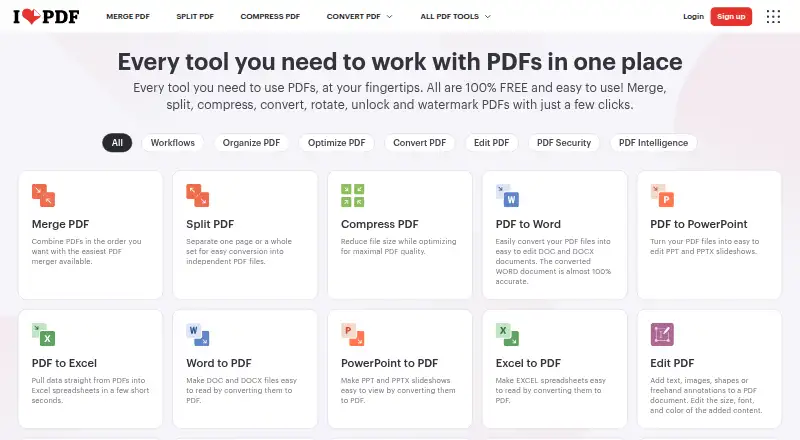
iLovePDF provides tools for editing text, annotating, converting, and working with PDF forms, along with OCR. Its form tools can detect fields and create fillable PDFs with text fields, checkboxes, multiple-choice fields, and lists. AI tools include document summarization, translation, and conversion to Markdown. The service is available on the web, Windows and Mac desktop, and iOS and Android. The free plan provides core tools for light use, with limits that vary by task; examples include 100 MB for Merge PDF and 15 MB for Office to PDF. Premium includes unlimited document processing. The desktop app supports offline batch editing and local document management. Integrations include Zapier, Make, and Wordpress, while iLoveAPI supports document automation for developers. Documents are described as encrypted and securely processed under regulations including GDPR; the pricing comparison lists HTTPS and ISO27001 certification. Premium pricing is listed as ₹3,400 billed annually or ₹500 billed monthly. Business offers custom contracts, a dedicated account manager, and single sign-on.
Who it suits
iLovePDF may suit people who need PDF editing, conversion, OCR, or form tools across desktop and mobile. Its offline desktop support and developer API may also be relevant to users with local batch tasks or document automation needs.
What it does well
- Available on web, Windows, Mac, iOS, and Android
- PDF forms can detect fields and create fillable documents
- Desktop app supports offline batch editing
- AI tools include summarization, translation, and Markdown conversion
- Premium includes unlimited document processing
What to know first
- Free processing limits vary by task
- Premium is ₹3,400 billed annually or ₹500 billed monthly
- Business pricing is customized
Limits
The Free plan has limited document processing, with limits varying by tool, including 100 MB for Merge PDF and 15 MB for Office to PDF. Premium removes document-processing limits and includes 2,000 AI credits; Business is for 25 or more users.
Plans
| Plan | Billed and limits | Price |
|---|---|---|
| Basic | Limited document processing | On request |
| Premium | ₹3,400 billed annually or ₹500 billed monthly · Up to 25 users · Unlimited document processing · 2,000 AI credits | On request |
| Business | 25+ users | On request |
As ilovepdf.com lists them, read 27 Sept 2026. The maker's own page has the final word.
Getting started
- Open the iLovePDF website
- Choose web, Windows, Mac, iOS, or Android access
- Start with the Free plan or select Premium or Business
- Upload documents for editing, conversion, OCR, or form creation
- Connect Zapier, Make, Wordpress, or iLoveAPI when automation is needed
Overview
iLovePDF is a freemium PDF service for people who want editing, conversion and form tools in one place, with desktop and mobile apps as well as a web version. It is best suited to individuals and small teams with varied PDF tasks; its task-based free limits make it less appealing for frequent, large-file processing.
Text editing, annotations, OCR and conversion sit alongside form creation and AI tools. A notable distinction is that its Mac and Windows desktop app supports offline batch editing and local document management, while online processing limits depend on the tool.
Key features
- Edit, mark up and convert: Text editing, annotations, OCR and PDF conversion cover common document work. That range is useful when a reader wants a single service for routine PDF changes rather than a narrowly focused tool.
- Create fillable forms: PDF Forms can detect fields and add text fields, checkboxes, multiple-choice fields and lists. This makes the service relevant to people preparing interactive PDFs, not just editing finished documents.
- Use AI tools: The service can summarize and translate PDFs and convert them to Markdown. These additions broaden its role, though the Premium plan's 2,000 AI credits mean they are not unlimited even when document processing is.
- Work offline: The Mac and Windows desktop app supports offline batch editing and local document management without internet or limits. It is the stronger fit for work that must stay local or be processed in batches.
- Build workflows: Users can create, automate and reuse workflows from favorite tools. Integrations include Zapier, Make and WordPress, and iLoveAPI supports document automation for developers.
- Security and teams: Documents are encrypted and processed under international data protection regulations including GDPR. The pricing comparison also cites HTTPS and ISO27001 certification. Business adds centralized billing, custom contracts, a dedicated account manager, Single Sign On and dedicated support.
Pricing
iLovePDF uses a freemium model. Basic is free and provides core tools for light use, but processing is limited and file caps vary by task: Merge PDF allows 100 MB and Office to PDF 15 MB. Those limits are manageable for occasional documents, but can interrupt heavier or large-file workloads.
Premium costs ₹3,400 billed annually or ₹500 billed monthly, and supports up to 25 users. It includes unlimited document processing, 2,000 AI credits and priority customer support. The monthly option costs more over a full year, while the annual option requires paying for the year upfront; the AI credit allowance remains a separate constraint.
Business has custom pricing for 25+ users and adds scalable business arrangements, custom contracts, a dedicated account manager, Single Sign On and dedicated support. It is the relevant tier for larger organizations needing administration and support rather than simply more individual processing capacity.
Users can upgrade, downgrade or cancel in account settings. Payments include Visa, MasterCard, American Express, PayPal, Apple Pay and Google Pay; bank transfer is available for Business.
Platforms
iLovePDF is available on the web, Windows and macOS desktop, and iOS and Android mobile. The breadth suits people moving between devices, while the offline and batch functions are specifically part of the desktop app.
Who it's for
Choose iLovePDF if you need a broad mix of PDF editing, conversion, OCR and form creation, or want offline desktop batch work alongside online tools. The free plan suits light, smaller-document use. Premium better serves frequent users or groups of up to 25 who need unlimited processing; larger teams that need SSO, centralized billing or dedicated support should consider Business. Readers who need predictable large-file online processing without task-specific caps should look elsewhere or use the desktop app for offline work.
Pros and cons
Pros
- Broad toolset: Editing, annotation, OCR, conversion, forms and AI tools cover more than basic file merging.
- Offline desktop processing: Mac and Windows users can batch edit and manage documents locally without internet or limits.
- Useful plan flexibility: Premium can be billed monthly or annually, allows up to 25 users and removes document-processing limits.
- Business administration: Larger teams get centralized billing, SSO, a dedicated account manager and dedicated support.
Cons
- Free limits vary by task: The 100 MB Merge PDF and 15 MB Office to PDF caps can rule out files that are routine for larger workloads.
- Premium still caps AI use: Unlimited document processing does not extend to its 2,000 AI credits.
- Business requires custom pricing: Teams above 25 users cannot assess the cost from a fixed plan price.
Alternatives
For a wider comparison of PDF tools, browse PDF editors, PDF Merger Software or PDF Compression Software.
- WPS PDF Editor is another freemium option with a free trial and apps across desktop, mobile, web and browser extension; consider it if its stated 1 GB cloud storage, 47 file formats or 46 languages are a closer fit.
- ONLYOFFICE PDF Editor offers a free tier and trial across web, desktop, mobile, API and self-hosted platforms; consider it if self-hosting or its broader platform coverage matters more.
- Smallpdf has a 7-day free trial and a free plan with 30+ tools and two Sign.com documents per month; consider it if that free allowance fits your document work.
- Soda PDF is a freemium option available on web, desktop and mobile; compare it if you need an alternative PDF service.
- PDFgear is free and allows online editing of PDFs up to 100 MB; consider it if avoiding a paid tier is more important than iLovePDF's broader plan structure.
- PDF Candy offers a free web and desktop plan with page and hourly restrictions, no batch processing and limited file size; consider it for lighter work that can fit those limits.
- DocHub is a freemium option whose Free plan allows three uses per month shared across core features; consider it if that monthly allowance suits your needs.
- Sejda PDF Editor offers web and desktop plans; consider it if you want to compare another PDF editing service.
Verdict
iLovePDF is a strong choice for individuals and teams that need a varied PDF toolkit, especially when form creation, workflow automation or offline desktop batch editing matters. Its free tier is useful for light work, but small task-specific caps can be restrictive; Premium is the clearest fit for regular processing, while larger organizations should weigh Business against alternatives if custom pricing is a concern.
Verdict
iLovePDF covers common PDF tasks alongside form creation, AI tools, and an offline desktop app. The free plan has task-specific processing limits, while Premium offers unlimited processing at the listed prices.
Questions
Is iLovePDF free?
Yes. A Free plan provides core tools for light use with limited document processing.
What does Premium cost?
Premium is listed as ₹3,400 billed annually or ₹500 billed monthly.
Which platforms are supported?
iLovePDF is available on web, Windows and Mac desktop, iOS, and Android.
Does it work offline?
The desktop app supports offline batch editing and local document management.
What integrations are available?
Integrations include Zapier, Make, and Wordpress; iLoveAPI supports document automation.
Who makes iLovePDF?
iLovePDF makes the service and is headquartered in Barcelona, Spain; it was founded in 2010.
Facts from iLovePDF's own pages
- AI features
- AI tools include summarization, PDF translation, and PDF-to-Markdown conversion. · ilovepdf.com, 27 Sept 2026
- Annotation tools
- Yes · ilovepdf.com, 20 Sept 2026
- Billing changes
- Users can upgrade, downgrade, or cancel anytime in account settings. · ilovepdf.com, 27 Sept 2026
- Centralized billing
- Multiple accounts can share one credit card for centralized billing. · ilovepdf.com, 27 Sept 2026
- Company reach
- iLovePDF reports 16.5 million documents processed every day and millions of trusted users. · ilovepdf.com, 27 Sept 2026
- Offline desktop
- The Desktop app supports offline batch editing and local document management without internet or limits. · ilovepdf.com, 27 Sept 2026
- Form creation
- Yes · ilovepdf.com, 20 Sept 2026
- Founded
- 2010 · ilovepdf.com, 23 Sept 2026
- Free file limits
- Basic task limits vary by tool, including 100 MB for Merge PDF and 15 MB for Office to PDF. · ilovepdf.com, 27 Sept 2026
- Free plan
- Yes · ilovepdf.com, 20 Sept 2026
- Free tier
- The Free Plan provides core tools for light use with limited document processing. · ilovepdf.com, 27 Sept 2026
- Headquarters
- Barcelona, Spain · ilovepdf.com, 23 Sept 2026
- Integrations
- Integrations include Zapier, Make, and Wordpress; iLoveAPI supports document automation for developers. · ilovepdf.com, 27 Sept 2026
- OCR
- Yes · ilovepdf.com, 20 Sept 2026
- Payment methods
- Payments include Visa, MasterCard, American Express, PayPal, Apple Pay, Google Pay, and bank transfer for Business. · ilovepdf.com, 27 Sept 2026
- PDF conversion
- Yes · ilovepdf.com, 20 Sept 2026
- PDF forms
- PDF Forms can detect fields, create fillable PDFs, and add text fields, checkboxes, multiple-choice fields, and lists. · ilovepdf.com, 27 Sept 2026
- Platforms and apps
- The service is available on Web, Desktop, and Mobile, with Desktop for Mac and Windows and Mobile for iOS and Android. · ilovepdf.com, 27 Sept 2026
- Premium processing
- Premium includes unlimited document processing. · ilovepdf.com, 27 Sept 2026
- Security certification
- The pricing comparison lists a secure HTTPS connection and ISO27001 certification. · ilovepdf.com, 27 Sept 2026
- Security and encryption
- Documents are fully encrypted and processed securely under international data protection regulations including GDPR. · ilovepdf.com, 27 Sept 2026
- Customer support
- Premium includes priority customer support, while Business offers dedicated support. · ilovepdf.com, 27 Sept 2026
- Supported platforms
- web,windows,macos,ios,android · ilovepdf.com, 20 Sept 2026
- Team administration
- Business includes custom contracts, a dedicated account manager, and Single Sign On. · ilovepdf.com, 27 Sept 2026
Where iLovePDF stands on Freedom251
- PDF editors#2 of 104
- PDF Software#1 of 35
- PDF Merger Software#5 of 36
- PDF Compression Software#7 of 39
- PDF compressors#16 of 22
- PDF mergers#18 of 23