
PDFgear
by PDFgear
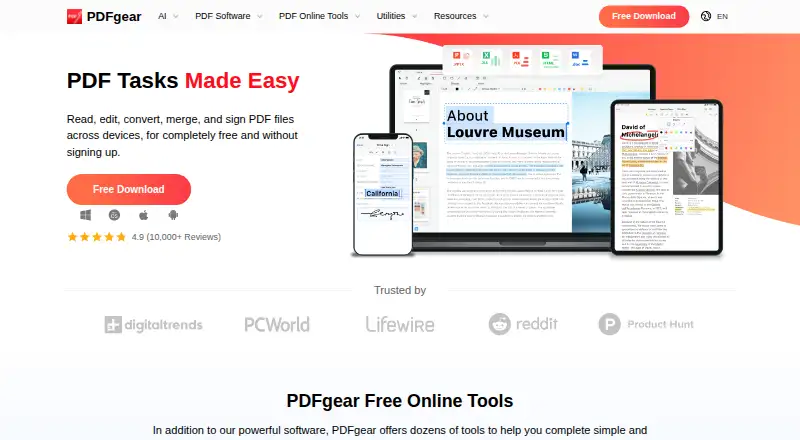
What PDFgear is
PDFgear is a PDF tool from a maker headquartered in Singapore, with access on Android, iOS, Windows, macOS, and the web. Its listed capabilities include editing text, adding annotations, converting PDFs, creating forms, and optical character recognition (OCR). OCR is included in the free plan alongside the other listed tools. For online editing, each PDF can be up to 100 MB, a limit to keep in mind when working with larger files in the browser. The available platform information covers the product as a whole and does not specify which tools are present on each version. PDFgear's listed plan is Free, and the pricing model is free. That makes it relevant to readers looking for PDF editing and conversion capabilities with browser, desktop, and mobile availability, while the online file-size limit is the clearest stated constraint.
Who it suits
PDFgear suits readers who want PDF text editing, annotation, conversion, forms, and OCR across mobile, desktop, and web platforms. Online users working with files over 100 MB should note the editor limit.
What it does well
- Free plan includes OCR
- Edits text and adds annotations
- Converts PDFs and creates forms
- Available on five listed platforms
What to know first
- Online editor limit is 100 MB per PDF
- Feature availability is not detailed by platform
Limits
The online editor supports PDFs up to 100 MB each. The plan is listed as free.
Plans
| Plan | Billed and limits | Price |
|---|---|---|
| Free | 100 MB per PDF for the online editor | Free |
| Basic | $0.00 · all functions · no trial watermark or page-count limits | Free |
As pdfgear.com lists them, read 20 Sept 2026. The maker's own page has the final word.
Getting started
- Visit the PDFgear website.
- Choose web access or the app for Windows, macOS, iOS, or Android.
- Use the free plan.
- For online editing, select PDFs no larger than 100 MB each.
Overview
PDFgear is a free PDF tool for people who want editing, markup, OCR, conversion and form creation in one product. It suits readers who need those capabilities across web, desktop and mobile, provided the online editor’s 100 MB per-PDF cap fits their files. Its broad task coverage is appealing, but the published feature details leave important format and workflow questions unanswered.
Key features
Editing and annotation
Text editing and annotation tools cover two everyday needs: changing document content and marking it up. That combination makes PDFgear a plausible starting point for general PDF work, though the feature details do not say which annotation tools are included or how editing differs between platforms.
OCR and conversion
OCR is included, so the product reaches beyond basic markup to text recognition, and PDF conversion adds another common document task. The supported languages, input and output formats, and conversion directions are not established, so users with a specific workflow should confirm those needs before relying on it.
Form creation
PDFgear also supports form creation. That is useful for users who need to build PDF forms, but the feature information does not establish which fields, distribution options or response-handling capabilities are included.
Pricing
The Free plan costs nothing and includes OCR. The stated limit is 100 MB per PDF in the online editor. There are no other plans, seats, quotas or trial terms to weigh here, and the file-size cap is specifically tied to the online editor rather than the other platforms.
That makes PDFgear a sensible no-cost option for users whose online PDFs stay within the cap. It is a less certain fit for larger files or specialized conversion and form workflows, because the feature details do not establish those capabilities.
Platforms
PDFgear is available on web, Windows, macOS, iOS and Android. This range gives users several ways to access it, though platform-specific feature differences and limits beyond the online editor’s cap are not established.
Who it's for
PDFgear is best suited to people who want a free set of core PDF utilities and value having web, desktop and mobile options. Its included OCR and form creation may broaden its appeal beyond readers who only need markup. Readers handling online PDFs larger than 100 MB, or depending on a particular format or workflow, should consider whether its stated capabilities match their needs before choosing it.
Pros and cons
Pros
- Free plan with OCR: OCR is included at no charge, alongside editing, annotation, conversion and form creation.
- Broad platform coverage: Web, Windows, macOS, iOS and Android give users multiple access options.
Cons
- Online file-size cap: Each PDF in the online editor is limited to 100 MB, which rules out larger files there.
- Unclear workflow fit: Supported formats, OCR languages and form capabilities are not established, so users with specific requirements may need another choice.
Alternatives
For a wider comparison of document tools, see PDF editors, PDF merger software or PDF form software. Readers focused on scanning from a phone can browse mobile scanning apps.
- WPS PDF Editor is worth comparing if you want a free plan plus a trial and broad platform support; its WPS Standard plan includes 1 GB of cloud storage, 47 file formats and 46 languages.
- ONLYOFFICE PDF Editor is another freemium option with a trial and web, desktop, mobile, Linux and self-hosted availability; its Startup plan includes 3 admins, unlimited users and guests, 12 rooms and 2 GB of storage.
- Smallpdf may suit users who prefer a free plan with 30+ tools and 2 Sign.com documents per month; it offers a 7-day free trial, and runs on web, Windows, iOS and Android.
- PDF Candy is an alternative across web, desktop and mobile, but its free plan has page and hourly restrictions, no batch processing and limited file size.
- DocHub may fit users with light monthly needs: its Free plan allows 3 uses per month shared across core features.
- Sejda PDF Editor offers a Web Week Pass with 7 days of web access and no desktop access.
- UPDF is available on desktop and mobile; its free plan caps conversions at 2 per day, batches at 2 files, OCR at 5 uses, storage at 1 GB and file size at 10 MB.
- Stirling PDF is an alternative for users seeking Linux or self-hosted availability, with a free plan offering 500 monthly credits.
Verdict
Choose PDFgear if you want a free, multi-platform PDF toolkit that includes OCR, editing, annotations, conversion and form creation. The main reason to look elsewhere is the online editor’s 100 MB per-file ceiling—or the need for clearly established formats and workflow specifics before committing to a tool.
Verdict
PDFgear brings several PDF utilities, including OCR, into a free product available across mobile, desktop, and web. The stated 100 MB cap applies to PDFs in its online editor.
Questions
How much does PDFgear cost?
The Free plan is listed as free.
Does the free plan include OCR?
Yes. OCR is included in the free plan.
Which platforms can I use?
PDFgear is available on the web, Windows, macOS, iOS, and Android.
What PDF tools does it include?
The listed features are text editing, annotations, PDF conversion, form creation, and OCR.
What is the online editor's file-size limit?
Each PDF can be up to 100 MB in the online editor.
Where is PDFgear based?
PDFgear is headquartered in Singapore.
Facts from PDFgear's own pages
- Annotations
- Markup tools support highlights, underlining, strike-through, notes, comments, stamps, shapes and text boxes. · pdfgear.com, 15 Oct 2026
- Annotation tools
- Yes · pdfgear.com, 20 Sept 2026
- API and extensibility
- A Capterra reviewer summary identifies no high-volume API and limited custom scripting, and no public SDK is described there. · capterra.com, 15 Oct 2026
- Browser processing
- PDFgear says its JavaScript browser tools process files locally without uploads or file-size limits. · pdfgear.com, 15 Oct 2026
- Company registration
- PDF GEAR TECH PTE. LTD. is a live Singapore company registered on 2 September 2020 for software and application development. · companies.sg, 15 Oct 2026
- Compliance claims
- Its eSign trust page claims GDPR, ESIGN Act, eIDAS and ISO 27001 compliance plus TLS encryption. · pdfgear.com, 15 Oct 2026
- Conversion
- PDFgear converts between PDF, Word, TXT, JPG, Excel and PowerPoint and supports batch conversion. · pdfgear.com, 15 Oct 2026
- Copilot
- PDFgear Copilot uses ChatGPT-based conversational interaction for PDF summaries and information retrieval. · pdfgear.com, 15 Oct 2026
- eSign
- The product offers electronic signatures, certificate-based signing and workflows for requesting signatures from other parties. · pdfgear.com, 15 Oct 2026
- Form creation
- Yes · pdfgear.com, 20 Sept 2026
- Free plan
- Yes · pdfgear.com, 20 Sept 2026
- Headquarters
- The company lists Singapore addresses including 91 Bencoolen Street, Sunshine Plaza, Singapore 189652. · pdfgear.com, 15 Oct 2026
- Integrations
- An App Store reviewer reports cloud integration for accessing documents and collaborating across locations. · apps.apple.com, 15 Oct 2026
- Internet requirement
- Windows documentation says internet access is needed for PDF chat, product help and live updates. · pdfgear.com, 15 Oct 2026
- Licence
- The EULA grants a non-transferable, non-exclusive licence and prohibits reverse engineering, redistribution and derivative works without permission. · pdfgear.com, 15 Oct 2026
- Limit: Android editing
- A Google Play reviewer reports that Android form text is hard to reposition and may overwrite the original form when saving. · play.google.com, 15 Oct 2026
- Limit: interface and signatures
- G2 reviewers mention a clunky or unsmooth interface, limited advanced editing and difficulty locating or using signature features. · g2.com, 15 Oct 2026
- Limit: Trustpilot complaints
- Trustpilot’s review summary mentions occasional slowness, glitches, promotional popups, scrolling problems and imperfect signature transparency. · trustpilot.com, 15 Oct 2026
- Limit: workflow details
- Capterra reviewers report a tricky interface, occasional crashes with unsuitable page formats, limited free-version functions and difficulty setting PDFgear as a Microsoft Office printer. · capterra.com, 15 Oct 2026
- Notable news
- Version 3.0.0 released on October 12, 2026 added multi-PDF tabs, a redesigned interface, improved conversion workspace, more Office output formats and stability fixes. · pdfgear.com, 15 Oct 2026
- OCR
- Its OCR recognizes scanned documents and supports more than 30 languages. · pdfgear.com, 15 Oct 2026
- Online tools
- Its browser toolkit includes editing, Word conversion, JPG conversion, compression, merging, signing, splitting and page operations. · pdfgear.com, 15 Oct 2026
- PDF conversion
- Yes · pdfgear.com, 20 Sept 2026
- PDF editing
- Users can modify PDF text, images, shapes, signatures, links and form fields. · pdfgear.com, 15 Oct 2026
Where PDFgear stands on Freedom251
- PDF editors#6 of 104
- Scanner apps#9 of 76
- Mobile Scanning Apps#12 of 76
- PDF Form Software#6 of 27
- PDF Software#8 of 35
- PDF Merger Software#13 of 36
- PDF mergers#12 of 23