
ONLYOFFICE PDF Editor
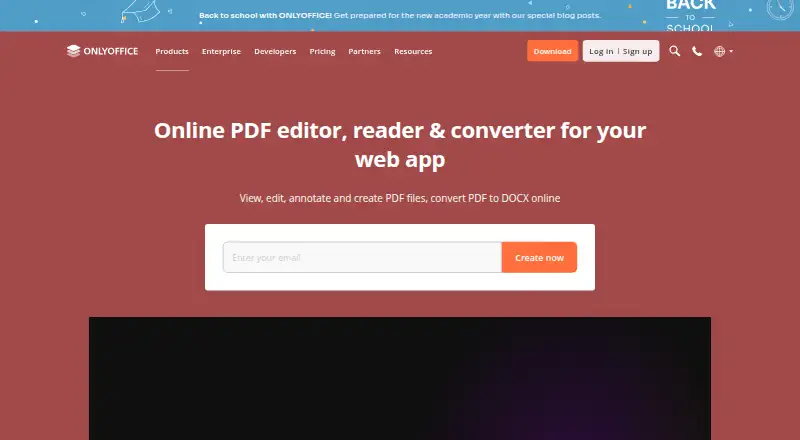
What ONLYOFFICE PDF Editor is
ONLYOFFICE PDF Editor lets users view, edit, annotate, create, and convert PDF files to DOCX online. It can revise text and adjust tables, shapes, images, SmartArt, charts, hyperlinks, and pages. Annotation tools include highlighting, underlining, strikethrough, comments, freehand drawings, and stamps. Users can create and fill forms with fields such as text areas, images, combo boxes, drop-down lists, and check boxes. Teams can co-edit in real time or paragraph-locking mode, using comments, built-in chat, Telegram, and Jitsi calls. The editor can extract text from scanned PDFs, connect AI assistants, and permanently remove selected content through redaction. Free desktop apps support offline editing and conversion on Windows, Linux, and macOS; free Documents apps provide PDF viewing on iOS and Android. Options include web, desktop, mobile, API, and self-hosted deployments. The listed integrations include Box, Moodle, Nextcloud, Odoo, and WordPress. Security features include AES-256 encryption and granular permissions; the maker says it is not currently ISO-certified as a standalone product.
Who it suits
It suits individuals or teams who need to edit, annotate, create, or convert PDFs. Organizations can also consider its collaboration, self-hosting, and on-premises deployment options.
What it does well
- Edits text and a range of PDF elements.
- Supports form creation and filling.
- Co-editing offers real-time and paragraph-locking modes.
- Free desktop apps support offline editing and conversion.
- Redaction permanently removes selected PDF content.
What to know first
- Free mobile apps support PDF viewing, not editing.
- The product is not ISO-certified as a standalone product.
Limits
The Startup plan includes 3 admins, 12 rooms, and 2 GB file storage. The Business plan includes 250 GB per admin and costs $3,020 a month, billed per admin per month.
Plans
| Plan | Billed and limits | Price |
|---|---|---|
| Business | Per admin per month · unlimited users · unlimited guests · unlimited rooms · 250 GB per admin · professional support | $3,020 a month |
| Startup | up to 3 admins · unlimited users · unlimited guests · up to 12 rooms · 2 GB storage | Free |
| Enterprise | pay per connections · unlimited admins/users/guests/rooms · on-premises · SLA with guaranteed response times | On request |
As onlyoffice.com lists them, read 28 Sept 2026. The maker's own page has the final word.
Getting started
- Visit https://www.onlyoffice.com/pdf-editor.
- Choose web, self-hosted, or a supported desktop or mobile platform.
- Use the free desktop app on Windows, Linux, or macOS for offline editing and conversion.
- Use the free Documents app on iOS or Android to view PDFs.
- Choose a plan; a free plan and trial are available.
ONLYOFFICE PDF Editor is a cross-platform tool for editing, reviewing, converting, and creating PDF forms. It is best suited to organizations that need shared document workflows or on-premises deployment; individuals can also use its free desktop apps for offline editing. Its breadth is a strength, but the paid plans center on team workspaces rather than standalone PDF use.
Overview
The editor goes beyond annotation: users can change PDF text and embedded elements, create forms, extract text from scans, and convert PDFs to DOCX online. Teams can collaborate on documents, while organizations can deploy on their own infrastructure. That combination makes it a stronger fit for document-heavy teams than for readers who only need to mark up or convert an occasional file.
Key features
Editing, annotation, and forms
Editing covers text, tables, shapes, images, SmartArt, charts, hyperlinks, and pages. This gives users a way to revise the document itself rather than adding comments alone. Highlighting, underlining, strikethrough, freehand drawing, comments, and stamps support review, and forms can include text areas, images, combo boxes, drop-down lists, and check boxes. The range is useful for preparing and reviewing structured paperwork, though casual users may not need so many document tools.
Collaboration, security, and redaction
Teams can co-edit in real time or use paragraph-locking mode, with comments, built-in chat, Telegram, and Jitsi calls as communication options. This is valuable for shared document work, but less relevant to someone editing alone. Security controls include AES-256 encryption, end-to-end encryption in Private Rooms, JWT access protection, granular permissions, and restrictions on downloading, printing, and copying. The Redact feature permanently removes selected text, words, phrases, pages, or page ranges. ONLYOFFICE states that its products comply with GDPR and supports on-premises deployment to keep data within an organization’s infrastructure. It also states that ONLYOFFICE is not ISO-certified as a standalone product, although its Docs are included in ISO-certified products and infrastructures; organizations requiring standalone product certification should look elsewhere.
Integrations and AI
ONLYOFFICE advertises more than 40 ready integrations, including Box, Moodle, Nextcloud, Odoo, and WordPress. It can connect AI assistants and extract text from scanned PDFs, extending its usefulness in document workflows without making those capabilities necessary for basic editing.
Pricing
ONLYOFFICE has a freemium model, a free plan, and a free trial. Free desktop apps support offline PDF editing and conversion on Windows, Linux, and macOS, while the free Documents apps on iOS and Android support PDF viewing. The pricing note says paid access starts at $20/mo, but the listed DocSpace plans show different workspace limits and billing terms.
| Plan | Price | What it includes |
|---|---|---|
| Startup | Custom pricing | 3 admins, unlimited users and guests, 12 rooms, and 2 GB file storage. |
| Business | $3,020 a month, billed per admin per month | Unlimited users, guests, and rooms; 250 GB per admin; professional support. |
| Enterprise | Custom pricing | Unlimited admins, users, guests, and rooms. |
Startup suits smaller teams that can work within 12 rooms and 2 GB of storage. Business raises storage to 250 GB per admin and adds professional support, but its per-admin monthly billing makes the cost scale with the number of admins. Enterprise is for organizations that need unlimited admins as well as unlimited users, guests, and rooms; it has custom pricing. The free desktop apps are a more direct fit for individuals who need offline editing than these team-oriented workspace plans.
Platforms
ONLYOFFICE supports web, Windows, Linux, macOS, iOS, Android, and self-hosted deployment. Desktop apps provide offline editing and conversion on Windows, Linux, and macOS, while iOS and Android Documents apps are for PDF viewing. This broad coverage suits teams with mixed devices, but mobile users should not expect the same editing scope as the desktop apps.
Who it's for
Choose ONLYOFFICE when a team needs PDF editing, forms, collaboration, document controls, or deployment within its own infrastructure. It is also a reasonable option for individuals who want free offline desktop editing or mobile PDF viewing. A user who only needs basic markup or occasional conversion may be better served by a narrower tool, and organizations that require standalone ISO certification should not treat ONLYOFFICE as meeting that requirement.
Pros and cons
- Broad editing and form tools: users can revise document content, create forms, annotate, convert, and extract text from scanned PDFs in one product.
- Team and deployment options: real-time co-editing, paragraph locking, self-hosting, and granular permissions suit organizational document workflows.
- Free offline desktop editing: individuals can edit and convert PDFs on Windows, Linux, and macOS without relying on an online workflow.
- Standalone ISO limitation: the product is not currently ISO-certified as a standalone product, which can rule it out for organizations with that requirement.
- Workspace-plan trade-offs: Startup has 2 GB of storage and 12 rooms; Business bills per admin per month, making admin count relevant to cost.
Alternatives
- PDF editors is a broader directory for comparing options.
- WPS PDF Editor is another freemium choice with a free plan and a listed Standard plan that includes 1 GB cloud storage, 47 file formats, and 46 languages.
- Smallpdf may suit users who want a browser and mobile option with a free tier; its free trial lasts 7 days.
- PDFgear is worth considering for a free cross-platform option; its online editor caps PDFs at 100 MB.
- PDF Candy offers a free web and desktop tier, with page and hourly restrictions, no batch processing, and limited file size.
- DocHub may fit light use, though its Free plan allows 3 uses per month shared across core features.
- Sejda PDF Editor is another freemium PDF editor with web and desktop options.
- UPDF has a free plan with caps including 2 conversions per day, 5 OCR uses, and a 10 MB maximum file size.
- Stirling PDF may suit users who want a free tier with 500 monthly credits or a paid team plan.
Verdict
ONLYOFFICE PDF Editor is a strong choice for organizations that need collaborative PDF work, broad editing and form tools, and the option to keep deployment on their own infrastructure. Its free offline desktop apps also make it useful for individual editing. Look elsewhere if standalone ISO certification is mandatory, or if your needs are limited to occasional PDF markup and conversion.
Verdict
ONLYOFFICE PDF Editor covers document editing, forms, collaboration, and redaction, with offline desktop tools and mobile viewing apps. Organizations requiring a standalone ISO-certified product should note the stated certification limitation.
Questions
Is ONLYOFFICE PDF Editor free?
Yes. A free plan is listed, and free desktop apps support offline PDF editing and conversion on Windows, Linux, and macOS.
What does the Business plan cost?
It is listed at $3,020 a month, billed per admin per month.
Which platforms are supported?
Listed options include web, Windows, Linux, macOS, iOS, Android, API, and self-hosted deployment.
Can I edit PDFs offline?
Yes. Free desktop apps support offline PDF editing and conversion on Windows, Linux, and macOS.
Can it work with scanned PDFs?
Yes. The editor can extract text from scanned PDFs.
Does it support self-hosting?
Yes. Self-hosted deployment is supported, and ONLYOFFICE says on-premises deployment can keep data within an organization’s infrastructure.
Facts from ONLYOFFICE PDF Editor's own pages
- AI and scanned PDFs
- The product can connect AI assistants and extract text from scanned PDFs. · onlyoffice.com, 28 Sept 2026
- Annotation
- The editor supports highlighting, underlining, strikethrough, comments, freehand drawings, and stamps. · onlyoffice.com, 28 Sept 2026
- Annotation tools
- Yes · onlyoffice.com, 20 Sept 2026
- Collaboration
- Teams can co-edit PDFs in real-time or paragraph-locking mode and use comments, built-in chat, Telegram, and Jitsi calls. · onlyoffice.com, 28 Sept 2026
- Core use
- ONLYOFFICE PDF Editor lets users view, edit, annotate, create, and convert PDF files to DOCX online. · onlyoffice.com, 28 Sept 2026
- Form creation
- Yes · onlyoffice.com, 20 Sept 2026
- Forms
- Users can create and fill PDF forms with text areas, images, combo boxes, drop-down lists, and check boxes. · onlyoffice.com, 28 Sept 2026
- Free plan
- Yes · onlyoffice.com, 20 Sept 2026
- Headquarters
- Riga, Latvia · onlyoffice.com, 28 Sept 2026
- Integrations
- ONLYOFFICE advertises 40+ ready integrations including Box, Moodle, Nextcloud, Odoo, and WordPress. · onlyoffice.com, 28 Sept 2026
- ISO status
- ONLYOFFICE states that it is not currently ISO-certified as a standalone product, although its Docs are included in ISO-certified products and infrastructures. · onlyoffice.com, 28 Sept 2026
- OCR
- Yes · onlyoffice.com, 20 Sept 2026
- Offline and mobile
- Free desktop apps support offline PDF conversion and editing on Windows, Linux, and macOS, while free Documents apps support PDF viewing on iOS and Android. · onlyoffice.com, 28 Sept 2026
- PDF conversion
- Yes · onlyoffice.com, 20 Sept 2026
- PDF editing
- Users can edit PDF text and insert or adjust tables, shapes, images, SmartArt, charts, hyperlinks, and pages. · onlyoffice.com, 28 Sept 2026
- Privacy compliance
- ONLYOFFICE states that its products are fully compliant with GDPR and support on-premises deployment to keep data within an organization’s infrastructure. · onlyoffice.com, 28 Sept 2026
- Redaction
- Its Redact feature permanently removes selected text, words, phrases, pages, or page ranges from a PDF. · onlyoffice.com, 28 Sept 2026
- Security
- ONLYOFFICE supports AES-256 encryption, end-to-end encryption in Private Rooms, JWT access protection, granular permissions, and restrictions on downloading, printing, and copying. · onlyoffice.com, 28 Sept 2026
- Support
- DocSpace Enterprise offers email support, training courses, a free demo, and enterprise support with SLA response times. · onlyoffice.com, 28 Sept 2026
- Supported platforms
- web,Windows,Linux,macOS,iOS,Android,self-hosted · onlyoffice.com, 20 Sept 2026
- Text editing
- Yes · onlyoffice.com, 20 Sept 2026
Where ONLYOFFICE PDF Editor stands on Freedom251
- PDF editors#5 of 104