Freedom251 › PDF Compression Software

Xodo Compress PDF
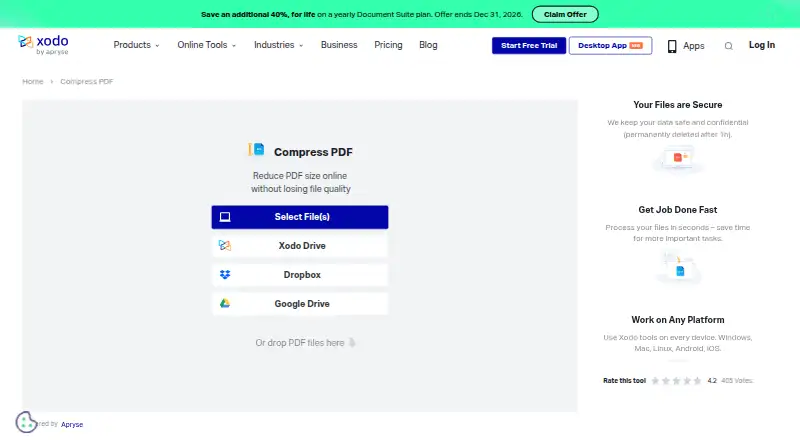
What Xodo Compress PDF is
Xodo Compress PDF is an online PDF tool with Low and High compression settings. The free online plan allows one Low compression action per day, while High compression requires a trial. Uploaded files are permanently deleted after one hour, and Xodo states that TLS encryption protects them. The wider Xodo suite is available on web, Windows, macOS, Linux, Android, and iOS. Xodo Web includes more than 40 online tools, while Xodo PDF Studio offers more than 60 professional tools and works offline. PDF Studio has Light, Balanced, Aggressive, and custom optimization profiles, plus batch optimization and other batch operations. Xodo Mobile can view, scan, edit, annotate, convert, compress, and e-sign documents, and supports Xodo Drive, Google Drive, OneDrive, Dropbox, and iCloud. A free plan and 3-day trial are listed. Paid plans start at $7.99/mo when billed annually; other listed annual plans include Xodo Web at $95.88 a year, Document Suite at $107.93 a year, and Desktop at $119.88 a year.
Who it suits
It suits people who need a browser-based way to reduce PDF size, as well as users looking for related web, desktop, or mobile document tools. The free compressor is limited to one Low compression action each day.
What it does well
- Offers Low and High compression settings.
- Uploaded files are permanently deleted after one hour.
- PDF Studio works offline and has over 60 tools.
- PDF Studio supports batch PDF optimization.
- Mobile apps support e-signing and five cloud integrations.
What to know first
- Free compressor permits one Low compression action per day.
- High compression requires a trial.
- Paid plans start at $7.99/mo billed annually.
Limits
The free online plan permits one Low compression action per day, and High compression requires a trial. The Xodo Web plan is browser-based; the Desktop plan covers Windows, macOS, and Linux, while the Document Suite covers web and desktop tools across its listed platforms.
Plans
| Plan | Billed and limits | Price |
|---|---|---|
| Free online PDF compressor | 1 Low compression action per day · High compression requires trial | Free |
| Free | 1 free action per day · no premium online tools · Xodo Drive limited to 1GB | Free |
| PDF Studio perpetual license | Unlimited desktop access · 12 months of upgrades · up to two devices | $240, paid once |
| Xodo Web | $95.88 annually · 40+ online tools · unlimited document downloads · browser-based | $7.99 a month |
| Xodo Document Suite | $107.93 annually · 40+ web tools unlimited · 60+ desktop tools · Android and iOS apps · promotional annual pricing | $8.99 a month |
| Xodo Desktop (PDF Studio) | $119.88 annually · 60+ professional tools · offline use · Windows, macOS and Linux · perpetual license available | $9.99 a month |
As xodo.com lists them, read 1 Oct 2026. The maker's own page has the final word.
Getting started
- Open the Xodo Compress PDF website to use the online compressor.
- Choose Low compression for the free daily action, or start a trial to use High compression.
- Choose a listed annual plan for access to its web, desktop, or combined tools.
- For desktop use, choose PDF Studio on Windows, macOS, or Linux.
- For mobile document tools, use Xodo Mobile on iOS or Android.
Xodo Compress PDF is an online PDF compressor for people who need occasional file-size reduction or want compression within a broader document workflow. Its strongest case is the range of web, desktop, and mobile tools; its main drawback is that the free compressor allows just one Low-compression action per day.
Overview
The browser tool offers Low and High compression, a simple choice for basic file-size reduction. The free daily allowance is restrictive for anyone processing several PDFs, and High compression requires a trial. Xodo says uploaded files are protected with TLS encryption and permanently deleted after one hour, a useful safeguard for online document handling.
Xodo is part of Apryse Software Inc. Its wider offering spans online tools, an offline desktop editor, and mobile apps, so it may suit people who want more than a single-purpose compressor.
Key features
Compression and PDF tools
The online compressor keeps its controls to two compression levels. That is convenient for occasional tasks, but not a substitute for the finer control in Xodo PDF Studio, which offers Light, Balanced, and Aggressive optimization profiles as well as custom profiles. Studio can optimize batches of PDFs and batch-convert, extract text, and run security operations, making it better suited to recurring or larger workloads.
Xodo Web provides more than 40 online tools. The Document Suite plan includes unlimited use of those web tools, while PDF Studio adds more than 60 professional tools and works offline. The broader suite is the reason to consider Xodo beyond a one-off compression job.
Mobile and integrations
Xodo Mobile can view, scan, edit, annotate, convert, compress, and e-sign documents on iOS and Android. It supports Xodo Drive, Google Drive, OneDrive, Dropbox, and iCloud, which helps users who move documents among those services. Browser options include a Chrome Extension and a Google Drive G Suite App.
Pricing
Xodo uses a freemium model. The Free online PDF compressor costs nothing and permits one Low-compression action per day; High compression requires a 3-day trial. That is a reasonable starting point for infrequent use, but a tight cap for regular compression.
Xodo Web costs $95.88 a year, billed annually. It includes more than 40 online tools, unlimited document downloads, and browser-based access, making it the focused paid option for people who work online and do not need the desktop suite.
Xodo Document Suite costs $107.93 a year, billed annually. It combines more than 40 web tools with more than 60 desktop tools across web, Windows, macOS, Linux, Android, and iOS. For a modest step up from Xodo Web, it is the broader choice for people who need both online and desktop access.
Xodo Desktop (PDF Studio) costs $119.88 a year, billed annually. It includes more than 60 professional tools, offline use, and Windows, macOS, and Linux support. It fits people who prioritize desktop work, batch operations, and offline access, but is less suited to someone who only needs occasional browser compression. Paid plans start at $7.99/mo (annual).
Platforms
Xodo supports web, Windows, macOS, Linux, Android, and iOS. PDF Studio runs on Windows, macOS, and Linux and works offline; Xodo Mobile supports iOS and Android. This spread suits people working across devices, while the free compressor itself remains an online tool.
Who it's for
Xodo is a good fit for occasional users who can work within the free daily limit, and for people who want compression alongside a larger set of document tools. Its paid desktop options are more compelling for users who need batch optimization or offline PDF work. Look elsewhere if you need frequent free online compression without a daily cap.
Pros and cons
- Pros: Web, desktop, and mobile coverage gives users several ways to work with PDFs across devices.
- Pros: PDF Studio’s profiles, custom optimization, and batch operations support more demanding desktop workflows.
- Pros: Xodo says files are TLS-protected and deleted after one hour, addressing two practical concerns with uploaded documents.
- Cons: The free compressor allows only one Low-compression action per day, limiting repeat use.
- Cons: High compression requires a 3-day trial, so it is not an unrestricted free option.
Alternatives
Compare PDF compression software if you want to consider a wider set of tools. PDF Candy is another freemium option across desktop, mobile, and web, but its free plan has page and hourly restrictions, a limited file size, and no batch processing. PDF24 Compare PDF is worth considering if you want a free option with no limits, registration, or time restrictions; it is supported by advertising.
PDF2Go is a cross-platform freemium alternative whose free plan provides access to most tools with limited file processing. Smallpdf may suit users who want a 7-day free trial and 30 free tools, though it supports fewer platforms than Xodo. AvePDF offers 50+ document tools on its free plan, with two processing operations per six hours, a 128 MB maximum file size, and ten files per processing.
PDFOptim is a possible alternative for users whose needs fit its free allowance of three operations per day, files up to 25 MB, and private processing. Sejda PDF Editor is another freemium alternative with web and desktop options. FS PDF Compressor is a free desktop alternative for Linux, macOS 14+ on Apple Silicon, and Windows 11 x64.
Verdict
Choose Xodo if you want a compressor that can sit inside a cross-platform PDF workflow, especially if you need PDF Studio’s offline tools and batch optimization. The main reason to look elsewhere is the free compressor’s one-action daily limit, particularly if you need regular online compression without committing to a paid plan or trial.
Verdict
Xodo pairs a simple online compressor with a larger collection of document tools across web, desktop, and mobile. Check the free compressor’s daily Low-compression limit and trial requirement for High compression against your needs.
Questions
Is Xodo Compress PDF free?
Yes. The free online plan costs nothing and allows one Low compression action per day.
How much do the paid plans cost?
Paid pricing starts at $7.99/mo when billed annually. Listed annual plans are $95.88 per year for Xodo Web, $107.93 per year for Document Suite, and $119.88 per year for Desktop (PDF Studio).
Is there a free trial?
Yes, a 3-day trial is listed. High compression requires a trial on the free online plan.
Which platforms does Xodo support?
Xodo tools are available on web, Windows, macOS, Linux, Android, and iOS. The Chrome Extension and Google Drive G Suite App are also listed.
Can Xodo work offline?
Yes. Xodo PDF Studio works offline and is listed for Windows, macOS, and Linux.
Who makes Xodo?
Xodo is part of Apryse Software Inc. Apryse provides customers technical support from its developers and solution engineers.
Facts from Xodo Compress PDF's own pages
- Batch processing
- PDF Studio can optimize batches of PDFs and perform batch conversion, text extraction, and security operations. · feedback.xodo.com, 1 Oct 2026
- Browser integrations
- Xodo offers a Chrome Extension and a Google Drive G Suite App. · xodo.com, 1 Oct 2026
- Chrome extension behavior
- The Chrome extension supports PDF editing, conversion, compression, merging, cropping, redaction, forms, splitting, rotation, deletion and signing, and uploads files to online tools. · chromewebstore.google.com, 15 Oct 2026
- Cloud integrations
- Xodo Mobile supports Xodo Drive, Google Drive, OneDrive, Dropbox, and iCloud. · xodo.com, 1 Oct 2026
- Company facts
- Crunchbase lists Xodo Technologies as a private Vancouver company with 11–50 employees and founders Catherine Andersz and Ivan Nincic. · crunchbase.com, 15 Oct 2026
- Company profile
- Xodo PDF by Apryse lists Denver, Colorado as headquarters and 2013 as its founding year. · ca.linkedin.com, 1 Oct 2026
- Company relationship
- Xodo identifies itself as part of Apryse Software Inc. · xodo.com, 15 Oct 2026
- Compression
- The online tool compresses PDFs using Low or High compression levels. · xodo.com, 1 Oct 2026
- Compression workflow
- The documented workflow is upload a PDF, choose Low or High compression, click Compress and download the result. · xodo.com, 15 Oct 2026
- Cross-platform
- Xodo tools are available across Windows, Mac, Linux, Android, and iOS. · xodo.com, 1 Oct 2026
- Desktop application
- Xodo PDF Studio is an offline editor for Windows, macOS and Linux with more than 60 professional tools. · xodo.com, 15 Oct 2026
- Desktop editor
- Xodo PDF Studio provides more than 60 professional tools and works offline. · xodo.com, 1 Oct 2026
- Developer SDK
- Apryse documentation describes a commercial cross-platform SDK with APIs for annotation, forms, conversion, OCR, redaction, PDF/A, page manipulation, optimization and security. · docs.apryse.com, 15 Oct 2026
- Documentation and support
- Xodo provides a searchable knowledge base, how-to articles and ticket submission through its support portal. · feedback.xodo.com, 15 Oct 2026
- Document features
- The plan comparison lists editing, compression, annotation, redaction, merging, splitting, conversion, OCR, comparison, DOCX editing, AI summaries, password protection, sanitization and automation. · xodo.com, 15 Oct 2026
- File deletion
- Uploaded files are permanently deleted after one hour. · xodo.com, 1 Oct 2026
- Google Drive behavior
- The support documentation says Xodo Drive editing uses a temporary local copy that is sent back after editing and then removed. · feedback.xodo.com, 15 Oct 2026
- Google Play app scope
- The Android listing describes viewing, editing, annotation, forms, scanning with OCR, conversion, compression, redaction, merging, splitting and signing. · play.google.com, 15 Oct 2026
- Input sources
- The compressor accepts local uploads or files from Xodo Drive, Dropbox and Google Drive. · xodo.com, 15 Oct 2026
- Integrations
- Xodo provides a Chrome extension, Google Workspace app for Google Drive, Xodo PWA, Windows app and Android and iOS apps. · xodo.com, 15 Oct 2026
- Limit: Apple reviews
- Apple reviewers mention crashes, Apple Pencil interruptions, insufficient zoom and annotations that are not always saved. · apps.apple.com, 15 Oct 2026
- Limit: Capterra value
- Capterra reviews include complaints that pricing is too high for small organizations and that advanced editing is limited. · capterra.com, 15 Oct 2026
- Limit: G2 interface
- G2 reviewers repeatedly describe the interface as somewhat outdated and mention occasional saving, rendering, loading and upload problems. · g2.com, 15 Oct 2026
- Limit: GetApp capabilities
- GetApp’s summary identifies limited advanced text editing, compatibility issues, restricted interface customization and missing advanced tools versus competitors. · getapp.com, 15 Oct 2026
Where Xodo Compress PDF stands on Freedom251
- PDF Compression Software#21 of 39
- PDF compressors#12 of 22