Freedom251 › PDF Merger Software
AvePDF
What AvePDF is
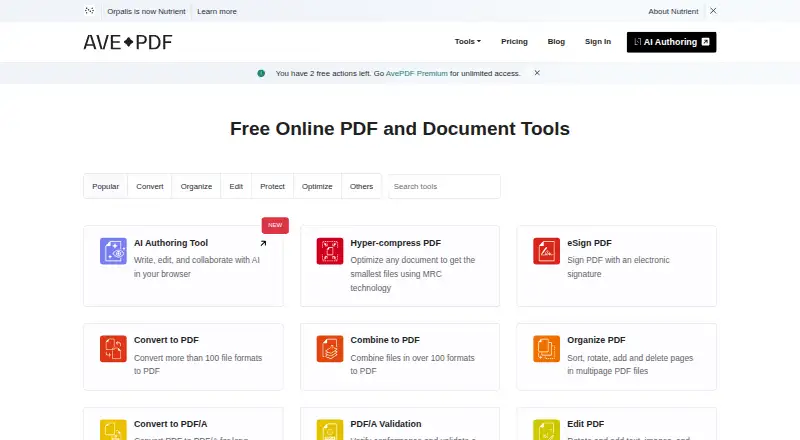
AvePDF is a browser-based service for editing, converting, and managing PDFs and other electronic documents. Its tools cover merging, splitting, compression, conversion, protection, redaction, signing, OCR, PDF/A conversion and validation, and scanning. The converter supports more than 100 formats, including raster and vector images, office and text files, CAD, and SVG. Users can upload from Google Drive, Dropbox, or a web address, then save results to cloud storage. The Free plan costs nothing and includes 50+ document tools, 2 processing operations per 6 hours, a 128 MB maximum file size, and up to 10 files per processing. Premium costs $45 a year, billed annually as one payment per user; it includes unlimited processing, files up to 512 MB, and up to 100 files per processing, along with no ads, technical support, and early beta access. Free-service uploads may be retained to improve services, including to train models; Premium files are not retained. Premium subscribers also receive multiple levels of encryption. Free users can embed AvePDF widgets on a website.
Who it suits
AvePDF suits individuals with occasional document editing, conversion, or management needs, as well as users who need a wider processing allowance. It is available through the web and listed for Android, iOS, and Linux.
What it does well
- Offers more than 100 conversion formats.
- Free plan includes 50+ document tools.
- Supports Google Drive and Dropbox uploads.
- Free users can embed its widgets.
- Premium files are not retained.
What to know first
- Free plan allows 2 operations per 6 hours.
- Free plan has a 128 MB file limit.
- Free-service files may be retained to train models.
- No offline desktop app is listed.
Limits
The Free plan allows two processing operations per six hours, files up to 128 MB, and up to 10 files per processing. Premium raises these limits to unlimited processing, 512 MB files, and 100 files per processing.
Plans
| Plan | Billed and limits | Price |
|---|---|---|
| AvePDF Free | 50+ document tools · 2 processing operations per 6 hours · 128 MB max file size · 10 files per processing | Free |
| AvePDF Premium | US$45 billed annually as one payment, per user · 50+ document tools · unlimited processing · 512 MB max file size · 100 files per processing · early beta access · no ads · technical support | $45 a year |
As avepdf.com lists them, read 3 Oct 2026. The maker's own page has the final word.
Getting started
- Visit https://avepdf.com/.
- Choose the Free plan for occasional document work or Premium for unlimited processing.
- Upload a file from Google Drive, Dropbox, or a web address.
- Select a document tool such as conversion, OCR, signing, or compression.
- Save the result to cloud storage.
Verdict
AvePDF covers common PDF tasks and conversion across a wide range of formats, with cloud upload and save options. The Free plan has processing and file-size limits, and free uploads may be retained; Premium costs $45 a year, billed annually as one payment per user.
Questions
Is AvePDF free?
Yes. AvePDF Free costs nothing and includes 50+ document tools, two processing operations per six hours, and files up to 128 MB.
How much does Premium cost?
Premium costs $45 a year, billed annually as one payment per user.
What platforms does AvePDF support?
The listed platforms are Android, iOS, Linux, and web. AvePDF is browser-based.
Can I connect cloud storage?
The converter accepts uploads from Google Drive, Dropbox, or a web address, and lets users save results to cloud storage.
What happens to uploaded files?
Files are accessible for up to 30 minutes and may be deleted manually. Free-service files may be retained to improve services, including to train models; Premium subscriber files are not retained.
Who publishes AvePDF?
The site identifies its publisher as Orpalis Imaging SAS d/b/a Nutrient.
Facts from AvePDF's own pages
- Company
- The site identifies the publisher as Orpalis Imaging SAS d/b/a Nutrient. · avepdf.com, 3 Oct 2026
- Embedding
- The maker says Free users can embed any AvePDF widget on their website. · blog.avepdf.com, 3 Oct 2026
- Encryption
- AvePDF says Premium subscribers benefit from multiple levels of encryption to protect their files. · avepdf.com, 3 Oct 2026
- File conversion
- The converter supports more than 100 file formats, including raster and vector images, office and text formats, CAD, and SVG. · avepdf.com, 3 Oct 2026
- Founded
- 2020 · avepdf.com, 28 Sept 2026
- Free plan audience
- AvePDF describes the Free plan as useful for individuals with occasional document editing, conversion, or management needs. · blog.avepdf.com, 3 Oct 2026
- Headquarters
- Muret, France · avepdf.com, 28 Sept 2026
- Integrations
- The converter supports upload from Google Drive, Dropbox, and a web address, and lets users save results to cloud storage. · avepdf.com, 3 Oct 2026
- PDF tools
- The service lists tools for merging, splitting, compressing, converting, protecting, redacting, signing, OCR, PDF/A conversion and validation, and scanning. · avepdf.com, 3 Oct 2026
- Product
- AvePDF is a browser based service for editing, converting, and managing PDF and other electronic documents. · blog.avepdf.com, 3 Oct 2026
- Security and retention
- Files are accessible for up to 30 minutes and may be deleted manually; the page says uploaded free-service files are retained to improve services, including to train models, while Premium subscriber files are not retained. · avepdf.com, 3 Oct 2026
- Support
- The Premium plan includes technical support. · avepdf.com, 3 Oct 2026
- Technology
- The converter is powered by Nutrient PDF Conversion using the GdPicture.NET SDK. · avepdf.com, 3 Oct 2026
Where AvePDF stands on Freedom251
- PDF Merger Software#1 of 36
- PDF Compression Software#2 of 39
- PDF compressors#4 of 22
- PDF mergers#13 of 23