PDF Compressor by DocuPub
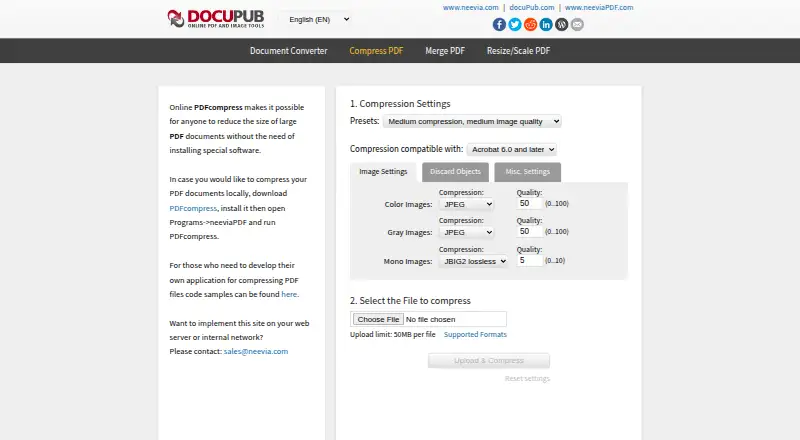
What PDF Compressor by DocuPub is
PDF Compressor by DocuPub is an online tool for reducing the size of PDF documents. It works on the web without requiring a special software installation, and the free online plan accepts files up to 50 MB each. Users can choose compression presets and PDF compatibility, adjust image quality, and set compression options for color, grayscale, and monochrome images. Additional controls can preserve PDF/A, optimize files for fast web viewing and page content streams, and remove duplicate images, fonts, or color profiles. Users can also discard forms, tags, bookmarks, annotations, attachments, and hidden layer content. The website links to a Windows application for compressing documents locally and provides code samples for developers building PDF compression applications. Organizations interested in running the service on a web server or internal network can contact sales. API access is also listed. Docupub Inc. operates under the Neevia Tech trade name and is headquartered in Davie, Florida. Neevia offers free email support to evaluators and priority phone and email support to licensed customers on weekdays from 9AM to 5PM EST, excluding holidays.
Who it suits
It suits people who want to reduce PDF file sizes in a browser and choose how images and other document elements are handled. Windows users can also consider the linked desktop application, while developers can consult the code samples or use the listed API access.
What it does well
- Free online plan with a 50 MB per-file limit.
- Offers presets, PDF compatibility, and image-quality controls.
- Can preserve PDF/A and optimize for fast web viewing.
- Can remove selected document objects and duplicate resources.
- Links to a Windows desktop app and developer code samples.
What to know first
- Online uploads must be no larger than 50 MB.
- Password-protected files cannot be processed by the online compressor.
Limits
The free online plan allows up to 50 MB per file. The online compressor cannot process password-protected files.
Plans
| Plan | Billed and limits | Price |
|---|---|---|
| PDF Compressor by DocuPub (online) | Free · 50MB per file · online compression | Free |
As docupub.com lists them, read 7 Oct 2026. The maker's own page has the final word.
Getting started
- Open the DocuPub PDF Compressor website.
- Choose the online compressor or follow the link to the Windows application for local compression.
- For online compression, make sure the PDF is no larger than 50 MB and is not password protected.
- Select compression and PDF options, then submit the file for online compression.
- Developers can review the linked code samples or use the listed API access.
Verdict
Choose PDF Compressor by DocuPub for free browser-based compression with controls over images, PDF compatibility, and removable content. Look elsewhere if your online files exceed 50 MB or are password protected; Windows users can consider the linked local application.
Questions
How much does PDF Compressor by DocuPub cost?
The online plan is free, billed Free.
Is there a free plan?
Yes. The online compressor has a free plan, with a 50 MB limit per file.
Which platforms are supported?
The listed platforms are web, Windows, and API. The site links to a downloadable Windows application for local compression.
Can it process password-protected PDFs?
No. The online compressor requires files not to be password protected.
Does it offer developer access?
API access is listed, and the website links to code samples for developers building PDF compression applications.
What support is available?
Neevia offers free email support to evaluators. Licensed customers can receive priority phone and email support weekdays from 9AM to 5PM EST, excluding holidays.
Facts from PDF Compressor by DocuPub's own pages
- Company
- Neevia Tech is a trade name of Docupub Inc., established in December 1999 and headquartered in Davie, Florida, United States. · neevia.com, 7 Oct 2026
- Compression controls
- Users can select presets and PDF compatibility, configure color, grayscale, and monochrome image compression, and set image quality. · docupub.com, 7 Oct 2026
- Developer use
- The page links to code samples for developers who want to build an application that compresses PDF files. · docupub.com, 7 Oct 2026
- File limit
- The online compressor limits uploads to 50MB per file. · docupub.com, 7 Oct 2026
- Founded
- 1999 · docupub.com, 28 Sept 2026
- Headquarters
- Davie, Florida, United States · docupub.com, 28 Sept 2026
- Local version
- The page links to a downloadable PDFcompress application for compressing documents locally. · docupub.com, 7 Oct 2026
- Object removal
- Users can choose to discard items such as forms, tags, bookmarks, annotations, attachments, and hidden layer content. · docupub.com, 7 Oct 2026
- PDF options
- Options include preserving PDF/A, optimizing for fast web view and page content streams, and removing duplicate images, fonts, and color profiles. · docupub.com, 7 Oct 2026
- Privacy scope
- Neevia’s privacy policy says its desktop products process documents locally and do not transmit document content to Neevia. · neevia.com, 7 Oct 2026
- Purpose
- The online tool reduces the size of large PDF documents without requiring special software installation. · docupub.com, 7 Oct 2026
- Server deployment
- The maker invites users who want to implement the site on a web server or internal network to contact sales. · docupub.com, 7 Oct 2026
- Support
- Neevia offers free email support to evaluators and priority phone and email support to licensed customers on weekdays from 9AM to 5PM EST, excluding holidays. · neevia.com, 7 Oct 2026
- Troubleshooting limit
- The compressor error page says files must not be password protected and must not exceed 50MB. · docupub.com, 7 Oct 2026
Where PDF Compressor by DocuPub stands on Freedom251
- PDF compressors#7 of 22
- PDF Compression Software#23 of 39