Online PDF Compressor
What Online PDF Compressor is
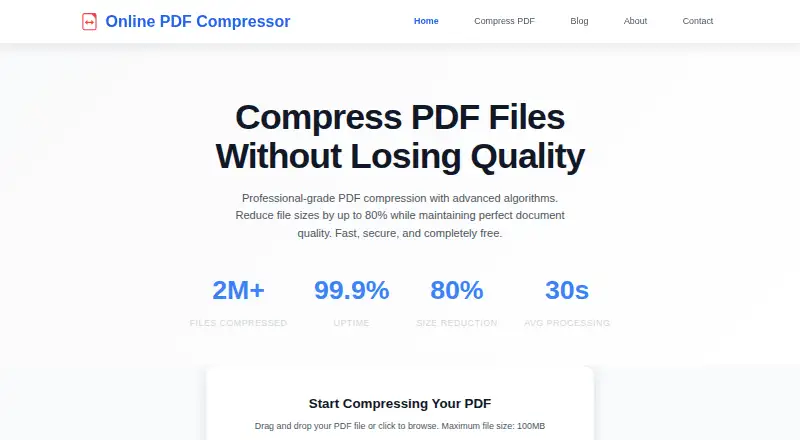
Online PDF Compressor is a web tool for reducing PDF file sizes while maintaining document quality. It offers three compression levels: High Quality, Balanced, and Maximum Compression. The site gives approximate reductions of 10–30%, 30–60%, and 50–80%, respectively. The free plan costs 0.00 USD and supports files up to 100 MB. Compression runs in a browser, with no software installation or account creation required; the homepage reports an average processing time of 30 seconds. The service does not support password-protected PDFs or batch compression, and it has no offline desktop app.
The service says uploads are protected with 256-bit SSL encryption and deleted after compression. Its privacy policy says PDFs are temporarily processed on servers and automatically deleted within 24 hours, and describes a zero data retention policy. The site states a commitment to GDPR compliance. Developers and businesses can ask about API integrations and pricing by contacting the company. Support is available by email at [email protected], with a stated response time within 24 hours, and through weekday live chat. Founded in 2024, the service describes its audience as ranging from students to Fortune 500 companies.
Who it suits
Online PDF Compressor suits people who want to shrink PDFs in a browser without installing software or creating an account. Its three compression settings offer different stated size reductions, and its API option may suit developers and businesses seeking automated access.
What it does well
- Free plan supports files up to 100 MB.
- Three compression levels offer different stated reduction ranges.
- Runs in a browser without installation or account creation.
- Uploads use 256-bit SSL encryption, according to the service.
- API access is available.
What to know first
- Password-protected PDFs are unsupported.
- Batch compression is unavailable.
- There is no offline desktop app.
Limits
The free plan supports PDF compression for files up to 100 MB. Password-protected PDFs are unsupported, and batch compression is unavailable.
Plans
| Plan | Billed and limits | Price |
|---|---|---|
| Free | PDF compression · maximum file size 100MB · password-protected PDFs unsupported | Free |
As onlinepdfcompressor.com lists them, read 7 Oct 2026. The maker's own page has the final word.
Getting started
- Open https://onlinepdfcompressor.com/ in a web browser.
- Choose a compression level: High Quality, Balanced, or Maximum Compression.
- Upload a PDF file up to 100 MB.
- Run compression and retrieve the compressed PDF.
Verdict
Choose Online PDF Compressor for browser-based PDF compression without an account or installation, with three compression levels and a 100 MB file limit. Look elsewhere if you need batch processing, an offline desktop app, or support for password-protected PDFs.
Questions
Is Online PDF Compressor free?
Yes. The Free plan costs 0.00 USD and supports PDF compression.
What compression levels does it offer?
It offers High Quality, Balanced, and Maximum Compression, with stated reductions of approximately 10–30%, 30–60%, and 50–80%, respectively.
What platforms does it support?
It runs on the web in a browser. The service says no software installation or account creation is required.
What is the maximum PDF file size?
The homepage supports PDF files up to 100 MB.
Does it support password-protected PDFs or batch compression?
Password-protected PDFs are unsupported, and batch compression is unavailable.
Does it offer API access?
Yes. Developers and businesses can contact the company to discuss integration needs and pricing.
Facts from Online PDF Compressor's own pages
- Browser use
- The service runs in the browser and requires no software installation or account creation. · onlinepdfcompressor.com, 7 Oct 2026
- Compression
- The site offers High Quality, Balanced, and Maximum Compression levels, with stated reductions of approximately 10–30%, 30–60%, and 50–80%, respectively. · onlinepdfcompressor.com, 7 Oct 2026
- File size limit
- The homepage supports PDF files up to 100MB. · onlinepdfcompressor.com, 7 Oct 2026
- Founded
- 2024 · onlinepdfcompressor.com, 28 Sept 2026
- GDPR
- The site states it is committed to GDPR compliance and describes user rights, data handling, and security measures. · onlinepdfcompressor.com, 7 Oct 2026
- Integrations and API
- The Contact page says API access is available for developers and businesses, with integration needs and pricing discussed by contacting the company. · onlinepdfcompressor.com, 7 Oct 2026
- Intended users
- The About page describes the service as serving users from students to Fortune 500 companies. · onlinepdfcompressor.com, 7 Oct 2026
- Privacy
- The privacy policy says uploaded PDFs are temporarily processed on servers and automatically deleted within 24 hours. · onlinepdfcompressor.com, 7 Oct 2026
- Processing
- The homepage reports an average processing time of 30 seconds. · onlinepdfcompressor.com, 7 Oct 2026
- Purpose
- Online PDF Compressor is a web-based tool for reducing PDF file size while maintaining document quality. · onlinepdfcompressor.com, 7 Oct 2026
- Security
- The About page states that uploads use 256-bit SSL encryption and files are automatically deleted after compression; it also describes a zero data retention policy. · onlinepdfcompressor.com, 7 Oct 2026
- Support
- The Contact page lists support by email at [email protected] with a stated response time within 24 hours, plus weekday live chat. · onlinepdfcompressor.com, 7 Oct 2026
- Unsupported files
- The Contact page says password-protected PDFs are not currently supported. · onlinepdfcompressor.com, 7 Oct 2026
Where Online PDF Compressor stands on Freedom251
- PDF compressors#10 of 22
- PDF Compression Software#22 of 39