Freedom251 › PDF Compression Software

Foxit PDF Compressor
What Foxit PDF Compressor is
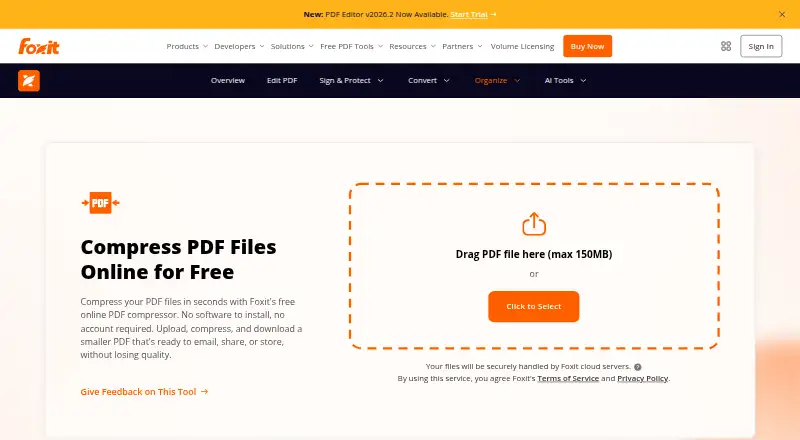
Foxit PDF Compressor reduces PDF file size for sharing, email, or storage. The free online tool lets users upload one PDF at a time, start compression, and download the smaller file; it accepts files up to 150 MB and does not require an account. Foxit says online compression preserves text clarity, images, and formatting, and that OCR-friendly compression can shrink scanned or image-heavy documents while keeping scanned text readable. The company says files are encrypted in transit and automatically deleted from its servers after processing. For offline work, Foxit PDF Editor offers batch compression and advanced optimization settings with multiple compression levels. The product page describes use with SharePoint, OneDrive, Google Drive, and Microsoft Teams. Foxit PDF Editor+ has a 14-day free trial with no credit card required. Listed paid options include PDF Editor at $129.99 a year, PDF Editor+ at $159.99 a year, and a perpetual license at $209.99, paid once. Foxit was founded in 2001 and is headquartered in Fremont, California.
Who it suits
The online compressor suits people who need to shrink a single PDF without creating an account. Organizations managing archives, regulated records, business communications, or high-volume PDF workflows may consider the desktop editor’s batch and offline options.
What it does well
- Free online compression requires no account.
- Online tool accepts PDFs up to 150 MB.
- Desktop editor supports offline and batch compression.
- PDF Editor+ offers a 14-day free trial.
- Foxit says uploads are deleted after processing.
What to know first
- Online compression handles one PDF at a time.
- PDF Editor costs $129.99 a year.
- Perpetual license excludes several cloud and AI features.
Limits
The free online compressor accepts one PDF upload at a time, up to 150 MB. PDF Editor is $129.99 a year, PDF Editor+ is $159.99 a year, and the perpetual license is $209.99, paid once; the perpetual license excludes AI Assistant, Workspace, Smart Redact, DMS and cloud features.
Plans
| Plan | Billed and limits | Price |
|---|---|---|
| Foxit online PDF compressor | One PDF upload at a time · max 150 MB · no account required | Free |
| PDF Editor | per user/year; annual plan, paid in full · Windows, macOS and web · PDF compression and editing · 300 AI credits/month | $129.99 a year |
| PDF Editor+ | per user/year; annual plan, paid in full · Includes PDF Editor · iOS and Android apps · 150 eSign envelopes/year · AI Smart Redact | $159.99 a year |
| Foxit PDF Editor 14 (Perpetual License) | one-time per user · Windows or macOS · excludes AI Assistant, Workspace, Smart Redact, DMS and cloud features | $209.99, paid once |
As foxit.com lists them, read 11 Oct 2026. The maker's own page has the final word.
Getting started
- Open the Foxit PDF Compressor website.
- For online compression, upload one PDF of up to 150 MB.
- Start compression and download the smaller PDF.
- For offline or batch work, choose a Foxit PDF Editor plan for Windows or macOS.
- Try PDF Editor+ with its 14-day trial; no credit card is required.
Foxit PDF Compressor reduces PDF sizes in a browser and through Foxit PDF Editor on desktop. It is a sensible fit for occasional file sharing as well as organizations handling archives, regulated records or recurring document queues. The online tool is convenient, but serious volume, offline work and advanced controls require a paid editor plan.
Overview
The web workflow is deliberately short: upload a PDF, start compression and download the result. Foxit says the process retains text clarity, images and formatting, while OCR-friendly handling targets scanned and image-heavy documents without making scanned text unreadable. That combination suits business correspondence and archive material where a smaller file cannot come at the cost of legibility.
Foxit says files are encrypted while moving to its service and automatically removed from its servers after processing. Its Trust Center identifies SOC 2 Type 2 and GDPR support. The company's HIPAA-ready position applies to Foxit's controls and customer obligations, so healthcare users still need to evaluate their own responsibilities and workflow.
Key features
- Free browser compression: No account is needed, which makes a single reduction quick for a student, freelancer or occasional sender. One PDF can be uploaded at a time and the maximum size is 150 MB, so it is not designed for a large queue.
- Scanned-file handling: OCR-friendly compression is useful for image-heavy scans and records because Foxit aims to preserve readable text. It is a more relevant capability for archives than a basic size reducer that only targets ordinary digital PDFs.
- Offline and batch work: Foxit PDF Editor adds desktop compression, batch processing, multiple compression levels and advanced optimization settings. Those controls are the practical reason to move beyond the browser when many files, repeatable output or local processing matters.
- Business workflow fit: Foxit describes use with SharePoint, OneDrive, Google Drive and Microsoft Teams, helping teams place smaller PDFs into established collaboration and storage processes.
- Support: A searchable Support Center provides articles, troubleshooting guidance and ticket submission, useful when compression settings or document behavior need explanation.
Pricing
The no-cost online compressor is best for occasional individual files: it allows one upload at a time, up to 150 MB, with no account. It does not provide the batch and offline workflow that recurring business processing demands.
| Plan | Price and terms | What it includes | Best fit |
|---|---|---|---|
| Foxit online PDF compressor | free | One PDF upload at a time; 150 MB maximum; no account required | Occasional single-file reductions |
| PDF Editor | $129.99 a year, billed per user/year and paid in full | Windows, macOS and web; compression and editing; 300 AI credits per month | Users needing desktop and web editing with ongoing compression |
| PDF Editor+ | $159.99 a year, billed per user/year and paid in full | Everything in PDF Editor, plus iOS and Android apps, 150 eSign envelopes per year and AI Smart Redact | Organizations adding mobile work, signing and redaction |
| Foxit PDF Editor 14 (Perpetual License) | 209.99 USD once, per user | Windows or macOS; excludes AI Assistant, Workspace, Smart Redact, DMS and cloud features | One-user desktop work where a perpetual license is preferable |
PDF Editor+ has a 14-day free trial with no credit card required. The annual plans commit users to a full-year payment, while the perpetual edition trades subscription renewal for a narrower feature set and no cloud or document-management features. Pricing for other organizational arrangements is custom.
Platforms
The service is presented across Android, iOS, macOS, web and Windows. The dedicated desktop compression capability is supported on Windows, while the listed PDF Editor plan covers Windows, macOS and web; PDF Editor+ adds iOS and Android apps. The perpetual license is for Windows or macOS.
Who it's for
Choose Foxit when you need a quick, no-account reduction for an individual PDF, or when a business needs batch, offline and adjustable compression for archives, regulated records or high-volume communications. The free tool is a poor match for repeated queues because of its 150 MB and single-upload limits. Teams that need mobile apps, e-signing or smart redaction have a clearer case for PDF Editor+, while a desktop-only buyer who wants to avoid annual renewal may prefer the perpetual license despite its exclusions.
Pros and cons
- Pros: Free, no-account online use; stated preservation of text, images and formatting; OCR-friendly treatment for scans; encrypted transfer and automatic server deletion; desktop batch and offline controls; broad editor platform coverage.
- Cons: The free service handles only one PDF at a time and caps files at 150 MB; batch and advanced optimization require paid desktop software; annual plans are paid in full; the perpetual edition omits AI, cloud, DMS and Workspace features.
Alternatives
PDF Compression Software is the broader category guide for comparing compression tools. Pick PDF Candy instead if you want Android, iOS, Linux, macOS, web and Windows coverage and can accept page, hourly and file-size restrictions without batch processing on its free tier. PDF24 Compare PDF is a free, ad-supported option with no limits, registration or time restrictions.
PDF2Go suits readers seeking most tools free across web, desktop, mobile and extension surfaces, with limited free processing. Choose Xodo Compress PDF for a freemium cross-platform service whose free online tier allows one low-compression action per day. BentoPDF Hyper Compress is the alternative for self-hosting or API-oriented deployments, with an AGPL-3.0 option and paid Solo plan.
Smallpdf offers a seven-day trial and a free tier with 30 tools, while AvePDF provides 50-plus document tools but limits free use to two operations per six hours, 128 MB files and 10 files per processing. PDFOptim is aimed at private processing, with three free operations per day and a 25 MB per-file limit.
Verdict
Foxit is a strong choice for users who value readable compression, secure stated handling and a path from one-off browser jobs to offline batch processing. Look elsewhere if you need unrestricted free volume, a lighter one-purpose tool or broader self-hosting options; Foxit's free caps and paid-editor requirements become restrictive once compression is routine.
Verdict
Foxit offers a no-cost online option for individual files and desktop tools for batch and offline compression. Check the file limit and the different paid-plan features before choosing an option.
Questions
Is Foxit PDF Compressor free?
Yes. Its online compressor costs nothing and does not require an account. It allows one PDF upload at a time, up to 150 MB.
What are the paid plan prices?
PDF Editor costs $129.99 a year, PDF Editor+ costs $159.99 a year, and PDF Editor 14 Perpetual License costs $209.99, paid once.
Which platforms are supported?
The listed platforms are Android, iOS, macOS, web and Windows. The standalone desktop app is listed for Windows, while the Editor plans include Windows or macOS and web as specified in their plan details.
Can it compress PDFs offline or in batches?
Yes. Foxit PDF Editor offers offline compression and batch processing, with multiple compression levels.
Does Foxit offer a free trial?
Foxit PDF Editor+ has a 14-day free trial, and no credit card is required.
What integrations does Foxit describe?
Foxit describes using compressed PDFs with SharePoint, OneDrive, Google Drive and Microsoft Teams.
Facts from Foxit PDF Compressor's own pages
- Company
- The product page identifies the copyright holder as Foxit Software Incorporated. · foxit.com, 11 Oct 2026
- Compression quality
- Foxit says online compression preserves text clarity, images and formatting. · foxit.com, 11 Oct 2026
- Desktop option
- Foxit PDF Editor offers offline compression, batch processing and advanced optimization settings, with multiple compression levels. · foxit.com, 11 Oct 2026
- Founded
- 2001 · foxit.com, 28 Sept 2026
- Headquarters
- Fremont, California, United States · foxit.com, 28 Sept 2026
- Integrations
- The page describes using compressed PDFs with SharePoint, OneDrive, Google Drive and Microsoft Teams. · foxit.com, 11 Oct 2026
- Intended users
- Foxit presents compression for organizations managing document archives, regulated records, business communications and high-volume PDF workflows. · foxit.com, 11 Oct 2026
- Online security
- Foxit says files are encrypted in transit and automatically deleted from its servers after processing. · foxit.com, 11 Oct 2026
- Purpose
- Foxit's free online compressor reduces PDF file size for emailing, sharing and storage. · foxit.com, 11 Oct 2026
- Scanned PDFs
- The product page says OCR-friendly compression can shrink scanned and image-heavy documents while keeping scanned text readable. · foxit.com, 11 Oct 2026
- Security and compliance
- Foxit's Trust Center lists SOC 2 Type 2 and GDPR support; its HIPAA-ready statement applies to Foxit's controls and customer obligations. · foxit.com, 11 Oct 2026
- Support
- Foxit provides a searchable Support Center with help articles, troubleshooting steps and ticket submission. · foxit.com, 11 Oct 2026
- Trial
- Foxit PDF Editor+ has a 14-day free trial, and the pricing page says no credit card is required. · foxit.com, 11 Oct 2026
- Workflow
- Users upload a PDF, start compression and download the smaller file. · foxit.com, 11 Oct 2026
Where Foxit PDF Compressor stands on Freedom251
- PDF Compression Software#5 of 39
- PDF compressors#15 of 22