Freedom251 › Personal Email Services

Zoho Mail
by Zoho Mail
What Zoho Mail is
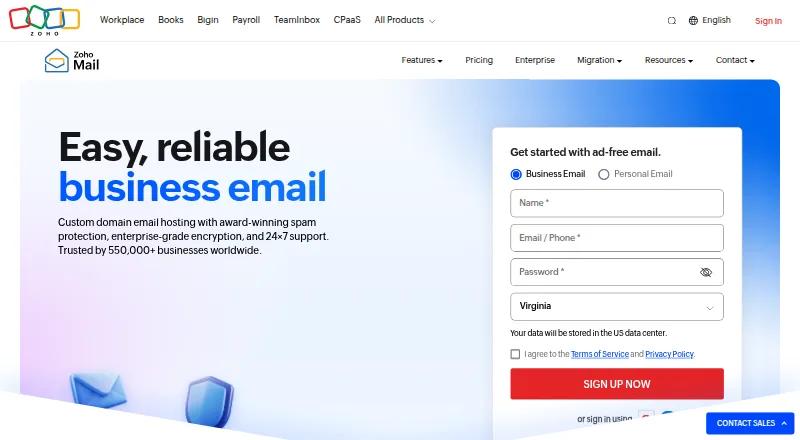
Zoho Mail provides custom-domain email hosting for businesses, with web access and desktop and mobile apps. Its free plan supports one domain and up to five users, with 5 GB of mail storage per user; IMAP, POP, and Active Sync are excluded. Paid plans start at $1 a month when billed annually, and a 15-day trial is listed. Security features include TLS, S/MIME, and AES-256 encryption at rest. Administration controls include role-based access, custom security policies, audit logs, and eDiscovery. Zoho Mail lists spam and phishing blockers intended to address socially engineered attacks. Zia can draft replies and summarize long email threads, and Zoho Mail MCP connects the service to AI apps. A migration tool can transfer email, contacts, and calendars from Google Workspace, Microsoft 365, or IMAP providers. Mobile apps combine email, calendar, contacts, and files. Zoho says it is GDPR compliant and has ISO/IEC 27001 and SOC 2 Type II certifications. Paid plans include 24×7 support by email, phone, and live chat.
Who it suits
Zoho Mail suits businesses that need email on a custom domain, with administration controls and migration tools. The free plan fits small teams willing to work without IMAP, POP, or Active Sync.
What it does well
- Free plan includes five users and one domain.
- Migration tool transfers email, contacts, and calendars.
- Mobile apps combine email, calendar, contacts, and files.
- Paid plans include 24×7 support.
What to know first
- Free plan excludes IMAP, POP, and Active Sync.
- Free plan has 5 GB mail storage per user.
- Paid plans start at $1 a month billed annually.
Limits
The free plan supports one domain, up to five users, and 5 GB of mail storage per user; it excludes IMAP, POP, and Active Sync. The lowest listed paid plan, Mail Lite 5 GB, costs $1.00 per month billed annually and has a 250 MB huge attachment limit.
Plans
| Plan | Billed and limits | Price |
|---|---|---|
| Mail Lite 5 GB | billed annually; no monthly plan · 5 GB mail storage per user · custom business email · IMAP/POP · any team size | $1 a month |
| Mail Lite 10 GB | billed annually; no monthly plan · 10 GB mail storage per user · custom business email · IMAP/POP · any team size | $1.25 a month |
| Mail Premium | billed annually; no monthly plan · 50 GB mail storage per user · 50 GB retention storage per user · e-discovery · S-MIME · any team size | $4 a month |
| Forever Free | up to 5 users · one hosted domain · 5 GB mail storage per user · web-only access · selected data centers | Free |
| Mail Free | Forever free · Up to 5 users · one custom domain · 5 GB mail storage per user · IMAP/POP/Active Sync not included · available in select data centers | Free |
| Mail Lite | Billed annually; no monthly plan · 5 GB or 10 GB mail storage per user · 30 MB attachment limit | $1 |
| Workplace Standard | Billed annually; US$4 per user/month billed monthly · 30 GB mail storage per user · 100 GB team file storage for 3–10 users · includes Mail and other Workplace apps | $3 |
| Workplace Professional | Billed annually; US$7 per user/month billed monthly · 100 GB mail and 100 GB retention storage per user · 1 TB team file storage for 3–10 users · includes Mail and other Workplace apps | $6 |
The first 8 of 9 plans, as zoho.com lists them, read 14 Oct 2026. The maker's own page has the final word. Every plan
Getting started
- Open the Zoho Mail website.
- Choose the free plan or review the paid plans; a 15-day trial is available.
- Set up a custom domain and add users within the plan's limits.
- Use the web service or install the app for a listed desktop or mobile platform.
- If migrating, use the migration tool for Google Workspace, Microsoft 365, or an IMAP provider.
Overview
Zoho Mail is hosted business email for organisations using a custom domain, with mailbox administration and migration tools alongside the core inbox. It suits small teams that want to start free and businesses that need more storage or administrative controls as they grow. The trade-off to weigh first is that the free tier excludes IMAP, POP and Active Sync, while paid plans require annual billing unless a Workplace monthly price is shown.
Key features
Mail, AI and integrations
Zia can draft replies and summarise long threads, and Zoho Mail MCP connects the service to AI apps. These are useful additions for routine correspondence, but the more practical differentiator for many teams is the free migration tool: it can transfer emails, contacts and calendars from Google Workspace, Microsoft 365 or IMAP providers. CRM integrations include Zoho CRM, HubSpot, Pipedrive and Insightly CRM.
The mobile app combines email, calendar, contacts and files. The desktop app supports Windows 10 or later, macOS 12 or later, and specified 64-bit Linux distributions. These options give users several ways to work with their mail, though the free plan's protocol restrictions matter for teams that depend on third-party mail clients or sync methods.
Security and administration
Zoho Mail lists TLS, S/MIME and AES-256 encryption at rest, as well as spam and phishing blockers aimed at socially engineered attacks. Administrators can use role-based access, custom security policies, audit logs and eDiscovery. Zoho states that its service is GDPR compliant and has ISO/IEC 27001 and SOC 2 Type II certifications. Paid plans include 24×7 support by email, phone and live chat; the pricing comparison gives its plans a 99.9% uptime guarantee.
Pricing
The freemium structure makes it possible to begin without a subscription, but compare the storage and billing terms carefully. Mail plans are billed annually with no monthly option; Workplace tiers show separate monthly prices.
- Mail Free — free: Forever free, with no credit card required; includes five users, one domain and 5 GB of mail storage per user. Its protocol exclusions make it best for teams happy to use Zoho's supported access rather than IMAP, POP or Active Sync.
- Mail Lite 5 GB — $1 a month, billed annually: 5 GB per user and a 250 MB huge-attachment limit. This is the lowest-cost paid mailbox option, but it does not offer the larger mailbox allowance of the 10 GB tier.
- Mail Lite 10 GB — $1.25 a month, billed annually: 10 GB per user and the same 250 MB huge-attachment limit. The small price increase over the 5 GB option makes this the more suitable Lite choice for users who expect fuller inboxes.
- Mail Premium — $4 a month, billed annually: 50 GB mail storage and 50 GB retention storage per user, with a 1 GB huge-attachment limit. It fits users who need substantially more mailbox and retention capacity, at a considerable step up in price.
- Mail Lite — $1 a year, billed annually: the plan entry gives 5 GB or 10 GB per user and a 30 MB attachment limit. Because the listed term and price differ sharply from the monthly-priced Lite tiers, confirm the billing details before choosing it.
- Workplace Standard — $3 a year, billed annually; US$4 per user/month billed monthly: 30 GB mail storage per user, 100 GB team file storage for 3–10 users, and Mail plus other Workplace apps. It is for teams seeking a broader app bundle and shared file storage, rather than email alone.
- Workplace Professional — $6 a year, billed annually; US$7 per user/month billed monthly: 100 GB mail and 100 GB retention storage per user, plus 1 TB team file storage for 3–10 users and other Workplace apps. It suits teams with greater storage needs, but carries a higher listed price than Standard.
- Workplace Enterprise — custom pricing: custom limits; virtual private cloud is only for subscriptions above 100,000 users, and pooled Mail storage only for subscriptions above 1,000 users. This is an option for very large organisations with those scale requirements, not a default upgrade for smaller teams.
A 15-day trial is available. The free plan is capped at one domain and five users; the paid Mail Lite and Premium tiers publish larger storage and attachment limits, while the 99.9% uptime guarantee applies across the plans.
Platforms
Zoho Mail is available on the web, Android, iOS, Linux, macOS and Windows. Native mobile apps bring email, calendar, contacts and files together. Desktop Lite supports Windows 10 or later, macOS 12 or later, and specified 64-bit Linux distributions.
Who it's for
Zoho Mail is a strong fit for small businesses that want custom-domain hosting with a free starting tier, or for teams needing migration, CRM connections and administrative controls. Growing organisations can move to paid mailbox tiers for more storage and larger attachment limits. It is less suitable for teams that need IMAP, POP or Active Sync on the free plan, and the annual commitment on Mail tiers is a poor fit for buyers who require monthly billing.
Pros and cons
- Pro: A free tier supports five users on one custom domain with 5 GB per user, giving small teams a no-cost starting point.
- Pro: Migration from Google Workspace, Microsoft 365 or IMAP providers covers email, contacts and calendars, reducing the scope of a service move.
- Pro: Paid plans combine security and administrative controls with 24×7 support and a stated 99.9% uptime guarantee.
- Con: The free tier excludes IMAP, POP and Active Sync, limiting teams that rely on those protocols.
- Con: Mail Lite and Premium have annual billing with no monthly plan, making them less flexible for short-term or month-to-month needs.
- Con: Workplace Standard and Professional have a 3–10 user range for team file storage, which may not suit organisations outside that band.
Alternatives
For teams comparing email migration tools rather than hosted mail, Email Migration Software is a category to browse. Readers choosing an inbox app can compare Email clients, while those seeking non-business email services can explore Personal Email Services.
- MailJerry is a freemium migration alternative with a free tier for unlimited mailboxes, 150 MB per mailbox and up to three simultaneous migrations, limited to one device.
- imapsync is a freemium migration alternative for Linux, macOS, self-hosted, web and Windows environments.
- imap-migrate is a free migration alternative for Windows, macOS and Linux.
- CloudM Migrate is a paid option for teams seeking migration involving Shared Drives, permissions, folder structure and version history.
- Google Workspace is a paid alternative with a free trial and apps for Android, iOS, macOS, web and Windows.
- Priasoft Migration Suite for Exchange is a paid Windows alternative.
- Cloudiway Mailbox Migration Tool is a paid web migration tool with a free trial; its Standard plan costs $570, paid once for 50 migration licenses.
- EdbMails IMAP Migration Tool is a paid Windows migration alternative with a free trial.
Verdict
Choose Zoho Mail if you need custom-domain business email, want to start with a five-user free tier, or value migration and administration tools as your organisation grows. Its main strengths are the range of storage tiers, migration support and business controls. Look elsewhere if free-tier protocol access is essential or if annual billing does not suit your budget.
Verdict
Zoho Mail offers a free custom-domain tier as well as paid options with larger storage allowances and support. Check protocol access and annual billing requirements when choosing a plan.
Questions
Is Zoho Mail free?
Yes. Mail Free is listed as free, billed forever, and requires no credit card. It supports five users, one domain, and 5 GB of mail storage per user.
How much do paid plans cost?
Paid plans start at $1/user/mo billed annually, with no monthly plan listed for Mail Lite. The 15-day trial is also listed.
Which platforms can I use?
Zoho Mail is listed for web, Windows, macOS, Linux, Android, and iOS. Its mobile app combines email, calendar, contacts, and files.
Does the free plan support IMAP or POP?
No. The free plan excludes IMAP, POP, and Active Sync.
Can I migrate from another email provider?
Yes. Zoho's free migration tool can transfer emails, contacts, and calendars from Google Workspace, Microsoft 365, or IMAP providers.
What integrations are listed?
Zoho Mail's integrations page lists Zoho CRM, HubSpot, Pipedrive, and Insightly CRM for working with CRM data from Zoho Mail.
Facts from Zoho Mail's own pages
- Administration
- Its admin controls include role-based access, custom security policies, audit logs, and eDiscovery. · zoho.com, 29 Sept 2026
- AI
- Zia can draft replies and summarize long email threads, and Zoho Mail MCP connects Zoho Mail to AI apps. · zoho.com, 29 Sept 2026
- API languages and auth
- The API is language-independent, returns JSON and supports OAuth 2.0 authentication; examples cover Java, .NET, C, C++ and PHP. · zoho.com, 14 Oct 2026
- API rate limit
- Zoho documents a limit of 30 API requests per minute and says the lockout duration after exceeding it is undisclosed. · zoho.com, 14 Oct 2026
- Attachment limit
- 30 · zoho.com, 23 Sept 2026
- Calendar and contacts
- Calendar and contacts are integrated directly into the mailbox and mobile app. · play.google.com, 14 Oct 2026
- Company headquarters
- LinkedIn lists Chennai, Tamil Nadu as Zoho Corporation's headquarters. · linkedin.com, 14 Oct 2026
- Company legal name
- Zoho Corporation is privately held and profitable, according to its LinkedIn company profile. · linkedin.com, 14 Oct 2026
- Company ownership and funding
- Crunchbase identifies Zoho as privately held and lists Sridhar Vembu as founder and CEO; the profile does not disclose a conventional venture funding total. · crunchbase.com, 14 Oct 2026
- Company size
- LinkedIn lists Zoho Corporation at 10001+ employees. · linkedin.com, 14 Oct 2026
- Compliance
- Zoho lists ISO 27001, ISO 27017, ISO 27018, SOC 2 Type II and GDPR compliance certifications or commitments. · zoho.com, 14 Oct 2026
- Conversation view
- The Android app groups related messages into conversation threads. · play.google.com, 14 Oct 2026
- Custom domains
- The service supports custom domain email addresses, aliases and organization domain management. · zoho.com, 14 Oct 2026
- Desktop apps
- Zoho Mail Desktop Lite supports Windows 10 or later, macOS 12 or later, and specified 64-bit Linux distributions. · zoho.com, 29 Sept 2026
- Desktop PWA
- Zoho Mail can be installed as a progressive web app through Google Chrome or Microsoft Edge. · zoho.com, 14 Oct 2026
- Developer extensions
- Developer Space supports custom eWidget extensions, connectors and incoming or outgoing webhooks. · zoho.com, 14 Oct 2026
- Documentation depth
- The help center includes REST API and CLI guides, FAQs, how-to articles, webinars, videos, forums and whitepapers. · zoho.com, 14 Oct 2026
- Email security
- Zoho Mail lists TLS, S/MIME, and AES-256 encryption at rest among its security features. · zoho.com, 29 Sept 2026
- Founded
- Crunchbase states that Zoho was founded in 1996 by Sridhar Vembu. · crunchbase.com, 14 Oct 2026
- Free plan
- Yes · zoho.com, 23 Sept 2026
- Free plan limit
- The free plan supports one domain and up to five users, and excludes IMAP, POP, and Active Sync. · zoho.com, 29 Sept 2026
- Integrations
- Native integrations include Zoho CRM, Creator, Projects and WorkDrive, while Zapier connects more than 750 third-party apps. · zoho.com, 14 Oct 2026
- License
- The desktop client is distributed under a Zoho Software License Agreement for use with the hosted service. · zoho.com, 14 Oct 2026
- Limit: app reliability
- An Apple App Store reviewer reports incorrect calendar notifications and inability to view deleted mail in the Zoho app. · apps.apple.com, 14 Oct 2026
Where Zoho Mail stands on Freedom251
- Personal Email Services#3 of 115
- Email clients#6 of 142
- Email Migration Software#5 of 24
- Business Email Hosting#8 of 33