Freedom251 › Email Migration Software
imap-migrate
What imap-migrate is
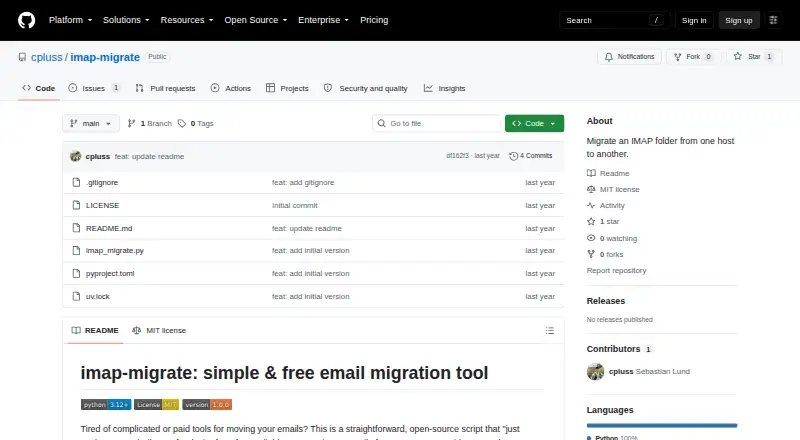
imap-migrate is a free, open-source command-line tool for moving email from one IMAP host to another. It supports accounts with IMAP access, including Gmail, Outlook, Fastmail, Yahoo, and custom servers. During transfer, it preserves original received dates and flags such as Seen and Flagged. Its progress display reports speed, success and error counts, and estimated time remaining, and it records actions in migration.log. The README says interrupted migrations can be rerun without creating duplicate emails. A dry-run option checks connection and settings without moving messages. Credentials can be provided as command-line arguments or environment variables; the README recommends environment variables as the more secure option. The tool requires Python 3.12 or higher and IMAP access enabled on both accounts, with uv recommended for dependency management. It runs on Linux, macOS, and Windows and is licensed under MIT. Its scope is one folder's contents: it does not rebuild the full folder structure or migrate provider-specific features such as Gmail labels or categories. Users can report bugs through GitHub issues and contribute pull requests.
Who it suits
imap-migrate suits people comfortable with command-line tools who need to move email between IMAP-accessible accounts. It requires Python 3.12 or higher and IMAP enabled on both accounts.
What it does well
- Free and open source under the MIT License.
- Preserves received dates and message flags.
- Dry run checks settings without transferring messages.
- Reruns can avoid duplicate emails after interruption.
- Runs on Linux, macOS, and Windows.
What to know first
- Requires Python 3.12 or higher.
- Both accounts must have IMAP access enabled.
- Moves one folder's contents, not the full folder structure.
- Does not migrate provider-specific features such as Gmail labels.
Limits
The free plan covers migration of one IMAP folder's contents. It requires Python 3.12 or higher and IMAP access on both accounts, and does not recreate the full folder structure or migrate provider-specific features such as Gmail labels and categories.
Plans
| Plan | Billed and limits | Price |
|---|---|---|
| Free | IMAP folder migration · Python 3.12 or higher · IMAP access required on both accounts | Free |
As github.com lists them, read 4 Oct 2026. The maker's own page has the final word.
Getting started
- Open the project's GitHub page.
- Make sure Python 3.12 or higher is available.
- Enable IMAP access on both email accounts.
- Use uv for dependency management, as the project recommends.
- Provide account credentials as command-line arguments or environment variables; the project recommends environment variables.
- Use the dry-run option to check connection and settings before migrating.
Overview
imap-migrate is a free, open-source command-line utility for transferring email between IMAP accounts, including Gmail, Outlook, Fastmail, Yahoo and custom servers. It is best for technically comfortable users who need to move a folder while retaining message dates and flags. Its focused scope and Python requirements make it a poor fit for anyone expecting a full mailbox rebuild or a ready-made desktop workflow.
Key features
Preserving received dates and flags such as Seen and Flagged keeps useful message context intact after transfer. Progress reporting covers speed, successful and failed counts, and estimated time remaining, with actions recorded in migration.log. These signals help users monitor a run and investigate errors, but do not compensate for the tool’s single-folder scope.
The --dry-run option checks connection and settings without moving messages, which is useful before committing to a transfer. If a run is interrupted, it can be rerun without creating duplicate emails. Together, these safeguards suit migrations that need careful monitoring or another attempt.
Credentials may be passed as command-line arguments or environment variables; the project recommends the latter as the more secure choice. Users should also account for Python 3.12 or higher and IMAP access enabled on both accounts, with uv recommended for dependency management. That setup is reasonable for command-line users, but less convenient than an app with a graphical workflow. The tool moves one folder’s contents to another and does not recreate the full folder structure or transfer provider-specific features such as Gmail labels and categories.
Pricing
The Free plan costs nothing and covers IMAP folder migration. There are no paid tiers, seats, quotas or trial terms to weigh against it, but the free offer is limited to the same one-folder task and requires Python 3.12 or higher plus IMAP access on both accounts. The MIT License permits use under its terms.
Platforms
imap-migrate supports Linux, macOS and Windows. Its command-line interface and Python requirement mean platform support does not make it a turnkey desktop migration app.
Who it's for
This is a good fit for users who can manage a Python command-line tool and need to transfer a folder between IMAP-accessible accounts, especially when preserving dates and flags matters. It is not the right choice for users who need an entire mailbox hierarchy rebuilt, Gmail labels or categories migrated, or a graphical tool requiring little setup. The project invites bug reports through GitHub issues and contributions through pull requests.
Pros and cons
- Pro: Keeps original received dates and flags, retaining useful message context after a move.
- Pro: Dry-run checks and reruns without duplicate emails reduce the risk and disruption of interrupted transfers.
- Pro: Progress indicators and a migration log help users follow a transfer and locate errors.
- Con: Transfers only one folder’s contents and cannot rebuild a full folder structure or move provider-specific features such as Gmail labels.
- Con: Python 3.12 or higher and IMAP access on both accounts add setup requirements that may deter nontechnical users.
Alternatives
Email Migration Software is the broader category to explore when comparing migration tools. Choose Zoho Mail instead if you want a hosted mail service with a free plan for up to 5 users, one domain and 5 GB of storage per user. MailJerry is an alternative with a free migration plan covering unlimited mailboxes, subject to 150 MB per mailbox, three simultaneous migrations and use on one device.
SysTools Email Migration Tool offers a free demo for full mailbox migration of up to two user accounts, making it an alternative when mailbox scope matters more than a no-cost folder transfer. SysTools Migrator likewise offers a free version for migrating two user accounts. imapsync is another IMAP migration alternative. Cigati Email Migrator gives a free demo limited to the first 100 emails per folder, with unlimited migration requiring its licensed edition. For a migration that needs shared drives, permissions, folder structure or version history, consider CloudM Migrate. Stellar Migrator for Exchange offers a trial covering two mailboxes with migration capabilities included.
Verdict
Choose imap-migrate when you need a free, closely scoped transfer between IMAP accounts and value preserved dates, flags and clear progress reporting. Its strongest case is a folder-level move with practical safeguards and no price barrier. Look elsewhere if the job requires rebuilding mailbox structure, carrying provider-specific features, or avoiding Python and command-line setup.
Verdict
imap-migrate covers a focused email-transfer task and provides progress information and a dry-run option. Its folder-level scope and technical requirements matter when planning a migration.
Questions
How much does imap-migrate cost?
The Free plan costs nothing.
Which email providers can it work with?
It supports providers with IMAP access. Examples include Gmail, Outlook, Fastmail, Yahoo, and custom servers.
Which operating systems does it support?
It is available for Linux, macOS, and Windows.
What does it preserve when moving email?
It preserves original received dates and flags such as Seen and Flagged.
What are the migration limits?
It moves the contents of one folder to another. It does not recreate the full folder structure or migrate provider-specific features such as Gmail labels or categories.
Who maintains the project and what license does it use?
The GitHub profile identifies cpluss as Sebastian Lund and lists London as the location. The project is licensed under MIT.
Facts from imap-migrate's own pages
- Credentials
- Credentials can be supplied as command-line arguments or environment variables. · github.com, 4 Oct 2026
- Dry run
- The --dry-run option tests the connection and settings without migrating emails. · github.com, 4 Oct 2026
- License
- The project is licensed under the MIT License. · github.com, 4 Oct 2026
- Limitations
- It migrates the contents of one folder to another and does not recreate the full folder structure or migrate provider-specific features such as Gmail labels or categories. · github.com, 4 Oct 2026
- Maintainer
- The GitHub profile identifies cpluss as Sebastian Lund and lists London as the location. · github.com, 4 Oct 2026
- Metadata
- It preserves original email received dates and flags such as Seen and Flagged. · github.com, 4 Oct 2026
- Platforms
- Installation instructions show macOS and Linux, Windows, and pip as installation options. · github.com, 4 Oct 2026
- Progress and logs
- It displays migration progress, speed, success and error counts, and estimated time remaining, and logs actions to migration.log. · github.com, 4 Oct 2026
- Provider support
- It supports migration between providers with IMAP access, with Gmail, Outlook, Fastmail, Yahoo, and custom servers listed as examples. · github.com, 4 Oct 2026
- Purpose
- imap-migrate is an open-source command-line tool for moving email from one IMAP host to another. · github.com, 4 Oct 2026
- Requirements
- The tool requires Python 3.12 or higher and IMAP access enabled on both email accounts; uv is recommended for dependency management. · github.com, 4 Oct 2026
- Reruns
- The README says interrupted migrations can be rerun without creating duplicate emails. · github.com, 4 Oct 2026
- Security
- The README recommends environment variables for credentials as a more secure option; it does not state security certifications or compliance claims. · github.com, 4 Oct 2026
- Support
- The project invites users to report bugs by opening a GitHub issue and welcomes contributions through pull requests. · github.com, 4 Oct 2026
Where imap-migrate stands on Freedom251
- Email Migration Software#4 of 24