Freedom251 › Employee Scheduling Software
Workly
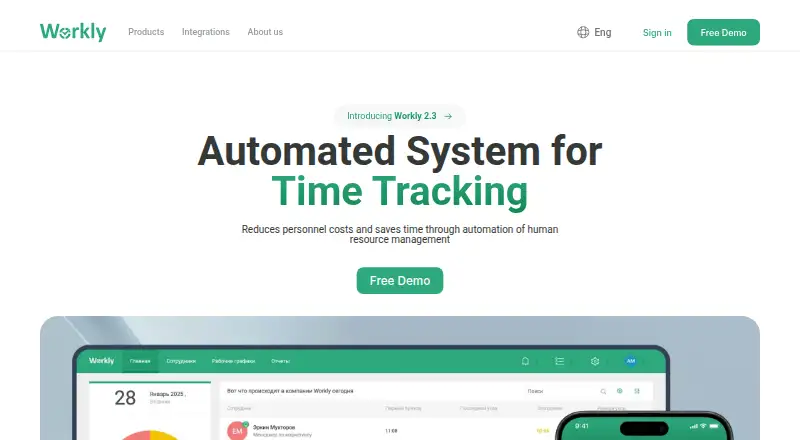
What Workly is
Workly is a cloud-based time and attendance system that tracks employee attendance, calculates salaries, and reports employee data. Employees can clock in and out through the TimePad app, while the system tracks tardiness and hours actually worked. It can produce hours-worked reports for payroll processing and supports schedules planned around business processes. Employee profiles can hold documents and notes and support time-off requests; attendance functions also include multi-location control. The mobile app supports geolocation-based check-in validation, attendance reports, notifications, and time-off requests. Workly describes integrations with SAP and 1C ERP, access-control and video-surveillance systems, and an API integration module. It can be accessed from computers, tablets, and smartphones using Windows, macOS, iOS, or Android; the platform list also includes API. The free TimePad app turns an iPad or Android tablet into an arrival and departure recording terminal. Workly offers a 30-day trial with full functionality and says no payment card or contract is required to start. Pricing is on request, and there is no free plan. Workly says the system was created in 2012 and that Biotrack was renamed Workly in 2013.
Who it suits
Workly is aimed at businesses managing employee attendance, schedules, and payroll reporting, with small and medium businesses specifically identified among its users. Its multi-location controls and employee profiles may suit organizations that need attendance records and time-off requests in one system.
What it does well
- Tracks clock-ins, clock-outs, tardiness, and hours worked.
- Generates hours-worked reports for payroll processing.
- Supports schedules, employee records, and time-off requests.
- Mobile app includes geolocation-based check-in validation.
- Integrations include SAP, 1C ERP, access control, and video surveillance.
What to know first
- There is no free plan.
- Pricing is available on request.
- Accounts are automatically deleted if no plan is activated within 30 days after the trial.
Limits
Workly has no free plan and offers a 30-day trial. After the trial, data remains saved while a plan is chosen, but the account is automatically deleted if no plan is activated within 30 days after the trial ends.
Plans
| Plan | Billed and limits | Price |
|---|---|---|
| Workly subscription (plan not named) | Contact sales for pricing · Plan details not stated | On request |
As workly.io lists them, read 11 Oct 2026. The maker's own page has the final word.
Getting started
- Open the Workly website.
- Start the 30-day trial; Workly says no payment card or contract is required.
- Use the system on a computer, tablet, or smartphone with Windows, macOS, iOS, or Android.
- Use the free TimePad app on an iPad or Android tablet as an attendance terminal.
Verdict
Consider Workly if you need attendance tracking, payroll reports, employee scheduling, and time-off management across business locations. Look elsewhere if you need published pricing or a permanent free plan.
Questions
How much does Workly cost?
Pricing is available on request.
Does Workly have a free plan or trial?
There is no free plan. The 30-day trial has full functionality, and Workly says no payment card or contract is needed to start.
What happens after the trial ends?
Data remains saved while a plan is chosen. If no plan is activated within 30 days after the trial, the account is automatically deleted.
Which platforms can access Workly?
Workly lists Android, iOS, macOS, web, and Windows, as well as API. It says the system can be accessed from a computer, tablet, or smartphone.
What integrations does Workly describe?
Workly describes integrations with SAP and 1C ERP, access-control systems, video-surveillance systems, and an API integration module.
What is the TimePad app?
The free Workly TimePad app turns an iPad or Android tablet into a terminal for recording employee arrival and departure times.
Facts from Workly's own pages
- Attendance features
- The system lists tardiness tracking, records of hours actually worked, multi-location control, schedules, and reports among its functions. · workly.io, 11 Oct 2026
- Audience
- Workly describes itself as a business system for companies of any scale and identifies small and medium businesses as users of its time and attendance solution. · workly.io, 11 Oct 2026
- Company history
- The company history says the system was created in 2012 and the Biotrack product was renamed Workly in 2013. · workly.io, 11 Oct 2026
- Data storage
- The privacy policy says personal data may be processed and stored in the United States or another country where Workly maintains its service. · workly.io, 11 Oct 2026
- Desktop access
- Workly says the system can be accessed using a personal computer, tablet, or smartphone with Windows, macOS, iOS, or Android. · workly.io, 11 Oct 2026
- Employee records
- Employee profiles can store documents and notes and support time-off requests. · workly.io, 11 Oct 2026
- Founded
- 2012 · workly.io, 28 Sept 2026
- Headquarters
- Tashkent, Uzbekistan · workly.io, 28 Sept 2026
- Integrations
- Workly describes integrations with SAP and 1C ERP, access-control systems, video-surveillance systems, and an API integration module. · workly.io, 11 Oct 2026
- Mobile app
- The mobile app supports geolocation-based check-in validation, attendance reports, notifications, and time-off requests. · workly.io, 11 Oct 2026
- Payroll
- Workly generates reports of hours worked for payroll processing. · workly.io, 11 Oct 2026
- Platforms
- The contact page says the system can be accessed on computers, tablets, and smartphones running Windows, macOS, iOS, or Android. · workly.io, 11 Oct 2026
- Product
- Workly is a cloud-based time and attendance system for small and medium businesses that tracks attendance, calculates salaries, and reports employee data. · workly.io, 11 Oct 2026
- Scheduling
- Workly supports work schedules planned around business processes. · workly.io, 11 Oct 2026
- Security
- Workly says it uses commercially reasonable administrative, technological, and physical security measures, but does not guarantee its system is completely secure. · workly.io, 11 Oct 2026
- Support
- Workly lists technical support by phone at +998 50 333 88 87 and email at [email protected]. · workly.io, 11 Oct 2026
- Time and attendance
- Employees can clock in and out with the Workly TimePad application. · workly.io, 11 Oct 2026
- TimePad app
- The free Workly TimePad app turns an iPad or Android tablet into a terminal for recording employee arrival and departure times. · workly.io, 11 Oct 2026
- Time tracking
- Workly records employee clock-ins and clock-outs through its TimePad app. · workly.io, 11 Oct 2026
- Trial
- Workly offers a 30-day trial with full functionality and says no payment card or contract is required to start. · workly.io, 11 Oct 2026
- Trial expiration
- After the trial ends, data remains saved while the user chooses a plan; the account is automatically deleted if no plan is activated within 30 days after the trial. · workly.io, 11 Oct 2026
- Who it is for
- Workly describes its system as a business solution for companies of any scale and specifically identifies small and medium businesses as users of its time and attendance service. · workly.io, 11 Oct 2026
Where Workly stands on Freedom251
- Employee Scheduling Software#31 of 43
- Employee Time Tracking Software#41 of 52